

Unal AgentTalk-to-code assistant for Visual Studio Code and the terminal. Describe the work in plain language; Unal Agent finds the relevant files, proposes edits, applies them after you approve, and can run commands when needed. This is not a general chatbot. Prefer an open project folder. With no folder open, Unal Agent still runs and writes generated files under
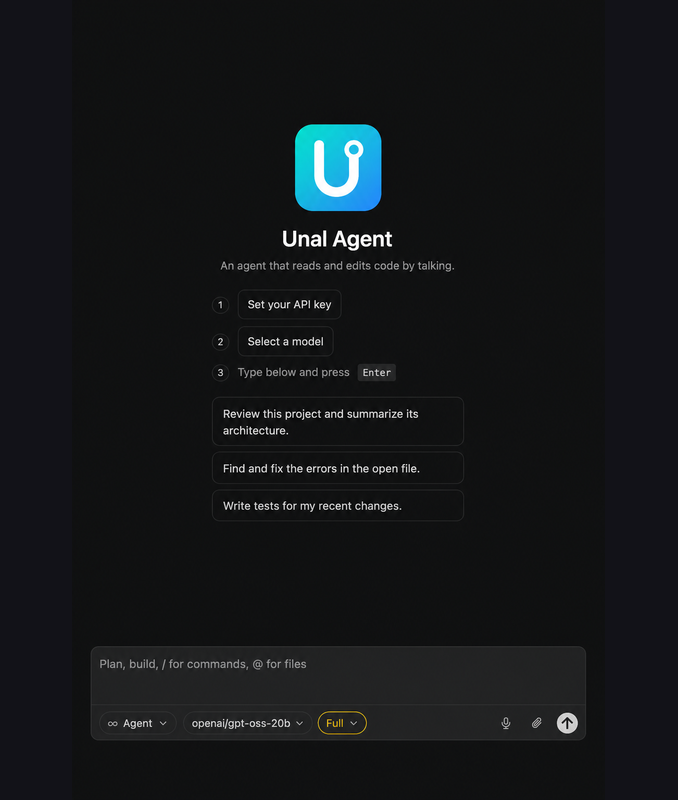
Chat panel — set a key or local model, then type.
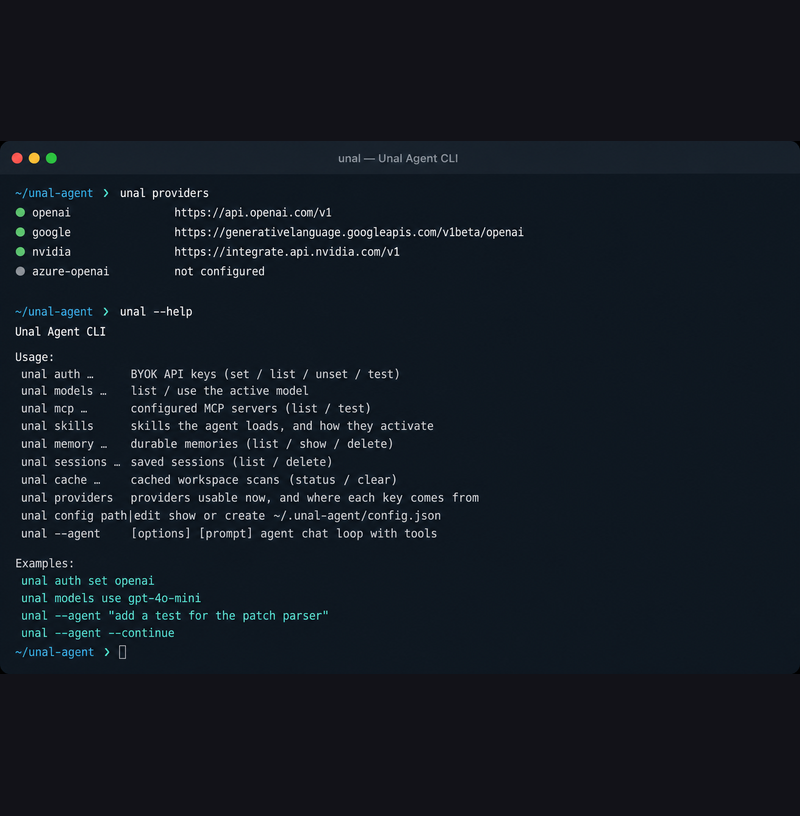
CLI — The VS Code DETAILS tab is this file. If you see “No README available”, the VSIX you installed was packaged without it (typical of old local builds such as 0.7.1). Install from the Marketplace, or rebuild from this folder — see Install. The one-line listing under the title is the English Why use Unal Agent
Reach for it when you want Cursor / Copilot–style work on your account or your hardware. It will not make a weak model strong. For repo work open a folder; for a one-off PDF or image you can leave the window empty. What you get
Requirements
InstallA) Visual Studio Marketplace (usual)
Store page: marketplace.visualstudio.com/items?itemName=maggsoft.unal-agent B) Local VSIX (what the DETAILS page calls “Source: VSIX”)From a clone of this repo: That writes
C) Command Palette after install
First setup: connect a modelOpen a project folder when you can (best for search and patches). Unal Agent also works with an empty window — see No folder open. Then pick one path. You can set up both and switch in chat. Cloud (your API key)
The Command Palette Unal Agent: Set API Key opens Settings → Providers. Do not put keys in Curate the model list (
|
In providers.<id> |
Effect |
|---|---|
models omitted or [] |
Full live catalogue from the provider (GET /v1/models) |
models: [{ "id", "name" }, …] |
Only these entries appear in pickers; name is the label, id is sent to the API |
modelNames: { "<id>": "Label" } |
Rename entries while keeping the full catalogue (Settings can edit the display name without shrinking the list) |
Full field list: https://github.com/Maggsoft/unal-agent/blob/main/docs/providers-json.md. Keys stay in the keychain — not in this file.
Local (no key)
If Ollama (127.0.0.1:11434), LM Studio (1234), llama.cpp (8080), or vLLM (8000) is running, Unal Agent discovers it as local:<name>.
- Unal Agent: Settings → Local models — pick or download a model that fits RAM (comfortable / tight / will not fit). Models marked tools=✗ can chat but cannot drive the agent.
- Settings → Find models — Hugging Face GGUF catalogue; Ollama can pull
hf.co/<repo>:<QUANT>. Prefer Q4_K_M / Q5_K_M / Q6_K over F16. - Settings → Behaviour — raise the Ollama context window (default Ollama 4096 is too small). Unal Agent can restart Ollama after that change.
A coding model that actually calls tools (for example qwen2.5-coder:7b) is required for Agent mode. A vision-only or “narrates tools as prose” model will look busy and do nothing useful.
How to use the panel
- Prefer opening the folder you want Unal Agent to work in (or skip this — see below).
- Open Unal Agent (Activity Bar or Unal Agent: Open Chat).
- Check Mode (Agent / Plan / Ask) and the model in the composer — the pill shows the display name, not the raw id.
- Type what you want in ordinary language. Name files when you know them (
@auth.ts). Your bubble renders markdown (headings, bold, code) the same way the assistant does. - If a file will change or a command will run, the thread shows Allow / Always / Deny. Deny skips that step; the rest of the turn continues.
- When Unal Agent creates an image or PDF, an artifact card appears in the thread — click it to open the file.
No folder open
If VS Code has no workspace folder, Unal Agent does not refuse the chat. It treats ~/Documents/Unal Agent as the write root (the folder is created on first use). Status text in the panel names that path once. Open a real project folder when you want search, @ files, and patches inside your repo.
Images and PDFs (Agent only)
Plan and Ask never register write or generate tools.
/GenerateImage (recommended for pictures)
Type / and pick /GenerateImage, or type the command yourself. It does not go to the chat model as a normal sentence — the panel calls the image API directly. You need an OpenAI API key (Settings → Providers → Set API key on the OpenAI card). The model selected in the composer only writes text; pictures use the image endpoint.
| Example | What happens |
|---|---|
/GenerateImage a flat blue app icon |
PNG under assets/generated/… (default path) |
/GenerateImage assets/logo.png olarak kare mavi ikon |
Writes assets/logo.png, aspect 1:1 (“kare” / “square”) |
/GenerateImage wide banner 16:9 for the landing hero |
Aspect 16:9 |
/GenerateImage @brand/ref.png soft pastel icon |
Can use reference images when the agent tool path is used |
Aspect ratios: 1:1, 4:3, 3:4, 16:9, 9:16 (or words like kare / yatay / dikey). Extensions: .png, .jpg, .webp. Approve the write when asked; open from the artifact card.
You can also ask in Agent chat without the slash (“Generate a logo PNG…”) — that uses the generate_image tool via the model. Prefer /GenerateImage when you want a brief that does not depend on the coding model calling tools.
New files — example prompts
| Example prompt | Result |
|---|---|
“Create docs/notes.md with a short project checklist” |
New markdown via write_file / empty-SEARCH apply_patch |
“Write src/utils/dates.ts that exports formatDate(iso: string)” |
New source file; same review path as patches |
“Add tests/dates.test.ts with two cases for formatDate” |
New test file |
“Create a sample developer CV as a PDF at docs/cv.pdf” |
create_pdf — markdown → PDF; artifact card |
| “Write an onboarding guide as PDF: title Unal Agent, sections Setup and Chat” | create_pdf with ## structure |
“Create docs/api-outline.md listing the public packages in this monorepo” |
Markdown only (not PDF) — use .md, not .pdf, with apply_patch |
Tips:
- Structure PDF content with
##headings, bullets, and blank lines. .md= text create/patch..pdf=create_pdfonly (apply_patchrefuses.pdf).- Do not ask Plan/Ask for a PDF or image; switch to Agent first.
- A path mentioned earlier in the chat is not proof the file still exists.
Modes
The Mode control changes which tools are loaded, not just a label.
| Mode | Tools | Writes files? | Use when |
|---|---|---|---|
| Agent | Full (read, search, edit, terminal, web, image, PDF) | Yes, subject to permission | “Fix / add / write this” / “make a PDF” / /GenerateImage |
| Plan | Read-only | No — write tools are not registered | Multi-file work; you want the plan first |
| Ask | Read-only (search, read) | No — write tools are not registered | “What does this do?” |
New chats start in Agent. Change the default under Settings → Behaviour, or per chat with /mode. Once picked, the mode holds — including across Developer: Reload Window — until you change it or start a new chat. The plan card comes back with the thread too.
CodeGraph search (#112)
After Unal Agent has permission to start a process (Full, or you approve the shell prompt once), it loads CodeGraph for the workspace (codegraph init if there is no .codegraph/, then MCP serve). Search and symbol tools prefer that graph:
| Example prompt | Tool path |
|---|---|
“Where is SessionStore defined?” |
find_definition → CodeGraph node |
“Who calls createRuntime?” |
find_references → CodeGraph callers |
| “How does checkpoint restore work?” | search_code → CodeGraph explore |
Disable with UNAL_AGENT_CODEGRAPH=0 or "codegraph": { "enabled": false } in config. Without CodeGraph, the built-in word index and line scanner still answer.
Permissions
| Setting | File edits | Terminal | Network |
|---|---|---|---|
| ask (default) | asks | asks | asks |
| workspace-auto | applies inside the project | asks | asks |
| full | applies | runs | fetches |
workspace-auto is the usual daily setting: in-repo edits apply (and are undoable); shell and network still ask, because both reach outside the folder. full belongs in a container or a scratch clone, not your main checkout.
Some destructive patterns are denied outright (rm -rf, curl … | sh, git push --force, and similar). Paths such as .env, *.pem, and id_rsa are refused before they can be sent to the model.
Chat habits that matter
- Say what “done” looks like. “Add auth;
auth.test.tsshould pass” lets the agent check with the terminal. - Name the file.
@fuzzy-searches the project. That skips a round of search-and-guess. - New chat for a new task.
/clear. History is resent every turn; a 30-minute debug thread taxes every later message. - Plan first when the change spans many files. The plan comes back as numbered steps anchored at
file:line, with a Carry this out button under it that switches to Agent and applies it. Or ignore the button and say “do steps 2 and 3.”
Composer: /, @, queue, undo, dictation
/ — commands (they run in the panel; they are not sent to the model)
| Command | Meaning |
|---|---|
/clear |
New chat |
/models |
Switch model |
/mode |
agent / plan / ask |
/history |
Saved chats |
/status |
Session, tools, MCP |
/cost |
Tokens and tool calls this session |
/index |
What Unal Agent knows about this repo |
/reindex |
Rescan |
/reset-index |
Discard the index and rebuild |
/skills |
Skills loaded vs on-demand |
/memory |
Stored memories |
/mcp |
MCP servers |
/config |
Open config.json |
/run @App.csproj |
Run a project |
/stop · /stop :5097 |
Stop the turn · free a port |
/undo |
Roll back the last agent change |
/GenerateImage … |
Draw a PNG/JPEG/WebP via the image API (needs OpenAI key); brief after the command |
/stop runs immediately (it does not queue). /stop :5097 is the fix for “address already in use” after a dev server outlived the session.
@ — attach files by fuzzy name.
Queue — type while Unal Agent is working. Edit, delete, or jump a queued message from the card.
Undo — each file-changing turn stores the previous content of files the agent actually touched. The ↺ on your message restores that moment (asks for confirmation; cannot itself be undone). Hand edits in those same files are rewound with them. Commit before a large speculative run if you want git as a second safety net.
Microphone — dictation uses the chat provider’s Whisper endpoint, or local whisper-cli (brew install whisper-cpp). See unalAgent.speech.* settings. On Windows, unalAgent.speech.device must be a DirectShow name from ffmpeg; there is no default.
Settings tabs
Unal Agent: Settings
- Local models — installed models, downloads, RAM fit
- Find models — Hugging Face GGUF
- Providers — each card: Set API key / Change API key (dialog for URL + key), API key saved badge when a key exists, model list (display names editable). Leave
modelsempty in JSON for the full catalogue. Keys are not written to JSON. - Appearance — theme (editor / Unal Dark / Unal Light / Midnight / Forest / High contrast) and language (
auto/en/tr) - Behaviour — permission mode, default chat mode, request timeout, max turns, Ollama window, auto-approve local shell (patches still reviewed)
Header Open config.json opens ~/.unal-agent/config.json (same as the composer Open JSON config button).
CLI
The CLI is the same agent: same ~/.unal-agent, same keys, same sessions. It is built from this monorepo (package @unal-agent/cli, bin name unal). It is not a separate Marketplace product.
Install the CLI
Node ≥ 20 and pnpm:
git clone https://github.com/Maggsoft/unal-agent.git unal-agent
cd unal-agent
pnpm install
pnpm build
From the repo:
pnpm cli --help
Put unal on your PATH:
cd apps/cli && npm link
unal --help
All Unal Agent state lives in ~/.unal-agent (keys, sessions, memories, cached scans). Set UNAL_AGENT_HOME to move it.
First run
unal auth set openai              # paste the key; it is not echoed
unal models list
unal models use gpt-4o-mini
unal --agent "add a test for the patch parser"
Local model, no key:
ollama pull qwen2.5-coder:7b
unal providers                    # local:ollama appears when it is up
unal models use qwen2.5-coder:7b
Two ways to run
One-shot patch (default) — Unal Agent proposes a SEARCH/REPLACE patch, prints the diff, applies only if you approve:
unal "rename createUser to registerUser everywhere"
unal --file src/auth.ts "add input validation"
unal -y "fix the failing test"          # approve without asking (implies full permission)
Agent loop (--agent) — reads, searches, runs commands, edits, for as many turns as needed:
unal --agent "why does the login test fail? fix it"
unal --agent --continue                 # newest session for this directory
unal --agent --resume 6becf0b7-…        # a specific session id
unal --agent -p "list the API routes"   # one prompt, then exit
unal --agent "Create a sample CV as a PDF at docs/cv.pdf"
A session started in the panel continues here, and the other way around. PDFs
and images need --agent (not one-shot patch mode). With no useful cwd, pass
--cwd to the folder that should receive the file.
Commands
| Command | What it does |
|---|---|
unal auth set <provider> |
Store an API key (prompt or stdin). Providers: openai, nvidia, google, azure-openai, custom:<name> |
unal auth list |
Which providers have a key (masked) |
unal auth unset <provider> |
Remove a stored key |
unal auth test <provider> |
Call the provider with the stored key |
unal models list |
Models the active provider is serving |
unal models use <id> |
Set the active model |
unal providers |
Usable providers and each key’s source |
unal mcp list / unal mcp test |
Configured MCP servers |
unal skills |
Skills found and what activates each |
unal memory list\|show\|delete |
Durable memories |
unal sessions list\|delete |
Saved conversations |
unal cache status\|clear |
Cached workspace scans |
unal config path\|edit |
Show or create ~/.unal-agent/config.json |
unal auth set azure-openai --base-url https://my.openai.azure.com/openai/v1
unal auth set custom:litellm --base-url http://localhost:4000/v1
echo "$KEY" | unal auth set openai — never pass the key as a flag (shell history).
Flags
| Flag | Meaning |
|---|---|
--model <id> |
Override the active model for this run |
--permission ask\|workspace-auto\|full |
How much to ask before acting |
-c, --continue |
Continue the newest session for this directory |
--resume <id> |
Continue a specific session |
-p, --once |
Run one prompt and exit |
--no-cache |
Rescan instead of using cached scans |
--cwd <dir> |
Treat another directory as the workspace root |
-y, --yes |
Approve everything (implies --permission full) |
--file <path> |
Point a one-shot run at one file |
--patch-file <path> |
Apply a patch from a file instead of asking a model |
Environment
| Variable | Meaning |
|---|---|
UNAL_AGENT_API_KEY / OPENAI_API_KEY |
Key if you would rather not store one (CI) |
UNAL_AGENT_BASE_URL / OPENAI_BASE_URL |
OpenAI-compatible endpoint |
UNAL_AGENT_MODEL |
Overrides the stored active model |
UNAL_AGENT_PERMISSION |
ask | workspace-auto | full |
UNAL_AGENT_HOME |
State directory (default ~/.unal-agent) |
UNAL_AGENT_SECRETS_BACKEND=file |
Force secrets.json instead of the OS keychain |
UNAL_AGENT_SEARCH_API_KEY |
Key for a keyed web-search backend |
Stored keys win over environment variables so interactive BYOK stays predictable.
Project configuration
Two layers:
| File | Whose | Secrets? |
|---|---|---|
.unal/config.json in the repo |
The team | Never put a key here |
~/.unal-agent/config.json |
You | No — keys go in the keychain. Holds providers, activeModel, and optional project defaults |
Every field: https://github.com/Maggsoft/unal-agent/blob/main/docs/providers-json.md.
Minimal .unal/config.json:
{
  "permission": "ask",
  "models": { "default": "", "architect": "", "weak": "" },
  "context": {
    "maxFiles": 200,
    "maxIndexFiles": 5000
  },
  "limits": { "requestTimeoutMs": 300000, "maxTurns": 32 },
  "web": { "enabled": true, "backend": "duckduckgo" }
}
Naming a model under models pins it: auto stops choosing for that role. weak is the cheap model that summarises old history — leave it empty and your expensive model does that work. It never answers you: Agent and Ask both run on default, Plan on architect.
Rules the agent always loads
AGENTS.mdat the repo root — short, binding (package manager, test command, branch rules)..unal/rules/*.md— the same, split into files..unal/skills/<name>/SKILL.md— long or specialist material, loaded on demand. A gooddescriptioncosts about one line until the agent asks for the body.
Memories: project scope in <repo>/.unal/memory/, user scope in ~/.unal-agent/memory/. Prune facts that went stale.
Security, in short
- API keys are not written to chat, git, or
settings.json. - Password and private-key files (
.env,*.pem,id_rsa, and similar) are not sent to the model. - Writes and commands default to your approval.
- With a local model, repository content is not sent to a cloud provider. The local embedding model that powers semantic search also runs on this machine.
When something goes wrong
| Symptom | What it usually is | What to do |
|---|---|---|
| DETAILS says No README available | Old VSIX (e.g. 0.7.1) packaged without this file | Reinstall from Marketplace or rebuild the VSIX from apps/vscode-extension |
| “The model sent nothing for 300s” | The endpoint is queued, not your prompt | Local model, or raise unalAgent.requestTimeoutSeconds / limits.requestTimeoutMs |
LLM HTTP 404 / 410 |
Catalogue lists a model your account cannot call, or NVIDIA retired it | Unal Agent records the refusal, drops the id, and switches to the next model |
| Agent loops or writes tool calls as prose | The model cannot drive tools | Switch model; auto routes around it after two such runs |
| Search misses a file you know | Outside maxIndexFiles, or stale index |
Raise the limit; /reset-index or unal cache clear |
| “Address already in use” | A dev server outlived the session | /stop :5097 |
| Stopped after a few failures | 4 consecutive or 3 identical tool failures — deliberate | Fix the path or assumption; do not expect it to guess forever |
| Index looks wrong after a huge refactor | Cache is content-addressed but a forced rebuild helps | /reindex or unal cache clear |
Support
- Mehmet Ünal
- unal.m1991@gmail.com
- +90 537 376 10 04
- mehmetunal.github.io/unal-agent
- Support · Privacy · Terms
Source: github.com/Maggsoft/unal-agent
Further reading in the repository: docs/why.md, docs/tips.md, docs/cli.md, docs/byok.md, docs/local-models.md, docs/token-economy.md.