Symbol Opener

VS Code/Cursor extension that opens symbol definitions via URI handler. Designed to work with osc8wrap to make terminal output symbols clickable.
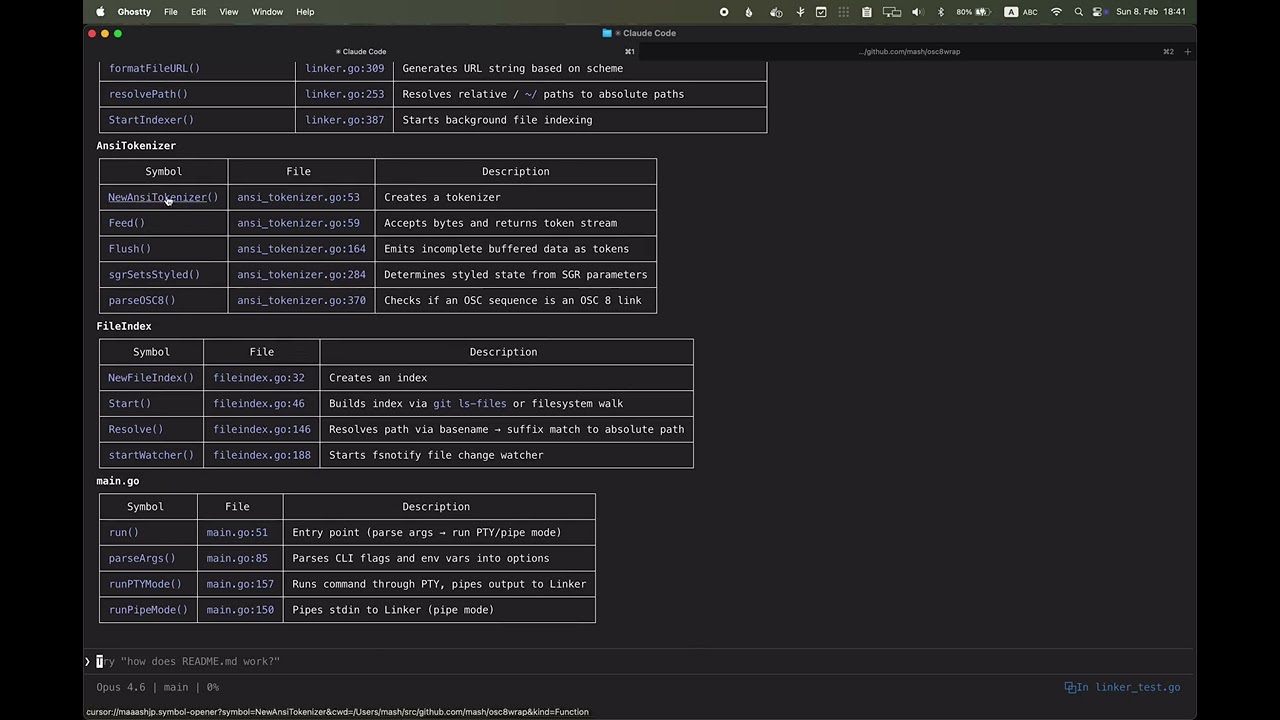
▶ Watch demo
Install
cursor://maaashjp.symbol-opener?symbol=createHandler&cwd=/path/to/project&kind=Function
| Parameter |
Required |
Description |
symbol |
Yes |
Symbol name to search |
cwd |
Yes |
Project root directory |
kind |
No |
Filter by SymbolKind (Function, Class, Method, etc.) |
Usage
open "cursor://maaashjp.symbol-opener?symbol=createHandler&cwd=/Users/mash/src/github.com/mash/symbol-opener"
How This Works
URI Handling - Receives cursor://maaashjp.symbol-opener?... URI. If the target workspace (cwd) is not open, opens it in a new window (configurable via workspaceNotOpenBehavior) and coordinates between windows using filesystem-based message passing.
LSP Activation - VS Code's LSP servers only start after opening a file of that language. The extension detects the project language by looking for marker files (go.mod, tsconfig.json, Cargo.toml, etc.), then opens a matching source file in the background to trigger LSP startup.
Symbol Resolution - Queries the LSP for symbols matching the requested name. Since LSP may still be indexing, retries up to retryCount times with retryInterval delay. When multiple symbols match, sorts results using symbolSortPriority (preferring exported/public symbols by default) and selects based on multipleSymbolBehavior. If no exact match is found, shows fuzzy matches in a QuickPick for manual selection.
Opening - Navigates to the symbol's location and reveals it in the editor.
Configuration
| Setting |
Default |
Description |
symbolOpener.multipleSymbolBehavior |
first |
first: use first match, quickpick: show picker |
symbolOpener.workspaceNotOpenBehavior |
new-window |
new-window: open in new window, current-window: replace current, error: show error |
symbolOpener.symbolNotFoundBehavior |
search |
error: show error message, search: open workspace search with symbol name |
symbolOpener.language |
(unset) |
Override language detection: go, rust, python, ruby, java, typescript, cpp |
symbolOpener.retryCount |
10 |
LSP retry count (LSP may need time to index) |
symbolOpener.retryInterval |
500 |
Retry interval in ms |
symbolOpener.logLevel |
info |
debug: show all logs, info: show only important messages |
symbolOpener.symbolSortPriority |
(see below) |
Priority order for sorting symbol results by SymbolKind |
symbolOpener.langDetectors |
(see below) |
Language detectors for LSP activation |
Project-Level Language Override
If automatic language detection picks the wrong language (e.g., in a monorepo with multiple languages), you can explicitly set the language in .vscode/settings.json:
{
  "symbolOpener.language": "go"
}
When set, this skips marker-based detection and directly uses the specified language's detector.
Symbol Sort Priority
When multiple symbols match, results are sorted by SymbolKind using this priority list. Kinds listed earlier appear first. Kinds not in the list are sorted to the end.
Default:
["Class", "Interface", "Struct", "Function", "Method", "Constructor", "Constant", "Property", "Field", "Enum", "Variable"]
Language Detectors
LSP servers only start after opening a file of that language. langDetectors configures which files trigger LSP activation:
{
  "symbolOpener.langDetectors": [
    { "lang": "go", "markers": ["go.mod"], "glob": "**/*.go", "exclude": "**/vendor/**" },
    { "lang": "rust", "markers": ["Cargo.toml"], "glob": "**/*.rs", "exclude": "**/target/**" },
    { "lang": "python", "markers": ["pyproject.toml", "requirements.txt", "setup.py"], "glob": "**/*.py", "exclude": "**/.venv/**" },
    { "lang": "ruby", "markers": ["Gemfile"], "glob": "**/*.rb", "exclude": "**/vendor/**" },
    { "lang": "java", "markers": ["pom.xml", "build.gradle", "build.gradle.kts"], "glob": "**/*.java", "exclude": "**/target/**" },
    { "lang": "cpp", "markers": ["CMakeLists.txt"], "glob": "**/*.{c,cpp,cc,cxx,h,hpp,hxx}", "exclude": "**/build/**" },
    { "lang": "typescript", "markers": ["tsconfig.json", "package.json"], "glob": "**/*.{ts,js}", "exclude": "**/node_modules/**" }
  ]
}
| Field |
Description |
lang |
Language identifier (optional, used with language) |
markers |
Files indicating this language (e.g., go.mod) |
glob |
Pattern to find source files to open |
exclude |
Pattern to exclude (e.g., **/node_modules/**) |
Viewing Logs
- Open the Output panel: View → Output (or
Cmd+Shift+U)
- Select "Symbol Opener" from the dropdown in the top-right corner
- Set
symbolOpener.logLevel to debug in Settings (Cmd+,) for detailed logs
- Reload the window (
Cmd+Shift+P → Developer: Reload Window) after changing log level
Build
npm install
npm run compile
npm run package  # creates .vsix
Test
npm test


