DeepSeek Harness Connector for VS Code
Same Harness. Same Workspace. Same Session.
Your agent keeps running wherever it already is. This puts a native VS Code client in front of it:
attach to the Harness on this machine, read the session the browser is reading, answer its
approvals, and review every edit in VS Code's own diff.




English | 简体中文






Install ·
Open VSX ·
Download VSIX ·
Changelog ·
How it got built
An independent, unofficial community project — not affiliated with, endorsed by, or published by DeepSeek.
The 30-second trailer, cut down to its two product beats. The silence is deliberate — there is no narration, the film says it in type. Play it · How it got built (中文版: STORY.zh-CN.md)
At a glance
|
|
| What it is |
A client for a dsh web you already have running. It attaches to that Harness and continues its workspaces and sessions inside VS Code. |
| What it is not |
An agent, a model provider, or a replacement for either. None of the orchestration is reimplemented here — it stays in the Harness. |
| What it needs |
VS Code ≥ 1.85, and a Harness on the same machine as the window. That is the one hard constraint; see Remote development. |
| Install |
code --install-extension lucasliang.harness-connector-deepseek |
Jump to: What it does · What's new · Quick start · Configuration · Commands · Remote development · Limitations · Development · Design
What it does
- Continues the session you already have. Workspaces and sessions are read from the running Host. Refresh that session in a browser and you see exactly what VS Code sent.
- Answers approvals and agent questions — for the conversation you are looking at. Both waterfalls are settled by this plugin, so a run is never blocked on a browser tab you have closed. The Host forwards every session's waterfalls down one socket, so a card is drawn only when the frame names your session; a question raised in a browser tab on another session is not rendered here, and switching to that session brings it back.
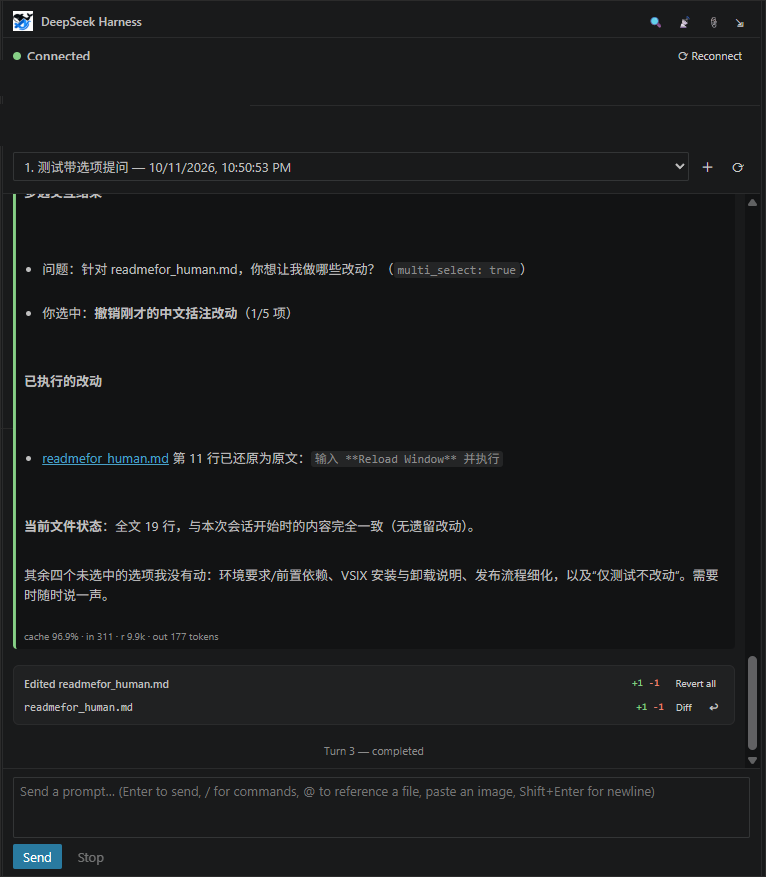
- Reports what each turn changed, and can undo it — one hunk at a time. Fed by the Host's own turn record, so it covers a file a shell command edited, not only what a file tool reported. Each hunk has its own undo; the file-level undo reverts whatever is left. Both check the file's current bytes first and refuse rather than overwriting you.
- Right-click to ask about things. Select code, a file in the explorer, or a change in the diff editor and the context menu offers Explain / Fix / Review — pre-filled with a prompt and the right
@ mention, including the line range for a selection.
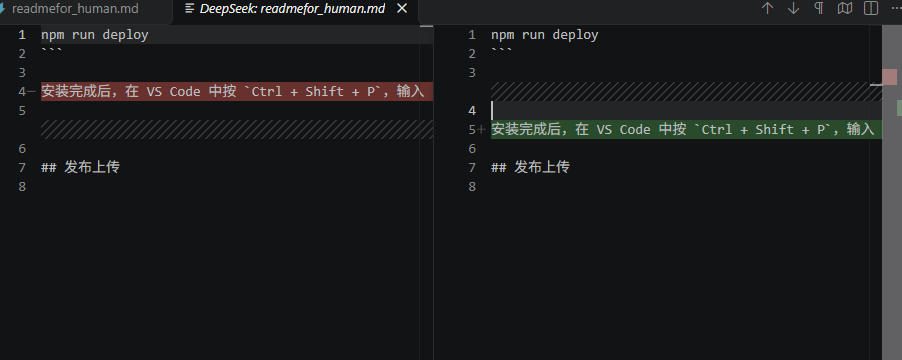
- Opens VS Code's own editor for anything that is code. A diff is a real diff editor; a path opens the file. Nothing is reimplemented in the webview.
- Finds the Host by itself, including the desktop app, which starts its Host on an OS-assigned port that changes on every launch.
- Four ways to obtain a session, and the default picks for you. Mint one from the harness's own credential store (zero configuration, but it means reading a file that also holds your API keys), let the extension start
dsh web and take the launch URL it prints, or paste a launch URL yourself. auto — the default since v0.2.8 — does the first and falls back to the second. See How the session is obtained.
- Starts no process unless you ask it to. The default attaches to the Host you already have running.
- Can install its own Host, on whichever machine that means.
DeepSeek Harness: Install Host runs the install in the extension host — on a Remote-SSH window, that is the remote — so you never end up with dsh on your laptop and a remote that still has none. Managed launch also retries through npx by itself when dsh is not on PATH, which needs no install at all.
How it connects
This is not a Cursor replacement, a Claude Code replacement, or a full coding agent. It connects VS Code to your already-running local dsh web instance:
Browser ─────┐
             │
             ▼
       DeepSeek Harness
             ▲
             │
VS Code ─────┘
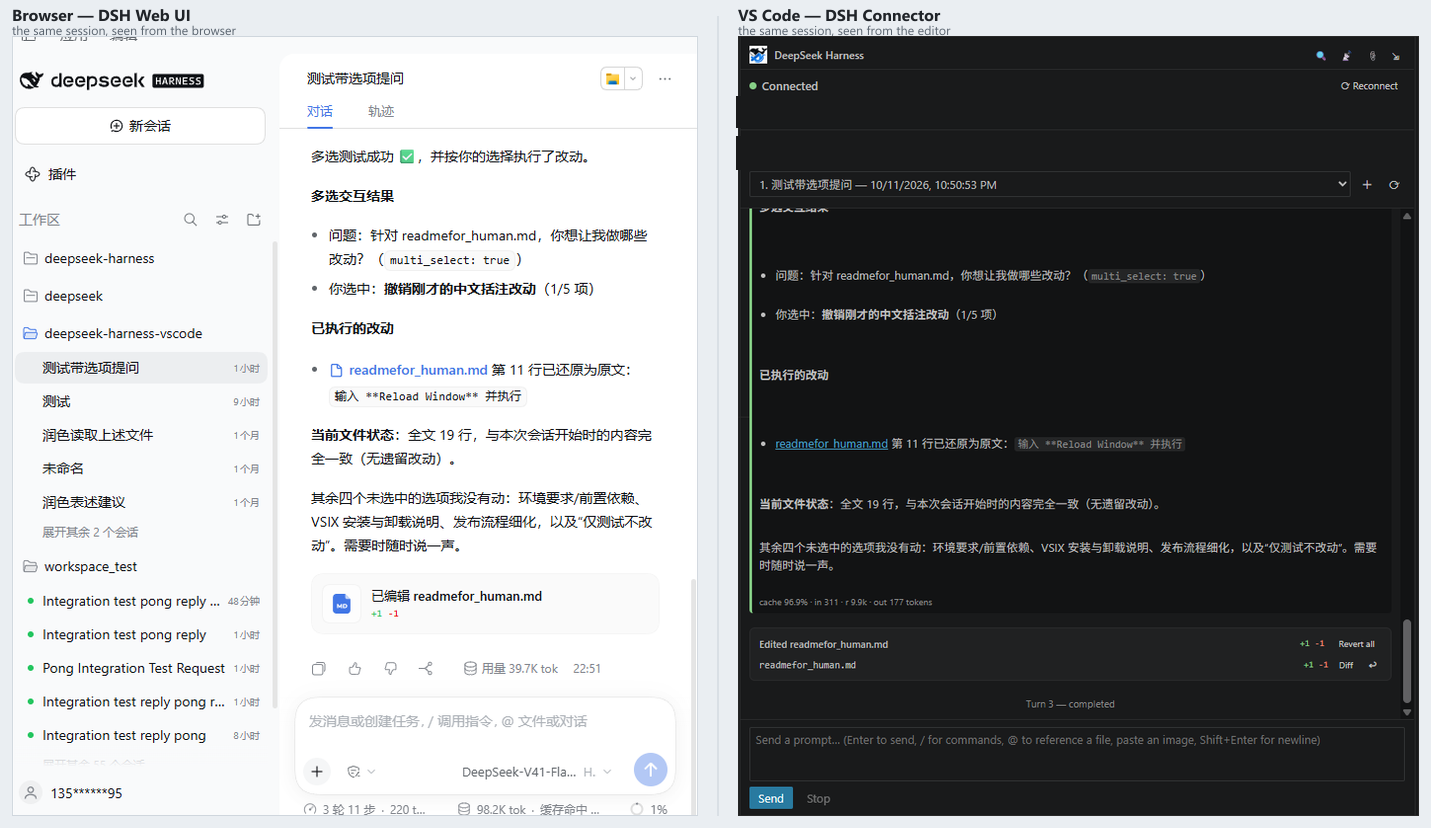
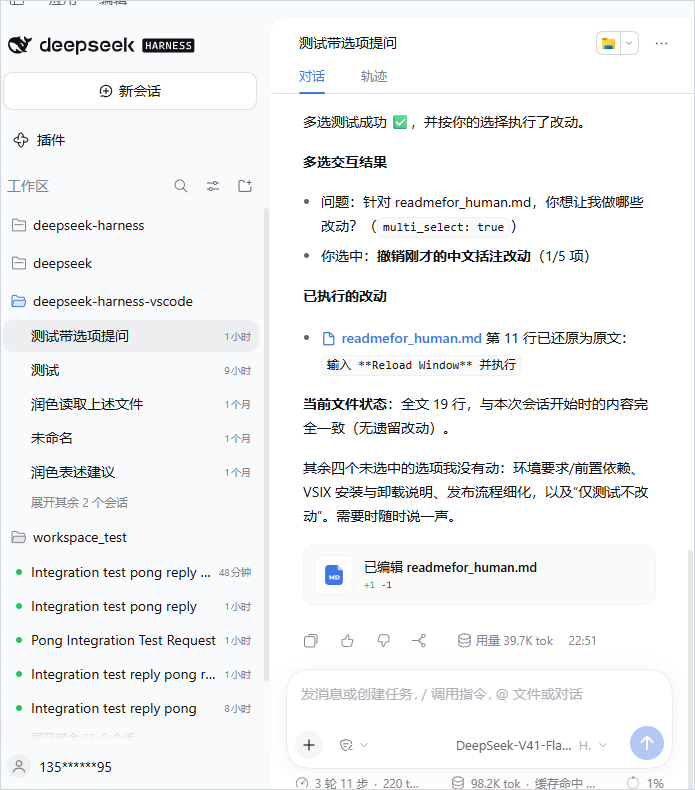
VS Code reads the workspaces and sessions the browser already has, and continues the same session — so a browser refresh of that session sees exactly what VS Code sent.
Screenshots
Top left: the same session at the same moment in two clients — nothing imported, mirrored or forked. Top right: "Diff" is VS Code's own diff editor, not a webview imitation — the left side is the text the plugin captured before the change. Bottom left: the conversation lives in the sidebar, tool rows and changed-files card included. Bottom right: the browser side, untouched.
What's new in v0.4.1
Pick the model in the editor, and prove "Open Web UI" works without opening a browser.
Two changes landed. Model and thinking-depth selection now lives in VS Code — a model ▾ / thinking ▾ bar under the composer, and a Model group in the ⚙ Settings panel, both going through the Host's session/selectModel and persisting as a durable model/selection event. And npm run verify-webui mints a cookie through the extension's own BrowserSessionAuth and hits the live Host: 401 with no cookie, 200 with the minted one — a one-command end-to-end check instead of trusting the unit test.
|
|
| Model & thinking depth, in the editor |
A model ▾ / thinking ▾ bar under the composer applies from the next turn. The ⚙ Settings panel has a Model group too, with "reset to Host default" and "fall back when unavailable". The choice goes through the Host's session/selectModel and lands as a durable model/selection event — reload the session and it is still there. |
npm run verify-webui |
End-to-end proof that Open Web UI works: it mints a cookie through the extension's own BrowserSessionAuth, then hits the live Host — 401 with no cookie (the Host gates /), 200 with the minted one. Run it before a release instead of trusting the unit test. |
Verification:
| Gate |
Result |
| Protocol assertions |
602 assertions — 533 in v0.3.0 |
| End-to-end chains |
96 across 3 of 5 chains |
Live Host (0.2.1-rc.2) |
42/42, both authentication paths |
| Version gate |
52 checks |
Most of the 26 new assertions pin the model-selection persistence and that request/header can still override it.
The release before this one — v0.4.0 — closed three dead ends (Open Web UI, privileged approvals, and a transcript that re-sent itself) and added the settings panel and first-run prompt. Its notes, and every earlier release's, are in CHANGELOG.md.
Requirements
- VS Code ≥ 1.85
- A local
dsh web (default port 3080), either already running or started for you by the default sessionMode: "auto".
- The Harness must be on the same machine as the VS Code window. That is the one hard constraint; Remote development covers what it means for Remote-SSH, WSL and containers.
Quick start
Start Harness locally — or skip this step and let the extension do it (it is the default):
dsh web
# → http://127.0.0.1:3080/?token=<43-char token>
Recent Harness builds print a launch URL carrying a per-process token. You
do not need it for the default setup — use it to open the Web UI in a browser if
you want both surfaces side by side. (The token is a per-process secret compared
on every request, not a single-use grant, so reloading that URL keeps working.)
Skipping this step is the default: deepseekHarness.sessionMode is "auto",
so when nothing answers on the port the extension starts the Host itself and
takes the URL off its console. See
How the session is obtained.
Older builds serve /api/* unauthenticated and need no token at all — the
plugin detects which it is talking to, so if no launch URL appears you can
simply ignore this step.
Install from the VS Code Marketplace or via command line:
code --install-extension lucasliang.harness-connector-deepseek
Or install the VSIX from GitHub Releases:
code --install-extension harness-connector-deepseek-0.4.1.vsix
Nothing to configure. The default sessionMode: "auto" first does what
credentials does — read the browser-session signing secret out of
$DSH_HOME/.credentials.yaml and mint the cookie itself, with no token to paste
— and if nothing is listening, it starts dsh web instead. Read
How the session is obtained for what that
implies, and for the two modes that never open that file.
Open a folder in VS Code that you want to bind to a Harness workspace.
The DeepSeek Harness activity-bar icon appears; the extension auto-connects. If your folder matches an existing Harness workspace, its sessions appear in the dropdown. Pick one and continue the conversation.
No matching workspace? Just type a prompt and hit Send — the workspace and session are created automatically.
Reference a file with @ — type @ in the input and a completion list appears; pick one and it is inserted as a mention (@src/main.ts). Right-click a file in the explorer and choose Add to Harness Chat, or select text in the editor and choose Send Selection to Harness to insert @src/main.ts:L10-L20. Nothing is pasted into your message: the mention is a pointer, and the host tells the agent to open the file itself. That keeps your prompt text (and its KV cache) stable no matter how large the file is.
Open the same session in your browser at http://127.0.0.1:3080/ — both surfaces see the same turn.
How the session is obtained
The harness authenticates /api/* with a browser-session cookie, and there are
four ways to get one here. deepseekHarness.sessionMode picks which.
auto (default) — mint if you can, start a Host if you cannot. The two
questions that looked like one: who are you is answered by minting from
$DSH_HOME/.credentials.yaml, while is anything listening is answered by the
socket. auto mints first and only reaches the launcher when the port answers
nothing, so a machine that already has a Host running behaves exactly as it did
before, and a machine nobody prepared gets one started. Modes below are the two
halves, for when you want one of them and not the other.
credentials — mint it locally, and nothing else. dsh web keeps a persistent
signing secret in $DSH_HOME/.credentials.yaml (client-connection/browser-session).
The cookie is an HMAC over {version, authority, issuedAt, expiresAt} keyed by that
secret, the cookie carries no trace of the launch token, and the secret is created
once and reused by every later dsh web process — so anything that can read the file
can mint a byte-identical cookie. The extension reads it and mints the cookie itself.
That is why there is nothing to paste. It never starts a Host: choosing this mode on
a machine with nothing running is a decision to run dsh web yourself.
managed — let the extension start the Host. It runs deepseekHarness.launchCommand
(dsh web --port 0 by default), reads the launch URL off the console of a process it
owns, and redeems that token. No credential file, no paste. The Host it started is
stopped when the window closes.
paste — start it yourself and hand over the URL. Run dsh web, copy the
dsh web: http://… line, and run DeepSeek Harness: Use Launch URL. Nothing is read
from disk and nothing is started.
About minting, since the default may do it and it is a real privilege:
- That same file holds your model API keys. Reading it is permission-equivalent
to full authority over this harness home. It is not an escalation, and it does not
defeat a boundary that protects you from yourself — but the extension's process can
then see secrets that have nothing to do with a VS Code client.
- It skips the per-process launch-token gate. That gate defends against remote
callers (DNS rebinding, CSRF), not against code already running as you.
managed is the answer to both of those. If reading that file is not a trade you
want to make, switch modes — you lose nothing but the process the extension starts.- No credential material is logged, sent to the webview, or put in a diagnostics
report. The log records that a mint happened, never the material. The launch URL is
held in memory for the one thing it is for and is redacted in every log line that
mentions it. The cookie lives in VS Code's secret storage — the OS keychain — never in
settings.json. DeepSeek Harness: Diagnostics exports a report you can read in full
before sending it anywhere.
This is a workaround, and we would rather it were not necessary. The sanctioned
flow is exchanging the per-process launch token, and managed/paste do exactly
that — but nothing writes the token to disk, so a client that did not start the Host
itself had no way to obtain it, which is what made reading the signing secret the only
zero-configuration path. A first-class local-client authorization flow would close the
gap properly: a socket, or a one-shot token file written 0600 and scoped to a single
client. Until Harness ships one, the three modes above are the honest menu.
When a route cannot run
The connect error names the cause and the file or command it looked for. There is no
silent fallback.
| Situation |
What to do |
$DSH_HOME points elsewhere and the env var is not set |
set DSH_HOME for the VS Code process, or start dsh web with the default home |
dsh web has never run in this harness home |
run it once — the client-connection/browser-session record is created then, or set sessionMode: "managed" so only the launcher is used |
No dsh command on PATH under managed |
managed launch retries through npx first; if that fails too, the panel offers Install Host; on Windows and macOS the desktop app also registers dsh for you |
managed ran but dsh exited immediately |
usually the port is already taken — the log carries the child's own last lines |
You are in paste mode and have not pasted yet |
run DeepSeek Harness: Use Launch URL |
A cookie obtained this way still lives its own life: the extension stores it in VS
Code's secret storage (OS keychain — never settings.json), it survives dsh web
restarts, and it is only re-derived when it expires or you change host/port
(the cookie name is dsh-auth-<sha256(host:port)>, so it is bound to the
authority that minted it).
Configuration
Everything below is also editable from the panel: ⚙ Settings & help lists each knob with the sentence that
explains it, and carries the actions that used to live only in the command palette — Find running Host, Install Host,
Diagnostics, Show logs and Open Web UI.
| Setting |
Default |
Notes |
deepseekHarness.host |
127.0.0.1 |
Exactly three values are accepted — 127.0.0.1, localhost, ::1. Any other value is refused before a socket is opened. See Remote development. |
deepseekHarness.port |
3080 |
The default dsh web port. Override if you started dsh web --port <n>. |
deepseekHarness.showSystemMessages |
false |
Show plugin-injected system messages (runtime context, approval notices). Hidden by default; toggle live with the SYS button in the webview header. |
deepseekHarness.sessionMode |
auto |
How a session is obtained. auto mints locally from $DSH_HOME/.credentials.yaml when it is readable and starts dsh web when nothing answers; credentials only mints; managed only starts; paste waits for you to supply a launch URL. See How the session is obtained. |
deepseekHarness.launchCommand |
dsh web --port 0 |
The command sessionMode: "managed" runs. The default binds an OS-assigned port, because managed launch reads the real port off the launch URL and pinning one only adds a way to fail. Run through a shell, so wrappers and npx work. If the default command is not found, managed launch retries once through npx — which on a remote fetches and starts the Host there; a command you set yourself is never substituted. Read only when a Host is started; changing it does not disturb a running one. |
deepseekHarness.autoApproveApprovals |
false |
Automatically answer incoming approval requests with allowed-once. Off by default — enabling it means tools run without per-call confirmation. |
deepseekHarness.autoDiscover |
true |
When the configured port answers nothing, look for a dsh Host elsewhere on loopback (pinned webserver.port first, then the OS listener table, confirmed by the Host's own refusal text). Needed by the desktop app, which starts its Host on an OS-assigned port. The discovered port is session-local and never written to your settings. |
Commands
DeepSeek Harness: Connect / Reconnect / Disconnect — Reconnect (also the ⟳ button in the panel header, and the always-visible button in the status row) drops whatever is live and negotiates a fresh sessionDeepSeek Harness: Diagnostics — one document with the runtime version, this extension's version, connection state, which capabilities the Host actually serves, and the last error. Offers a Copy redacted report action; nothing credential-bearing is includedDeepSeek Harness: Clear Session Token — drop the stored cookie and reconnect (a fresh one is minted under credentials, or a fresh Host is started under managed; use it before switching dsh web instances)DeepSeek Harness: Use Launch URL — paste the dsh web: http://… line a Host printed and adopt its session. The paste route, usable in any modeDeepSeek Harness: Switch to Auto and Connect — what the status row's repair button runs: persist sessionMode: "auto" and force a reconnect, which is the one-click answer to "nothing is listening" under credentialsDeepSeek Harness: New Session (in the active workspace)DeepSeek Harness: Refresh SessionsDeepSeek Harness: Move to Right Side Bar — dock the view in the secondary side bar (like Chat) so it stops competing with the file explorer. Also available via the ⇲ button in the webview header.DeepSeek Harness: Toggle Plan Mode — flip /plan on the active sessionDeepSeek Harness: Set Permission Preset — pick (or type) a preset such as read-only / workspace-write / danger-full-accessDeepSeek Harness: Compact Session Context — request /compactDeepSeek Harness: Fork Session — branch off the current session and switch to the forkDeepSeek Harness: Rename Session — pin a title (stops automatic regeneration)DeepSeek Harness: Archive Session — archive it out of the active workspace listDeepSeek Harness: Attach File to Session — stage local images/files for the next prompt (images ride session/prompt as inline parts; other files upload to POST /api/session/uploadFileBinary and are referenced by receipt) — also available via the 📎 button and by pasting or dropping into the composerDeepSeek Harness: Install Host — install the dsh CLI in the extension host, which on a remote connection is the remote machine. Confirms first and names that machine; runs npm i -g @deepseek-ai/dsh; never elevates, so a system-owned npm prefix reports its own EACCES instead of escalatingDeepSeek Harness: Open Web UI — opens the token-bearing launch URL in your browser. Whichever route left the extension holding a URL — managed launch, or a launch URL you pasted — it uses it; credentials mode has no token to add and says soDeepSeek Harness: Show Logs (the DeepSeek Harness output channel)
The same six controls also live in the sidebar's Controls panel, which
additionally shows what arrived from the host: plan state, sandbox mode,
approval policy, agent preset, effective model, todos, the active goal,
subagent activity and the last compaction summary.
Every control is offered only when this host actually serves it — capability
probing happens at connect time, so an older dsh web simply shows fewer knobs
instead of buttons that would fail.
Nine commands, in three submenus. Two of them insert a bare mention; the other seven are the same three asks against the thing you right-clicked.
| Where |
Command |
What it inserts |
| Explorer, right-click a file or folder |
Add to Harness Chat |
@<relative-path> |
| Editor, with text selected |
Send Selection to Harness |
@<relative-path>:L<start>-L<end> |
| Explorer → DeepSeek Harness |
Explain / Fix / Review this file |
a prompt line, then @<relative-path> |
| Editor → DeepSeek Harness (selection) |
Explain / Fix / Review this code |
a prompt line, then @<path>:L<n>-L<m> |
| Editor → DeepSeek Harness (diff editor) |
Explain / Fix / Review this change |
a prompt line, then @<path> — the working-tree side of the diff |
| Source control, right-click a file row → DeepSeek Harness |
Explain / Fix / Review this change |
the same, resolved from the SCM row |
Every one of them inserts a mention, not file content: the host's mention grammar is
@path, @"path with spaces", @dir/, with an optional :L<n>/:L<n>-L<m>
suffix. Picking a candidate from the @ completion list attaches nothing either —
the agent reads the file itself. The prompt text lands above the mention, on its own
line, so it stays your text rather than becoming part of a path.
The nine are hidden from the Command Palette, because "Fix the problems in this file"
with no file in hand is a command with nothing to act on. Add to Harness Chat and
Send Selection to Harness are the two that also work with no host connected — they
insert text and stop there.
Architecture
See ARCHITECTURE.md for the one-page design and the protocol contract. (中文版: ARCHITECTURE.zh-CN.md) The reasoning behind the product — what was ruled out and why — is in the development story.
Protocol fixtures
test/fixtures/ holds sanitized captures of the live wire format, useful for detecting upstream Harness protocol drift:
host-describe.json, workspace-list.json, session-list.json, session-history.json, session-prompt.json, session-event.json — note: these are pre-0.1.6 captures, kept only as historical drift references. host-describe / session-history / workspace-list no longer exist upstream.
No credentials, API keys, or real prompt content are stored — only the JSON shapes (text fields are redacted).
Protocol test
A standalone Node script drives the real client code against a fake harness
that implements the 0.2.1-alpha.2 server half exactly — so no dsh web is
needed:
npm run protocol-test    # 602 assertions: the two-stream transport split
                         # ($events allowlist vs session/follow), wire negotiation
                         # (dot/slash, cookie gating, event socket), auth and cookie
                         # derivation, {args} payloads (wrapped vs bare), the approval
                         # and question waterfalls (exact Allow/Deny envelopes,
                         # withdrawing on cancel, delegating with next), assistant
                         # stream start/chunk/end (including orphan-chunk rejection),
                         # missing-method vs business-not-found classification,
                         # removed-endpoint 404 handling, control-surface capability
                         # probing, the whole-value control fold, the @-completion
                         # state contract through the real controller, the pending
                         # panel driven through a scriptable DOM stub, the
                         # reconnect button's exact posts, Host-discovery parsing
                         # (pinned ports, three listener-table dialects, the
                         # fingerprint's three verdicts), the publish budget of a
                         # waterfall event, the streaming model contract (stable
                         # uid, advancing rev, no bubble after turn/end), the
                         # webview's incremental reconciliation (a no-op push
                         # builds zero DOM and re-parses zero markdown; one chunk
                         # rebuilds one row), the batch projection budget, the
                         # changed-files routes (plain authenticated GETs, a gone
                         # summary as "no card"), the hunk-to-sides line alignment,
                         # the virtual URI authority contract, the one-card-per-turn
                         # model semantics, the per-hunk undo's text surgery (an
                         # undo from either side, a repeated fragment located where
                         # the diff meant it, and a refusal when the two sides
                         # disagree), the nine right-click asks driven through the
                         # real `@` grammar so a prompt that would not chip fails
                         # here rather than in the agent's lap, the loopback fence
                         # and the three strings built from an accepted host,
                         # waterfall attribution (agentId over request.sessionId,
                         # and no card at all when a frame names neither), the
                         # launch plan that turns an absent `dsh` into one `npx`
                         # retry and never substitutes a command the user set, the
                         # install route a remote window gets instead of a desktop
                         # installer, the token a browser URL may carry, and the
                         # webview script's integrity
What the protocol test deliberately does not cover is the whole product. It
pins the wire contract and the model — not a user's sequence of actions. See
End-to-end tests for the layer above it.
To ask your real dsh web what it actually serves (endpoint style, event
socket, and which of 30 candidate methods exist):
npm run protocol-probe            # defaults to 127.0.0.1:3080
npm run protocol-probe 127.0.0.1 3080
For a closed loop against your real dsh web, use the integration test
(start dsh web first — it mints the cookie locally, no token to paste):
npm run integration-test
# the desktop app works too, but it starts its Host on an OS-assigned port:
DSH_PORT=3081 npm run integration-test
End-to-end tests
Protocol assertions are cheap and they passed all the way through the release
that broke the mention chip. What they cannot see is a sequence: connect,
restart the Host, reconnect; send from the browser, observe here; approve,
reject, time out. That is the layer this project is now building out.
test/e2e/ is where those chains live. This table is the honest state of it, not a
roadmap of intent — a chain that is not written says so, in the suite's own output as
well as here, because a suite that quietly omits two of five chains looks identical to
one that passes.
| # |
Chain |
State |
| 1 |
Connect and auth — Host up → VS Code connects → Host restarts → recovers |
✅ 23 assertions passing, against a fake Host that is killed and restarted between two connects |
| 2 |
Session consistency — browser sends → VS Code sees it → switch → reload → history intact |
⬜ not written — needs a real Extension Host |
| 3 |
Streaming — long reply → tool call → drop the socket → no duplicate, loss or reorder |
⬜ not written — needs a Host that can kill one connection without dying itself |
| 4 |
Approvals — allow, reject, time out, Host error → every card reaches a terminal state |
✅ 36 assertions passing, against a fake Host that drives all four endings |
| 5 |
File changes — agent edits → user re-edits → revert must not clobber the user |
✅ 37 assertions passing, on a real filesystem |
Chains 1 and 4 are the two the changelog of v0.0.4→v0.1.1 makes the case for: the panel
did not start until v0.1.1, and "Allow" never actually allowed until later, and a unit
test would have been green through both. They are possible because HarnessClient and
BrowserSessionAuth import no vscode — so test/e2e/fake-host.ts is a real
http.Server with a hand-written WebSocket, and the two chains run in plain Node with no
Extension Host at all. The fake Host is deliberately 0.2.1-rc.2-shaped including its
fences: a POST route that forgot to require the cookie would answer the wire-negotiation
probe with 200 instead of 401, and the test would then be measuring the wrong
classifier. Its waterfall emitter takes the frame's scope as an argument, so chain 4 can
put a question from another session on the wire and check that it lands on that session
— and that a frame naming no session produces no card at all.
Chain 5 is the one with a hazard rather than a bug, and the only one whose subject is the
filesystem: ReviewMaterializer takes the workspace API as a constructor argument, so it
runs against a stub whose fs is the real filesystem and a real temp directory. A
simulated one would let the test agree with the implementation instead of catching it. Its
thirteen sections cover the ordinary revert, the checklist case (file edited after the
turn → revert refuses → your bytes survive), unsaved editor changes, a created file
removed, a created file edited, a deleted file restored, and — since hunk undo landed —
undoing the second hunk then the first, undoing them in the other order, a half-undone file
reverting whole, an edit made after a hunk undo still refusing, a double-click writing
nothing, and a review with no captured text refusing instead of deleting the file.
npm run e2e-test reports 3 of 5 chains covered, 2 not written and exits non-zero only
for a chain that ran and failed. The OS matrix (ubuntu-latest, windows-latest,
macos-latest) is wired in .github/workflows/e2e.yml and already earns its keep: the
protocol test parses three different OS listener-table dialects, so running it on all
three is the only way those parsers meet their real target.
Development
npm install
npm run build            # esbuild → dist/extension.js
npm run watch            # rebuild on change
npm run typecheck
npm run check-versions   # every version surface must agree with package.json
npm run protocol-test    # 602 protocol assertions against a fake harness
npm run protocol-probe   # report what your real dsh web exposes
npm run package          # → harness-connector-deepseek-0.4.1.vsix
Press F5 in VS Code to launch an Extension Development Host with the extension loaded.
Two habits this repo now enforces rather than requests:
package.json is the only place a version is authored. Everything else — the
README's "what's new" heading, the install command's VSIX filename, the CHANGELOG's
newest entry, the release baseline, the assertion counts quoted in the docs — is
compared against it by npm run check-versions. Add a surface that mentions a
version and you add a check; do not add a number and hope.- Release history goes in the CHANGELOG. The README describes the current state
of the product and keeps exactly one release's notes.
Design: DSH owns the write; the plugin observes and tells
Two facts about how DSH works decide almost everything else here.
DSH writes to disk and reads it back on the next step. That ordering is not an implementation detail you can route around — it is what each step is built on. A file tool reports its change, and the following step opens the file as it now is.
So the tempting move — intercepting the write, buffering it, proxying it, turning it into a WorkspaceEdit for VS Code to apply — buys a tidier-looking review flow at the price of breaking step-to-step consistency. And it breaks late and sideways: a wrong result several steps on, with no visible thread back to the interception. This plugin does not intercept writes. DSH is the only writer.
The plugin is an observer, not a gatekeeper. By the time you see a change, it is already on disk. That made "Accept" a button that did nothing except imply the change had been waiting for permission, so it is gone. What is left is a report: here is what changed, here is the diff, here is the undo. This is the same relationship two people have on one repository — you do not ask permission to save a file, you look at what the other person did.
Three consequences, all deliberate:
- Human and AI are equals at the file level. DSH writes, you write, and neither is asked to confirm the other. What keeps you from colliding is not a lock — it is that both of you can see the diff and either of you can undo. The plugin's job is to make that record visible in the conversation stream, next to the call that produced it, rather than standing between the two of you.
- There is no reflow mechanism, and none is needed. DSH re-reads the file every step, so it is never working from a stale copy of something you edited underneath it. If you want the AI to know about your edit, you say so in the conversation, or it reads git history. Nothing has to be pushed at it.
- What the browser can show, VS Code shows natively. Where the plugin has something to present — a diff, a file the AI pointed at — it opens VS Code's own editor instead of reimplementing a viewer in the webview. The webview is for the conversation; the editor is for the code.
What is ruled out is as much a part of the design as what is included:
| Ruled out |
Why |
| Registering DSH as a Copilot language model provider |
It would put a dropdown entry in the picker and put something else's agent loop behind it — no tool calling, no approvals, no context management, none of the orchestration that is the actual product. Trading the harness for a model entry is a bad trade. |
| Driving DSH over ACP instead of the web transport |
The same shape of mistake in miniature: the acp profile is a stdio JSON-RPC server that describes itself as automation-only, and it carries neither elicitation nor the DSH display cards — so it would lose the approval/question waterfall and the changed-files record that the HTTP+WS transport already delivers. |
| Intercepting writes to review them first |
See above: it breaks the step-to-step contract, quietly and several steps later. |
Starting no process remains the default. The one place this design was softened is managed launch, and it is softened in the same spirit: it is opt-in, the extension only ever starts the Host it was asked to start, and it stops that Host on the way out. The default still attaches to what you already have.
Verified against
Upstream @deepseek-ai/dsh@0.2.1-rc.2, from npm, both ways in. The suite runs end to end
against a Host started by that exact release twice: once where the extension mints the cookie
from $DSH_HOME/.credentials.yaml (41/41), once where it redeems the --port 0 launch URL
the Host printed (41/41). The wire did not move between 0.2.0-rc.2 and 0.2.1-rc.2 —
same slash endpoints, same /api/remote.mux, same cookie gate, same 13-method control surface,
same 401 fingerprint, same launch-URL shape — so this is a measured support range rather than
a version string that happens to match. npm run protocol-probe prints the whole surface for
whatever host you point it at.
Default dsh web port 3080; the host must be on loopback.
The wire is negotiated, not assumed. Endpoint style (session/list vs
session.list), cookie gating, and the event socket (/api/remote.mux on
0.2.1-rc.2, /api/events.mux on older hosts) are all discovered at connect
time, so one build works across host releases. Run npm run protocol-probe to
see what your host actually serves.
Conversation traffic is not on the event socket. On 0.2.1-alpha.2 the
multiplexed socket carries two logical streams with different vocabulary:
$events (a fixed allowlist of forwarded host events — session status,
approvals, plugin inventory) and session/follow (one session's records and
live assistant deltas). Coding against a single "everything arrives on
$events" stream is what made an earlier build connect and then go silent.
Both streams are opened separately; the shapes are pinned in
scripts/protocol-test.ts.
A launch URL is a per-process secret, not a one-shot grant. Upstream's
authorizeIndex compares the token query parameter against the process secret with
timingSafeEqual on every request to /, so the same URL can be redeemed more than
once and a reconnect does not need a new Host. Measured, not inferred:
scripts/launch-probe.ts redeems the URL twice and expects 303 both times.
dsh web does not daemonise. The process this extension spawns is the one holding
the port — sampled over several seconds, with the Host still answering 401 while the
child is alive and the port refusing connections once it is stopped. That is the
invariant stop() rests on: if dsh re-exec'd itself into the background, killing our
child would leave a Host running that the user could not account for.
The Host can be found without being told where it is. An anonymous request
to a dsh Host is refused by the connection carrier with a fixed sentence
(dsh web authentication required; reopen the URL printed by dsh web.), which
no other local server emits — so it doubles as an identity check. That is what
deepseekHarness.autoDiscover uses, after first reading any webserver.port
pinned in a profile's user patch layer. Measured on this machine: 46 loopback
listeners probed, one Host found, attributed to the pinned desktop profile.
The three ways to get a session each end somewhere different. credentials opens a
file that also holds API keys; managed spawns a process it owns and stops it; paste
touches neither. The panel says which one is in play rather than presenting them as
equivalent, and Open Web UI can only add a token in the two routes that exchanged one.
A state push is expensive, so there are as few of them as there are changes.
The webview used to answer an accepted push by tearing down #messages and
rebuilding every item, so anything that published had to have something to
publish. Measured on a 72-record session, one approval/question event used to
cost 2 pushes, ~70 KB and 2 full rebuilds; it now costs 1 push and no rebuild.
The event inspector's frame ring buffer — up to ~600 KB of truncated frames — is
published only while that panel is on screen, which took a single push from
1,318,580 bytes to 35,399 on the same session. The figures are asserted, not
asserted-to: see group I of scripts/protocol-test.ts.
Remote development
The Harness and the VS Code window have to be on the same machine. That is not a
preference and not a setting: the extension refuses any host that is not 127.0.0.1,
localhost or ::1, and it refuses before opening a socket, in a module whose whole
job is that decision (src/harness/endpoint.ts). The refusal is deliberate. DSH writes
to disk and re-reads it on the next step, so a Harness editing one machine's files while
you look at another machine's workspace is not a degraded setup — it is a different one.
There are two independent fences, and both would have to move:
- This plugin's fence. The three accepted host strings above. A LAN address, a
forwarded port,
0.0.0.0, host.docker.internal and 172.17.0.1 are all refused
before anything is sent. 0.0.0.0 fails twice over: it is not in the set, and it is
not a valid client-side authority to send as Host/Origin in the first place.
- The Host's own binding.
dsh web listens on loopback only. Measured here, with a
Host running on 127.0.0.1:3080: the OS listener table shows
TCP 127.0.0.1:3080 … LISTENING and nothing else on that port, and the same port on
this machine's LAN address (192.168.68.221:3080) answers ECONNREFUSED. A client
that ignored the fence would still find nothing to talk to.
That leaves four arrangements, and the honest state of each:
| Scenario |
State |
What it means |
| Local window |
✅ Measured |
The supported arrangement and the only one exercised here: 42/42 integration assertions against a live Host on 127.0.0.1:3080, on top of the 602 protocol and 96 end-to-end assertions. |
| Remote-SSH |
⚠️ Not measured — this machine has no SSH server (localhost:22 refuses) |
Works when the Harness runs on the remote host. The extension declares extensionKind: "workspace", so in a remote window its extension host runs on the remote machine: it reads that machine's $DSH_HOME, probes that machine's listener table, and talks to that machine's loopback. A Harness on your laptop is unreachable from there — and should be, since the workspace it would edit is not the one you have open. |
| WSL |
⚠️ Not measured — wsl.exe is on this sandbox's program blacklist, so it could not be launched at all |
Same shape as Remote-SSH: run dsh web inside the distro. VS Code hands WSL over as an ordinary remote, so nothing WSL-specific is needed. |
| Dev container |
⚠️ Not measured — docker is not installed here |
Same shape again: run dsh web inside the container. The container's own $DSH_HOME/.credentials.yaml is what gets read, not the host's. |
Three rows say not measured, and that is the measured answer rather than a hedge: the
sandbox refuses to launch wsl.exe at all, docker is not installed, and there is no
SSH server to connect to. What was measured is the part that decides all four rows —
the fence and the binding — and it is identical in every scenario. The rows differ only
in which machine the extension host and the Harness land on together.
Getting a dsh onto the remote
The remote needs its own dsh, and the two ways to get one both run on the remote
without you having to reproduce the setup there by hand:
- Managed launch falls back to
npx. When the configured command is the default and
dsh is not on PATH, managed launch retries once with
npx -y @deepseek-ai/dsh@latest web --port 0. Because the spawn happens in the
extension host, on a remote window that fetches the CLI on the remote and starts the
Host there. Nothing is installed globally and nothing has to be on the remote's PATH.
DeepSeek Harness: Install Host runs npm i -g @deepseek-ai/dsh in the extension
host for the case where npx is not enough — and the confirmation dialog names the
machine it will write to, which on a remote is the remote. It does not elevate: a
system-owned npm prefix fails with EACCES, and the refusal plus npm's own output is
what tells you which prefix was not writable.
The install guidance follows the same rule rather than the platform: a remote window is
never offered a desktop installer, because the machine that can run it is not the machine
the click happens on.
@ mentions work everywhere, including remote windows: a remote file arrives as a
vscode-remote: URI, which the mention path accepts, so Add to Harness Chat, the
selection submenu and the change submenu behave the same locally and remotely. The
scope policy is deliberately narrower than "any URI" — a git: URI is a view of a
revision rather than a file on disk, and a gitlens: URI is a view of someone's cache,
so neither becomes a mention.
If the fence does refuse, the panel says so as a diagnosis rather than as an unknown
failure: it names the three accepted values and, for a remote user, points back here so
you know which side has to move.
Limitations
- Loopback only. The plugin talks to a Harness on the same machine, and the Host
itself binds loopback — see Remote development for the four
scenarios, including the three this machine could not exercise.
- Under
sessionMode: "credentials" the extension can read a file that contains your
API keys. It has to, to mint the session cookie — which is why that mode is no
longer the only one. See How the session is obtained.
- Managed launch only covers "nothing is listening". A Host somebody else started —
a terminal, the desktop app — never shows us its launch URL, so that case still ends in
the
paste route. The two cover different halves and neither replaces the other.
- The Host started by
managed is stopped when the window closes. That is deliberate
(a stray Host holding a port is exactly the mess this extension avoids), but it means
the Web UI tab you had open stops working when you quit VS Code.
- Managed launch needs a
dsh that can actually boot. An out-of-date global dsh can
be too old for the credential file the desktop app wrote, and it will exit on startup —
the panel's advice in that case is to open the log, because the reason is always in the
child's own last lines. Updating it fixes it. A dsh that is missing is a different
ending: managed launch retries through npx first, and only if that also fails does it
offer to install one for you.
- Images depend on the model. Whether a model accepts images is not published in
session/modelCatalog, so the plugin can only pass the host's verdict through: a non-vision model fails the prompt with MODEL_DOES_NOT_SUPPORT_IMAGES, and the panel tells you to switch models in Controls. Your staged attachments are kept for the retry.
- Staged files are process-bound. An upload receipt is tied to the session and the running
dsh web process, so a file staged across a host restart must be re-picked.
- History loads the last ~50 messages; "load older" is a future feature.
- "Open Web UI" can only add a token the extension was given. Two of the three session
routes leave it holding a launch URL, and it opens that.
credentials mode does not: the
cookie is minted from the signing secret without any token exchange, so there is no token
to put in a URL — the command says so rather than opening a page that answers 401. The
terminal running dsh web has the URL in that case.
- Session deep-links in "Open Web UI" are intentionally not guessed — only the Harness home opens.
- Unknown harness event types are ignored (the protocol is merge-extensible); they do not crash the client but also do not render.
- A revert writes the captured
before text back — it does not use git checkout. Before writing, it checks that the file on disk still matches the after it captured at review time, and that no editor has unsaved changes to it. If either has moved on, the revert is refused and the file is marked conflicted rather than overwritten. That guard is why the undo is safe to offer without asking, and why it can decline.
- Undoing one hunk re-checks the whole file, not just that hunk. The expected content after undoing hunk n of a partly-undone file is "what is on disk now, plus back every hunk you had not yet undone" — so a hunk undo fails if you edited any part of the file in the meantime, including the parts you already reverted. That is stricter than it strictly needs to be, and it is the conservative direction to be wrong in.
- Per-hunk undo needs a hunk the Host can name. A review whose hunk list came back empty (a turn record for a file tool that reported no diff) offers only the file-level revert, and a review that captured no text at all refuses with
no-diff rather than guessing. A hunk undo also has no cross-file reach: reverting two hunks of one file does not touch a third file.
- A turn's changed-files card lists what the turn changed, but only a file tool's own change can be undone from it. The undo is scoped to the reviews that turn produced, because a Host summary carries paths and line counts, not the text needed to restore anything. A turn that changed files only through shell commands will say so.
- A changed-files summary lives for the Session's lifetime on the Host, so a card can resolve to "no changes to show" after a host restart. That renders as no card, matching the Web UI.
Roadmap (v0.3.0+)
- The two end-to-end chains that are still unwritten — the session-consistency chain
(browser sends → VS Code sees it → switch → reload → history intact) and the streaming
chain (long reply → tool call → drop the socket → no duplicate, loss or reorder). Both
need a Host that can kill one connection without dying itself; the fake Host already
knows how to be killed and restarted, which is what chains 1 and 4 use.
- The chains on macOS and Linux. The protocol and e2e suites already run on all three
platforms in CI; the integration test against a live Host has only ever been run on
Windows.
- Per-item state patches: a streaming push still ships the whole transcript (~52 KB per push on a 40-turn session). The renderer no longer rebuilds it, but the structured clone across
postMessage is the remaining per-chunk cost.
- Per-hunk undo where you actually edit. The changes card has it; the native diff
editor does not yet offer "revert this hunk" next to the hunk you are looking at.
- Inspector: filter box / type highlight / export as JSONL
- Search: scope to workspace, pagination, highlight rendering
- Inline Completion
- VS Code filesystem provider
- Terminal integration
- LSP / ACP integration
License
MIT