vscode-claude-status
Claude Code token usage & cost — always visible in your VS Code status bar.
Overview
vscode-claude-status is a Visual Studio Code extension that monitors your
Claude Code usage in real time — without leaving your editor.
It reads session data from ~/.claude/projects/ locally (no extra network calls)
and queries the Anthropic API at most once per 5 minutes to fetch rate-limit
utilization headers. All token costs are calculated client-side using configurable
per-token rates (defaults: Claude Sonnet 4.x pricing).
[!NOTE]
API calls are minimal and only happen while Claude Code is active.
The rate-limit API call fires only when a JSONL file was recently updated —
when you stop using Claude Code, the extension stops calling the API entirely.
Each call uses ≈ 9 tokens of claude-haiku-4-5 (≈ $0.00013).
Typical cost with default settings: < $0.01 / month.
Set claudeStatus.rateLimitApi.enabled: false to stop all new API calls.
If a prior cache exists, the last-fetched rate-limit % is still shown with a [Xm ago]
staleness indicator. Without any cache, the display falls back to cost-only.
[!WARNING]
Cost figures are estimates. Default rates are based on Anthropic's publicly
announced pricing at the time of implementation and may not reflect future changes.
If pricing changes, update the claudeStatus.pricing.* settings to match the
latest rates on the Anthropic pricing page.
Features
📊 Status Bar — Always Visible
Real-time usage summary pinned to the VS Code status bar.
| State |
Example |
| Normal (% mode, Claude.ai Max) |
🤖 5h:45% 7d:62% |
| Warning ≥ 75% |
🤖 5h:78%⚠ 7d:84%⚠ |
| Rate limit hit |
🤖 5h:100%✗ |
| 5h-only plan (no 7d window) |
🤖 5h:45% |
| Cost mode |
🤖 5h:$14.21 7d:$53.17 |
| AWS Bedrock / API key (cost only) |
🤖 5h:$0.15 7d:$0.42 |
| With project cost |
🤖 5h:78% 7d:84% \| my-app:$3.21 |
| Stale cache |
🤖 5h:78% 7d:84% [10m ago] |
| Not logged in |
🤖 Not logged in |
Hover for a detailed tooltip with full token breakdown and reset times.
🗂 Dashboard Panel
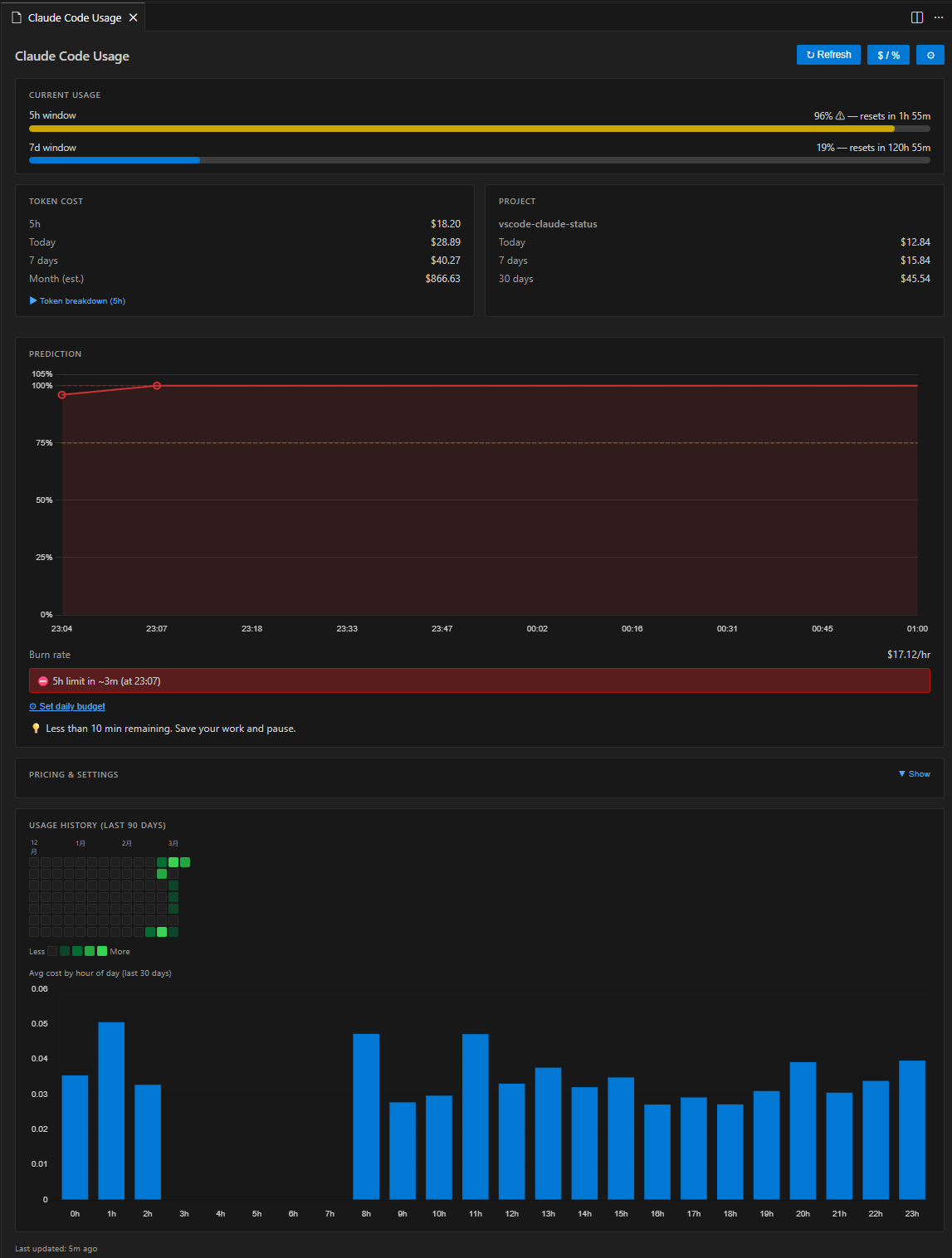
Click the status bar item to open a rich dashboard panel with:
- Current Usage — colour-coded progress bars for 5 h and 7 d windows
- Token Cost — 5 h / today / 7 d / month (est.) costs; expandable token breakdown
shows per-type counts (input / output / cache read / cache create) with individual costs
and cache hit ratio
- Project Cost — per-workspace breakdown (today / 7 days / 30 days)
- Prediction — burn rate ($/hr), time-to-exhaustion, daily & weekly budget tracking;
Rate Limit Timeline chart visualises the projected 5 h utilization from now to reset
- Pricing & Settings — always-visible card showing current token pricing rates,
provider, API state, and cache TTL; opens VS Code settings with one click
- Usage History — GitHub-style daily heatmap + hourly pattern bar chart
The panel supports light, dark, and high-contrast VS Code themes natively.
🗂 Project-Level Cost Tracking (VS Code-exclusive)
Automatically maps the open workspace folder to its Claude Code session
directory and shows how much you've spent for that specific project —
today, this week, and this month.
Multi-root workspaces are fully supported: each folder gets its own breakdown
in the dashboard, and the status bar shows the aggregate.
🤖 5h:78% 7d:84% | my-app:$3.21          ← single workspace
🤖 5h:78% 7d:84% | PJ:$5.43              ← multi-root aggregate
🔮 Usage Prediction & Budget Alerts
Based on the last 30 minutes of activity, the extension predicts how long until
the 5 h rate limit is exhausted and warns you before it happens.
- Burn rate — current consumption in $/hr (rolling 30-minute window)
- Time-to-exhaustion — estimated minutes until the 5 h window is full,
capped at the next window reset time
- Safety indicator — "Safe to start heavy task" if > 30 min remains
- Daily budget — set an optional USD cap; progress bar and alerts fire when
the configured threshold (default 80 %) is reached
- Weekly budget — optional USD weekly cap with progress bar (
claudeStatus.budget.weeklyUsd)
- VS Code notifications — non-blocking warning at ≤ 30 min, error dialog
at ≤ 10 min (with "Open Dashboard" action); budget alert fires once per window
Configure via Settings → Claude Status or the command palette:
Claude Status: Set Budget...
📅 Usage History Heatmap
Understand your long-term usage patterns at a glance.
- Daily heatmap — GitHub Contributions-style grid for the last 30 / 60 / 90 days;
green intensity reflects daily spend; hover any cell for exact date and cost
- Hourly bar chart — average cost per hour of day (last 30 days); shows when
you typically use Claude Code most heavily
Number of days is configurable via claudeStatus.heatmap.days (30 / 60 / 90).
Requirements
- VS Code 1.73 or newer
- Claude Code CLI with active sessions — the extension reads
~/.claude/projects/**/*.jsonl for token cost data
Authentication is optional depending on your provider:
| Provider |
Authentication |
Display |
| Claude.ai subscription |
claude login — credentials stored in macOS Keychain (v2.x+) or ~/.claude/.credentials.json; detected automatically |
Rate-limit % + cost |
| AWS Bedrock |
AWS credentials (env vars or ~/.aws/) |
Cost only |
| Anthropic API key |
ANTHROPIC_API_KEY env var |
Cost only |
Plan Compatibility
Note: This extension is developed and tested by the author on a
Claude.ai Pro plan (which provides both 5 h and 7 d rate-limit windows).
Other plans and providers — including AWS Bedrock, direct API key, Claude.ai
Free, and any plan that exposes only a 5 h window — are supported on a
best-effort basis via auto-detection. If you encounter unexpected behaviour on
your plan, please open an issue
and include your plan type. We will investigate and add support promptly.
Behaviour by plan type:
| Plan |
Rate-limit display |
7d window |
| Claude.ai Pro / Max (5h + 7d) |
5h:45% 7d:32% |
✅ |
| Claude.ai Pro / any 5h-only tier |
5h:45% |
auto-hidden |
| AWS Bedrock |
cost only (5h:$0.15 7d:$0.42) |
N/A |
| Anthropic API key |
cost only |
N/A |
If auto-detection does not work for your setup, set claudeStatus.claudeProvider
explicitly in VS Code Settings.
Installation
VS Code Marketplace
Search "Claude Status" in the Extensions panel, or:
code --install-extension long-kudo.vscode-claude-status
Install from VSIX
- Download the
.vsix from the Releases page.
- In VS Code: Extensions (Ctrl+Shift+X) → ⋯ → Install from VSIX…
Build from Source
git clone https://github.com/long-910/vscode-claude-status.git
cd vscode-claude-status
npm install
npm run package       # → vscode-claude-status-*.vsix
Usage
The extension activates automatically on VS Code startup (onStartupFinished).
| Action |
Result |
| Glance at status bar |
Live utilization / cost |
| Click status bar |
Open dashboard panel |
Ctrl+Shift+Alt+C (⌘⇧⌥C on Mac) |
Toggle % ↔ $ display mode |
| Claude Status: Refresh Now |
Force API refresh |
| Claude Status: Open Dashboard |
Open dashboard panel |
| Claude Status: Toggle % / $ Display |
Switch display mode |
| Claude Status: Set Budget… |
Set or disable daily USD budget |
Configuration
All settings are under the claudeStatus namespace in VS Code Settings.
| Setting |
Type |
Default |
Description |
claudeStatus.displayMode |
"percent" | "cost" |
"percent" |
Status bar display mode |
claudeStatus.statusBar.alignment |
"left" | "right" |
"left" |
Status bar position |
claudeStatus.statusBar.showProjectCost |
boolean |
true |
Show project cost in status bar |
claudeStatus.statusBar.format |
string \| null |
null |
Custom label template. Placeholders: ${usage5h}, ${usage7d}, ${cost5h}, ${cost7d}, ${costDay}. null = default auto-generated label |
claudeStatus.cache.ttlSeconds |
number (60–3600) |
300 |
API cache TTL in seconds |
claudeStatus.rateLimitApi.enabled |
boolean |
true |
Fetch rate-limit % from Anthropic API. When disabled, no new API calls are made; cached % is still shown with a staleness indicator ([Xm ago]) if available |
claudeStatus.realtime.enabled |
boolean |
false |
Poll rate-limit API every TTL seconds (requires rateLimitApi.enabled) |
claudeStatus.budget.dailyUsd |
number \| null |
null |
Daily budget in USD (null = disabled) |
claudeStatus.budget.weeklyUsd |
number \| null |
null |
Weekly budget in USD |
claudeStatus.budget.alertThresholdPercent |
number (1–100) |
80 |
Budget alert threshold % |
claudeStatus.notifications.rateLimitWarning |
boolean |
true |
Warn when rate limit is near |
claudeStatus.notifications.rateLimitWarningThresholdMinutes |
number (5–120) |
30 |
Minutes before limit to show warning |
claudeStatus.notifications.budgetWarning |
boolean |
true |
Warn when budget threshold exceeded |
claudeStatus.heatmap.days |
30 \| 60 \| 90 |
90 |
Days shown in usage heatmap |
claudeStatus.credentials.path |
string \| null |
null |
Custom credentials file path |
claudeStatus.claudeProvider |
"auto" | "claude-ai" | "aws-bedrock" | "api-key" |
"auto" |
Provider type (auto-detect or explicit) |
claudeStatus.pricing.inputPerMillion |
number |
3.00 |
USD per 1M input tokens |
claudeStatus.pricing.outputPerMillion |
number |
15.00 |
USD per 1M output tokens |
claudeStatus.pricing.cacheReadPerMillion |
number |
0.30 |
USD per 1M cache-read tokens |
claudeStatus.pricing.cacheCreatePerMillion |
number |
3.75 |
USD per 1M cache-creation tokens |
// Example: settings.json
{
  "claudeStatus.displayMode": "cost",
  "claudeStatus.cache.ttlSeconds": 120,
  "claudeStatus.budget.dailyUsd": 5.00,
  "claudeStatus.budget.alertThresholdPercent": 80,
  "claudeStatus.statusBar.showProjectCost": true,
  // For AWS Bedrock users — skip OAuth detection, show cost only:
  "claudeStatus.claudeProvider": "aws-bedrock",
  // Disable new rate-limit API calls (cached % still shown with staleness indicator):
  // "claudeStatus.rateLimitApi.enabled": false,
  // If Anthropic changes pricing, update these values to match:
  "claudeStatus.pricing.inputPerMillion": 3.00,
  "claudeStatus.pricing.outputPerMillion": 15.00,
  "claudeStatus.pricing.cacheReadPerMillion": 0.30,
  "claudeStatus.pricing.cacheCreatePerMillion": 3.75
}
Roadmap
| Feature |
Status |
| Data layer (JSONL reader, API client, cache) |
✅ v0.1.0 |
| Status bar with % / $ display |
✅ v0.1.0 |
| WebView dashboard skeleton |
✅ v0.1.0 |
| Project-level cost tracking |
✅ v0.1.0 |
| Usage prediction & budget alerts |
✅ v0.2.0 |
| Session history heatmap |
✅ v0.3.0 |
| VS Code Marketplace publication |
✅ v0.3.0 |
| Rate Limit Timeline chart |
✅ v0.4.0 |
| Token breakdown with cache efficiency |
✅ v0.4.0 |
| Monthly cost projection |
✅ v0.4.0 |
| Weekly budget progress bar |
✅ v0.4.0 |
| Pricing & Settings card in dashboard |
✅ v0.4.0 |
| i18n — English / Japanese / Chinese |
✅ v0.4.1 |
| macOS Keychain credential fallback (Claude Code v2.x+) |
✅ v0.6.0 |
Contributing
Contributions are welcome. See CONTRIBUTING.md for setup instructions,
architecture overview, and release procedures.
Contributors
Thanks to everyone who has contributed to this project!

License
MIT — © 2026 long-910