Polylog
One git log across every repository in your workspace.
Every VS Code git extension gives you a repository picker: one repo's history at a time.
Polylog merges them. Every commit from every repository sits in one list, newest first. You
can search and filter all of them at once, and click any commit to see its files in VS
Code's own diff editor.
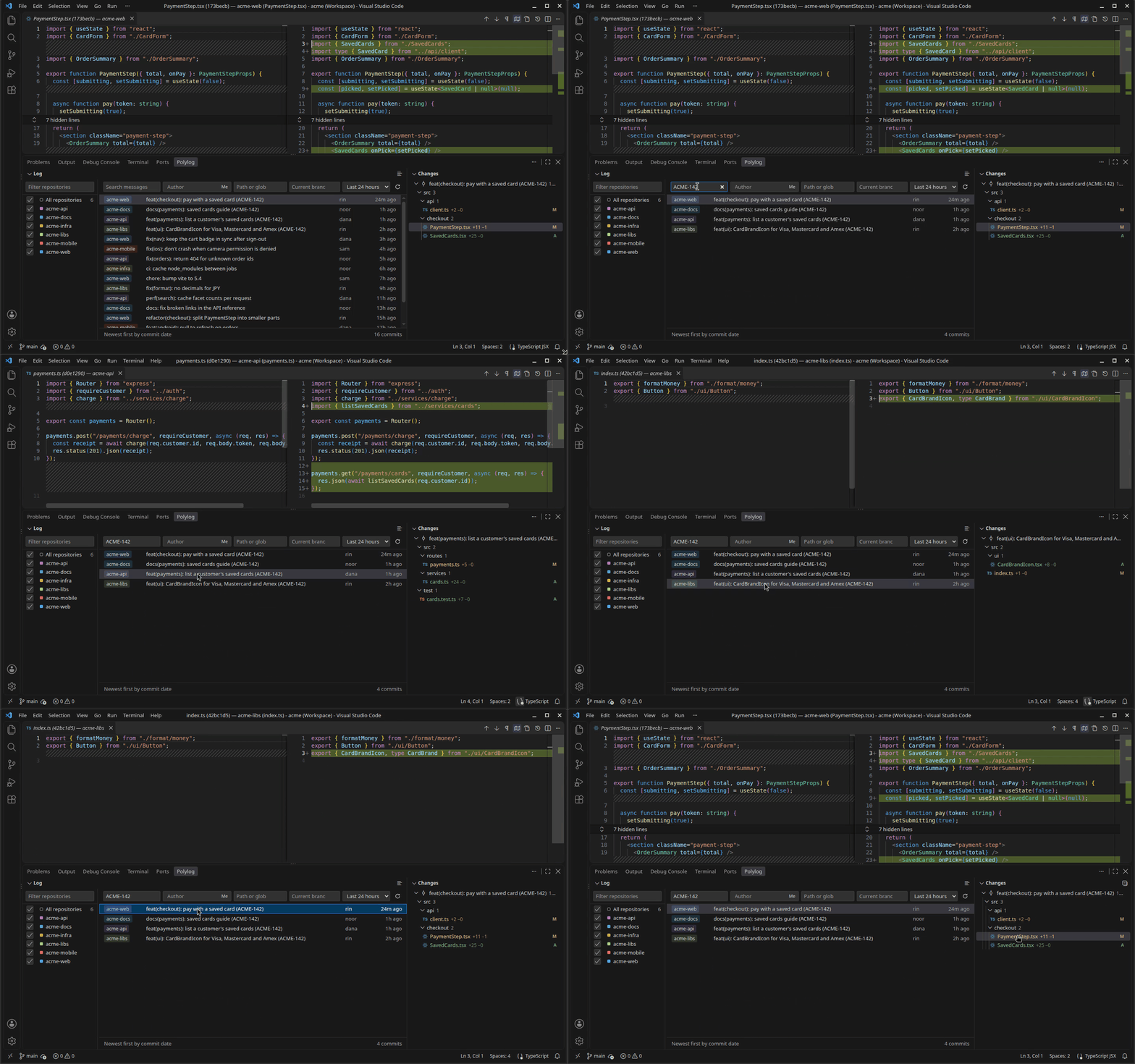
Ticket ACME-142 touched four repositories. Searching for it once in Polylog lists all
four commits, and each one opens in the native diff editor.
Screenshots
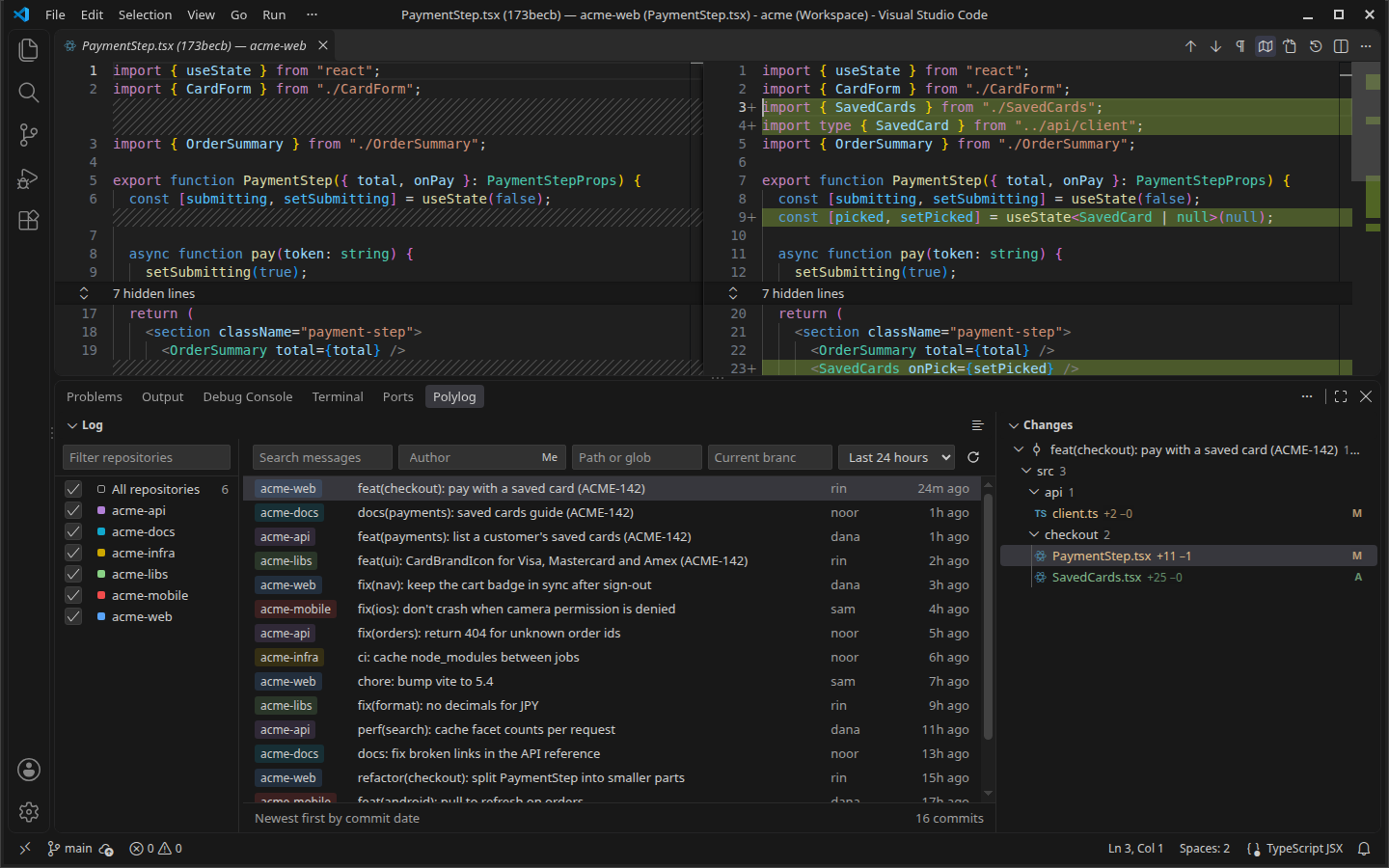
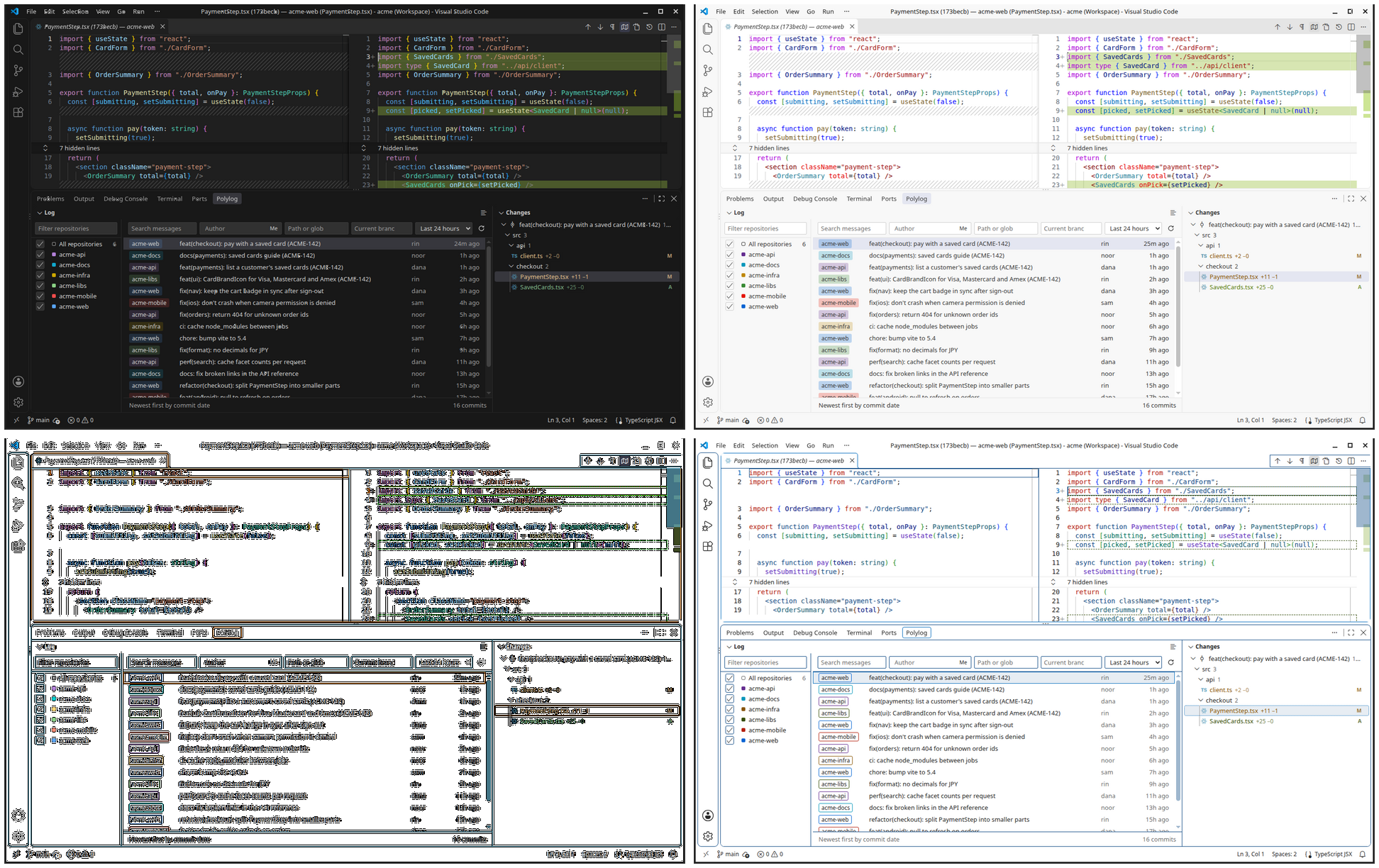
The merged log. Every commit from every repo, with a colored chip showing where it
lives. The Changes tree follows your selection, and clicking a file opens its diff above.
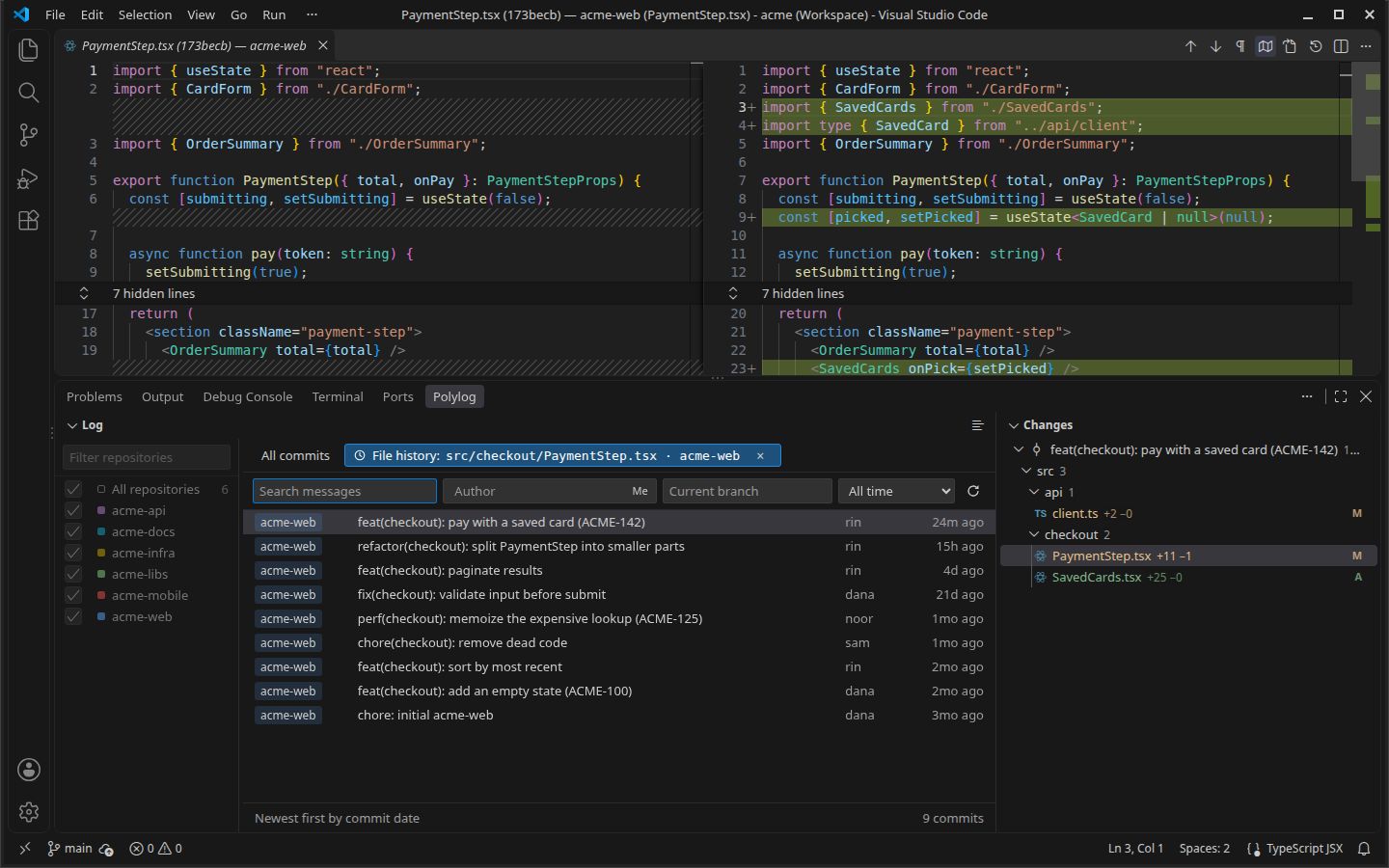
File History. Right-click any file and choose Polylog: File History to get the
commits that touched it, across renames. The diff follows as you step through them with
↑/↓.
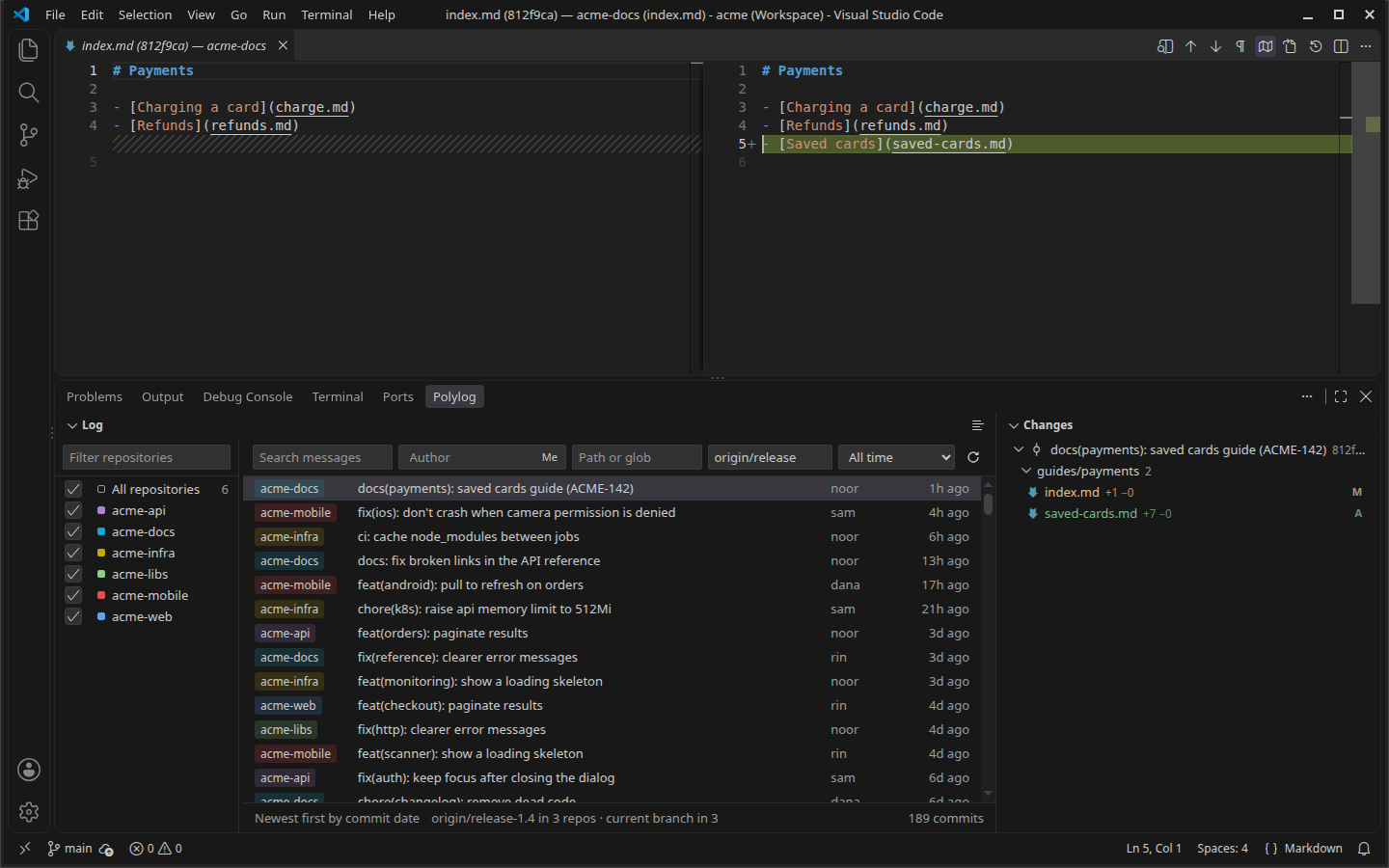
A branch in every repo. Type origin/release-1.4 to see that branch in every
repository that has it. The others fall back to their current branch, and the footer
shows how many repos use each.
Your theme, not ours. Every color comes from your VS Code theme, so Polylog looks like
the rest of your editor. That includes light, dark and both high-contrast themes.
Quick Start
- Install Polylog (extension ID
lntvan166.polylog-git) in any of these ways:
- Extensions view: search for
lntvan166.polylog-git, or "Polylog", and pick the
one by lntvan166. Another publisher's unrelated extension is also called polylog.
- Quick Open (
Ctrl+P / Cmd+P): ext install lntvan166.polylog-git
- Command line:
code --install-extension lntvan166.polylog-git
- Cursor, VSCodium, Windsurf: it is on Open VSX
under the same ID.
- Listings: VS Code Marketplace
· Open VSX
- Open a folder or multi-root workspace containing more than one git repository.
- Run Polylog: Open Merged Log from the Command Palette (
Ctrl+Shift+P /
Cmd+Shift+P), or click the Polylog tab in the bottom panel next to Terminal.
Nothing to configure. Polylog shows every repository VS Code's Git extension has open,
plus any it finds in your workspace folders (up to polylog.scanDepth levels deep). Use
polylog.excludeRepos to leave some out.
Features
- One merged log. Every repository's commits in one list, newest first by commit
date, with a colored chip showing each commit's repo.
- Search across every repo. Search commit messages (literal, case-insensitive) across
every repository at once.
- Filters:
- Authors: type a name or email. Enter, a comma or a picked suggestion adds it as a
chip, and a commit by any of the chips matches. Suggestions list who committed
recently across your repos. Me is a toggle inside the box that adds each repo's own
user.email.
- Path: only commits touching a file, a folder (everything inside it), or a glob, in
every repository at once. Paths are relative to each repo's root.
*.sql matches in
any folder; db/*.sql only in db/.
- Branch, applied in every repo that has it.
- Date range: last 24 hours by default, or 7 days, 30 days, all time, or a custom
range.
- Repositories pane. Pick which repositories to show, with fuzzy search and
multi-select. Toggle it with Group by Repository in the Log's title bar.
- Native Changes tree. Git status colors and
A/M/D/R badges. Click a file to
open its diff in the editor area. Right-click the commit to copy its SHA or message.
- Open File on any Polylog diff (the title-bar button, or a file's right-click in
Changes) opens the file as it is in your workspace now, at the same line number.
- File History. From the Explorer, an editor, a tab, or a file in Changes. Follows
renames, and always shows every commit of the file: it sets your date range, search and
author aside while open, and gives them back when you close it.
- Keyboard first. The selection drives everything, so you can review a day's work
without touching the mouse.
| Key |
Action |
↑ / ↓, Home / End, PageUp / PageDown |
Move the selection; the changed files follow |
Enter |
Open the selected commit's first changed file |
/ or Ctrl/Cmd+F |
Search commit messages |
Esc |
Clear the search, then return to the list |
How It Works
 Filters (search · authors · path · branch · dates · repos)
                 │  passed straight through as git log flags
     ┌───────────┼───────────┬───────────┐
  git log     git log     git log     git log      one process per repository,
  acme-web    acme-api    acme-libs   …            16 at a time
     └───────────┴─────┬─────┴───────────┘
                       ▼
          merged by commit date, streamed a page at a time
                       ▼
             Log  ·  Changes  ·  diff editor
Polylog has no index, no cache and no database. Git does all the searching. Every
filter becomes a git log flag (--grep, --author, --since/--until, a ref, a pathspec), so each
repository returns only matching commits, and Polylog merges those already-filtered lists.
On a 68-repository, 16,000-commit workspace:
- The full
git log fan-out takes 25 ms.
- A message search across all of history takes 640 ms.
- The first rows appear 0.4 s after the panel opens.
An index would add a background process and a way to show stale results, for a gain
measured in milliseconds. Typing in a filter waits 250 ms before searching. A new search
stops any git processes still running, rather than waiting for them.
Unrelated repositories share no history, so the merge is by commit date. A rebase or a
skewed clock can place a commit out of order.
Extension Settings
| Setting |
Default |
Description |
polylog.pageSize |
200 |
Commits fetched per repository per page. |
polylog.maxConcurrency |
16 |
Maximum number of git processes running at once. |
polylog.scanDepth |
2 |
Folder levels to search the workspace folders for repositories, in addition to those the Git extension has open. |
polylog.excludeRepos |
[] |
Glob patterns for repositories to leave out, matched against the folder name and full path. |
polylog.keepViewsExpanded |
true |
Expand the Log or Changes again when a header click collapses it. Hiding a view again right after is respected until reload. |
Requirements
| Requirement |
Notes |
| VS Code 1.85+ |
Or a compatible editor that installs from Open VSX |
| Git |
The same git as VS Code: your git.path setting, then the git VS Code's Git extension found, then git on PATH. Changing git.path takes effect at once |
Polylog only reads history. It never runs a command that changes a repository.
Contributing & Issues
Found a bug or have a feature request?
Open an issue on GitHub.
Development:
npm install
npm run compile && npm test          # lint/typecheck: npm run lint, npm run typecheck
npm run harness                      # webview in a browser: http://localhost:5178/gallery.html
xvfb-run -a npm run test:integration # real VS Code, three fixture repos
xvfb-run -a npm run perf:startup     # time to first rows on a generated 68-repo workspace
node dev/demo/seed.mjs               # the demo workspace in the screenshots: /tmp/polylog-demo
dev/demo/capture.sh <polylog.vsix>   # re-shoot the screenshots and GIF (Linux, Xvfb)
License
MIT — see LICENSE

