
Sapphire Tide Theme




An ocean-inspired editor theme built around deep sea blue, indigo, vivid blue and pale cyan. Two coordinated variants share one palette, so the workspace keeps the same tide-lit character in light and dark mode.
以深海蓝、靛蓝、亮蓝与浅青为核心的一套海洋感主题:明暗两套变体共享同一色板,切换时保持同一份海潮气质。
Preview / 预览
| Light 浅色 |
Dark 深色 |
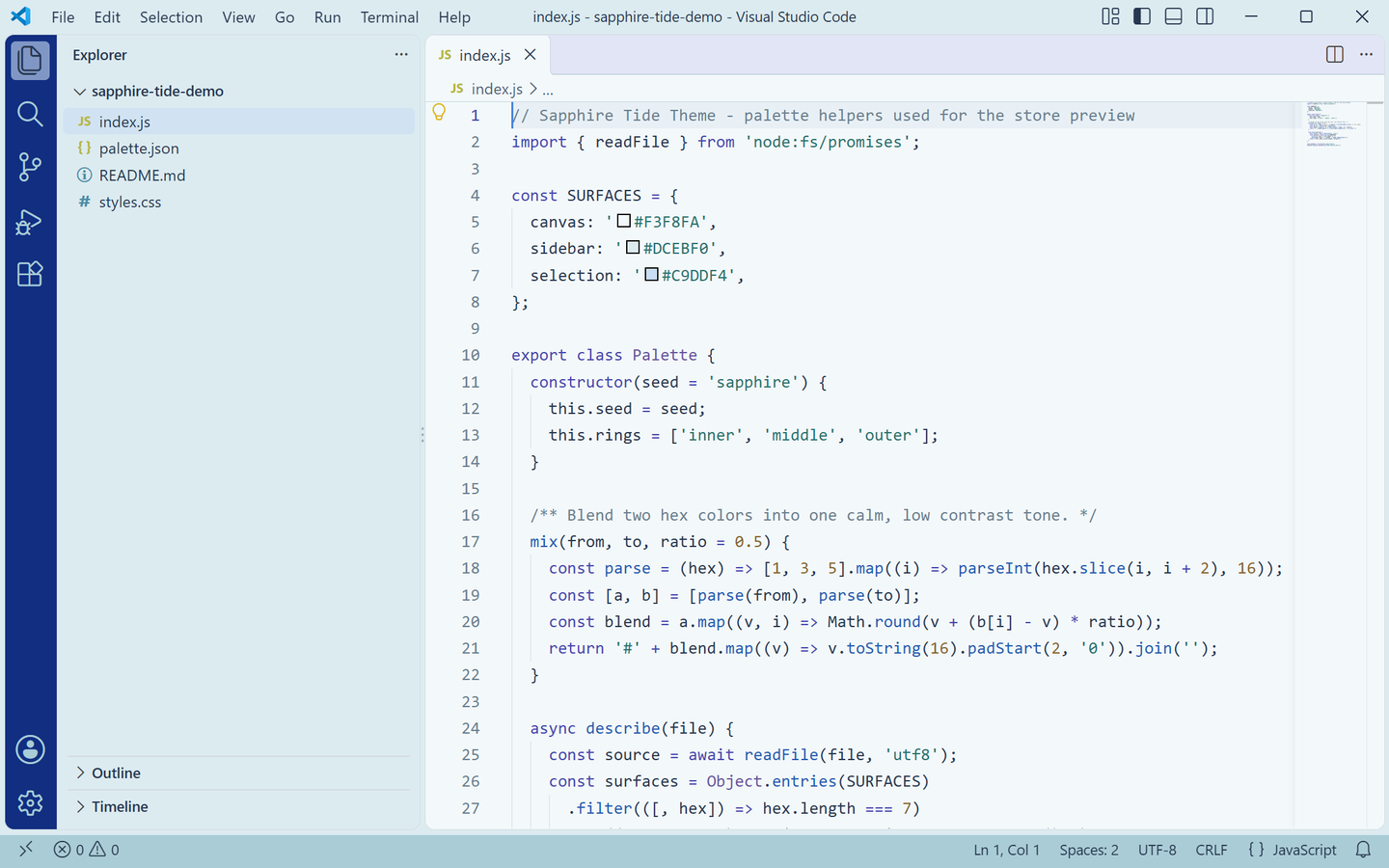 |
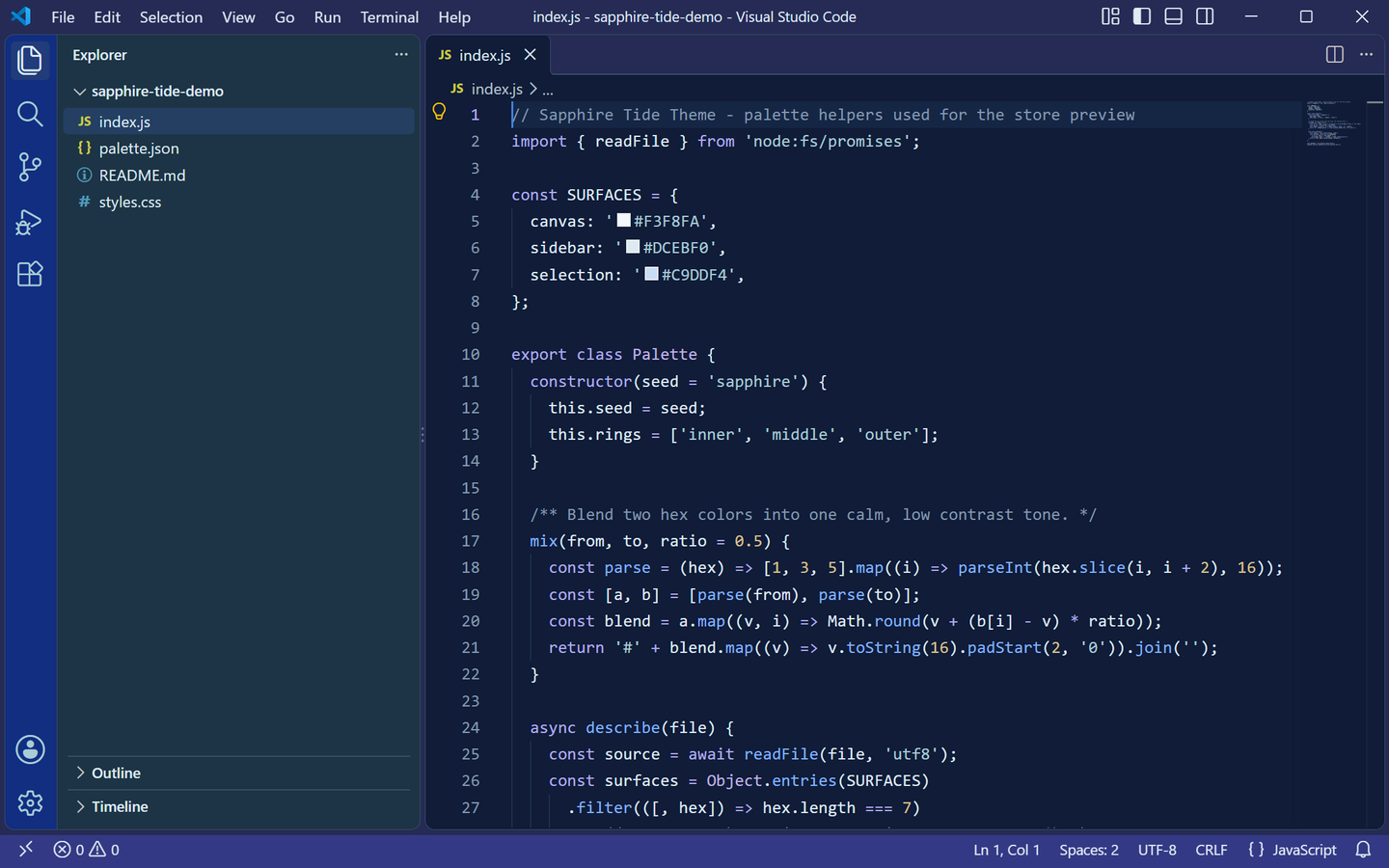 |
Both previews are captured from a real VS Code window running the theme — no mockups.
上方预览图取自真实运行该主题的 VS Code 窗口截图,非模拟图。
Palette / 色板
| Role |
Light |
Dark |
| Editor background |
#F3F8FA pale foam |
#101C38 deep sea |
| Foreground |
#263750 navy slate |
#DFEAF3 sea spray |
| Cursor |
#4382DF vivid blue |
#4382DF vivid blue |
| Focus border / links |
#326BC4 / #245BB0 |
#82B3FF |
| Selection |
#C9DDF4 |
#294675 |
| Current line |
#E8F0F5 |
#152645 |
| Side bar |
#DCEBF0 |
#1C3445 |
| Title bar |
#DCEBF0 |
#252B55 |
| Status bar |
#AACCD6 |
#343985 |
| Activity bar |
#112E81 with #F3F8FA icons |
#112E81 with #F3F8FA icons |
| Tabs (bar / inactive tab) |
#E2E5F5 |
#252B55 |
| Borders / indent guides |
#C6D5E1 |
#394F68 |
| Button |
#326BC4 with white text |
#AACCD6 with #112E81 text |
| Badge |
#F3F8FA on #4647AE |
#101C38 on #B1ACF0 |
Both variants are built from the same roles, so switching between them changes the light level rather than the identity.
两套变体的角色色一一对应,切换时改变的是明暗而非风格。
Syntax mapping / 语法映射
| Syntax |
Light |
Dark |
| Comments |
#6B7F90 |
#8399AE |
| Keywords / storage / tags |
#4647AE indigo |
#B1ACF0 periwinkle |
| Strings |
#28716E teal |
#AACCD6 pale cyan |
| Numbers / constants |
#87652F ochre |
#D9C18F sand |
| Types / classes |
#66549D violet |
#C0B3E6 lilac |
| Functions / methods |
#245BB0 blue |
#82B3FF bright blue |
| Attributes |
#87652F |
#EAC18C |
| Variables |
#263750 |
#DFEAF3 |
| Headings / invalid |
#4647AE / #AB4858 |
#B1ACF0 / #E69DA8 |
Coverage / 覆盖范围
Every surface below is themed in both variants:
- Editor — background, foreground, selection and inactive selection, current-line highlight, find match and find highlight, bracket-match background and border, cursor, line numbers (plus the active line number), indent guides, whitespace, errors, warnings and info.
- Workbench chrome — activity bar and its badge, title bar (active and inactive), side bar and its border, status bar (normal, no-folder and debugging states), editor group header and tabs (active, inactive, border and active top border).
- Panels and overlays — panel, editor widgets, hover widget, suggest widget, dropdowns, inputs and placeholder text, notifications, quick input, and the focus border.
- Lists — active, inactive and hover selection backgrounds, plus the highlight color.
- Terminal — background, foreground and the full 16-color ANSI palette, matched to the theme.
- Details — workbench borders, scrollbar sliders, git decoration colors (added / modified / deleted), buttons and badges, and semantic token colors for function, method, class, type, string, number, keyword and comment.
Diff editor, peek view, breadcrumbs, minimap, debug toolbar and the settings UI are intentionally left to VS Code's defaults.
以下区域在两套变体中均已配色:编辑器本体(选区、当前行、查找匹配、括号匹配、光标、行号、缩进线、空白符、错误/警告/提示)、活动栏与角标、标题栏、侧边栏、状态栏(含无文件夹与调试态)、标签栏,以及面板与各类浮窗(悬停、建议、通知、快速输入)、下拉与输入框、列表选中/悬停、全部边框与滚动条、Git 装饰色、终端 ANSI 全色,以及函数/方法/类/类型/字符串/数字/关键字/注释的语义高亮。差异编辑器、peek 视图、面包屑、缩略图、调试工具栏与设置界面保留 VS Code 默认样式。
Features / 功能
Two coordinated variants — Sapphire Tide Theme Light and Sapphire Tide Theme Dark ship in one extension.
One ocean palette — deep sea blue, indigo, vivid blue and pale cyan run through the editor, side bar, activity bar, status bar and terminal.
Readable syntax colors — indigo keywords, teal strings, ochre numbers and violet types, tuned for contrast on both backgrounds.
Semantic highlighting enabled, so language-aware tokens are colored beyond the classic TextMate scopes.
Terminal ANSI colors taken from the same palette, so the integrated terminal sits inside the theme.
明暗两套协调变体——同一扩展内含 Sapphire Tide Theme Light 与 Sapphire Tide Theme Dark。
一套海洋色板——深海蓝、靛蓝、亮蓝与浅青贯穿编辑器、侧边栏、活动栏、状态栏与终端。
可读的语法配色——靛蓝关键字、青绿字符串、赭黄数字、紫罗兰类型,在明暗底色上均保持对比。
启用语义高亮,在传统 TextMate scope 之外为语言感知的 token 着色。
终端 ANSI 配色取自同一色板,集成终端与主题融为一体。
Installation / 安装
Requires VS Code 1.80 or newer.
- Search for Sapphire Tide Theme in the Extensions view (
Ctrl+Shift+X / Cmd+Shift+X), or open the Marketplace page.
- Or install from a VSIX: download
sapphire-tide-theme-1.0.0.vsix, open the Command Palette (Ctrl+Shift+P / Cmd+Shift+P) and run Extensions: Install from VSIX....
需要 VS Code 1.80 或更高版本。
- 在扩展面板(
Ctrl+Shift+X / Cmd+Shift+X)搜索 Sapphire Tide Theme,或打开 Marketplace 页面。
- 也可以从 VSIX 安装:下载
sapphire-tide-theme-1.0.0.vsix,打开命令面板(Ctrl+Shift+P / Cmd+Shift+P),运行 Extensions: Install from VSIX... 并选择该文件。
Or from the command line:
或使用命令行:
ext install lilinhuang.sapphire-tide-theme
Activation / 启用
Open the Command Palette (Ctrl+Shift+P / Cmd+Shift+P), run Preferences: Color Theme, and choose Sapphire Tide Theme Light or Sapphire Tide Theme Dark.
To switch between the two variants quickly, use the keyboard shortcut Ctrl+K Ctrl+T at any time.
打开命令面板(Ctrl+Shift+P / Cmd+Shift+P),运行 Preferences: Color Theme,选择 Sapphire Tide Theme Light 或 Sapphire Tide Theme Dark。
随时可用快捷键 Ctrl+K Ctrl+T 在两套变体之间快速切换。
Development / 开发
Open this folder in VS Code and press F5 to launch an Extension Development Host with the theme loaded. Regenerate the real-window preview screenshots with:
在 VS Code 中打开本文件夹并按 F5,在扩展开发宿主中预览主题。重新生成真实窗口预览图:
python3 scripts/capture-real-screenshots.py
License / 许可
Released under the Non-Commercial License — licensed for personal, educational and non-commercial use. See LICENSE for details.
基于 Non-Commercial License(非商业使用许可) 发布,可用于个人、教育及非商业用途,详见 LICENSE。
Feedback / 反馈
Found an unthemed area or want a tweak? Open an issue at github.com/vaxicy/sapphire-tide-theme/issues.
发现没有配色的区域或想调整某处颜色,欢迎在 GitHub Issues 反馈。
Publisher / 发布者
Published by lilinhuang on the Visual Studio Code Marketplace.

