
Primrose Peach Theme




A soft peach theme: white paper with peach, primrose pink and mint in the light variant, and a deep moss night in the dark one. Both variants are built from one palette, so switching changes the light rather than the garden.
一套柔和的蜜桃色主题:浅色版是纯白纸配上蜜桃、报春粉与薄荷,深色版是深苔藓夜色。明暗两版共用同一套色板,切换时变的是光线,不是花园。
Preview / 预览
| Light 浅色 |
Dark 深色 |
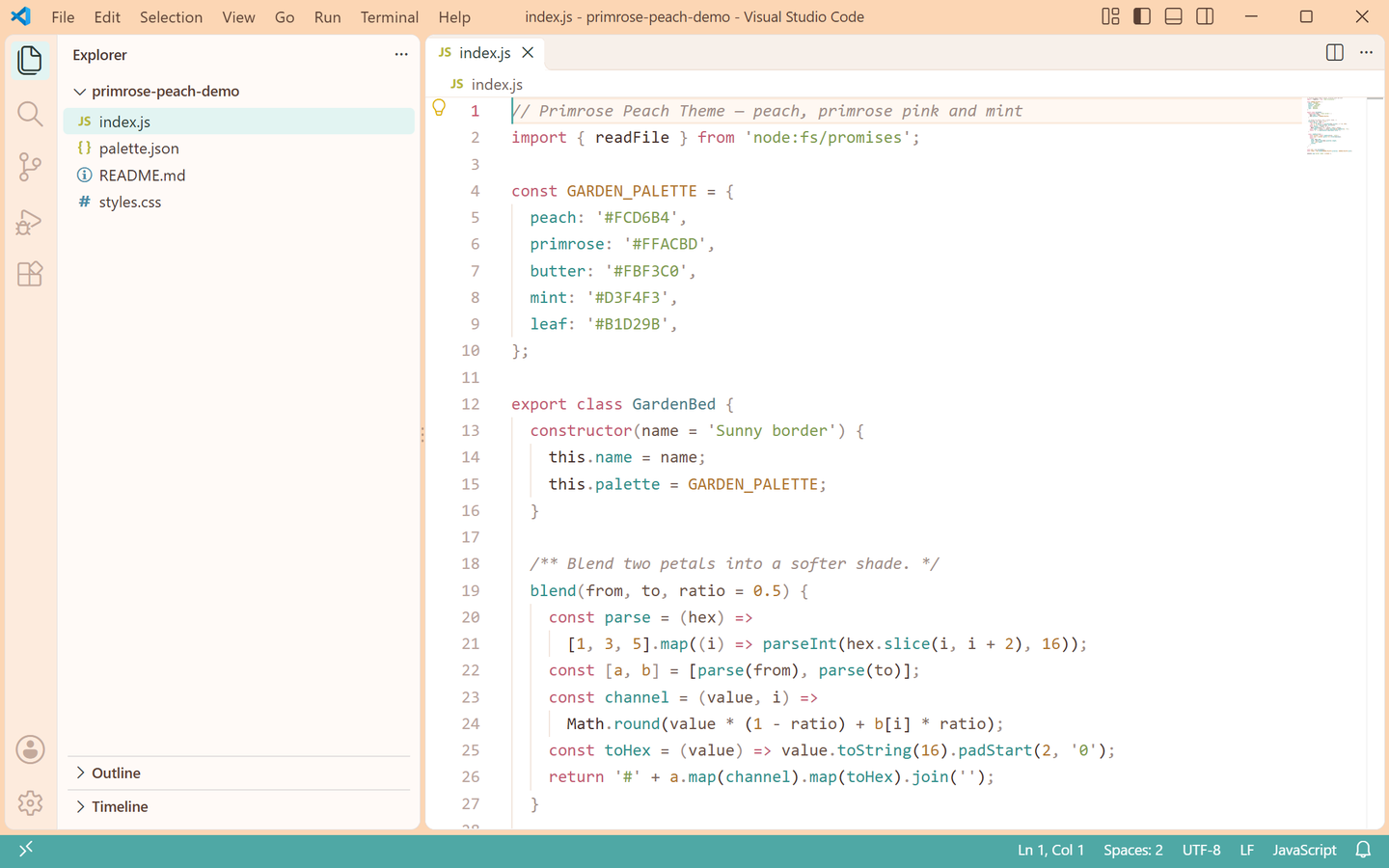 |
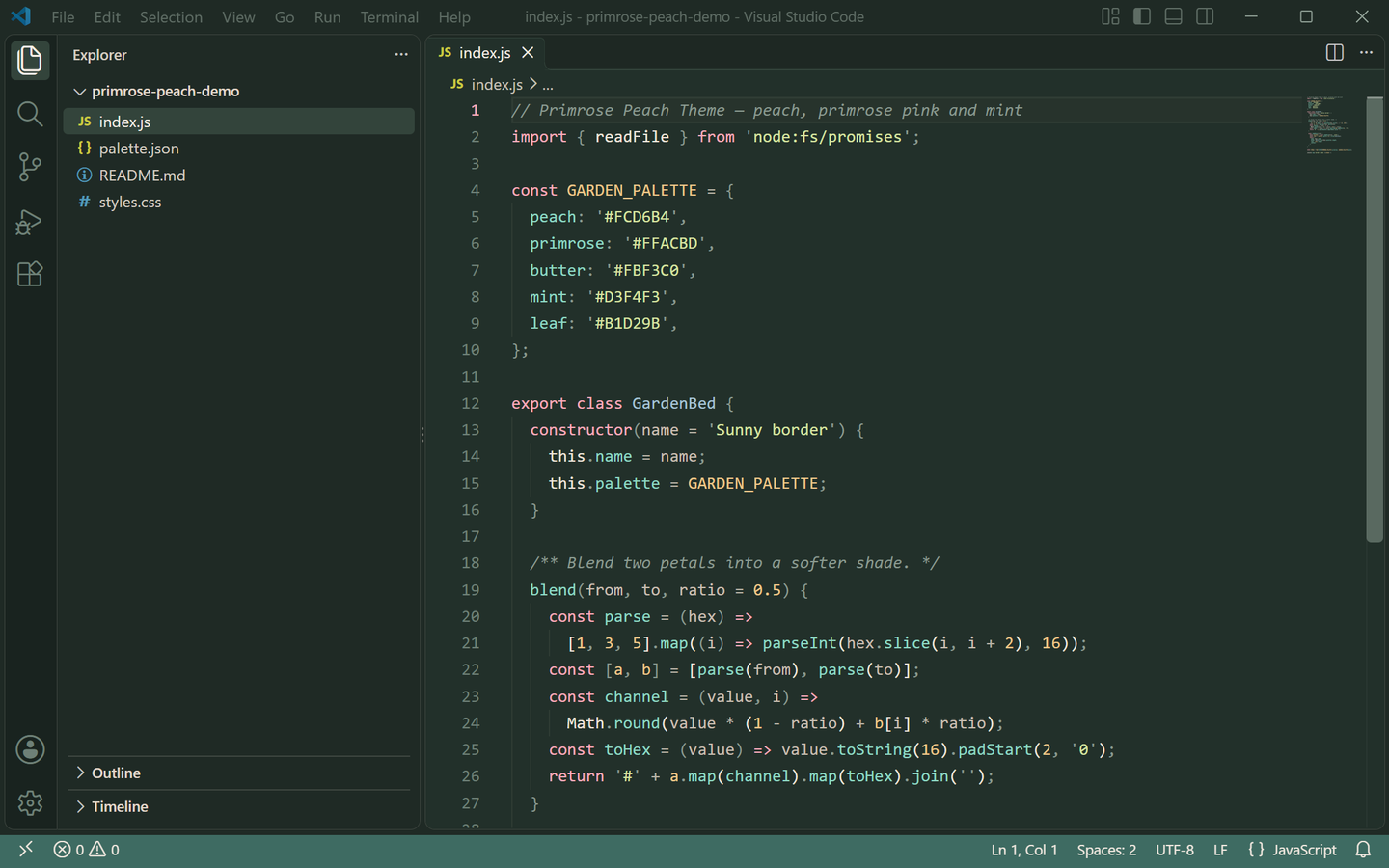 |
Both previews are captured from a real VS Code window running the theme — no mockups.
上方预览图取自真实运行该主题的 VS Code 窗口截图,非模拟图。
Palette / 色板
| Role |
Light |
Dark |
| Editor background |
#FFFFFF white paper |
#22302A moss night |
| Foreground |
#46302C warm ink |
#F0E6DC soft cream |
| Muted text / placeholders |
#A08C86 |
#A3B5AA |
| Side bar |
#FFFAF7 with #4A3733 text |
#1F2A25 with #D6CEC2 text |
| Panel / terminal |
#FFFCF8 |
#1E2823 |
| Title bar |
#FCD6B4 peach with #5A4034 text |
#1B2621 with #D9CFC2 text |
| Tab bar / inactive tab |
#F7F0EA |
#1E2823 |
| Active tab / indicator |
#3B2724 text, #C9556E top border |
#F7EFE6 text, #FFACBD top border |
| Activity bar |
#FDEBDD with #C0705E icons |
#19231F with #E8A9B5 icons |
| Status bar |
#4FA8A5 with white text |
#3E6B62 with #F2E9E0 text |
| Selection |
#CFEDEA mint wash |
#3A4A42 moss shade |
| Current line |
#FFF8F2 |
#27332C |
| Borders |
#F0E2D8 |
#33443B |
| Indent guides |
#F1E4DA |
#2F3C34 |
| Button |
#C9556E with white text (hover #B04E63) |
#FFACBD with #22302A text (hover #F5B9C6) |
| Badge |
#C9556E with white text |
#FFACBD with #22302A text |
| Cursor |
#4FA8A5 |
#FFACBD |
| Links |
#C9556E |
#FFACBD |
| Errors / warnings |
#B4475C / #A0781F |
#F09A9A / #F0C88A |
| Git added / modified / deleted |
#5F9142 / #B0742E / #B4475C |
#B1D29B / #F0C88A / #F09A9A |
Peach #FCD6B4, primrose #FFACBD, butter #FBF3C0, mint #D3F4F3 and leaf #B1D29B carry both variants, so a file still reads as "primrose peach" after switching.
蜜桃 #FCD6B4、报春粉 #FFACBD、奶油黄 #FBF3C0、薄荷 #D3F4F3 与嫩叶 #B1D29B 贯穿明暗两版,切换后整个文件还是同一座花园。
Syntax mapping / 语法映射
| Syntax |
Light |
Dark |
| Comments |
#A08C86 |
#8A9A90 |
| Keywords / storage |
#C25A72 |
#FFACBD |
| Strings |
#7E9B4F |
#D8E4A2 |
| Functions / methods |
#2F8F8B |
#8FD9C4 |
| Types / classes |
#4A7A86 |
#A8C6D8 |
| Numbers / constants |
#B0742E |
#F0C88A |
| Variables |
#46302C |
#F0E6DC |
| Parameters |
#6B5248 |
#C9BFB2 |
| Properties |
#2F8F8B |
#8FD9C4 |
| Operators |
#7A6660 |
#B9B3A6 |
| Punctuation |
#A08C86 |
#8A9A90 |
| HTML tags |
#C25A72 |
#FFACBD |
| Attribute names |
#B0742E |
#F0C88A |
| Regex |
#B0742E |
#DCC48A |
| Escape characters |
#A0781F |
#FBF3C0 |
Semantic highlighting is enabled, so variables, parameters, properties, functions and types follow the same mapping in TypeScript, JavaScript, Go, Rust and Python.
已开启语义高亮,TypeScript、JavaScript、Go、Rust 与 Python 里的变量、参数、属性、函数与类型都会落到同一套配色。
Install / 安装
- 打开扩展面板
Ctrl+Shift+X。
- 搜索 Primrose Peach Theme 并安装。
- 按
Ctrl+K Ctrl+T,选择 Primrose Peach Theme Light 或 Primrose Peach Theme Dark。
也可以用命令行安装:
code --install-extension lilinhuang.primrose-peach-theme
Build from source / 本地构建
py -3 scripts/build-theme.py       # regenerate both theme JSON files
py -3 scripts/generate-icon.py     # export assets/icon.png from the selected logo
py -3 scripts/capture-real-screenshots.py   # real VS Code screenshots
License / 许可证
Non-Commercial License — free for personal, educational and non-commercial use. See LICENSE.
非商业许可证:个人、教育与非商业用途免费使用,详见 LICENSE。

