Lime Whisper Theme




A gentle citrus-inspired theme: soft lime and cool mint over a creamy white editor in the light variant and over a charcoal green editor in the dark one. Both variants are built from one palette, so switching changes the light level rather than the character of the workspace.
一套清爽的柑橘主题:浅色版是奶油白的纸面,深色版是炭绿的底子,两者都用柔和的青柠与清凉的薄荷点缀。明暗两套变体共享同一套色板,切换时改变的是明暗而非气质,工作区始终保持安静、低噪的青柠感。
Preview / 预览
| Light 浅色 |
Dark 深色 |
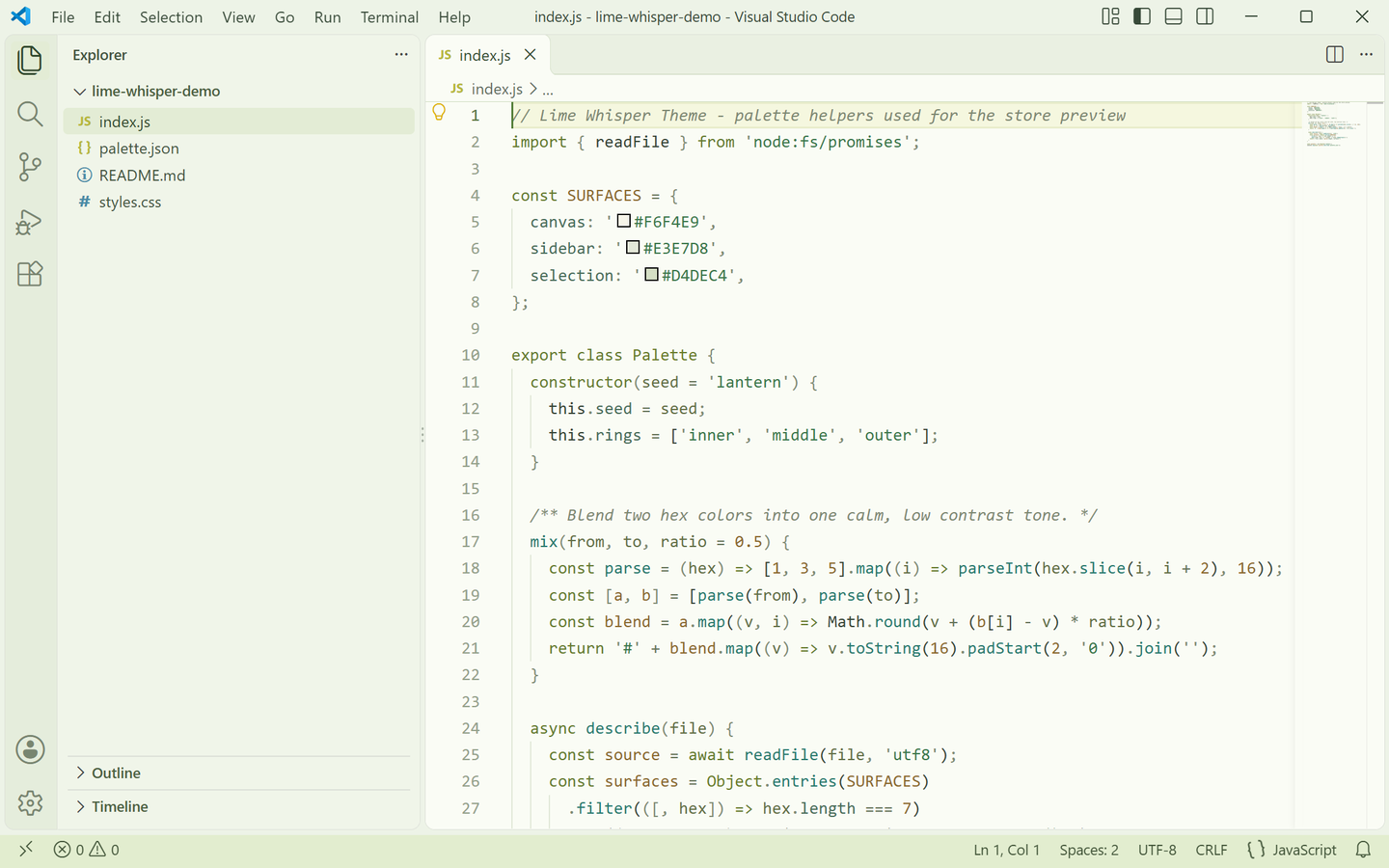 |
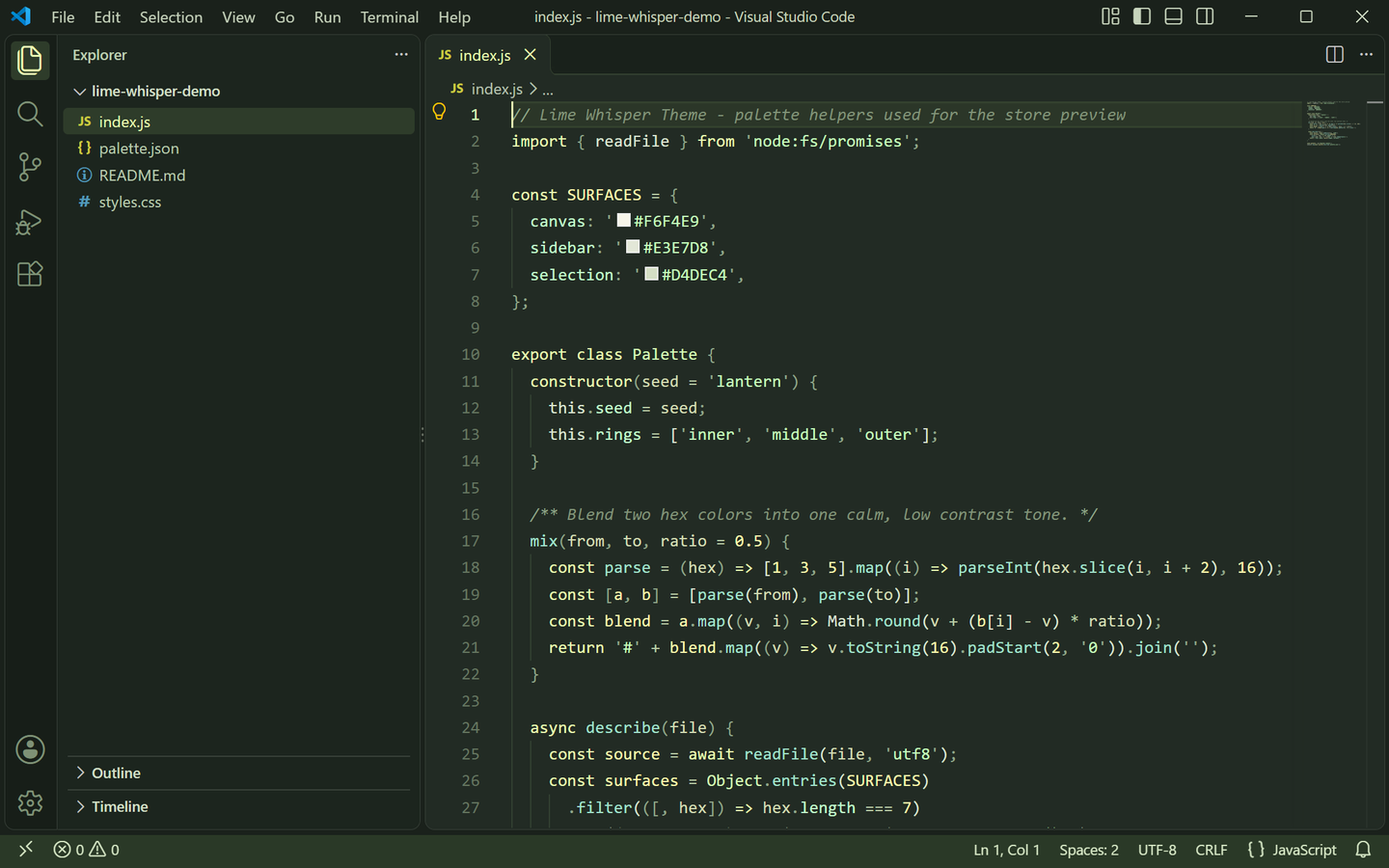 |
Both previews are captured from a real VS Code window running the theme — no mockups.
上方预览图取自真实运行该主题的 VS Code 窗口截图,非模拟图。
Palette / 色板
| Role |
Light |
Dark |
| Editor background |
#FAFCF5 creamy white |
#222B24 charcoal green |
| Foreground |
#354335 deep botanical |
#DCE6D3 pale sage |
| Muted text / placeholders |
#7B8872 |
#899B7F |
| Side bar |
#F0F5E9 with #42523D text |
#1C251E with #BCCDB1 text |
| Panel / terminal |
#F4F8ED |
#1E2720 |
| Title bar |
#EDF3E7 with #374938 text |
#1A211B with #C7D4BC text |
| Tab bar / inactive tab |
#EAF0E2 |
#19211B |
| Active tab indicator |
#8AAE58 |
#D7FEB9 |
| Activity bar |
#E5EDDC with #426B36 icons |
#171E18 with #D7FEB9 icons |
| Status bar |
#E2EDCF with #405337 text |
#2A3927 with #D7E8C6 text |
| Selection |
#D2EBC2 lime wash |
#456039 deep leaf |
| Current line |
#F5F7DF |
#2B3628 |
| Borders / indent guides |
#D8E2CD / #E0E7D6 |
#354231 / #344232 |
| Button |
#D7FEB9 with #30482C text (hover #C6EEA5) |
#D7FEB9 with #263820 text (hover #EAFDB4) |
| Badge |
#66864A with white text |
#D7FEB9 with #263820 text |
| Cursor |
#527D38 |
#EAFDB4 |
| Links |
#38796A |
#A3E3CD |
| Errors / warnings |
#B65353 / #947223 |
#E99B91 / #E5CD83 |
| Git added / modified / deleted |
#5E934B / #A18B3C / #B65353 |
#ACDB8D / #E4D58E / #E99B91 |
Lime #D7FEB9, leaf green #5E934B, botanical ink #354335 and mint #A3E3CD carry both variants, so a file still reads as "lime whisper" after switching.
青柠色 #D7FEB9、叶绿 #5E934B、植物墨绿 #354335 与薄荷 #A3E3CD 贯穿明暗两版,切换后整个文件依然是同一份「青柠低语」气质。
Syntax mapping / 语法映射
| Syntax |
Light |
Dark |
| Comments |
#7D8872 italic |
#819479 italic |
| Keywords / storage |
#657A2E olive |
#EAFDB4 lime |
| Strings |
#39764A forest |
#C6FEBE mint |
| Regexp |
#78628A |
#CFB8DB |
| Escapes |
#9A6D3D |
#E9C391 |
| Numbers / constants |
#8B682D amber |
#FDFAB0 lemon |
| Types / classes |
#697B28 |
#D7FEB9 |
| Functions / methods |
#28796E |
#A3E3CD |
| Properties |
#486C59 |
#C3FFCD |
| Variables |
#354335 |
#DCE6D3 |
| Parameters |
#626E45 |
#D4DDB5 |
| Operators |
#657359 |
#BBCDA7 |
| Punctuation |
#7E8B73 |
#91A68A |
| Tags / headings |
#527536 |
#D7FEB9 |
| Attributes |
#8B7438 |
#E5D99C |
| Invalid |
#B65353 |
#E99B91 |
Keywords stay olive-or-lime, strings stay green mint and numbers stay lemon in both variants, so the syntax keeps its identity whichever variant you use.
关键字在浅色下是橄榄绿、深色下是青柠色,字符串始终保持薄荷绿,数字始终保持柠檬黄,两套变体的语法读感一致。
Coverage / 覆盖范围
Every surface below is themed in both variants:
- Editor — background, foreground, selection and inactive selection, current-line highlight, word and selection highlights, find match and find highlight, bracket-match background and border, cursor, line numbers (plus the active line number), indent guides, whitespace, errors, warnings and info.
- Workbench chrome — activity bar, badge and active border, title bar (active and inactive), side bar with section headers and border, status bar (normal, no-folder and debugging states), editor group header and tabs (active, inactive, hover, modified border and active top border).
- Panels and overlays — panel, editor widgets, hover widget, suggest widget, dropdowns, inputs and placeholder text, notifications, quick input, and the focus border.
- Lists — active, inactive and hover selection backgrounds, plus the highlight and focus-highlight colors, and tree indent guides.
- Terminal — background, foreground and the full 16-color ANSI palette, matched to the theme.
- Details — workbench borders, scrollbar sliders, git decoration colors (added / modified / deleted) with their gutter markers, buttons, badges, and semantic token colors for function, method, class, type, string, number, keyword and comment.
Diff editor colors are themed as well; peek view, breadcrumbs, minimap, debug toolbar and the settings UI intentionally keep VS Code's defaults.
以下区域在两套变体中均已配色:编辑器本体(选区与失焦选区、当前行、词/选区高亮、查找匹配与高亮、括号匹配、光标、行号、缩进线、空白符、错误/警告/提示);活动栏与角标、标题栏、侧边栏(含分节标题)、状态栏(含无文件夹与调试态)、标签栏;面板与各类浮窗(悬停、建议、通知、快速输入)、下拉与输入框、列表选中/悬停/高亮、树缩进线;终端 ANSI 全色;全部边框与滚动条、Git 装饰色与 gutter 标记、按钮与角标,以及函数/方法/类/类型/字符串/数字/关键字/注释的语义高亮。差异编辑器同样已配色;peek 视图、面包屑、缩略图、调试工具栏与设置界面保留 VS Code 默认样式。
Features / 功能
Two coordinated variants — Lime Whisper Theme Light and Lime Whisper Theme Dark ship in one extension.
One citrus palette — creamy white and charcoal green surfaces with lime, leaf green and mint accents.
Readable syntax colors — olive keywords, mint strings, amber and lemon numbers, tuned for contrast on both backgrounds.
Semantic highlighting enabled, so language-aware tokens are colored beyond the classic TextMate scopes.
Terminal ANSI colors taken from the same palette, so the integrated terminal sits inside the theme.
明暗两套协调变体——同一扩展内含 Lime Whisper Theme Light 与 Lime Whisper Theme Dark。
一套柑橘色板——奶油白与炭绿底,配青柠、叶绿与薄荷点缀。
可读的语法配色——橄榄绿关键字、薄荷绿字符串、琥珀与柠檬黄数字,在明暗底色上均保持对比。
启用语义高亮,在传统 TextMate scope 之外为语言感知的 token 着色。
终端 ANSI 配色取自同一色板,集成终端与主题融为一体。
Installation / 安装
Requires VS Code 1.80 or newer.
- Search for Lime Whisper Theme in the Extensions view (
Ctrl+Shift+X / Cmd+Shift+X), or open the Marketplace page.
- Or install from a VSIX: download
lime-whisper-theme-1.0.0.vsix, open the Command Palette (Ctrl+Shift+P / Cmd+Shift+P) and run Extensions: Install from VSIX....
需要 VS Code 1.80 或更高版本。
- 在扩展面板(
Ctrl+Shift+X / Cmd+Shift+X)搜索 Lime Whisper Theme,或打开 Marketplace 页面。
- 也可以从 VSIX 安装:下载
lime-whisper-theme-1.0.0.vsix,打开命令面板(Ctrl+Shift+P / Cmd+Shift+P),运行 Extensions: Install from VSIX... 并选择该文件。
Or from the command line:
或使用命令行:
ext install lilinhuang.lime-whisper-theme
Activation / 启用
Open the Command Palette (Ctrl+Shift+P / Cmd+Shift+P), run Preferences: Color Theme, and choose Lime Whisper Theme Light or Lime Whisper Theme Dark.
To switch between the two variants quickly, use the keyboard shortcut Ctrl+K Ctrl+T at any time.
打开命令面板(Ctrl+Shift+P / Cmd+Shift+P),运行 Preferences: Color Theme,选择 Lime Whisper Theme Light 或 Lime Whisper Theme Dark。
随时可用快捷键 Ctrl+K Ctrl+T 在两套变体之间快速切换。
Development / 开发
Open this folder in VS Code and press F5 to launch an Extension Development Host with the theme loaded. Regenerate the real-window preview screenshots with:
在 VS Code 中打开本文件夹并按 F5,在扩展开发宿主中预览主题。重新生成真实窗口预览图:
python3 scripts/capture-real-screenshots.py
The script builds a throwaway VS Code profile, installs this theme into it, opens the sample project under scripts/demo-project and captures the window for both variants into store-assets/screenshots/en/.
脚本会临时创建一个独立的 VS Code 配置目录,把本主题装进去,打开 scripts/demo-project 示例工程,并把两套变体的窗口截图输出到 store-assets/screenshots/en/。
Check a build before publishing:
发布前自查:
python3 scripts/validate.py
It refreshes COLOR-SPEC.md from the theme JSON files, verifies that every color value is a valid hex code, checks that the screenshot edges match titleBar.activeBackground, and — when a .vsix is present — verifies the manifest publisher, version and theme entries.
脚本会依据主题 JSON 重新生成 COLOR-SPEC.md,校验所有颜色值均为合法十六进制,检查截图首行/首列与 titleBar.activeBackground 一致,并在存在 .vsix 时校验清单里的发布者、版本与主题条目。
The extension icon is drawn in code; re-draw the candidate set with:
扩展图标由代码绘制,重新生成候选图:
python3 scripts/generate-icon-candidates.py
Candidates land in store-assets/icon-candidates/ (never packaged); the shipped assets/icon.png is the lime-slice mark from that set, resized to 256 px.
候选图输出到 store-assets/icon-candidates/(不会进发布包);正式使用的 assets/icon.png 即取自其中的青柠切面方案,缩放为 256 px。
Package the extension with:
打包扩展:
vsce package
License / 许可
Released under the Non-Commercial License — licensed for personal, educational and non-commercial use. See LICENSE for details.
基于 Non-Commercial License(非商业使用许可) 发布,可用于个人、教育及非商业用途,详见 LICENSE。
Feedback / 反馈
Found an unthemed area or want a tweak? Open an issue at github.com/vaxicy/lime-whisper-theme/issues.
发现没有配色的区域或想调整某处颜色,欢迎在 GitHub Issues 反馈。
Publisher / 发布者
Published by lilinhuang on the Visual Studio Code Marketplace.
由 lilinhuang 发布于 Visual Studio Code Marketplace。

