Apricot Glow Theme




A warm apricot theme: creamy white with peach-apricot panels in the light variant, and deep cocoa with petal pink and honey in the dark one. Both variants are built from one palette, so switching changes the light level rather than the character of the workspace.
一套暖杏色调主题:浅色版是奶油白配蜜桃杏色面板,深色版是深可可棕配花瓣粉与暖蜂蜜色。明暗两套变体共享同一套色板,切换时改变的是明暗而非气质,工作区始终保持柔和的杏色温度。
Preview / 预览
| Light 浅色 |
Dark 深色 |
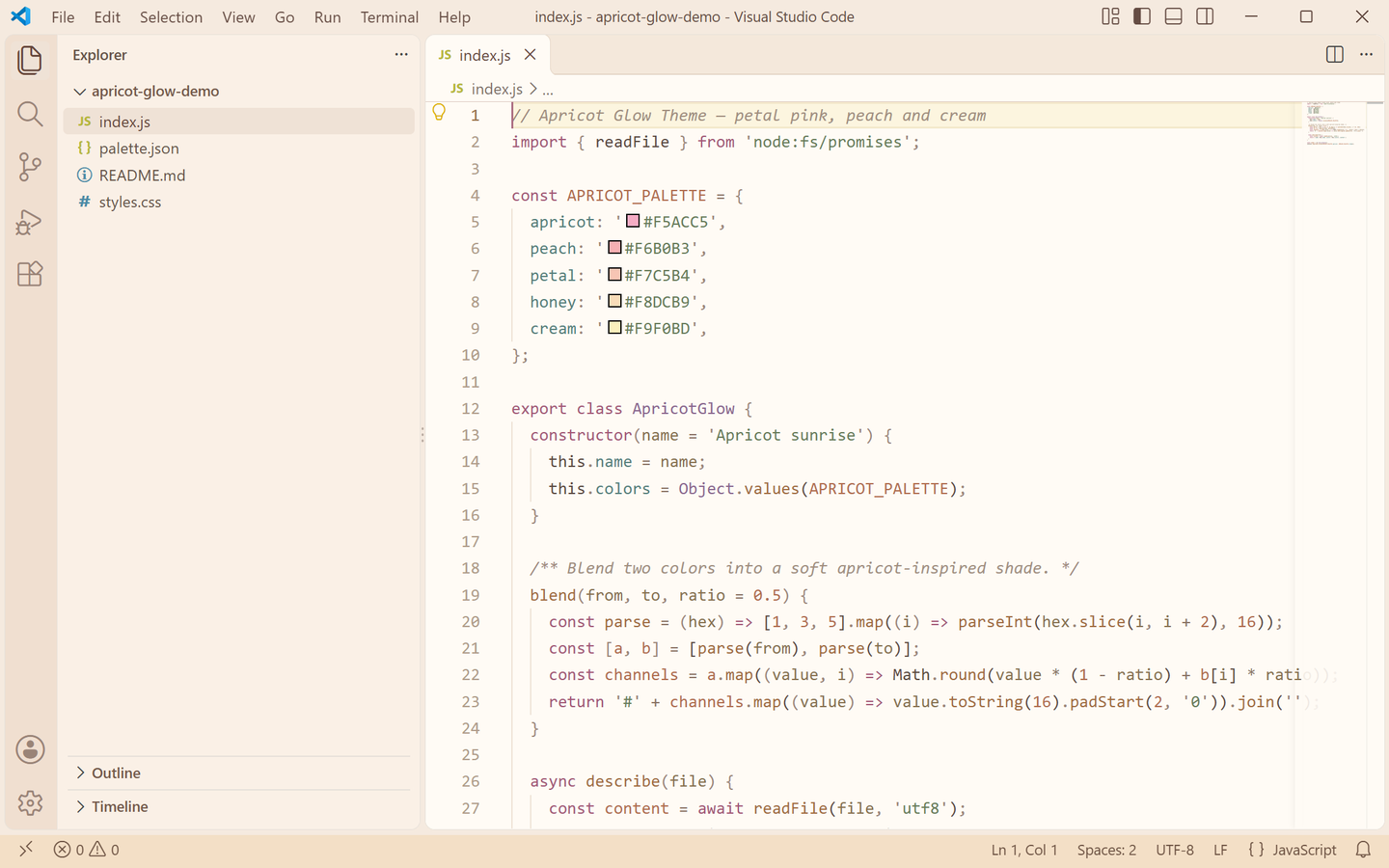 |
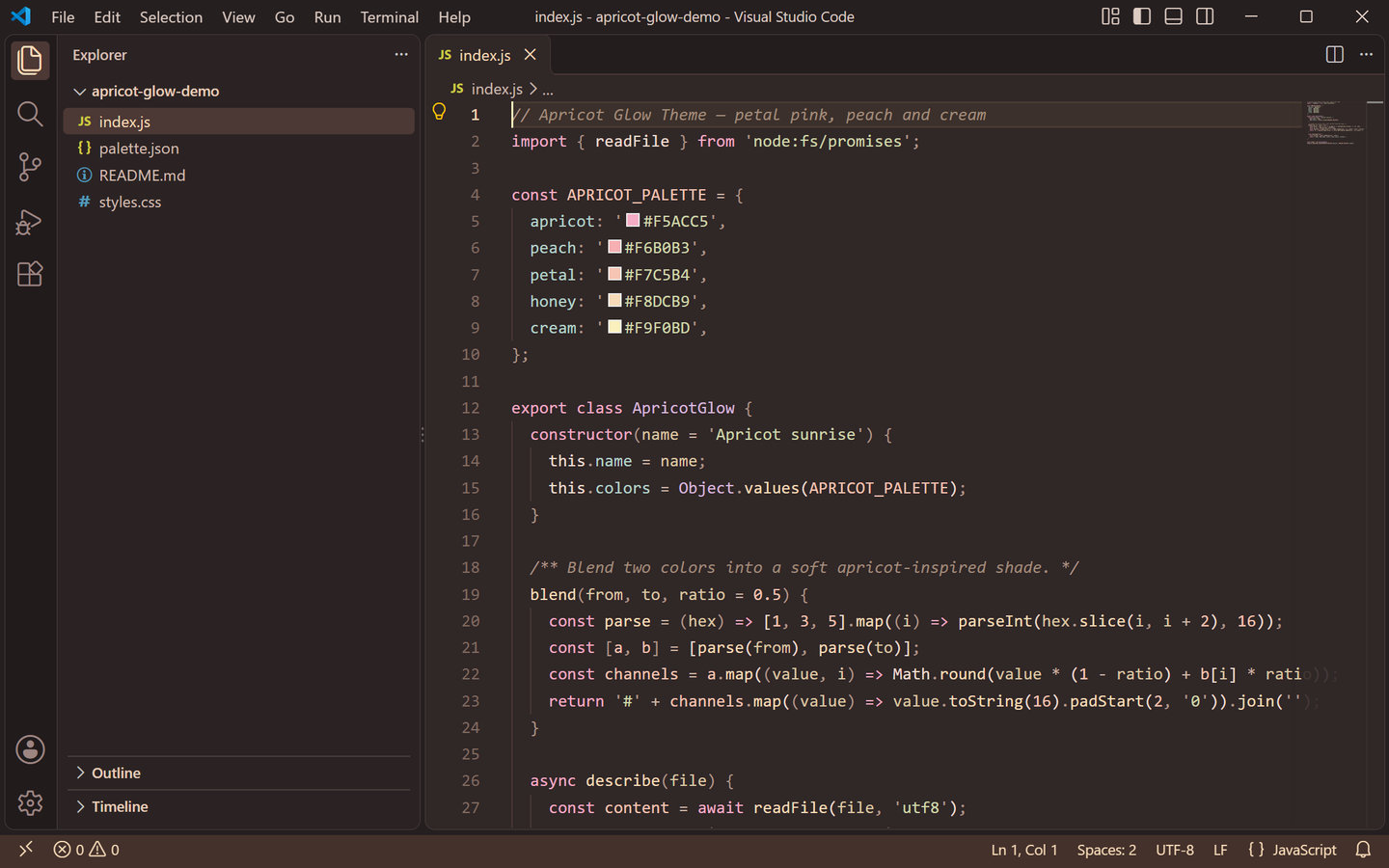 |
Both previews are captured from a real VS Code window running the theme — no mockups.
上方预览图取自真实运行该主题的 VS Code 窗口截图,非模拟图。
Palette / 色板
| Role |
Light |
Dark |
| Editor background |
#FFFBF5 creamy white |
#302727 deep cocoa |
| Foreground |
#59483F cocoa ink |
#F0DED2 almond cream |
| Muted text / placeholders |
#887A72 |
#9B897F |
| Side bar |
#FAF0E6 with #655247 text |
#2B2323 with #D4BFB3 text |
| Panel / terminal |
#FCF4E9 |
#2A2222 |
| Title bar |
#F5EADF with #654C43 text |
#251F20 with #DDCBC1 text |
| Tab bar / inactive tab |
#F4E8DB |
#241D1E |
| Active tab / indicator |
#77515C text, #C98AA0 top border |
#F8DCB9 text, #F5ACC5 top border |
| Activity bar |
#F0DFD0 with #9C6575 icons |
#211B1C with #F5ACC5 icons |
| Status bar |
#F3DFC6 with #6B5141 text |
#44312B with #F8DCB9 text |
| Selection |
#F4D5CB petal wash |
#65443F dusty rose |
| Current line |
#FCF5DF |
#3B302B |
| Borders |
#E5D6C7 |
#4A3934 |
| Indent guides |
#EDE1D3 |
#493A34 |
| Button |
#F7C5B4 with #654539 text (hover #EDB49F) |
#F7C5B4 with #4A3028 text (hover #F8DCB9) |
| Badge |
#AE7683 with white text |
#F5ACC5 with #4A3028 text |
| Cursor |
#AC6D81 |
#F9F0BD |
| Links |
#9D6647 |
#E9C5B2 |
| Errors / warnings |
#B65353 / #947223 |
#E99B91 / #E5CD83 |
| Git added / modified / deleted |
#93654B / #A1603C / #B65353 |
#DBA98D / #DFAE93 / #E99B91 |
Petal pink #F5ACC5, blush #F6B0B3, peach #F7C5B4, honey #F8DCB9 and cream #F9F0BD carry both variants, so a file still reads as "apricot glow" after switching.
花瓣粉 #F5ACC5、腮红 #F6B0B3、蜜桃 #F7C5B4、蜂蜜 #F8DCB9 与奶油黄 #F9F0BD 贯穿明暗两版,切换后整个文件依然是同一份「杏色微光」气质。
Syntax mapping / 语法映射
| Syntax |
Light |
Dark |
| Comments |
#A18E7E italic |
#A28C7C italic |
| Keywords / storage |
#A35776 rose |
#F5ACC5 petal pink |
| Strings |
#677B59 sage |
#D0D8AC soft sage |
| Regexp |
#A27E6A |
#EAC9B6 |
| Escapes |
#9B7954 |
#E8C79B |
| Numbers / constants |
#B06C4E terracotta |
#F7C5B4 peach |
| Types / classes |
#8A668F plum |
#D9B8DD lilac |
| Functions / methods |
#A16B3F apricot |
#F8DCB9 honey |
| Properties |
#547E7B teal |
#B5D4CB sea sage |
| Variables |
#59483F |
#F0DED2 |
| Parameters |
#87704F |
#DDC7A4 |
| Operators |
#897264 |
#CEB5A5 |
| Punctuation |
#9B8678 |
#AF9688 |
| Tags |
#A35776 |
#F6B0B3 |
| Attributes |
#A16B3F |
#F8DCB9 |
| Markdown headings / bold / italic |
#5D4639 |
#F5E8E1 |
| Invalid |
#B65353 |
#E99B91 |
Keywords stay rose-or-pink, strings stay sage and numbers stay terracotta-or-peach, so the syntax keeps its identity whichever variant you use.
关键字在浅色下是玫瑰色、深色下是花瓣粉,字符串始终保持鼠尾草绿,数字始终保持陶土/蜜桃色,两套变体的语法读感一致。
Coverage / 覆盖范围
Every surface below is themed in both variants:
- Editor — background, foreground, selection and inactive selection, word and selection highlights, current-line highlight, find match and find highlight, bracket-match background and border, cursor, line numbers (plus the active line number), indent guides, whitespace, rulers, errors, warnings and info.
- Workbench chrome — activity bar, badge and active border, title bar (active and inactive), side bar with section headers and border, status bar (normal, no-folder and debugging states), editor group header and tabs (active, inactive, hover, modified border and active top border).
- Panels and overlays — panel, editor widgets, hover widget, suggest widget, dropdowns, inputs and placeholder text, notifications, quick input, and the focus border.
- Lists — active, inactive and hover selection backgrounds, plus the highlight and focus-highlight colors, and tree indent guides.
- Terminal — background, foreground and the full 16-color ANSI palette, matched to the theme.
- Details — workbench borders, scrollbar sliders, text links, git decoration colors (added / modified / deleted) with their gutter markers, buttons (primary and secondary), badges, diff editor backgrounds, and semantic token colors for function, method, class, type, string, number, keyword and comment.
The remaining VS Code surfaces (peek view, breadcrumbs, minimap, debug toolbar, settings UI) intentionally keep the editor defaults.
以下区域在两套变体中均已配色:编辑器本体(选区与失焦选区、词/选区高亮、当前行、查找匹配与高亮、括号匹配、光标、行号、缩进线与参考线、空白符、错误/警告/提示);活动栏与角标、标题栏、侧边栏(含分节标题)、状态栏(含无文件夹与调试态)、标签栏;面板与各类浮窗(悬停、建议、通知、快速输入)、下拉与输入框、列表选中/悬停/高亮、树缩进线;终端 ANSI 全色;全部边框与滚动条、文本链接、Git 装饰色与 gutter 标记、主次按钮与角标、差异编辑器底色,以及函数/方法/类/类型/字符串/数字/关键字/注释的语义高亮。peek 视图、面包屑、缩略图、调试工具栏与设置界面保留 VS Code 默认样式。
Features / 功能
Two coordinated variants — Apricot Glow Theme Light and Apricot Glow Theme Dark ship in one extension.
One apricot palette — creamy white and deep cocoa surfaces with petal pink, peach and honey accents.
Readable syntax colors — rose keywords, sage strings, terracotta numbers and plum types, tuned for contrast on both backgrounds.
Semantic highlighting enabled, so language-aware tokens are colored beyond the classic TextMate scopes.
Terminal ANSI colors taken from the same palette, so the integrated terminal sits inside the theme.
明暗两套协调变体——同一扩展内含 Apricot Glow Theme Light 与 Apricot Glow Theme Dark。
一套杏色色板——奶油白与深可可底,配花瓣粉、蜜桃与蜂蜜点缀。
可读的语法配色——玫瑰色关键字、鼠尾草绿字符串、陶土色数字、李子紫类型,在明暗底色上均保持对比。
启用语义高亮,在传统 TextMate scope 之外为语言感知的 token 着色。
终端 ANSI 配色取自同一色板,集成终端与主题融为一体。
Installation / 安装
Requires VS Code 1.80 or newer.
- Search for Apricot Glow Theme in the Extensions view (
Ctrl+Shift+X / Cmd+Shift+X), or open the Marketplace page.
- Or install from a VSIX: download
apricot-glow-theme-1.0.0.vsix, open the Command Palette (Ctrl+Shift+P / Cmd+Shift+P) and run Extensions: Install from VSIX....
需要 VS Code 1.80 或更高版本。
- 在扩展面板(
Ctrl+Shift+X / Cmd+Shift+X)搜索 Apricot Glow Theme,或打开 Marketplace 页面。
- 也可以从 VSIX 安装:下载
apricot-glow-theme-1.0.0.vsix,打开命令面板(Ctrl+Shift+P / Cmd+Shift+P),运行 Extensions: Install from VSIX... 并选择该文件。
Or from the command line:
或使用命令行:
ext install lilinhuang.apricot-glow-theme
Activation / 启用
Open the Command Palette (Ctrl+Shift+P / Cmd+Shift+P), run Preferences: Color Theme, and choose Apricot Glow Theme Light or Apricot Glow Theme Dark.
To switch between the two variants quickly, use the keyboard shortcut Ctrl+K Ctrl+T at any time.
打开命令面板(Ctrl+Shift+P / Cmd+Shift+P),运行 Preferences: Color Theme,选择 Apricot Glow Theme Light 或 Apricot Glow Theme Dark。
随时可用快捷键 Ctrl+K Ctrl+T 在两套变体之间快速切换。
Development / 开发
Open this folder in VS Code and press F5 to launch an Extension Development Host with the theme loaded. Regenerate the real-window preview screenshots with:
在 VS Code 中打开本文件夹并按 F5,在扩展开发宿主中预览主题。重新生成真实窗口预览图:
python3 scripts/capture-real-screenshots.py
The script builds a throwaway VS Code profile, installs this theme into it, opens the sample project under scripts/demo-project and captures the window for both variants into store-assets/screenshots/en/.
脚本会临时创建一个独立的 VS Code 配置目录,把本主题装进去,打开 scripts/demo-project 示例工程,并把两套变体的窗口截图输出到 store-assets/screenshots/en/。
Check a build before publishing:
发布前自查:
python3 scripts/validate.py
It refreshes COLOR-SPEC.md from the theme JSON files, verifies that every color value is a valid hex code, checks that the screenshot edges match titleBar.activeBackground, and — when a .vsix is present — verifies the manifest publisher, version and theme entries.
脚本会依据主题 JSON 重新生成 COLOR-SPEC.md,校验所有颜色值均为合法十六进制,检查截图首行/首列与 titleBar.activeBackground 一致,并在存在 .vsix 时校验清单里的发布者、版本与主题条目。
Package the extension with:
打包扩展:
vsce package
License / 许可
Released under the Non-Commercial License — licensed for personal, educational and non-commercial use. See LICENSE for details.
基于 Non-Commercial License(非商业使用许可) 发布,可用于个人、教育及非商业用途,详见 LICENSE。
Feedback / 反馈
Found an unthemed area or want a tweak? Open an issue at github.com/vaxicy/apricot-glow-theme/issues.
发现没有配色的区域或想调整某处颜色,欢迎在 GitHub Issues 反馈。
Publisher / 发布者
Published by lilinhuang on the Visual Studio Code Marketplace.
由 lilinhuang 发布于 Visual Studio Code Marketplace。

