MD Human Review



A powerful Markdown review & annotation extension for VSCode — comment, mark deletions, insert content, Rich Mode editor (ProseMirror), Custom Editor integration, and generate AI fix instructions with one click.
🖊️ 像导师批改论文一样批阅 Markdown —— 评论、删除、插入、富文本编辑器(ProseMirror),一键生成 AI 修改指令。
Key Features: Markdown review, annotation, comment, Rich Mode editing (ProseMirror), Custom Editor Provider, YAML frontmatter editing, link bubble menu, table grid selector, AI-powered fix, code highlighting, Mermaid diagrams, KaTeX math, PlantUML, Graphviz, content search, dark/light theme, table of contents, image lightbox, multi-window, auto-save.
📦 Available on VS Code Marketplace & Open VSX Registry — Works with VS Code and all VS Code–based AI-powered editors, including Cursor, Windsurf, CodeBuddy IDE, Trae, and more.
中文
📸 Screenshots
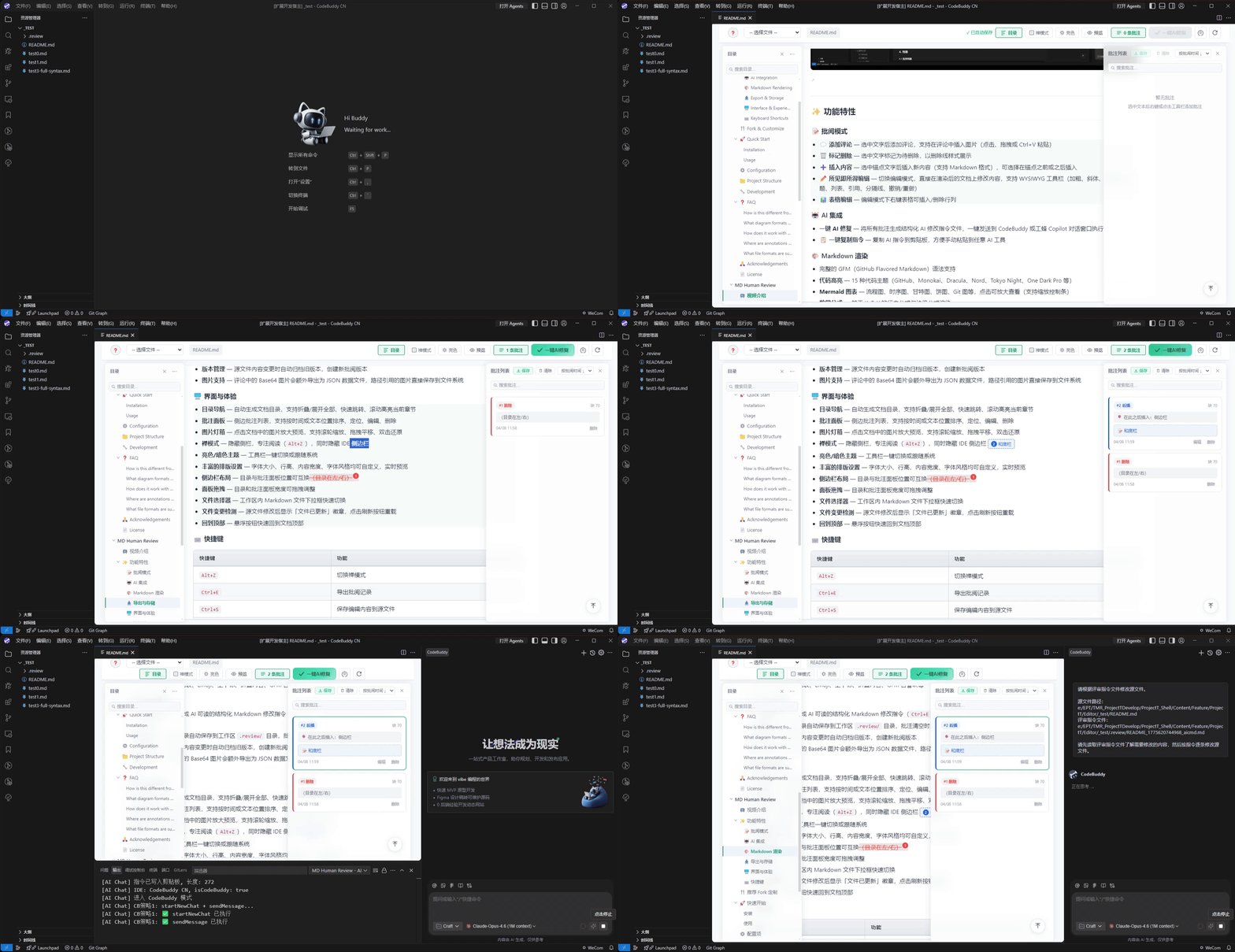
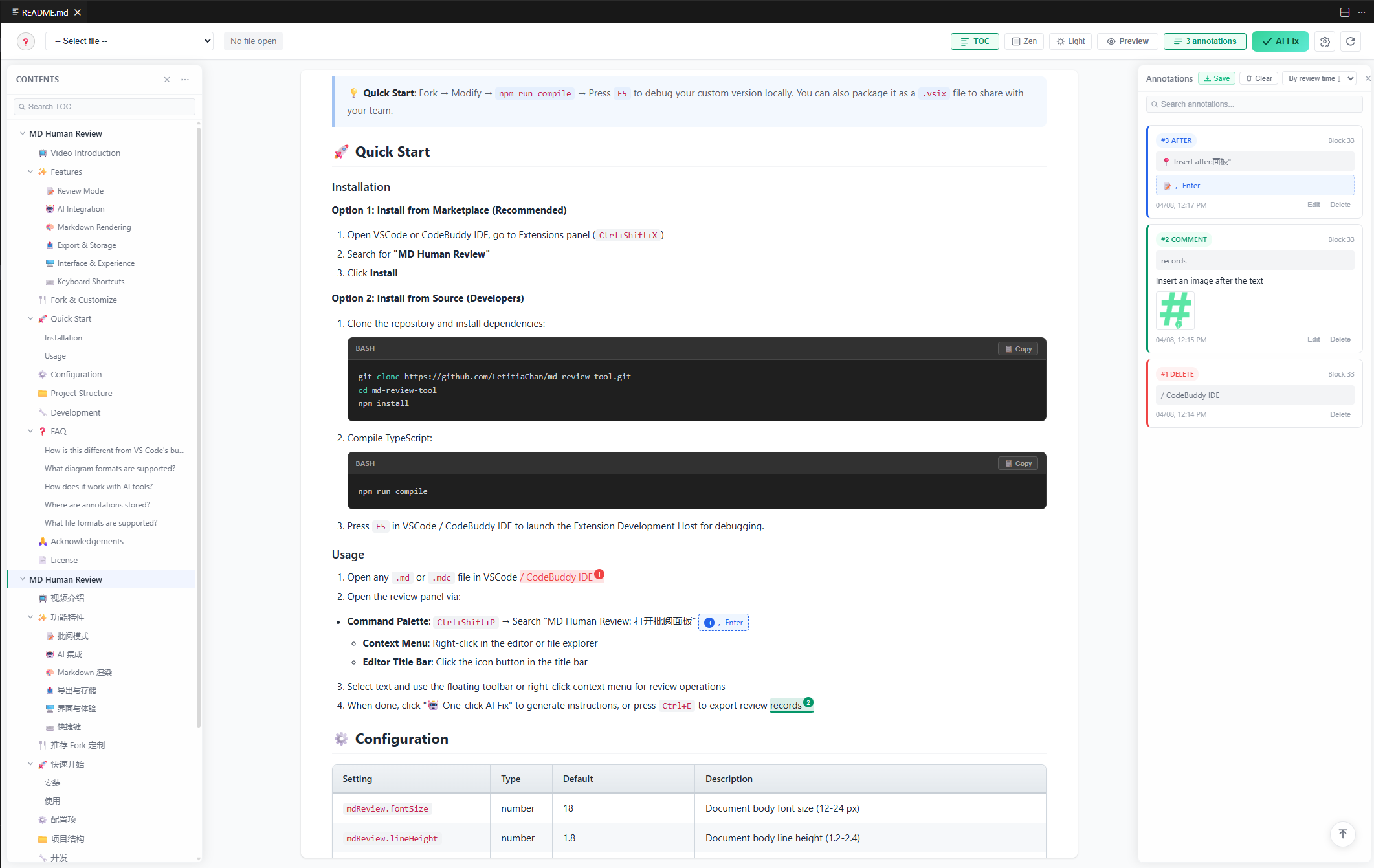
✨ Features
📝 Review Mode
- 💬 Add Comments — Select text to add comments with image attachments (click, drag, or Ctrl+V paste)
- 🗑️ Mark Deletion — Select text to mark as pending deletion, displayed with strikethrough
- ➕ Insert Content — Select anchor text to insert new content (supports Markdown), with before/after insertion options
- ✏️ Rich Mode Editor — Click the pencil (✎) toolbar button to enter a ProseMirror-based structured editor with a formatting toolbar (Bold, Italic, Headings, Lists, etc.), syntax highlighting, diagram preview, smart paste, annotation decorations, and local image insertion (pick from file system or paste)
- 📝 Editable YAML Front Matter — Double-click frontmatter block to edit with textarea, Ctrl+Enter to confirm
- 🔗 Link Bubble Menu — Click any hyperlink to show a floating menu (preview URL, edit, open in browser, copy, unlink)
- 🔗 Re-edit Hyperlinks — Double-click existing links to edit URL, title, and display text
- 📊 Table Grid Selector — Table button opens a 6×6 grid popover for custom row/column selection when inserting tables
- 📊 Table Editing — Right-click tables in edit mode to insert/delete rows and columns, delete entire table, or use hover "+" overlay to add rows/columns
- 🖼️ Pick Local Images — Image popover adds "📁 Pick Local Image" button with native file picker for inserting images from your file system
- 📈 Diagram Source Editing — In edit mode, Mermaid / PlantUML / Graphviz diagrams are converted to editable source code areas for direct modification
- ⚠️ Alert Block Type Selector — 5 alert types (Note/Tip/Important/Warning/Caution) via popover
- 💻 Code Block Language Selector — 12 common languages + custom input via popover
- 🔄 Smart Edit Preservation — Editing blockquotes, GitHub alert blocks, code blocks, math formulas, and diagrams preserves their original Markdown structure
- 🔄 Refresh Button (Three Strategies) — Visual Refresh (re-render without disk read), Disk Reload (re-read file, creates new review version if changed), Editor Reload (reset webview state). Disk Reload and Editor Reload prompt confirmation when unsaved edits exist
🔍 Search
- Content Search — Press
Ctrl+F to open the search bar; all matching text is highlighted with navigation between matches
- TOC Search — Filter the table of contents by keyword while preserving hierarchy structure
- Annotation Search — Filter annotations by content, selected text, inserted content, and more
🤖 AI Integration
- One-click AI Fix — Generate structured AI modification instruction files from all annotations; automatically open a new chat and send instructions on CodeBuddy, Cursor, or Windsurf; fall back to clipboard + manual paste on other editors
- 📋 Copy Instructions — Copy AI instructions to clipboard for manual use with any AI tool
🎨 Markdown Rendering
- Full GFM (GitHub Flavored Markdown) syntax support
- Code Highlighting — 15 code themes (GitHub, Monokai, Dracula, Nord, Tokyo Night, One Dark Pro, etc.)
- Mermaid Diagrams — Flowcharts, sequence diagrams, Gantt charts, pie charts, Git graphs, etc. Click to enlarge with zoom controls
- Math Formulas — KaTeX-based inline and block formula rendering
- PlantUML Diagrams — UML class diagrams, sequence diagrams, activity diagrams, etc. Rendered via online PlantUML server; click to enlarge
- Graphviz Diagrams — DOT language graph rendering via local Viz.js engine; click to enlarge with zoom controls
- Task Lists — Directly toggle checkboxes in edit mode
- Tables, footnotes, definition lists, Emoji, superscript/subscript, collapsible content, GFM alert blocks, and more
📤 Export & Storage
- Export Review Records — Generate AI-readable structured Markdown modification instructions (
Ctrl+E), ordered back-to-front for safe execution
- Auto-save — Annotation records automatically saved to workspace
.review/ directory; historical versions are preserved for rollback (records are only deleted when users explicitly click "Clear All Annotations")
- Version Management — Automatically archives old versions when source file content changes, creating new review versions
- Image Support — Base64 images in comments are additionally exported as JSON data files; path-referenced images are stored in the file system
🌐 Internationalization
- Multi-language Support — Chinese and English UI, switchable in settings
- Auto Language Detection — Defaults to VS Code's display language
🖥️ Interface & Experience
- Custom Editor Provider — Registered as
CustomTextEditorProvider for .md/.mdc/.markdown files; supports native dirty-state indicator (●) and Ctrl+S save. Use "Open With..." to choose between MD Human Review and the default text editor
- Table of Contents — Auto-generated document TOC with collapse/expand all, quick navigation, and scroll-synced active section highlighting
- Annotations Panel — Side annotation list with sorting by time or text position, navigation, editing, and deletion
- Image Lightbox — Click images to enlarge with scroll-wheel zoom, drag-to-pan, double-click to reset (
+/- zoom, 0 fit window, R reset)
- Zen Mode — Hide sidebars for focused reading (
Alt+Z), also hides IDE sidebars
- Light/Dark Theme — One-click toolbar toggle or follow system preference
- Rich Typography Settings — Customizable font size, line height, content width, and font style with live preview
- Sidebar Layout — Swappable positions for TOC and annotations panels (TOC left/right)
- Panel Resize — Drag to adjust TOC and annotations panel widths
- Multi-Window Support — Open multiple Markdown files simultaneously, each in its own independent review panel with separate annotations and state; smart titles auto-append parent directory for same-name files (e.g.
README.md — docs)
- File Change Detection — Shows "File Updated" badge when source file changes; click refresh to reload
- Context Menus — Right-click context menus with
mdReview.openWithReview command for quick access
- Back to Top — Floating button to quickly scroll to the top of the document
⌨️ Keyboard Shortcuts
| Shortcut |
Action |
Ctrl+F |
Open content search |
Alt+Z |
Toggle Zen Mode |
Ctrl+E |
Export review records |
Ctrl+S |
Save edits to source file |
Ctrl+Shift+E |
Toggle preview/edit mode |
Ctrl+Enter |
Open review panel from Explorer |
ESC |
Close modals / Exit Zen Mode / Close search bar |
🍴 Fork & Customize
This extension's review styles, interaction logic, and AI instruction templates are fully open-source, making it ideal for forking and creating your own personalized version. You can:
- 🎨 Adjust highlight colors and comment card styles to match your preferences
- 🤖 Modify AI instruction templates to fit your preferred AI tools or prompt styles
- 📐 Customize typography settings
- 🔌 Extend new review operation types to suit your specific workflow
💡 Quick Start: Fork → Modify → npm run compile → Press F5 to debug your custom version locally. You can also package it as a .vsix file to share with your team.
🚀 Quick Start
Installation
Option 1: Install from Marketplace (Recommended)
- Open your editor (VS Code, Cursor, Windsurf, CodeBuddy IDE, Trae, or any VS Code–based AI editor) and go to the Extensions panel (
Ctrl+Shift+X)
- Search for "MD Human Review"
- Click Install
💡 Compatible Editors — This extension is published on both the VS Code Marketplace and the Open VSX Registry, so it works out of the box with all VS Code–based AI editors:
Option 2: Install from Source (Developers)
Clone the repository and install dependencies:
git clone https://github.com/LetitiaChan/md-review-tool.git
cd md-review-tool
npm install
Compile TypeScript:
npm run compile
Note: npm run compile now runs tsc -p ./ && npm run build:webview. The webview bundler (esbuild) produces webview/dist/app.bundle.js (7 webview modules) and webview/dist/pm.bundle.js (ProseMirror Rich Mode editor engine). For webview-only hot reload during development, use npm run build:webview:watch in a separate terminal.
Press F5 in your editor (VS Code / Cursor / Windsurf / CodeBuddy IDE / Trae, etc.) to launch the Extension Development Host for debugging.
Usage
- Open any
.md, .mdc, or .markdown file in your editor (VS Code / Cursor / Windsurf / CodeBuddy IDE / Trae, etc.)
- Open the review panel via:
- "Open With...": Right-click a Markdown file → "Open With..." → select "MD Human Review" (Custom Editor)
- Context Menu: Right-click in the editor or file explorer → "Open with MD Human Review"
- Editor Title Bar: Click the icon button in the title bar
- Select text and use the floating toolbar or right-click context menu for review operations
- When done, click "🤖 One-click AI Fix" to generate instructions, or press
Ctrl+E to export review records
⚙️ Configuration
| Setting |
Type |
Default |
Description |
mdReview.fontSize |
number |
16 |
Document body font size (12-24 px) |
mdReview.lineHeight |
number |
1.6 |
Document body line height (1.2-2.4) |
mdReview.contentMaxWidth |
number |
1100 |
Max width of document content area (600-1800 px) |
mdReview.fontFamily |
string |
"" |
Document body font (empty for system default, e.g. 'Microsoft YaHei') |
mdReview.codeFontFamily |
string |
"" |
Code block font (empty for default monospace, e.g. 'Fira Code') |
mdReview.theme |
string |
"light" |
UI theme (light / dark / auto) |
mdReview.showToc |
boolean |
true |
Show TOC navigation by default |
mdReview.showAnnotations |
boolean |
true |
Show annotations panel by default |
mdReview.sidebarLayout |
string |
"toc-left" |
Sidebar layout (toc-left / toc-right) |
mdReview.panelMode |
string |
"embedded" |
Side panel display mode (floating / embedded) |
mdReview.documentAlign |
string |
"center" |
Document alignment (left / center / right) |
mdReview.autoSave |
boolean |
true |
Enable auto-save for annotations |
mdReview.autoSaveDelay |
number |
1500 |
Auto-save delay (500-10000 ms) |
mdReview.enableMermaid |
boolean |
true |
Enable Mermaid diagram rendering |
mdReview.enableMath |
boolean |
true |
Enable math formula rendering |
mdReview.enablePlantUML |
boolean |
true |
Enable PlantUML diagram rendering (requires network) |
mdReview.enableGraphviz |
boolean |
true |
Enable Graphviz diagram rendering |
mdReview.showLineNumbers |
boolean |
false |
Show line numbers in code blocks |
mdReview.language |
string |
"zh-CN" |
UI language (zh-CN / en) |
mdReview.codeTheme |
string |
"default-dark-modern" |
Code highlighting theme (15 options) |
📁 Project Structure
md-review-tool/
├── src/                        # Extension backend (TypeScript)
│   ├── extension.ts            # Extension entry, command registration
│   ├── customEditorProvider.ts # Custom Editor Provider (native dirty-state, Ctrl+S)
│   ├── webviewHelper.ts        # Shared webview rendering (panel + editor modes)
│   ├── fileService.ts          # File read/write, review record management
│   ├── aiChatAdapters.ts       # AI Chat multi-IDE adapters (Cursor/Windsurf/CodeBuddy)
│   └── stateService.ts         # State management
├── webview/                    # Frontend UI
│   ├── index.html              # Main page (toolbar, modals, settings panel)
│   ├── css/
│   │   ├── style.css           # Main styles (layout, toolbar, panels)
│   │   ├── markdown.css        # Markdown rendering styles, image lightbox
│   │   ├── annotations.css     # Annotation highlight & card styles
│   │   ├── settings.css        # Settings panel styles
│   │   ├── highlight-themes.css # Code highlighting theme collection
│   │   ├── katex.min.css       # KaTeX math formula styles
│   │   └── fonts/              # KaTeX font files
│   ├── js/
│   │   ├── app.js              # Main app logic (init, events, mode switching)
│   │   ├── renderer.js         # Markdown rendering engine (parsing, Mermaid, KaTeX)
│   │   ├── annotations.js      # Annotation system (highlights, cards, interactions)
│   │   ├── edit-mode.js        # Edit mode state machine (INACTIVE/RICH)
│   │   ├── pm-schema.js        # ProseMirror schema (20 nodes + 11 marks)
│   │   ├── pm-markdown-bridge.js # Markdown↔PM bidirectional bridge
│   │   ├── export.js           # Export module (review doc generation, auto-save)
│   │   ├── store.js            # Data store (annotation data, version management)
│   │   ├── settings.js         # Settings management (read, apply, sync)
│   │   └── i18n.js             # Internationalization (zh-CN / en)
│   └── src/entries/            # esbuild entry points
│       ├── main.entry.js       # → dist/app.bundle.js
│       └── pm.entry.js         # → dist/pm.bundle.js (ProseMirror engine)
├── syntaxes/                   # .mdc syntax highlighting definitions
├── package.json                # Extension manifest
└── tsconfig.json               # TypeScript configuration
🔧 Development
# Install dependencies
npm install

# Compile
npm run compile

# Watch mode (recommended for development)
npm run watch
💡 Tips
Use as a Markdown Reader
Hide the review panels (TOC + Annotations) by toggling them off in the toolbar, and MD Human Review becomes a beautiful Markdown reader with full rendering support — code highlighting, Mermaid diagrams, math formulas, PlantUML, Graphviz, and more. Combined with rich style settings (font size, line height, content width, font style, 15 code themes, light/dark theme), you can create a personalized reading experience that far surpasses the built-in Markdown preview.
❓ FAQ
How is this different from VS Code's built-in Markdown preview?
The built-in preview is read-only. MD Human Review lets you annotate rendered documents with comments, deletion marks, and content insertions — then generate AI fix instructions with one click. You can also hide the review panels and use it as a powerful Markdown reader with rich customization options.
Mermaid (flowcharts, sequence diagrams, Gantt charts, etc.), KaTeX (math formulas), PlantUML (online server rendering), and Graphviz (DOT language, local Viz.js rendering).
After reviewing, click "🤖 One-click AI Fix" to generate structured modification instructions. These can be sent directly to ChatGPT, CodeBuddy, Copilot, or any AI tool. You can also press Ctrl+E to export and manually paste.
Where are annotations stored?
Annotations are auto-saved to the .review/ directory in your workspace as JSON files. Old versions are automatically archived when source file content changes.
.md, .markdown, and .mdc (Markdown Cursor) files.
🙏 Acknowledgements
This project is inspired by MDReviewTool, a web-based Markdown review tool. Building on that foundation, I rebuilt it as a VSCode extension with significant enhancements: comprehensive Markdown rendering support (Mermaid diagrams, math formulas, code highlighting, etc.), one-click AI-powered editing, extensive customization settings, and an improved overall user experience. Thanks to the original author for the creative idea and open-source contribution!
📄 License
MIT
If anything feels off during use, feel free to fork the repo and build your own customized version (recommended), or open an issue to let us know — we'll keep improving in future releases 🚀
MD Human Review
🖊️ 像导师批改论文一样批阅 Markdown —— 评论、删除、插入、富文本编辑器(ProseMirror),一键生成 AI 修改指令。
📦 已发布至 VS Code 插件市场 与 Open VSX(Cursor 市场) —— 支持 VS Code 及所有基于 VS Code 开源版本构建的 AI 编辑器,包括 Cursor、Windsurf、CodeBuddy IDE、Trae 等。
English
📸 截图预览
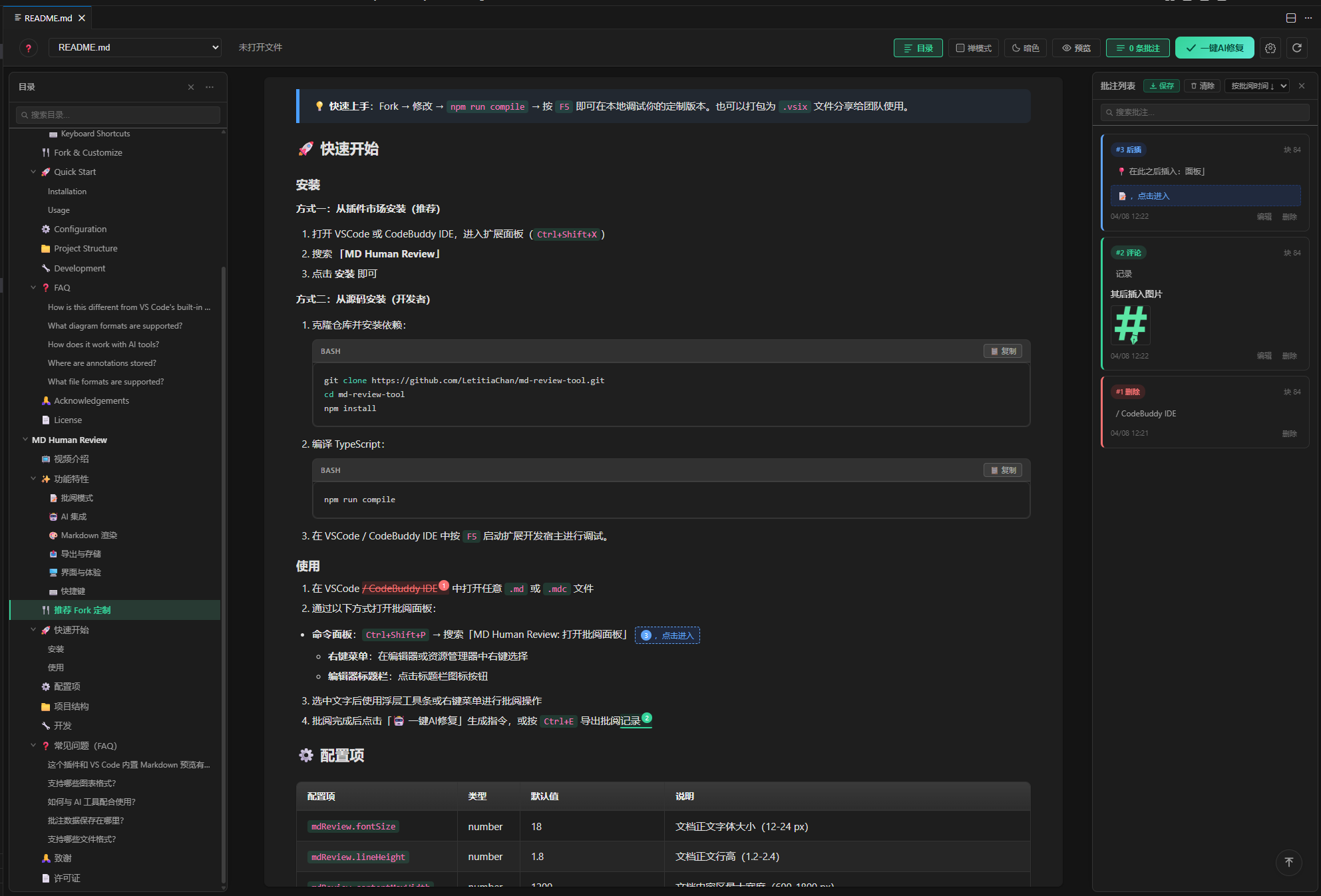
✨ 功能特性
📝 批阅模式
- 💬 添加评论 — 选中文字后添加评论,支持在评论中插入图片(点击、拖拽或 Ctrl+V 粘贴)
- 🗑️ 标记删除 — 选中文字标记为待删除,以删除线样式展示
- ➕ 插入内容 — 选中锚点文字后插入新内容(支持 Markdown 格式),可选择在锚点之前或之后插入
- ✏️ 富文本编辑器 — 点击工具栏的铅笔(✎)按钮进入基于 ProseMirror 的结构化编辑器,支持语法高亮、图表预览、智能粘贴、批注装饰、本地图片选取插入
- 📝 可编辑 YAML Front Matter — 双击 frontmatter 区块即可以 textarea 形式编辑,Ctrl+Enter 确认
- 🔗 链接气泡菜单 — 点击任意超链接显示浮动菜单(预览 URL、编辑、在浏览器中打开、复制、取消链接)
- 🔗 重新编辑超链接 — 双击已有链接可编辑 URL、标题和显示文本
- 📊 表格网格选择器 — 表格按钮打开 6×6 网格弹窗,可自定义行列数插入表格
- 📊 表格编辑 — 编辑模式下右键表格可插入/删除行列、删除整个表格,或使用悬停“+”覆盖层添加行/列
- 🖼️ 选取本地图片 — 图片弹窗新增“📁 选取本地图片”按钮,支持原生文件选择器插入图片
- 📈 图表源码编辑 — 编辑模式下 Mermaid / PlantUML / Graphviz 图表自动转换为可编辑的源码区域,支持直接修改图表代码
- ⚠️ 告警块类型选择器 — 5 种告警类型(Note/Tip/Important/Warning/Caution)通过弹窗选择
- 💻 代码块语言选择器 — 12 种常用语言 + 自定义输入通过弹窗选择
- 🔄 智能编辑保护 — 编辑引用块、GitHub 告警块、代码块、数学公式和图表时,保留原始 Markdown 结构不被破坏
- 🔄 刷新按钮(三策略) — 工具栏刷新按钮提供三种刷新策略:视觉刷新(纯重渲染,不读磁盘)、磁盘重载(重读文件并按需创建新审阅版本)、编辑器重载(重置 webview 状态)。磁盘重载和编辑器重载在文档有未保存修改时会弹出确认对话框
🔍 搜索功能
- 正文搜索 — 按
Ctrl+F 打开搜索栏,文档中所有匹配文本高亮标记,支持上下导航切换
- 目录搜索 — 在目录面板中按关键词过滤,保持层级结构
- 批注搜索 — 在批注面板中按内容、选中文本、插入内容等多字段搜索过滤
🤖 AI 集成
- 一键 AI 修复 — 将所有批注生成结构化 AI 修改指令文件;在 CodeBuddy、Cursor、Windsurf 上自动打开新对话并送出指令;其他编辑器降级为剪贴板 + 手动粘贴。发送给 AI 的指令末尾会自动附加提醒,引导 AI 在完成所有修改后提示用户回到 MD Human Review 面板点击右上角刷新按钮,以加载最新内容并创建新的批阅版本
- 📋 一键复制指令 — 复制 AI 指令到剪贴板,方便手动粘贴到任意 AI 工具
🎨 Markdown 渲染
- 完整的 GFM(GitHub Flavored Markdown)语法支持
- 代码高亮 — 15 种代码主题(GitHub、Monokai、Dracula、Nord、Tokyo Night、One Dark Pro 等)
- Mermaid 图表 — 流程图、时序图、甘特图、饼图、Git 图等,点击可放大查看(支持缩放控制条)
- 数学公式 — 基于 KaTeX 的行内公式与块级公式渲染
- PlantUML 图表 — UML 类图、时序图、活动图等,通过在线 PlantUML 服务器渲染,点击可放大查看
- Graphviz 图表 — DOT 语言图形渲染,基于本地 Viz.js 引擎,点击可放大查看(支持缩放控制条)
- 任务列表 — 编辑模式下可直接勾选切换
- 表格、脚注、定义列表、Emoji、上下标、折叠内容、GFM 告警块等
📤 导出与存储
- 导出批阅记录 — 生成 AI 可读的结构化 Markdown 修改指令(
Ctrl+E),指令按从后往前排列确保执行安全
- 自动保存 — 批注记录自动保存到工作区
.review/ 目录,历史版本永久保留供回溯(仅当用户显式点击"清除全部批注"时才会删除记录文件)。文件内容变化(如刷新、一键 AI 修复后)会自动创建新的批阅版本号(v+1),旧批注作为历史版本归档,新版本以空白批注状态开始。如果插件关闭期间源文件被外部工具修改,下次重新打开会自动检测并升级到新版本,避免将旧批注的锚点应用到已变化的文件上。
- 版本管理 — 源文件内容变更时自动归档旧版本,创建新批阅版本
- 图片支持 — 评论中的 Base64 图片会额外导出为 JSON 数据文件,路径引用的图片直接保存到文件系统
🌐 国际化
- 多语言支持 — 中文和英文界面,可在设置中切换
- 自动语言检测 — 默认跟随 VS Code 显示语言
🖥️ 界面与体验
- Custom Editor Provider — 注册为
CustomTextEditorProvider,支持 .md/.mdc/.markdown 文件的原生脏状态指示器(●)和 Ctrl+S 保存。使用“打开方式...”可在 MD Human Review 和默认文本编辑器之间切换
- 目录导航 — 自动生成文档目录,支持折叠/展开全部、快速跳转、滚动高亮当前章节
- 批注面板 — 侧边批注列表,支持按时间或文本位置排序、定位、编辑、删除
- 图片灯箱 — 点击文档中的图片放大预览,支持滚轮缩放、拖拽平移、双击还原(
+/- 缩放,0 适应窗口,R 重置)
- 禅模式 — 隐藏侧栏,专注阅读(
Alt+Z),同时隐藏 IDE 侧边栏
- 亮色/暗色主题 — 工具栏一键切换或跟随系统
- 丰富的排版设置 — 字体大小、行高、内容宽度、字体风格均可自定义,实时预览
- 侧边栏布局 — 目录与批注面板位置可互换(目录在左/右)
- 面板拖拽 — 目录和批注面板宽度可拖拽调整
- 多窗口支持 — 可同时打开多个 Markdown 文件,每个文件拥有独立的批阅面板、批注和状态;同名文件自动在标题中追加父目录区分(如
README.md — docs)
- 文件变更检测 — 源文件修改后显示「文件已更新」徽章,点击刷新按钮重载
- 右键菜单 — 通过
mdReview.openWithReview 命令快速打开批阅面板
- 回到顶部 — 悬浮按钮快速回到文档顶部
⌨️ 快捷键
| 快捷键 |
功能 |
Ctrl+F |
打开正文搜索 |
Alt+Z |
切换禅模式 |
Ctrl+E |
导出批阅记录 |
Ctrl+S |
保存编辑内容到源文件 |
Ctrl+Shift+E |
切换预览/编辑模式 |
Ctrl+Enter |
在资源管理器中打开批阅面板 |
ESC |
关闭弹窗 / 退出禅模式 / 关闭搜索栏 |
🍴 推荐 Fork 定制
本插件的批阅样式、交互逻辑和 AI 指令模板都以源码形式开放,非常适合 Fork 后打造个人专属版本。你可以:
- 🎨 调整批阅高亮颜色、评论卡片样式,匹配你的审美偏好
- 🤖 修改 AI 指令模板,适配你常用的 AI 工具或提示词风格
- 📐 定制排版参数
- 🔌 扩展新的批阅操作类型,满足特定工作流需求
💡 快速上手:Fork → 修改 → npm run compile → 按 F5 即可在本地调试你的定制版本。也可以打包为 .vsix 文件分享给团队使用。
🚀 快速开始
安装
方式一:从插件市场安装(推荐)
- 打开你的编辑器(VS Code、Cursor、Windsurf、CodeBuddy IDE、Trae 或任意基于 VS Code 的 AI 编辑器),进入扩展面板(
Ctrl+Shift+X)
- 搜索 「MD Human Review」
- 点击 安装 即可
💡 兼容的编辑器 —— 本插件同时发布于 VS Code 插件市场 与 Open VSX Registry,开箱即用地支持所有基于 VS Code 开源版本构建的 AI 编辑器:
方式二:从源码安装(开发者)
克隆仓库并安装依赖:
git clone https://github.com/LetitiaChan/md-review-tool.git
cd md-review-tool
npm install
编译 TypeScript:
npm run compile
注:npm run compile 已升级为 tsc -p ./ && npm run build:webview。Webview 打包器(esbuild)会产出 webview/dist/app.bundle.js(整合 7 个业务模块)和 webview/dist/pm.bundle.js(ProseMirror 富文本编辑器引擎)。开发调试 webview 时可单独开另一个终端跑 npm run build:webview:watch 实现热重建。
在你的编辑器(VS Code / Cursor / Windsurf / CodeBuddy IDE / Trae 等)中按 F5 启动扩展开发宿主进行调试。
使用
- 在你的编辑器(VS Code、Cursor、Windsurf、CodeBuddy IDE、Trae 或任意基于 VS Code 的 AI 编辑器)中打开任意
.md、.mdc 或 .markdown 文件
- 通过以下方式打开批阅面板:
- “打开方式...”:右键 Markdown 文件 → “打开方式...” → 选择“MD Human Review”(Custom Editor)
- 右键菜单:在编辑器或资源管理器中右键选择“使用 MD Human Review 打开”
- 编辑器标题栏:点击标题栏图标按钮
- 选中文字后使用浮层工具条或右键菜单进行批阅操作
- 批阅完成后点击「🤖 一键AI修复」生成指令,或按
Ctrl+E 导出批阅记录
⚙️ 配置项
| 配置项 |
类型 |
默认值 |
说明 |
mdReview.fontSize |
number |
16 |
文档正文字体大小(12-24 px) |
mdReview.lineHeight |
number |
1.6 |
文档正文行高(1.2-2.4) |
mdReview.contentMaxWidth |
number |
1100 |
文档内容区最大宽度(600-1800 px) |
mdReview.fontFamily |
string |
"" |
文档正文字体(留空使用系统默认,可输入字体名如 'Microsoft YaHei') |
mdReview.codeFontFamily |
string |
"" |
代码块字体(留空使用默认等宽字体,可输入字体名如 'Fira Code') |
mdReview.theme |
string |
"light" |
界面主题(light / dark / auto) |
mdReview.showToc |
boolean |
true |
默认显示目录导航栏 |
mdReview.showAnnotations |
boolean |
true |
默认显示批注列表面板 |
mdReview.sidebarLayout |
string |
"toc-left" |
侧边栏布局(toc-left / toc-right) |
mdReview.panelMode |
string |
"embedded" |
侧边面板显示模式(floating 悬浮 / embedded 嵌入) |
mdReview.documentAlign |
string |
"center" |
主文档对齐方式(left / center / right) |
mdReview.autoSave |
boolean |
true |
启用批注自动保存 |
mdReview.autoSaveDelay |
number |
1500 |
自动保存延迟(500-10000 毫秒) |
mdReview.enableMermaid |
boolean |
true |
启用 Mermaid 图表渲染 |
mdReview.enableMath |
boolean |
true |
启用数学公式渲染 |
mdReview.enablePlantUML |
boolean |
true |
启用 PlantUML 图表渲染(需要网络连接) |
mdReview.enableGraphviz |
boolean |
true |
启用 Graphviz 图表渲染 |
mdReview.showLineNumbers |
boolean |
false |
代码块中显示行号 |
mdReview.language |
string |
"zh-CN" |
界面语言(zh-CN / en) |
mdReview.codeTheme |
string |
"default-dark-modern" |
代码高亮主题(15 种可选) |
📁 项目结构
md-review-tool/
├── src/                        # 扩展后端(TypeScript)
│   ├── extension.ts            # 扩展入口,注册命令
│   ├── customEditorProvider.ts # Custom Editor Provider(原生脏状态、Ctrl+S)
│   ├── webviewHelper.ts        # 共享 webview 渲染(面板 + 编辑器模式)
│   ├── fileService.ts          # 文件读写、批阅记录管理
│   ├── aiChatAdapters.ts       # AI Chat 多 IDE 适配器(Cursor/Windsurf/CodeBuddy)
│   └── stateService.ts         # 状态管理
├── webview/                    # 前端界面
│   ├── index.html              # 主页面(工具栏、弹窗、设置面板)
│   ├── css/
│   │   ├── style.css           # 主样式(布局、工具栏、面板)
│   │   ├── markdown.css        # Markdown 渲染样式、图片灯箱
│   │   ├── annotations.css     # 批注高亮与卡片样式
│   │   ├── settings.css        # 设置面板样式
│   │   ├── highlight-themes.css # 代码高亮主题集合
│   │   ├── katex.min.css       # KaTeX 数学公式样式
│   │   └── fonts/              # KaTeX 字体文件
│   ├── js/
│   │   ├── app.js              # 主应用逻辑(初始化、事件、模式切换)
│   │   ├── renderer.js         # Markdown 渲染引擎(解析、Mermaid、KaTeX)
│   │   ├── annotations.js      # 批注系统(高亮、卡片、交互)
│   │   ├── edit-mode.js        # 编辑模式状态机(INACTIVE/RICH)
│   │   ├── pm-schema.js        # ProseMirror schema(20 nodes + 11 marks)
│   │   ├── pm-markdown-bridge.js # Markdown↔PM 双向桥
│   │   ├── export.js           # 导出模块(批阅记录生成、自动保存)
│   │   ├── store.js            # 数据存储(批注数据、版本管理)
│   │   ├── settings.js         # 设置管理(读取、应用、同步)
│   │   └── i18n.js             # 国际化(zh-CN / en)
│   └── src/entries/            # esbuild 入口点
│       ├── main.entry.js       # → dist/app.bundle.js
│       └── pm.entry.js         # → dist/pm.bundle.js(ProseMirror 引擎)
├── syntaxes/                   # .mdc 语法高亮定义
├── package.json                # 扩展清单
└── tsconfig.json               # TypeScript 配置
🔧 开发
# 安装依赖
npm install

# 编译
npm run compile

# 监听模式(开发时推荐)
npm run watch
💡 小贴士
当作 Markdown 阅读器使用
关闭右侧批阅面板(目录 + 批注),MD Human Review 就变成了一个精美的 Markdown 阅读器,拥有完整的渲染能力——代码高亮、Mermaid 图表、数学公式、PlantUML、Graphviz 等一应俱全。配合丰富的样式设置(字体大小、行高、内容宽度、字体风格、15 种代码主题、亮色/暗色主题),打造远超内置预览的个性化阅读体验。
❓ 常见问题(FAQ)
这个插件和 VS Code 内置 Markdown 预览有什么区别?
内置预览只能查看,MD Human Review 支持在渲染后的文档上直接批注(评论、删除标记、插入内容),并能一键生成 AI 修改指令。同时,关闭批阅面板后还可以当作功能强大的 Markdown 阅读器使用,拥有丰富的自定义样式选项。
支持哪些图表格式?
Mermaid(流程图、时序图、甘特图等)、KaTeX(数学公式)、PlantUML(通过在线服务器渲染)、Graphviz(DOT 语言,本地 Viz.js 渲染)。
如何与 AI 工具配合使用?
批阅完成后点击「🤖 一键 AI 修复」,会生成结构化的修改指令文件,可直接发送到 ChatGPT、CodeBuddy、Copilot 等 AI 工具执行。也可以按 Ctrl+E 导出批阅记录后手动粘贴。
批注数据保存在哪里?
批注自动保存到工作区的 .review/ 目录下,以 JSON 格式存储。源文件内容变更时会自动归档旧版本。
支持哪些文件格式?
.md、.markdown、.mdc(Markdown Cursor)文件。
🙏 致谢
本项目的批阅工具原型来源于 MDReviewTool(一个基于 Web 的 Markdown 批阅工具)。在此基础上,我将其重构为 VSCode 插件版本,并进行了大量增强:完善了 Markdown 渲染支持(Mermaid 图表、数学公式、代码高亮等)、新增一键 AI 修改功能、丰富了自定义设置项,以及优化了整体交互体验。感谢原作者的创意与开源贡献!
📄 许可证
MIT
使用过程中如有任何不顺手的地方,欢迎 Fork 仓库 打造你的个人定制版(推荐),也可以 提交 Issue 反馈给作者,我们会在后续版本中持续优化 🚀

