Merge Magic ✨
Predicts merge conflicts before they happen — and dissolves the ones that slip through. Removes the mechanical merge work so review focuses on the decisions that actually need a human. Works in your editor, your terminal, and your CI. Verification, rollback, multi-backend (Copilot, Claude, GPT, Gemini, Ollama). Never auto-commits. Free, bring your own AI.
Try it in 30 seconds
VS Code — Install Merge Magic → (one click), then run a demo:
| Demo |
What you'll see |
| ▶ Resolve demo → |
a temp repo with 15 conflicts dissolving live in the dashboard |
| 🛰️ Conflict Radar demo → |
a multi-branch repo — the status-bar badge lights up, then run Conflict Radar + Preview Future Merge to see collisions, the merged code before it happens, and the pick buttons |
💡 These links work from a browser on the marketplace page. Inside VS Code's extension viewer the webview blocks vscode:// links — open the command palette (Cmd+Shift+P) and run "Merge Magic: Run Live Demo" or "Run Conflict Radar Demo" instead.
Terminal (no VS Code required):
npm install -g merge-magic

mergemagic demo            # 15 conflicts, resolved live — won't touch your code
mergemagic demo radar      # multi-branch repo → see Conflict Radar predict collisions
mergemagic radar --preview            # (in any repo) the merged code, before it happens
mergemagic radar --preview --pick both --apply --yes   # resolve the ambiguous ones + adopt

mergemagic setup           # wire it in as a global git merge driver
echo "* merge=mergemagic" >> /path/to/your/repo/.gitattributes
# now `git merge` / `git rebase` auto-resolve textual conflicts in any terminal
mergemagic radar --install-hooks   # auto-run the radar on checkout + push
Every demo runs in a throwaway temp directory — your real code is never touched.
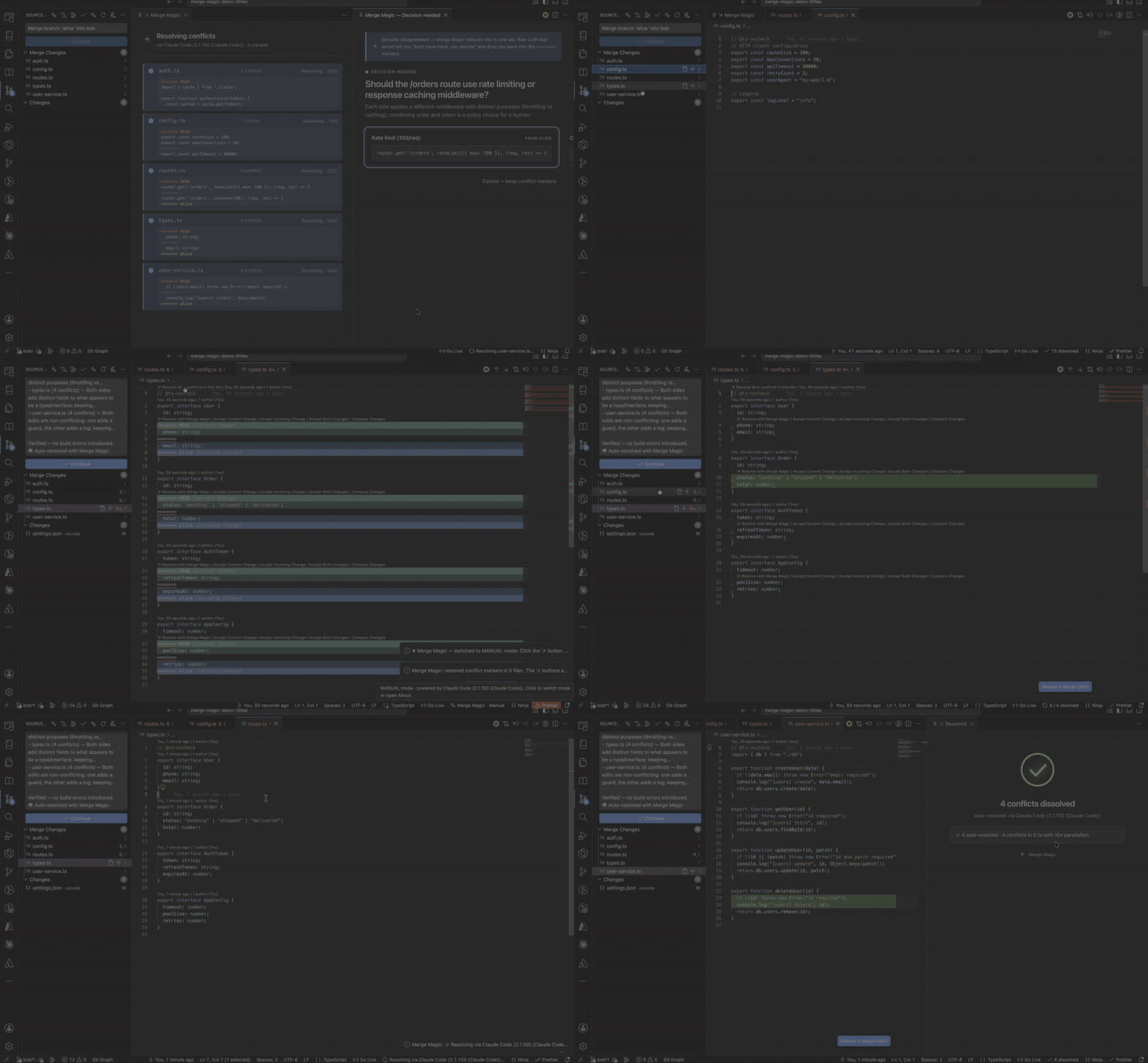
Stop reading <<<<<<< markers. Let the obvious conflicts dissolve, decide only the ones that truly need you.
📦 npm: merge-magic · 🧩 VS Code Marketplace: Merge Magic — AI Conflict Resolver
Predict, then resolve — everywhere
Most tools only react to a conflict once it exists. Merge Magic catches it a step earlier, then resolves what's left across every surface you work in:
  ┌─ 1. PREDICT ───────────────────────────────────────────┐
  │  Conflict Radar — spot the clash, and the function,     │
  │  before you've even opened a PR                          │
  └────────────────────────────┬───────────────────────────┘
                                │   the ones that slip through ↓
  ┌─ 2. RESOLVE ───────────────────────────────────────────┐
  │  mechanical pre-pass → LLM → verify → never auto-commit  │
  └────────────────────────────┬───────────────────────────┘
              ┌─────────────────┼─────────────────┐
           EDITOR           TERMINAL               CI
        VS Code ext       git merge driver     GitHub Action
        CodeLens + auto   any terminal,        resolve PRs for
        dashboard         rebase replay        the whole team
| Surface |
How |
Best for |
| 🖥️ Editor |
VS Code extension — CodeLens buttons + auto-mode dashboard |
Interactive, visible feedback |
| 🧑💻 Terminal |
git merge driver via the merge-magic CLI |
Terminal-first devs, no editor needed |
| 🤖 CI |
GitHub Action — resolves PR conflicts server-side |
Whole teams, before a human reviews |
Built in my free time. No telemetry. No ads. No paywalls. If Merge Magic saved you from a painful merge today, a coffee genuinely fuels the next feature.

✨ Features
🛰️ Conflict Radar — see the conflict before it exists
Every other tool is reactive — git, GitHub, and Copilot all wait until a conflict already exists, then react. Conflict Radar is proactive. Run "Merge Magic: Conflict Radar" (or mergemagic radar) and it scans every other branch in the repo, finds where someone else is editing the same function you are, and warns you before you've even opened a PR:
✨ Merge Magic — Conflict Radar
Branch: feature/mine · scanned 6 other branches

⚠ 1 branch on a collision course:

  feature/alice  (Alice, 4 minutes ago)
    auth.ts → authenticate(token)   [you: line 14 · them: line 14]

These branches edit the same regions you do — you'll conflict on merge.
Coordinate now, or let Merge Magic resolve it when they land.
It's also ambient — it surfaces on its own, no command to remember:
- In VS Code — a live status-bar indicator (
$(radio-tower) 2 collisions) updates itself as you and your team work. When you start editing a function someone else is also editing, it lights up before anyone commits. Click it to open the full radar. (Status-bar only, never interrupts; toggle with mergeMagic.conflictRadar.ambient.)
- In the terminal — run
mergemagic radar --install-hooks once, and the radar auto-fires on git checkout and git push. You're warned about a collision before you push, with no command to remember.
Pure git plumbing — deterministic, instant, no LLM, no server, no telemetry. It diffs each branch against its merge-base with yours and detects overlapping edits to the common ancestor (the exact thing that produces a conflict), reading your working tree (so uncommitted edits count) and pulling the function name straight from git's hunk headers. The best merge conflict is the one that never happens — Radar is how you catch it a day early.
🔮 Future Merge — resolve the conflict before it exists
Radar tells you that you'll collide. Future Merge shows you the resolved code. Run mergemagic radar --preview (or "Merge Magic: Preview Future Merge" in VS Code) and it 3-way merges your working tree with the colliding branch's HEAD and resolves it with the normal engine — so you see the merged function while both branches are still in flight:
src/auth.ts (with feature/sso) — resolved
    rateLimiter.check(token);                    ← your in-progress edit
    if (sso.enabled) return sso.verify(token);   ← their pushed branch
    return verify(token);
You're resolving a conflict that hasn't happened yet. Git, GitHub, and Copilot can't merge two branches that aren't merged — they wait. (A forecast, not a guarantee: it's a snapshot of their last push, and previews the textual merge.)
Each previewed file is expandable (where: your code vs theirs, side by side; how: the proposed resolution) with one-tap actions:
- 🔍 Review as diff — opens a read-only side-by-side of your current file vs the merged result, so you check before you touch anything
- ✓ Adopt into my file — writes the merge into your working copy (undo with
git restore / Cmd+Z), then you commit & push as usual. Partial merges are clearly labeled ("leaves N markers to finish") so you're never surprised by stray <<<<<<<
- Copy — the full merged file to your clipboard
In the terminal, the same: mergemagic radar --preview shows the merges; --pick both (or ours/theirs) resolves the ambiguous regions too — the CLI parallel to the editor's pick buttons; --apply --yes adopts them into your working tree. Full commit / push / undo / abort controls live in the auto-mode dashboard when a real git merge runs.
🛰️ Cross-PR Radar in CI — which open PRs will fight each other
GitHub tells you a PR conflicts with its base. It will not tell you two open PRs are on a collision course with each other. mergemagic pr-radar (in a CI step) lists every open PR, finds the ones editing the same regions as the current PR, and posts it right on the PR: "#7 and #12 both edit authenticate() — they'll conflict whichever merges second." Nobody else does cross-PR conflict prediction.
Auto-resolve — one click, or zero-touch
A ✨ Resolve with Merge Magic button appears above every <<<<<<< marker — click it and the conflict disappears, both edits intelligently combined. Multiple conflicts in a file? One button cleans up all of them. Or turn on auto-mode and conflicts resolve in parallel the instant git merge produces them — no clicking at all.
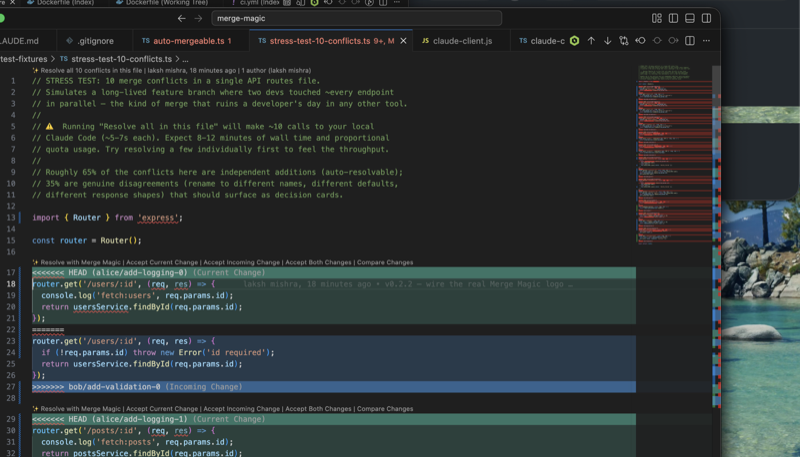
Genuine disagreements get a one-tap decision — not a marker dump
When two branches actually disagreed — both renamed the same symbol differently, or one deleted code the other modified — Merge Magic doesn't pretend to know what you meant. It opens a side panel with a clean one-tap question (showing which commit and author each side came from), instead of leaving you a 40-line wall of markers.
Instant + free on the obvious ones (mechanical pre-pass)
The conflicts that can't be wrong — identical edits, one-sided edits, additions to different parts of a region — resolve instantly with no model call, marked 100% · mechanical in the dashboard. The LLM is only spent on the genuinely ambiguous ones. Especially handy during rebase replay, where the same conflict recurs. (A provably-safe textual merge — not a tree-sitter/AST merge.)
Preview a merge before you run it
Run "Merge Magic: Preview Merge with Branch…", pick a branch, and see what would conflict before you merge — per-file counts and snippets, computed in a throwaway git worktree so your working tree is never touched. Merging stops being a leap of faith.
See exactly what happened — confidence, dashboard, stats
Every auto-resolve carries a self-rated confidence (92% · combined logging and validation) so you can tell the obvious merges from the ones worth a second look. A live dashboard shows each file resolving in parallel. "Show Stats" keeps a running tally — conflicts dissolved, time saved — and "Review Last Auto-Merge" lets you re-check what auto-mode did before you commit.

Works on the whole conflict surface
Not just git merge. Rebasing onto a moved main, git stash pop, cherry-picks, reverts — all produce conflicts, and Merge Magic handles them all. For rebases it shows a Continue rebase button and, if the next commit also conflicts, resolves that too: automatic rebase replay.
Runs in CI — resolve PR conflicts for the whole team
Drop the official GitHub Action into a workflow and conflicts get resolved (or reported) server-side, before a human reviews the PR:
# .github/workflows/merge-magic.yml
on:
  pull_request:
    types: [opened, synchronize, reopened]
jobs:
  resolve-conflicts:
    runs-on: ubuntu-latest
    steps:
      - uses: actions/checkout@v4
        with: { ref: ${{ github.head_ref }}, fetch-depth: 0 }
      - uses: Lakshmishraofficial/merge-magic-action@v1
        with:
          base: ${{ github.base_ref }}
          commit: 'false'   # dry-run: report only. 'true' to write resolutions back.
          anthropic-api-key: ${{ secrets.ANTHROPIC_API_KEY }}
Prefer to skip the Action wrapper? The same flow runs inline — npm install -g merge-magic + mergemagic ci --base ${{ github.base_ref }} works identically.
On every PR it merges the base branch, resolves the additive conflicts, and posts a report to the Actions run summary — exactly like this:
╭──────────────────────────────────────────────────────────────────────╮
│  ✓ Merge Magic / resolve-conflicts                  passed in 24s      │
├──────────────────────────────────────────────────────────────────────┤
│  ✨ Merge Magic — conflict resolution                                  │
│                                                                        │
│  Merging `main`: 2 conflicts across 2 files.                           │
│                                                                        │
│  ┌─────────────────────────────┬───────────┬──────────┬─────────────┐ │
│  │ File                        │ Conflicts │ Resolved │ Needs human │ │
│  ├─────────────────────────────┼───────────┼──────────┼─────────────┤ │
│  │ src/components/list.tsx     │     1     │ 1        │      0      │ │
│  │ src/hooks/use-clients.ts    │     1     │ 1 (mech) │      0      │ │
│  └─────────────────────────────┴───────────┴──────────┴─────────────┘ │
│                                                                        │
│  2/2 resolved (1 mechanical, no LLM). All conflicts resolved ✅        │
╰──────────────────────────────────────────────────────────────────────╯
Genuine disagreements are never auto-picked — they're flagged "needs human" and the check fails, so a real decision always reaches a person. (When that happens, the table row shows 1 in Needs human and the run status is ⚠ failed — needs human.)
Merge Magic uses whatever LLM you've already authenticated — GitHub Copilot (via VS Code's vscode.lm API), Claude Code CLI, Ollama (local), or your own Anthropic / OpenAI / Gemini API key. No API key shipped, no subscription, no servers. Your code never leaves your machine except via the LLM you've already authorized. If your company already approves your LLM, Merge Magic is approved by extension.
Safe by default (the part that earns the install)
- Auto-mode never auto-commits. Resolutions land on disk; you always run
git commit yourself after reviewing the diff. Merge Magic cannot silently push bad code.
- Every auto-resolve is verified against build diagnostics. Baseline error set (ours-side) captured first; merged result re-checked after. Anything that introduces NEW errors reverts that file to markers with the actual error surfaced. Pre-existing errors don't cause false reverts.
- Decision card, not silent pick. Genuine disagreements become a one-tap question, never a guess.
- Undo + abort.
Undo Auto-Resolve restores markers on a file; Cmd+Z reverts the whole batch; the Abort merge button runs git merge --abort behind a confirmation.
- LLM error → markers preserved. Unparseable response or timeout leaves the file untouched. Never silently corrupted.
- Dry-run mode (
mergeMagic.dryRun: true) previews every change without writing.
🚀 How it works
1. You hit a merge conflict (git merge, rebase, cherry-pick, stash pop…)
2. Auto-mode (off by default): the watcher fires the moment conflicts appear,
   resolves all files in parallel. Manual: click ✨ above any marker.
3. Mechanical pre-pass resolves the provably-safe conflicts instantly (no LLM).
4. The rest dispatch to your backend (Copilot, Claude CLI, Ollama, or API key):
   • clean merge   → applied + verified against baseline diagnostics
   • real decision → one-tap pick in a side panel
5. Anything that introduces new build errors reverts to markers.
6. You review the diff and commit. Merge Magic never commits for you.
Typical resolution time: 5–8 seconds per conflict via the LLM, instant for the mechanical ones.
📦 Requirements
- One LLM backend — pick any:
- GitHub Copilot (zero setup if you already have it — uses VS Code's
vscode.lm API).
- Claude Code CLI on your
PATH (claude --version to verify).
- Ollama running locally (free, offline, fully private).
- API key for Anthropic / OpenAI / Gemini via environment variable.
- VS Code 1.91+ (also works in Cursor, Windsurf, and other VS Code forks).
🔧 Install
From Marketplace: search "Merge Magic" in the Extensions panel and click Install.
CLI: npm install -g merge-magic
Sideload from .vsix: code --install-extension merge-magic-0.20.0.vsix
⚙️ Configuration
Search "Merge Magic" in VS Code Settings.
| Setting |
Default |
What it does |
mergeMagic.backend |
"auto" |
Which LLM backend to use. auto picks the first available (vscode-lm → claude-cli → ollama → api-key). |
mergeMagic.autoResolveOnConflict |
false |
Auto mode. When true, resolves conflicts the moment git merge produces them — no clicking. Always verified, never auto-commits. |
mergeMagic.decisionMode |
"ask" |
Genuine disagreements: ask shows a one-tap decision card (safe default); auto-pick (vibe-coder mode) applies the top option and relies on verification + diff review. |
mergeMagic.preferredVendor |
"" |
When using vscode-lm, prefer a specific vendor (e.g. copilot, anthropic). |
mergeMagic.claudePath |
"claude" |
Path to the Claude Code CLI if it's not on PATH. |
mergeMagic.ollamaModel |
"llama3.1:latest" |
Ollama model to use. Must be pulled locally. |
mergeMagic.ollamaBaseUrl |
"http://localhost:11434" |
Ollama server base URL. |
mergeMagic.timeoutSeconds |
60 |
Max seconds to wait per conflict before giving up. |
mergeMagic.dryRun |
false |
Log what would change without modifying files. Safety mode. |
🆚 How it compares
|
Built-in git markers |
Copilot smart-actions |
Merge Magic |
| Resolves "fake" conflicts (independent edits) |
❌ |
⚠️ (per-conflict invocation) |
✅ |
| Surfaces real conflicts as a clean question |
❌ |
⚠️ |
✅ |
Auto-resolves the moment git merge runs |
❌ |
❌ |
✅ (auto-mode) |
| Works outside an editor (terminal, CI) |
✅ |
❌ |
✅ (CLI + Action) |
| Verifies the resolution against build errors |
❌ |
❌ |
✅ (baseline-diff revert) |
| Resolves N files in parallel |
❌ |
⚠️ |
✅ |
| Costs you money per merge |
Free |
$$$ (Copilot sub) |
Free (BYO LLM — Ollama is fully free) |
| Sends your code to a 3rd-party server |
No |
Yes (Copilot) |
Only via your existing LLM (Ollama keeps it local) |
| Works with multiple LLMs |
— |
Copilot only |
✅ (4 backends) |
🙋 FAQ
Does Merge Magic send my code to any server?
No. Merge Magic dispatches to the LLM backend you've configured — whatever data those send, they send. We have no servers, no telemetry, no analytics. Use Ollama to keep everything fully local.
What if I don't have any LLM installed?
Use Ollama — free, local, no signup. brew install ollama && ollama pull llama3.1, then set mergeMagic.backend to ollama. Or use Copilot if your editor already has it.
Will this resolve every conflict?
No tool can — sometimes two humans genuinely disagree, and that needs a human. Merge Magic dissolves the textual conflicts that aren't real disagreements and reduces the real ones to a one-tap question instead of a marker dump.
What about conflicts where one branch deletes code and another modifies it?
Merge Magic doesn't pretend to know intent there. It detects the disagreement and opens a one-tap decision card — "Branch A deleted this; Branch B modified it. Which intent?" The mechanical "combine both" cases auto-resolve; the genuine decisions surface for you.
Doesn't GitHub Copilot already have AI conflict resolution?
Yes — the smart-actions resolver (experimental). It's reactive — you invoke it per conflict in the merge editor. Merge Magic adds the workflow layer: auto-mode the instant git merge runs, parallel resolution, build-diagnostics verification, multi-backend, and it runs in the terminal + CI too. If you're a low-volume Copilot user, the merge editor is genuinely fine — install Merge Magic when auto-mode, verification, or the terminal/CI surfaces matter.
What's the difference between the VS Code extension and the CLI?
Same engine, different surface. The extension gives you inline CodeLens, the decision-card webview, the live dashboard, and auto-mode hooked to git events — best for interactive work. The CLI / git merge driver is invoked by git directly during git merge / git rebase / CI — best for terminal-first devs and headless environments. Install either or both; they share zero state.
What if the LLM gets it wrong?
Every auto-resolve is verified against a baseline error set — any merge that introduces NEW build errors reverts to markers with the actual error surfaced. Unparseable responses leave the file untouched. For extra paranoia, enable mergeMagic.dryRun.
Does it work in Cursor / Windsurf / other VS Code forks?
Yes — every VS Code fork loads the extension API the same way.
🗺️ Roadmap
Next:
- True AST / tree-sitter structural merge — the structural version of today's mechanical pre-pass, for language-aware merges beyond the provably-safe textual cases.
- Semantic conflict detection — go beyond the current heuristic warning toward real "these two changes interact" analysis.
- JetBrains plugin — same engine in IntelliJ / WebStorm / PyCharm.
- Public GitHub Action wrapper — a one-line
uses: action on top of the CLI.
Recently shipped: mechanical pre-pass, pre-merge preview, confidence scores, usage stats, the CI command, inline diff highlighting, rebase replay, and the multi-backend CLI / git merge driver.
⭐ Liked it?
If Merge Magic dissolved a conflict for you today, please leave a review on the VS Code Marketplace — that's how more devs discover it.
Rate Merge Magic on the Marketplace →
Every star helps another developer skip a painful merge.
📜 License
MIT — see LICENSE.

