
MiniMax Copilot
English
·
简体中文
Pick MiniMax M3 / M2.7 from the Copilot Chat model picker.
Features
- M3.1-Flash-Preview / M3 / M2.7 / M2.7-highspeed in the Copilot Chat model picker with pricing in the tooltip. M3 accepts native image and video input; M2.7 models are text / tool-call only on the Anthropic-compatible API.
- Native video input on M3 —
type: "video" parts inline, with a hard 64 MB request body cap.
- Thinking mode toggle — binary
disabled / adaptive switch in the M3 picker dropdown.
- Use MiniMax for Copilot utility flows — configure Agent helpers, titles, summaries, and the Source Control ✨ commit button through MiniMax.
- Per-model sampling —
temperature / topK / topP / frequencyPenalty overrides per model.
- Cumulative usage tracker — per-model input / output / cache tokens across the extension lifetime.
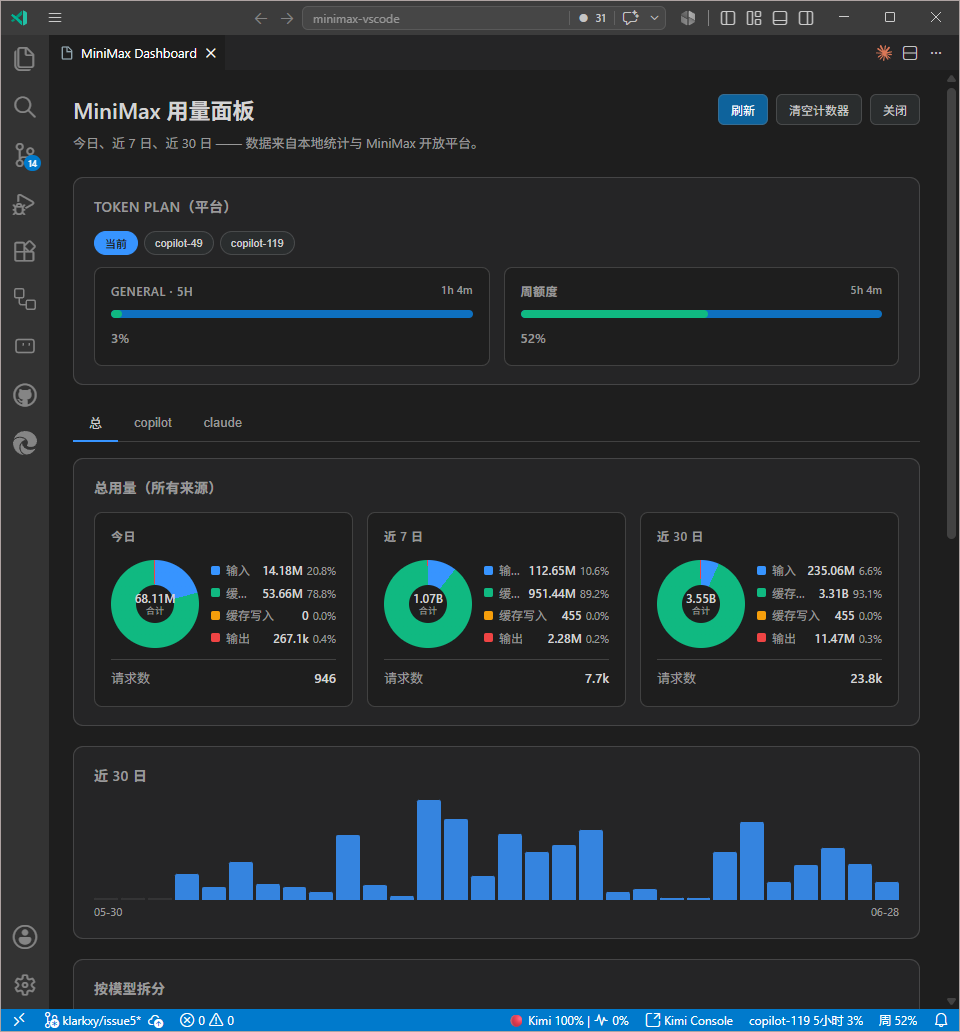
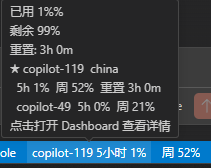
- Usage dashboard — today / 7-day / 30-day views, 30-day bar chart, per-model breakdown, platform
coding_plan/remains, and Claude Code JSONL ingest.
- mmx-cli status detection — dashboard shows whether the official MiniMax CLI / auth / SKILL is set up; copy the install prompt to the clipboard.
- MiniMax Web Search MCP (Agent Mode) — VS Code's MCP runtime launches
uvx minimax-coding-plan-mcp automatically once you've set an API key and a recognised host; the extension injects the key + host as env and re-fires the definition when either changes.
- Diagnostics — per-request classifier, cache-hit stats, verbose mode dumps every request to disk.
Screenshots
Getting Started
Prerequisites
- VS Code 1.111.0+
- GitHub Copilot Chat installed and signed in
- A MiniMax Token Plan subscription and API key
- VS Code Insiders to render M3 thinking blocks via the proposed
languageModelThinkingPart API
Installation
- Install from the VS Code Marketplace (or build a
.vsix from source with npm run package).
- Run MiniMax: Add API Key from the command palette, give it a name, and paste your Token Plan key. The extension auto-detects China vs Global and stores the key in SecretStorage. Use MiniMax: Manage API Keys to add more, switch, rename, or delete.
- Open Copilot Chat, pick MiniMax M3 (or M2.7 / M2.7-highspeed).
- On VS Code 1.128+, run MiniMax: Set Copilot's Utility Models before using Agent mode with MiniMax. Choose a MiniMax model, keep both utility slots selected, then reload Copilot Chat.
Endpoint
On first activation, if minimax.apiBaseUrl is still at its default, the extension picks https://api.minimax.io/anthropic automatically. Once you set the URL manually or run the switch command, the auto-picked value is preserved.
Models
| Model |
Context (spec / effective) |
Native media input |
Notes |
| MiniMax M3.1 Flash (Preview) |
1,000,000 / 512,000 |
✅ image + video |
Post-trained M3 variant; shares M3's capabilities, pricing and the 512K safe default / 1M toggle. |
| MiniMax M3 |
1,000,000 / 512,000 |
✅ image + video |
Top-tier coding; native video input (MP4 / AVI / MOV / MKV). Effective cap is 512K until the >512K tier is fully rolled out. |
| MiniMax M2.7 |
204,800 |
— |
Self-iterating, ~60 TPS; text and tool-call content blocks only. |
| MiniMax M2.7-highspeed |
204,800 |
— |
Same quality, ~100 TPS; text and tool-call content blocks only. |
Users with >512K access can run MiniMax: Toggle M3 1M Context to lift the cap (the command pops a modal warning about 1.5× billing before flipping the switch). The full spec is on the Supported models page.
Historical models: M2.5 / M2.1 / M2 are not in the picker by default.
Pricing
Prices are in USD (billed in USD for international users). The picker tooltip renders the table that matches your active minimax.apiBaseUrl. See the pricing page for the latest.
Pay-as-you-go (per million tokens)
| Model |
Input |
Output |
Cache read |
Cache write |
| MiniMax M3.1 Flash (Preview) |
$0.30 |
$1.20 |
$0.06 |
— |
| MiniMax M3 (≤512K input) |
$0.30 |
$1.20 |
$0.06 |
— |
| MiniMax M3 (>512K input, limited) |
$0.60 |
$2.40 |
$0.12 |
— |
| MiniMax M2.7 |
$0.30 |
$1.20 |
$0.06 |
$0.375 |
| MiniMax M2.7-highspeed |
$0.60 |
$2.40 |
$0.06 |
$0.375 |
The >512K input tier is in limited rollout; see the pricing page for the latest. Token Plan subscription is billed separately — see below.
Token Plan subscription
A Subscription Key covers language models plus speech / video / music / image endpoints through a shared usage bar. Deducts from the included quota at each endpoint's pay-as-you-go price; purchased Credits cover any overrun.
| Tier |
Price (USD) |
Quota windows |
Agent usage |
| Starter |
$20 per month |
5-hour rolling + weekly |
3-4 agents |
| Pro |
$50 per month |
5-hour rolling + weekly |
4-5 agents |
| Max |
$120 per month |
5-hour rolling + weekly |
6-7 agents |
Settings
| Setting |
Default |
Purpose |
minimax.apiBaseUrl |
auto-picked |
Anthropic-compatible base URL. Auto-picked on first activation; defaults to https://api.minimax.io/anthropic. |
minimax.visibleModels |
all M-series |
Restrict which models appear in the picker. Defaults to MiniMax-M3.1-Flash-Preview / MiniMax-M3 / MiniMax-M3-Priority / MiniMax-M2.7 / MiniMax-M2.7-highspeed. |
minimax.maxOutputTokens |
0 |
Output cap. 0 lets the model decide. See minimax.enableM31MContext for the input/context window. |
minimax.enableM31MContext |
false |
Lift M3 / M3-Priority from 512K to 1M context. Off by default; the toggle command pops a billing warning first. |
minimax.sampling |
{} |
Per-model temperature / topP / topK / frequencyPenalty overrides. Keys: MiniMax-M3.1-Flash-Preview, MiniMax-M3, MiniMax-M3-Priority, MiniMax-M2.7, MiniMax-M2.7-highspeed. |
minimax.experimental.modelDefPresets |
{} |
Per-model escape hatch for request body fields. |
minimax.debugMode |
minimal |
minimal / metadata / verbose. |
minimax.modelIdOverrides |
{} |
Map picker IDs to API IDs (useful for proxies). |
minimax.dashboard.includeClaudeCode |
true |
Master toggle for the Claude Code JSONL ingest section. |
minimax.claudeCode.logPath |
~/.claude/projects |
Root directory the ingester walks. |
minimax.claudeCode.pollIntervalMs |
30000 |
Scan interval in milliseconds. Clamped to [5000, 600000]. |
minimax.experimental.stabilizeToolList |
false |
Synthesise preflight tool calls to keep the upstream prompt cache warm. Experimental. |
minimax.claudeCode.allowedModels |
MiniMax-M3.1-Flash-Preview / M3 / M2.7 / M2.7-highspeed / M2.5 / M2.1 / M2 |
Allowlist of model IDs counted in the Claude Code section of the dashboard. Claude Code may be talking to other Anthropic-compatible providers; only MiniMax-related rows are counted. |
Commands
| Command |
Purpose |
| MiniMax: Add API Key |
Name a new key, auto-detect its region (China / Global / unknown), store in SecretStorage, make it active |
| MiniMax: Remove API Key |
Remove the active named key (or the legacy single-key slot if the pool is empty) |
| MiniMax: Manage API Keys |
Open a sub-menu: Add / Switch / Rename / Delete |
| MiniMax: Switch API Key |
Pick an existing named key to make active (mirrors its endpoint) |
| MiniMax: Rename API Key |
Change a named key's display name |
| MiniMax: Delete API Key |
Pick a named key to delete (with confirmation) |
| MiniMax: Set Copilot's Utility Models |
Pick a chat model and write it to both chat.utilitySmallModel and chat.utilityModel by default |
| MiniMax: Toggle M3 1M Context |
Lift M3's picker entry to 1M (with billing warning) |
MiniMax: Switch to Global API (minimax.io/anthropic) |
Switch to the international Anthropic endpoint |
MiniMax: Switch to Chinese API (minimaxi.com/anthropic) |
Switch to the China-region Anthropic endpoint |
| MiniMax: Show Logs |
Focus the MiniMax output channel |
| MiniMax: Open Request Dumps Folder |
Reveal verbose request dumps |
| MiniMax: Open Usage Dashboard |
Open the usage dashboard |
| MiniMax: Rescan Claude Code Logs |
Force a fresh read of the Claude Code JSONL log directory |
| MiniMax: Open Claude Code Log Folder |
Reveal the resolved Claude Code log directory in the OS file manager |
| MiniMax: Copy mmx-cli install prompt |
Copy the verbatim three-step install prompt to the clipboard |
| MiniMax: Refresh MiniMax Web Search MCP |
Re-resolve the MCP provider so VS Code picks up the latest API key / host on the next spawn |
Troubleshooting
- No models in the picker — open MiniMax: Open Usage Dashboard to see whether an API key is set and which models are visible.
- HTTP 404 from the gateway — make sure
minimax.apiBaseUrl is https://api.minimax.io/anthropic, not a third-party proxy that expects the OpenAI protocol.
- "API key is missing its secret" warning in the dashboard — VS Code SecretStorage lost the entry (e.g. after a settings reset or a workspace migration). Run MiniMax: Add API Key to re-add the key, or MiniMax: Delete API Key to drop the orphan metadata. The dashboard shows a
secret missing badge next to affected entries.
- "API key not configured" — run MiniMax: Add API Key; the key is stored in VS Code SecretStorage, not in
settings.json.
No utility model is configured for 'copilot-utility-small' in Agent mode — run MiniMax: Set Copilot's Utility Models, keep both utility slots selected, then reload Copilot Chat. Alternatively set chat.byokUtilityModelDefault to mainAgent in user settings.- Source Control ✨ button does not invoke MiniMax — run MiniMax: Set Copilot's Utility Models to set
chat.utilitySmallModel to a MiniMax model, then restart Copilot Chat.
- M3 picker still shows 512K after toggling 1M on — switch models in the picker once; some Copilot Chat versions cache the entry until the next message.
| |

