Claude Markdown Translator / Claude Markdown 文档翻译器




Open a translated Markdown reader beside the active file in VS Code or Cursor. The extension uses the Claude Code CLI already signed in on your computer, with Claude Haiku at low effort.
在 VS Code 或 Cursor 中于当前 Markdown 文件旁打开译文阅读器。扩展复用电脑上已登录的 Claude Code CLI,并使用 Claude Haiku 的 low 推理强度。
Project and community / 项目与社区
Source code, releases, and documentation: kian-zh/markdown-translator.
源代码、版本发布与文档:kian-zh/markdown-translator。
If this extension is useful, please star the repository. For bugs and feature ideas, please open a GitHub Issue.
如果这个扩展对你有帮助,欢迎为仓库 Star;遇到问题或有功能建议,请在 GitHub 提交 Issue。
What it does / 功能
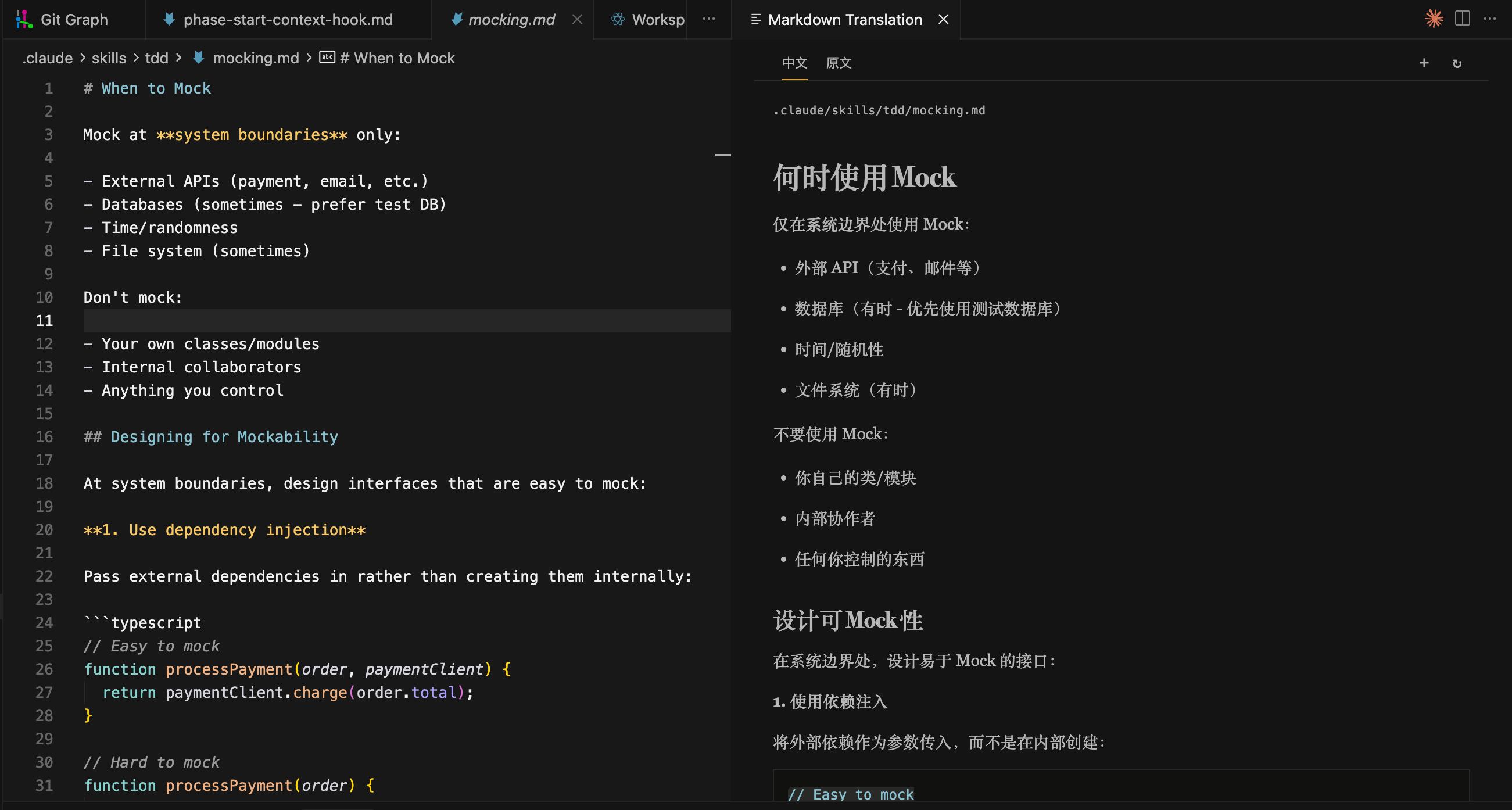
- Open it with the Markdown editor's top-right toolbar button; the reader appears in a split editor column beside the source.
通过 Markdown 编辑器右上角的工具栏按钮打开;阅读器会在源文件旁以分屏编辑器列显示。
- Chinese is the default view. Switch to the original document or add another language through tabs; there is no internal two-column layout.
默认显示中文译文。可通过标签切换原文或添加其他语言;阅读器内部不会采用双栏布局。
- Send the complete Markdown document to one local Claude Code invocation, rather than making hundreds of short web-translation requests.
将完整 Markdown 文档交给一次本机 Claude Code 调用,而不是发起数百个短文本网页翻译请求。
- Render the translated Markdown as Claude generates it. The final result is then validated before it is cached.
Claude 生成译文时即时渲染 Markdown;最终结果会在校验通过后才被缓存。
- Ask Claude to return Markdown only and preserve code, commands, paths, URLs, frontmatter, HTML tags, identifiers, and proper nouns.
要求 Claude 只返回 Markdown,并保持代码、命令、路径、URL、Frontmatter、HTML 标签、标识符和专有名词不变。
- Validate protected Markdown after every response. When its Markdown structure remains recognisable, the extension restores source code, URLs, tags, and other protected data before rendering; it retries once and refuses to display an unsafe result when safe restoration is impossible.
每次响应后校验受保护的 Markdown。若 Markdown 结构仍可识别,扩展会在渲染前恢复源文中的代码、URL、标签和其他受保护数据;无法安全恢复时会重试一次,仍失败则不展示结果。
- Cache successful translations during the current extension session and cancel obsolete requests when the document or language changes.
在当前扩展会话中缓存成功译文,并在文档或语言改变时取消过期请求。
- Editing the source file never starts a new translation automatically; use the reader's refresh button when you want an updated translation.
编辑源文件不会自动发起新的翻译;需要更新译文时,请使用阅读器内的刷新按钮。
Requirements / 前置条件
Required: a working local Claude Code environment. This extension does not include Claude Code, an Anthropic API key, or a fallback translation service. Claude Code must be installed, signed in, and able to complete a local command-line request on the same machine that runs VS Code or Cursor.
必须具备可用的本地 Claude Code 环境。 本扩展不内置 Claude Code、不提供 Anthropic API Key,也没有备用翻译服务。运行 VS Code 或 Cursor 的同一台电脑必须已安装并登录 Claude Code,且 Claude 命令本身能够正常完成请求。
Before installing the extension, run this check in the integrated terminal:
安装扩展前,请在集成终端执行以下检查:
claude --version
claude -p "Reply with OK only."
Both commands must succeed. If either command fails, install or repair Claude Code and complete its normal sign-in flow first. The extension runs Claude with --safe-mode, disables tools, and uses --no-session-persistence.
两条命令都必须成功。若任一命令失败,请先安装或修复 Claude Code 并完成其常规登录流程。扩展会以 --safe-mode 运行 Claude、禁用工具,并使用 --no-session-persistence。
Privacy and cost / 隐私与费用
There is no developer-operated proxy, API key, telemetry, or server. The full Markdown document is passed from the extension to your local Claude Code CLI, which then sends it through your Claude account to Anthropic. This includes code and other protected content so that Claude can preserve document structure; the extension checks that those protected constructs return unchanged.
本扩展没有开发者运营的代理、API Key、遥测或服务器。完整 Markdown 文档会从扩展交给本机 Claude Code CLI,再通过你的 Claude 账户发送给 Anthropic。为保持文档结构,代码等受保护内容也会随文档发送;扩展会检查它们是否原样返回。
Translation consumes your Claude plan or account usage. Do not translate confidential material unless your organisation permits sending it to Anthropic.
翻译会消耗你的 Claude 套餐或账户用量。除非你的组织允许将机密材料发送给 Anthropic,否则请勿使用本扩展翻译机密内容。
Development / 开发
npm install
npm test
npm run build
Press F5 and select Run Extension in VS Code/Cursor to open an Extension Development Host. The configuration runs npm: build first. While iterating, run the Watch Extension task from Tasks: Run Task, then reload the development host after changes.
在 VS Code 或 Cursor 中按 F5 并选择 Run Extension,即可打开 Extension Development Host;该配置会先执行 npm: build。持续开发时,从 Tasks: Run Task 启动 Watch Extension,代码变更后重新加载开发宿主。
Release / 发布
See RELEASING.md for the dual-marketplace checklist: publish the same VSIX to the Visual Studio Marketplace for VS Code and to Open VSX for Cursor.
双市场发布清单见 RELEASING.md:将同一个 VSIX 发布到 Visual Studio Marketplace(VS Code)和 Open VSX(Cursor)。
License / 许可证
MIT

