



Run multiple agent sessions in parallel without losing track of a single one.
Agent Cockpit brings every background and interactive Claude Code session into one live VS Code sidebar —
organized by project folders and smart tickets, with silent auto-naming, terminal tab sync, live status, prompt-cache countdowns, and instant alerts when a session needs you.
Why ·
Zero-Friction Flow ·
Features ·
Quick Start ·
Commands ·
Skills ·
Configuration
Why Agent Cockpit
Claude Code makes parallel agent workflows effortless to start — and chaotic to track. Spin up a few claude --bg jobs, open a couple of interactive terminals across worktrees, and twenty minutes later you have no idea which session is blocked waiting for approval, which prompt cache is about to expire, and which terminal tab belongs to which topic or ticket.
Agent Cockpit is your mission control: one sidebar that automatically names your sessions and terminal tabs, organizes them into topic or ticket folders, shows live status and open PRs, and takes you to the right terminal in a single click.
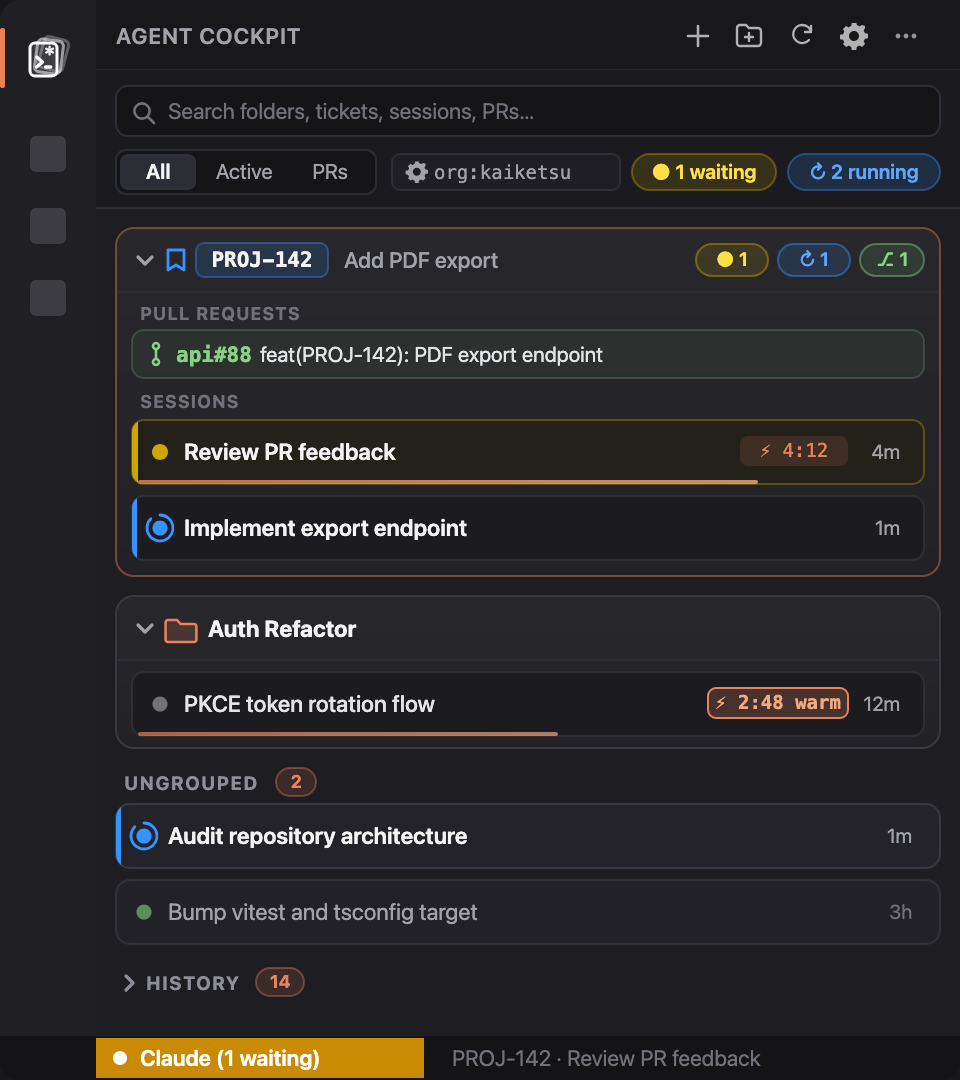
Live sidebar overview — ticket folders with issue summaries, clean topic folders, ungrouped sessions, live status orbs, and prompt cache TTL / keepalive
How a session flows
You don't need to change how you use Claude Code or memorize slash commands:
- Start working anywhere — launch
claude in a terminal, claude --bg in the background, or click + Session inside any folder in the sidebar.
- Silent background classification — ~10 seconds after your first prompt, Agent Cockpit's hook silently asks Haiku (
$.model.complete) for a concise 3–6 word title and topic folder, writes it to ~/.claude/cockpit/sessions/, and syncs your active VS Code terminal tab title directly to <Session Name> without touching your conversation context.
- Automatic ticket upgrades — mention
PROJ-123 or #42 in a prompt, or run acli, jira, gh issue, or git checkout -b feat/PROJ-123, and the session automatically binds to a smart ticket folder with live Jira/GitHub status and open PRs.
- Stay in flow — see at a glance which sessions are working or idle, monitor warm prompt-cache TTL (
⚡ 4:12), keep caches alive on demand, and click the header ● 1 waiting pill or the VS Code status bar pill (Claude (1 waiting)) to jump straight to the session waiting on you.
Features
| Feature |
What it does |
| 🗂️ Folders & smart tickets |
Group sessions into free-form project/topic folders (Auth Refactor, Release Prep) or smart ticket folders (PROJ-123, #42, owner/repo#42). Ticket folders show live issue summaries from Jira or GitHub, while project folders stay clean and concise. |
| ✨ Silent auto-naming |
Unnamed sessions automatically receive a concise title and folder in the background (~10s after your first prompt via Haiku) without polluting your prompt or transcript, and sync back to claude --resume. |
| 🎫 Automatic ticket detection |
Detects ticket keys in user prompts and CLI commands (acli, jira, gh issue, git switch/checkout) and binds the session to that ticket folder automatically. |
| 🖥️ VS Code terminal tab sync |
Automatically syncs your interactive VS Code terminal tab to your concise <Session Name> as soon as a session is classified or renamed. |
| 🚦 Live session status |
Real-time status orbs (working, needs input, idle, failed, done) show at a glance which sessions are actively working and what topic they are working on. |
| 🔔 Needs-input spotlight |
Highlights blocked or failed sessions with in-place accent borders and a pulsing status orb. Clicking the header ● X waiting pill or the VS Code status bar navigates directly to the session with a smooth pulse animation, alongside VS Code toast notifications. |
| 📊 Status bar telemetry |
Shows Claude (1 waiting) or Claude (2 running) in the VS Code status bar; clicking it immediately focuses the session needing input or opens the cockpit. |
| ⏱️ Prompt cache countdown |
Tracks each session's 5m / 1h prompt cache TTL with a countdown badge (⚡ 4:12) and micro progress bar so you can reply before a warm cache goes cold. |
| ⚡ Prompt cache keepalive |
Click any warm cache badge (⚡ 4:45) or use the keep_warm MCP tool to automatically keep prompt cache warm. Agent Cockpit pings the session prefix before cache expiry so you never lose your warm cache while switching tasks or stepping away. |
| 🔗 Zero-config Jira & GitHub |
Enriches ticket folders with issue titles, status colors, and open PRs via Jira REST API, Atlassian CLI (acli), jira-cli, or GitHub CLI (gh) — or any custom shell script. |
| 🎯 Scoped PR & issue lookup |
Automatically scopes GitHub searches to your repository or organization (agentCockpit.githubOrg) so you never get false matches from unrelated public repositories. Click the ⚙️ gear icon to instantly toggle scope between Organization, specific Repositories, or Disabled. |
| 🧹 Self-tidying & drag-and-drop |
Drag and drop sessions to reorder them within or across folders (persisting custom order over automatic sorting), or use inline hover actions to rename, move, or archive. Inactive sessions and closed tickets automatically archive to History. |
Install
[!TIP]
🤖 Ask your AI agent to install it for you
Paste this prompt into Claude Code, Cursor, Windsurf, or your terminal agent:
Install Agent Cockpit for me:
1. Run: claude plugin marketplace add kaiketsu-labs/agent-cockpit && claude plugin install cockpit@agent-cockpit
2. Install the VS Code extension: `code --install-extension kaiketsu-labs.agent-cockpit` (or download from https://marketplace.visualstudio.com/items?itemName=kaiketsu-labs.agent-cockpit).
1. Install the Claude Code plugin
In Claude Code (interactive session):
/plugin marketplace add kaiketsu-labs/agent-cockpit
/plugin install cockpit@agent-cockpit
Or from your terminal / agent CLI:
claude plugin marketplace add kaiketsu-labs/agent-cockpit
claude plugin install cockpit@agent-cockpit
Alternative: Load directly from a local checkout
Add CLAUDE_CODE_PLUGIN_DIRS to the env block of ~/.claude/settings.json:
{
  "env": {
    "CLAUDE_CODE_PLUGIN_DIRS": "/path/to/agent-cockpit/plugin"
  }
}
2. Install the VS Code extension
From the Visual Studio Marketplace:
Search for Agent Cockpit in the Extensions view (Cmd+Shift+X / Ctrl+Shift+X), or install via CLI:
code --install-extension kaiketsu-labs.agent-cockpit
(Replace code with cursor or windsurf if preferred).
Alternative: Install directly from GitHub Releases (.vsix)
Install the latest release directly:
curl -fsSL https://github.com/kaiketsu-labs/agent-cockpit/releases/latest/download/agent-cockpit.vsix -o /tmp/agent-cockpit.vsix && code --install-extension /tmp/agent-cockpit.vsix --force
Download agent-cockpit-0.6.0.vsix from the latest GitHub Release and install it:
code --install-extension agent-cockpit-0.6.0.vsix --force
Or build and install from source (zero npm dependencies — package.py packages the .vsix directly):
git clone https://github.com/kaiketsu-labs/agent-cockpit
cd agent-cockpit/vscode
python3 package.py && code --install-extension agent-cockpit-0.6.0.vsix --force
3. Open the cockpit
Click the Agent Cockpit icon in the VS Code Activity Bar. Sessions appear automatically as soon as you start Claude Code; tracker badges and PR links light up automatically when gh, acli, jira, or JIRA_URL/JIRA_TOKEN are available.
Commands & shortcuts
All actions are available directly from the sidebar or via the VS Code Command Palette (Cmd+Shift+P / Ctrl+Shift+P):
| Command |
Description |
Agent Cockpit: Focus / Open Session Needing Input |
Jumps straight to the first session waiting on input, or focuses the Agent Cockpit sidebar. Great for binding to a keyboard shortcut. |
Agent Cockpit: Search Sessions |
Quick-pick across all active and archived sessions by name, folder, ticket key, or issue summary. |
Agent Cockpit: New Session |
Opens a new interactive Claude Code terminal in the editor area (optionally pre-bound to a folder). |
Agent Cockpit: New Folder or Ticket |
Creates a custom topic folder (e.g. Auth Refactor) or pins a ticket folder (e.g. PROJ-123, #42). |
Agent Cockpit: Rename Folder |
Renames a folder and migrates all assigned sessions to the new folder name. |
Agent Cockpit: Configure GitHub PR Search Scope |
Configures GitHub pull request search scope (Organization, specific Repositories, or Disabled) via interactive QuickPick. |
Agent Cockpit: Toggle Keep Warm (Prompt Cache Keepalive) |
Toggles automatic prompt cache keepalive for a session so warm cache stays alive while switching tasks. |
Agent Cockpit: Refresh |
Forces an immediate refresh of sessions, tracker statuses, and open pull requests. |
Optional ticket workflow skills
Sessions are named and organized automatically without any slash commands. When you want structured ticket workflows with on-demand git worktrees and handoff comments, the plugin includes three skills:
| Skill |
What it does |
/start-task [KEY] <task> |
Fetches the ticket (via MCP, gh, acli, jira, or Jira REST), names the session via name_session, aligns on the approach, and creates git worktrees on demand. |
/finish-task [KEY] |
Drafts a structured handoff comment (status, acceptance criteria, PRs, test results) and posts it to the ticket once you approve. |
/cleanup-worktrees |
Cleans up local git worktrees whose associated pull request has been merged or closed. |
Configuration
Configure Agent Cockpit via VS Code Settings (agentCockpit.*) or via the env block of ~/.claude/settings.json / .claude/settings.json:
| VS Code Setting |
Env Fallback |
Default |
Effect |
agentCockpit.tracker |
— |
"auto" |
"auto" (Jira for PROJ-123 via REST API → acli → jira-cli, GitHub Issues for #42 / owner/repo#42 via gh, silent when unconfigured), "jira", "github", "command", or "none". |
agentCockpit.trackerCommand |
COCKPIT_TRACKER_COMMAND (or DECK_TRACKER_COMMAND) |
"" |
Shell command for "command" mode. Receives a JSON array of keys on stdin and outputs { "KEY": { "status", "category", "summary", "url" } }. |
agentCockpit.pullRequests |
— |
"auto" |
"auto" (queries GitHub via gh when available, silent when unconfigured), "github", or "none". |
agentCockpit.githubOrg |
— |
"" |
GitHub organization (e.g. "kaiketsu-labs") to scope pull request searches to enterprise-wide in a single API call. |
agentCockpit.githubRepositories |
— |
[] |
Specific GitHub repositories (array of "owner/repo" strings) to search for pull requests when scoping searches without an organization. |
agentCockpit.ticketProjects |
TICKET_PROJECTS |
"" |
Comma-separated project keys, e.g. PROJ,OPS. Narrows Jira-style keys (case-insensitive). Default: any ABC-123 or #42 / owner/repo#42 key. |
agentCockpit.ticketPattern |
— |
"" |
Custom regular expression override for matching ticket keys. |
agentCockpit.closeTerminalOnArchive |
— |
true |
Automatically close the associated VS Code terminal tab when archiving a session (moving to history). |
| — |
JIRA_URL, JIRA_TOKEN, JIRA_EMAIL |
— |
Base URL and PAT/API token for Jira REST lookups (with JIRA_EMAIL uses Basic Auth for Jira Cloud; otherwise Bearer PAT). Automatically falls back to acli or jira-cli when unset. |
| — |
CLAUDE_CODE_PROMPT_CACHE_TTL=1h |
5m |
Sets the prompt cache countdown to 1 hour instead of 5 minutes (also honours ENABLE_PROMPT_CACHING_1H). |
Development
The VS Code extension is written in dependency-free Node.js and uses Node's built-in test runner:
cd vscode && node --test
python3 package.py
Issues and pull requests are welcome.
License
MIT. Not affiliated with Anthropic. Claude and Claude Code are trademarks of Anthropic.

