junai - AI Agent Pipeline
Agentic engineering for GitHub Copilot.
junai turns Copilot into a structured software delivery pipeline with specialist agents, deterministic routing, durable state, and a governed project-local runtime. The extension installs the pool into your repo, keeps ownership boundaries clear, and helps teams promote reusable knowledge back into the pool through review instead of ad hoc copy/paste.
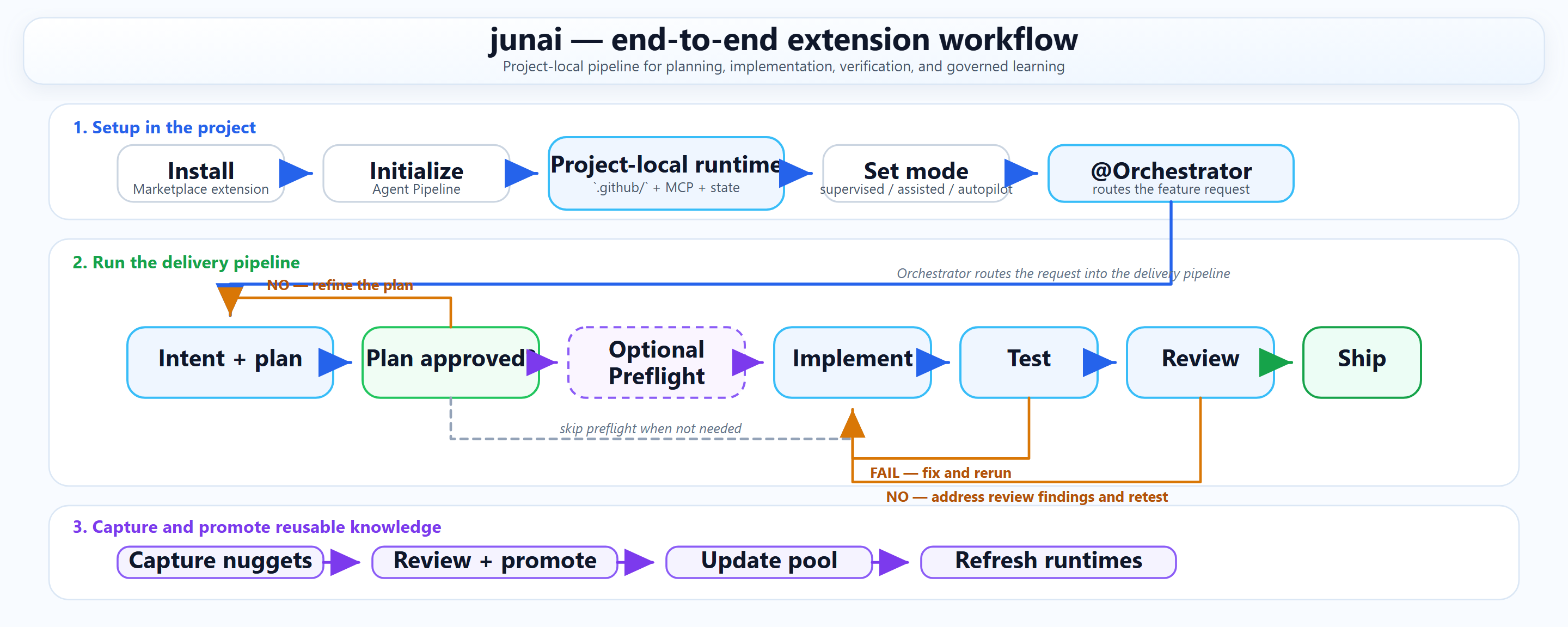
Delivery model at a glance
- Deterministic routing: work starts with the right specialist instead of one long general-purpose chat.
- Project-local runtime: the deployed
.github/ runtime stays in your repo, remains auditable in git, and preserves ownership boundaries.
- Governed promotion: durable patterns move back into the shared pool through review, not silent auto-sync from project repos.
- Operational recovery: pipeline state, evidence capture, and handoffs stay inspectable when a phase stalls or needs operator review.
What shipped in this release
- Manifest-driven pool sync for managed, owned, managed-region, and private paths.
- Profile-aware deployment with
.github/.junai-profile and stamped deploys via .github/.pool-version.
- Read-only drift tooling with
junai pool version, junai pool status, and junai pool diff.
- Human-reviewed promotion with
junai pool promote and junai pool nuggets review.
- CI knowledge capture that writes release lessons into
.github/agent-docs/nuggets-inbox.md.
- Stronger pipeline runner contracts, validation gates, smoke checks, and CI coverage.
Why teams use junai
- 26 specialist agents with deterministic stage routing instead of one long chat thread.
- 9 MCP tools for pipeline control, status, gate handling, and command execution.
- Project-local
.github/ runtime that travels with the repo and stays auditable in git.
- No auto-mirror from project back to pool. Reusable knowledge goes through review branches.
- Runtime dedupe guards to avoid duplicate instruction surfaces and context compaction.
Pool governance loop
- Deploy the managed pool into a project.
- Stamp the project with the deployed pool SHA and selected profile.
- Capture release candidates into
nuggets-inbox.md.
- Review each candidate as
keep-local, promote-to-pool, or discard.
This keeps local project context local, while still giving you a deterministic path for promoting durable patterns back into the shared pool.
Pipeline updates
The runner now supports stronger operational flows around the same deterministic state machine:
junai pipeline run-plan and fast-track to enter from an approved plan.junai pipeline doctor, resume, history, and last-handoff to recover or inspect routing state.junai pipeline dashboard and evidence to write operator-facing reports and execution bundles.- Dedicated runner CI plus release smoke gates before marketplace publication.
| Mode |
What it does |
supervised |
Keeps every gate manual for operator-controlled execution. |
assisted |
Preserves manual gates while adding AI hints and structured guidance. |
autopilot |
Auto-satisfies all gates except intent_approved, so teams can move quickly with one explicit human approval checkpoint. |
Quick start
- Install
junai from the VS Code Marketplace.
- Run
junai: Initialize Agent Pipeline from the command palette.
- Open Copilot Chat, select
Orchestrator, and start with your feature request.
Requirements:
- VS Code 1.101+
- GitHub Copilot
uv on PATH for the bundled MCP server
Common commands
Extension commands:
junai: Initialize Agent Pipelinejunai: Update Agent Pooljunai: Show Pipeline Statusjunai: Set Pipeline Modejunai: Remove from this project
Pool and pipeline CLI examples:
junai pool status --project E:\Projects\my-app
junai pool diff --project E:\Projects\my-app --json
junai pool nuggets review --project E:\Projects\my-app
junai pipeline doctor
junai pipeline run-plan --from-plan .github/plans/my-plan.md --entry preflight --mode autopilot
Safety model
agent-docs/, plans/, handoffs/, and pipeline-state.json stay project-owned.copilot-instructions.md uses a managed region instead of whole-file overwrite.- Promotion to the pool happens on review branches, not by automatic project sync.
Learn more
| |

