shpe



Important Note for Editor: This extension/plugin requires the core Python CLI tool to function. Please make sure you run pip install shpe in your environment!
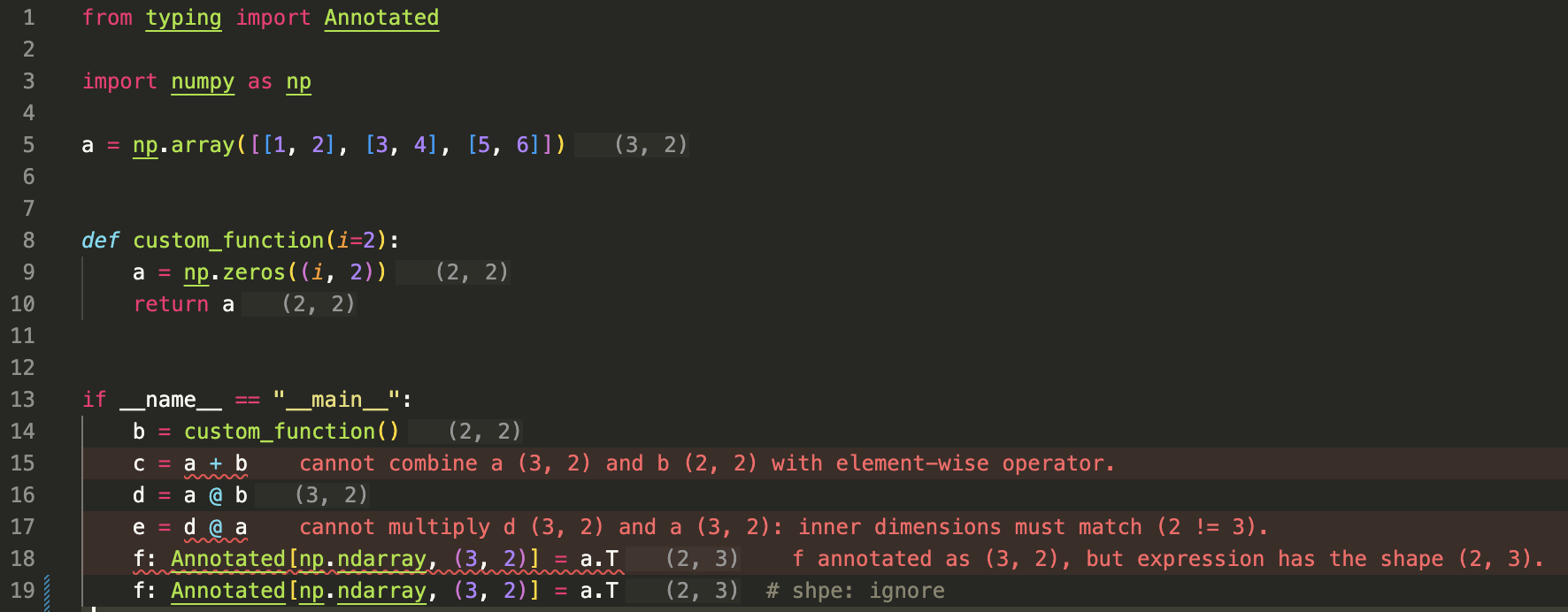
A lightweight static analyzer for tracking and validating NumPy tensor shapes. It automatically infers and shows shapes, so you do not need manual shape comments anymore. It catches shape errors directly in your editor before you even run your code, and you can also integrate it into your CI/CD pipeline.
VS Code Demo
Install
Requires Python 3.12+.
pip install shpe
or with uv:
uv add shpe
Search for shpe in the VS Code Marketplace or PyCharm Marketplace.
CLI
import numpy as np

a = np.zeros((3, 2))
b = np.ones((2, 2))
c = a + b
shpe examples/intro.py
examples/intro.py:15: [Elementwise] cannot combine a (3, 2) and b (2, 2) with element-wise operator.
examples/intro.py:17: [MatMul] cannot multiply d (3, 2) and a (3, 2): inner dimensions must match (2 != 3).
examples/intro.py:18: [Annotation] f annotated as (3, 2), but expression has the shape (2, 3).

Found 3 error(s) across 1 file(s).
Pass files or directories (*.py). --show-shapes prints inferred shapes and scalars. Exit code 1 if any shape error is reported. Skip a line with # shpe: ignore.
examples/demo.py shows more of what is inferred and what is not.
What is checked
- Array creation (
np.array, np.zeros, np.ones, random helpers, …)
Annotated[np.ndarray, (rows, cols)] vs the inferred expression- Element-wise
+ - * / (broadcast) and @ (matmul)
- Subset of NumPy functions (
reshape, transpose, sum, ...)
- Simple user functions and classes
If shpe is uncertain, it does not infer a shape. No control flow (if / for / while), no recursion, and only a subset of NumPy. Inplace updates such as a.resize(...) are not modeled.
Bugs and requests: GitHub Issues.
Development
See CONTRIBUTING.md and docs/architecture.md.