MDPS: Markdown-Preview-Showdown
A excellent markdown preview vscode extension with showdowns that converte markdown content to preview html.
If you think the vscode extension can help you or also hope to encourage the author, click on the top right corner to give me a Star⭐️.
Supporting this project
As you know, Markdown-Preview-Showdown(MDPS) is a free extension and it will remain free forever. However, maintaining and improving the extension costs time and money.
If you like our work and find our extension useful, please donate through Wechat Pay(微信支付)! Your contribution will be greatly appreciated and help me continue to develop this awesome extension.
Its ongoing development is made possible thanks to the support by these awesome sponsors.
Example image


Features
Markdown-Preview-Showdown(MDPS) is an vscode extension that preview markdown content as HTML and provides you with many useful functionalities such as antv infographic, plantuml, mermaid, ZenUML for mermaid, ZenUML, LaTex, plotly, gnuplot, abcjs, echarts, wavedrom, railroad, vega, viz, code block theme, LaTeX math and AsciiMath, TOC, export HTML, export PDF etc.
MDPS converte markdown content to html that using the @jhuix/showdowns npm package. See to Demo Features:
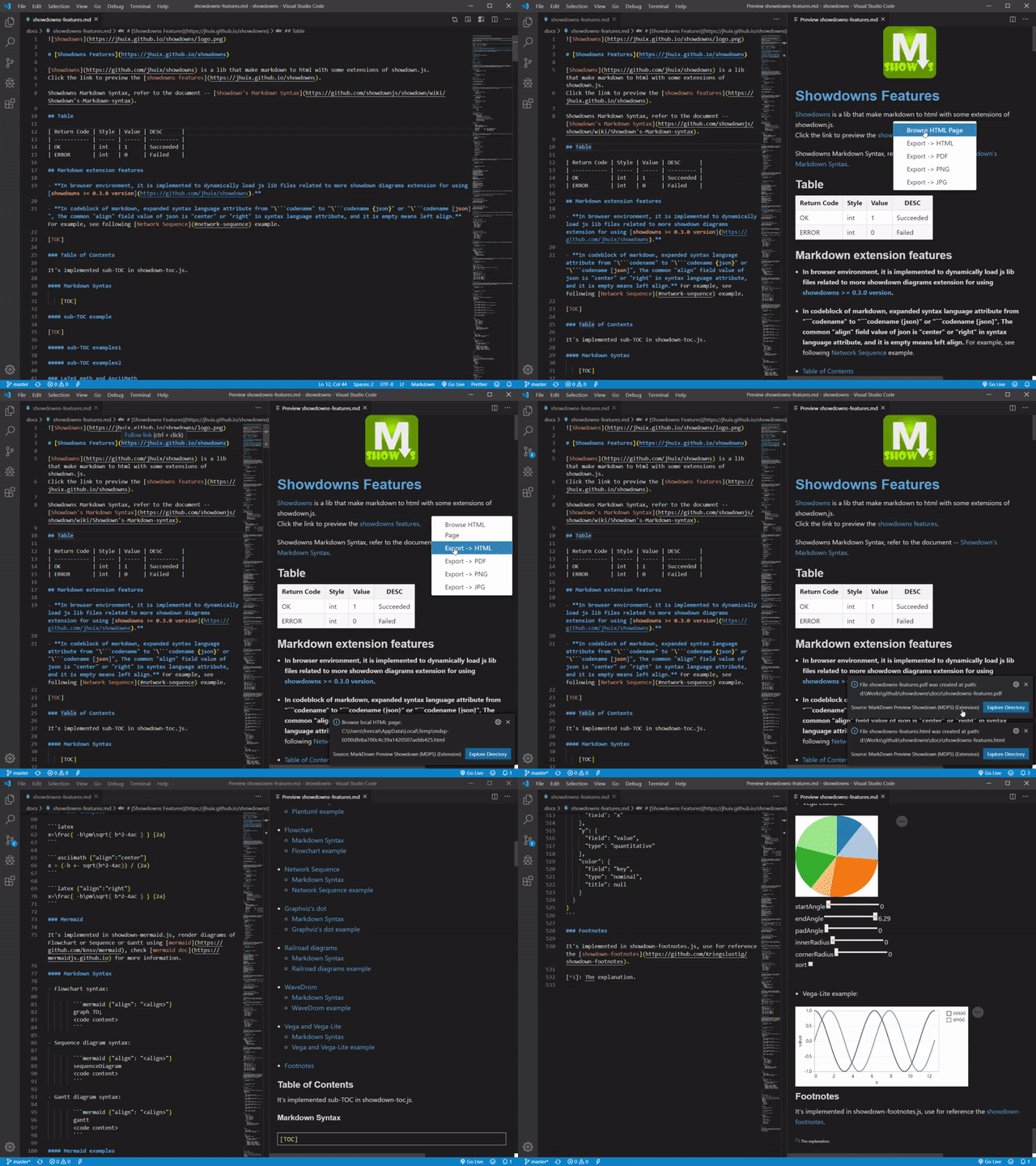
@jhuix/showdowns is a lib that make markdown to html with some extensions of showdown.js. And showdown.js is a Javascript Markdown to HTML converter, based on the original works by John Gruber. For more information, refer to the following document:
Requirements
For local rendering plantuml
When local rendering plantuml requires Java support, so Java environment (JDK or JRE) needs to be installed and the Java executor directory needs to be set to the global path environment variable for the extension to work:
- JAVA_HOME: Java SDK installed directory (must have a bin sub-directory)
- Windows example: C:\Program Files\Java\jdk1.8.0_101
- macOS example: /Library/Java/JavaVirtualMachines/jdk1.8.0_101.jdk/Contents/Home
- PATH: the global path environment variable
- Windows example: PATH=%PATH%;%JAVA_HOME%\bin
- macOS example: PATH=$PATH:$JAVA_HOME/bin
If you want to use PlantUML's functionality that requires GraphViz, you need to download and install it, and to set the GRAPHVIZ_DOT environment variable, as explained here:
- GRAPHVIZ_DOT: Path for the dot executable binary
- Windows example: C:\Program Files\Graphviz\bin\dot.exe
- macOS example: /usr/local/Cellar/graphviz/2.38.0_1/bin/dot
After setting these environment variables you need to restart VSCode for the extension to work.
For local rendering tex
LaTeX need get going with on a machine. Generally speaking it involves downloading a Latex distribution, of which there are a few, although the big three tend to be:
These distributions have installers, and the way they need to be installed is platform specific. Generally they are large monolithic downloads.
After installation, it is necessary to set the corresponding exe(pdflatex, dvisvgm) files path to the PATH environment variable.
For local rendering gnuplot
Gnuplot need get going with on a machine. For more information, please refer to Gnuplot.
Dowload websit is gnuplot download.
After installation, it is necessary to set the corresponding exe(gnuplot) files path to the PATH environment variable.
For export PDF or PNG or JPEG:
When markdown-preview-showdown.puppeteer.useCore setting is true, this extension require puppeteer-core package (It has been integrated into the MDPS extension) and google chrome browser or chrome-location package, and chrome.exe program path is set to markdown-preview-showdown.puppeteer.chromePath. The chrome-location package also already exists in the extension, but it can also be globally installed by npm:
npm install -g chrome-location
When markdown-preview-showdown.puppeteer.useCore setting is false, this extension require puppeteer package that needs to be globally installed by npm:
npm install -g puppeteer
Install from VS Code (Recommended)
Open vscode editor, then search markdown-preview-showdown in extensions, then click Install button.
Extension Settings
This extension contributes the following settings:
markdown-preview-showdown.autoPreview:
Automatic preview markdown file, default false.
markdown-preview-showdown.flavor:
Flavor of preview html page, you can choose one from ["github", "ghost", "vanilla", "original"], default flavor is "github".
markdown-preview-showdown.autoToc:
Automatic generate the total table of content of the markdown file, default true.
markdown-preview-showdown.codeTheme:
Code block theme for shiki, default 'ayu-dark'.
markdown-preview-showdown.debounceDelay:
Debounce delay time in milliseconds, min 100ms and default 2s.
markdown-preview-showdown.export.showPageLabel:
Show page label in exported file, such as "This page is generated by XXX", default true.
markdown-preview-showdown.fontSize:
Custom font size of preview page, default "13" px.
markdown-preview-showdown.scrollSync:
Automatic scroll sync, default true, it is experimental.
markdown-preview-showdown.katex.mathDelimiters:
Delimiters of katex math, format is {"left": "chars", "right": "chars"}; Multiple delimiters are separated by ',', example: {"left": "\(", "right": "\)"}; Default value is an empty string, it means that the internal default values is used.
The internal default values of each attribute are as follows:
| Attribute Name |
Internal Default Value |
| latexinline |
{ "left": "\\(", "right": "\\)" } |
| latexdisplay |
{ "left": "$$", "right": "$$" },{ "left": "\\[", "right": "\\]" } |
| asciiinline |
{ "left": "\\~", "right": "\\~" } |
| asciidisplay |
{ "left": "@@", "right": "@@" } |
markdown-preview-showdown.kroki.website:
The kroki remote rendering website to be set, default web site is "kroki.io".
Support diagram types for BlockDiag (BlockDiag, SeqDiag, ActDiag, NwDiag, PacketDiag, RackDiag), BPMN, Bytefield, C4 (with PlantUML), Diagrams.net (experimental), Ditaa, Erd, Excalidraw, GraphViz, Mermaid, Nomnoml, PlantUML, Structurizr, SvgBob, Symbolator, UMLet, Vega, Vega-Lite, WaveDrom and WireViz…
markdown-preview-showdown.mermaid.theme:
Mermaid theme, you can choose one from ["default", "dark", "forest", "neutral"], default is "default" theme.
markdown-preview-showdown.vega.theme:
Vega theme, you can choose one from ["excel", "ggplot2", "quartz", "vox", "dark"], default is "vox" theme.
markdown-preview-showdown.plantuml.theme:
Plantuml theme, you can choose one from ["default", "nature", "c4", "c4-handwrite"], default is "default" theme.
markdown-preview-showdown.plantuml.renderMode:
The mode of rendering plant UML diagram, you can choose one from ["local", "remote"]: the default mode is "local", which means local rendering, but local rendering requires Java support, so Java environment needs to be installed and the Java executor directory needs to be set to the global path environment variable; while the mode "remote" means remote rendering, which means the setting item of plantumlWebsite needs to be set as the remote rendering URL.
markdown-preview-showdown.plantuml.website:
When the setting item of plantumlrendermode is mode "remote", the remote rendering website to be set, default web site is "www.plantuml.com/plantuml".
markdown-preview-showdown.puppeteer.useCore:
If set to true, then locally installed puppeteer-core will be required. Otherwise, the puppeteer globally installed by npm install -g puppeteer will be required, defualt true.
markdown-preview-showdown.puppeteer.waitForTimeout:
Puppeteer waits for a certain timeout in milliseconds before the document export, default false.
markdown-preview-showdown.puppeteer.chromePath:
Chrome executable path, which is used for Puppeteer export. Leaving it empty means the path will be found automatically (only for windows).
markdown-preview-showdown.toc.chapterNumber:
Show chapter number of TOC such as "1.1.", default true.
markdown-preview-showdown.toc.compatible:
Compatible mode for TOC placeholder, true is expressed that the TOC placeholder be used in the elements p and h, false is expressed that the TOC placeholder be only used in the elements h. default is false.
markdown-preview-showdown.toc.expand:
Expand all the levels of TOC, default is false which means collapsed TOC.
markdown-preview-showdown.toc.title:
Custom title of TOC, default is empty string which means the internal default string -- 'Table of Contents'.
markdown-preview-showdown.toc.toc:
Custom regular expression string for matching the TOC placeholder, default is empty string which means the internal default regular expression string '^((?:\[(?:Table[ -]Of[ -]Contents|目录|TOC)\])|(?:【(?:Table[ -]Of[ -]Contents|目录|TOC|TOC)】)|(?:\{\{([_]?)TOC\2\}\})|(?:\[\[([_]?)TOC\3\]\]))$'.
Keybindings
| OS |
Key |
Command |
| WINDOWS |
ctrl+shift+v ctrl+shift+v |
openPreview |
| MAC |
cmd+shift+v cmd+shift+v |
openPreview |
Release Notes
Please see the release-notes page.
License
MIT License
Copyright (c) 2019-present, Jhuix (Hui Jin)
| |

