Clean Architecture Highlighter




VS Code extension to enforce Clean Architecture rules by statically analyzing imports and reporting dependency violations as editor diagnostics.
This package is the VS Code adapter for the shared analysis engine in packages/core. The same rules are also available from the CLI.
Features
- ⚙️Configurable layers and dependency rules
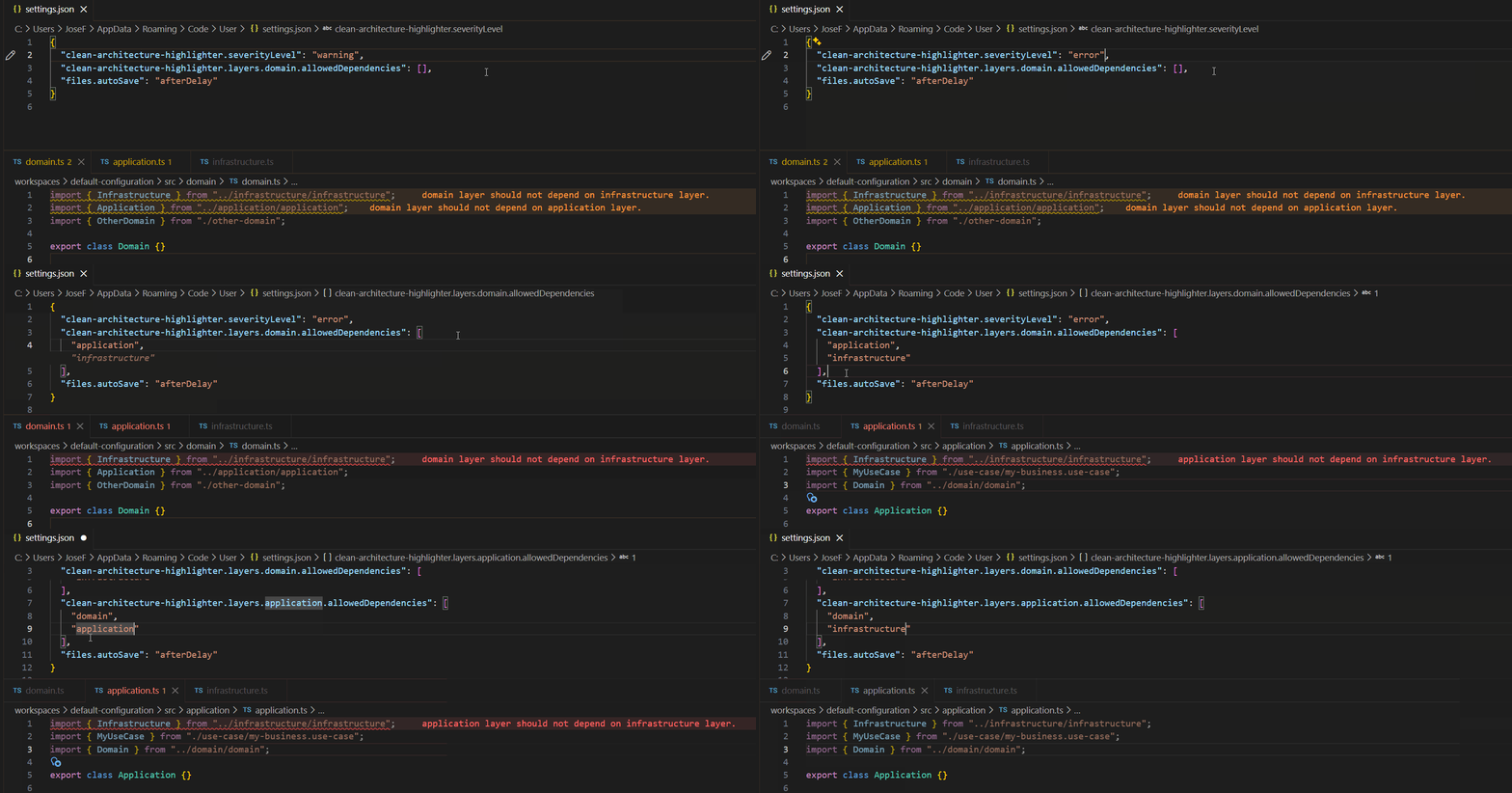
- ⚡Real-time diagnostics on file open / change
- 🗺️ Path alias support
- 🧅Default Clean Architecture rules out of the box
- 🧩 Non-intrusive (no code changes required)
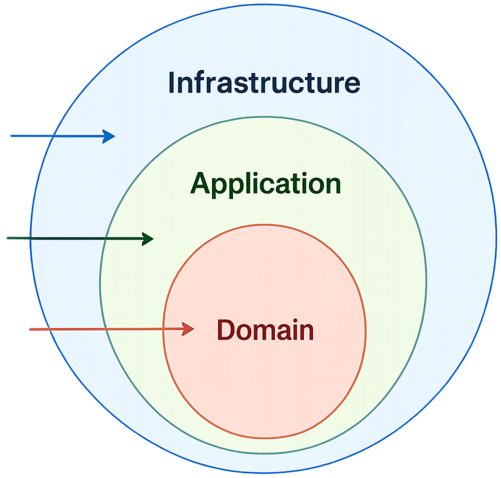
Checks that dependencies between layers follow the configured architecture, by default:
infrastructure → application → domain
If a file imports something from a forbidden layer, the extension shows a VS Code diagnostic using the configured severity.
Extension Settings
The extension can be customized via workspace or user settings.
Below is the default configuration, which enforces a standard Clean Architecture layout.
// settings.json
{
    "clean-architecture-highlighter.severityLevel": "warning",
    "clean-architecture-highlighter.enabledLanguages": ["javascript", "typescript"],

    "clean-architecture-highlighter.layers.domain.aliases": ["domain"],
    "clean-architecture-highlighter.layers.domain.allowedDependencies": ["domain"],

    "clean-architecture-highlighter.layers.application.aliases": ["application"],
    "clean-architecture-highlighter.layers.application.allowedDependencies": ["application", "domain"],

    "clean-architecture-highlighter.layers.infrastructure.aliases": ["infrastructure"],
    "clean-architecture-highlighter.layers.infrastructure.allowedDependencies": ["infrastructure", "application", "domain"]
}
| Setting |
Type |
Default |
Possible values |
Description |
severityLevel |
string |
warning |
error, warning, info |
VS Code diagnostic severity used when a rule is broken |
sourceFolder |
string |
— |
any folder name |
Optional root folder where the source code is analyzed. Only files under this folder (and subfolders) are analyzed. When unset, all supported files in the workspace are analyzed. |
enabledLanguages |
string[] |
["javascript", "typescript"] |
VS Code language identifiers |
Languages that the extension should analyze. Unsupported languages are ignored even when opened under sourceFolder. |
layers.<layer>.aliases |
string[] |
— |
any string[] |
Folder or import aliases identifying the layer |
layers.<layer>.allowedDependencies |
string[] |
— |
domain, application, infrastructure |
Layers this layer is allowed to depend on |
JavaScript and TypeScript are analyzed by default. enabledLanguages replaces the full analyzed-language list, so include every language you want to analyze:
"clean-architecture-highlighter.enabledLanguages": ["<language-id>", "<another-language-id>"]
Supported Languages
| Language |
VS Code language id |
Enabled by default |
Supported dependency syntax |
| JavaScript |
javascript |
Yes |
Static ES Module import ... from ... |
| TypeScript |
typescript |
Yes |
Static ES Module import ... from ... |
| C# |
csharp |
No |
using ..., alias directives, static imports, and global usings |
| Dart |
dart |
No |
import ..., export ..., part ..., aliases, and show/hide combinators |
| Elixir |
elixir |
No |
alias ..., grouped aliases, import ..., require ..., and use ... |
| Go |
go |
No |
Single-line imports, import blocks, aliased imports, dot imports, and blank imports |
| Groovy |
groovy |
No |
Static import ..., import static ..., alias imports, and wildcard imports |
| Java |
java |
No |
Static import ..., import static ..., and wildcard imports |
| Kotlin |
kotlin |
No |
Static import ..., aliased import ... as ..., and wildcard imports |
| Lua |
lua |
No |
require(...), require '...', and local assignment requires |
| PHP |
php |
No |
Namespace use ..., aliases, grouped imports, and function/constant imports |
| Python |
python |
No |
Static import ... and from ... import ... |
| Ruby |
ruby |
No |
require ... and require_relative ... |
| Rust |
rust |
No |
use ..., grouped imports, aliases, glob imports, and mod ... declarations |
| Scala |
scala |
No |
Static import ..., grouped imports, aliases, exclusions, and wildcard imports |
Note that the default aliases and allowedDependencies do not need to be set; they are applied automatically.
aliases are used when your layer folder has a different name. For example, if your application folder is called business, you can add it here using:
"clean-architecture-highlighter.layers.application.aliases": ["business"]
Requirements
This extension analyzes JavaScript and TypeScript by default. Additional languages listed in the Supported Languages section can be enabled through enabledLanguages.
- Folder Structure: It assumes a layered architecture. Use
sourceFolder to restrict analysis to a specific folder; when unset, all supported files in the workspace are analyzed.
- Language-aware design: import extraction is handled per language internally, so additional languages can be added in future versions without changing the architecture rules.
Known Limitations
For the current analysis limitations, see the core Known Limitations.
The Dependency Rule
The arrows in the diagram below represent the only allowed direction for dependencies.
Inner layers must not know anything about outer layers.