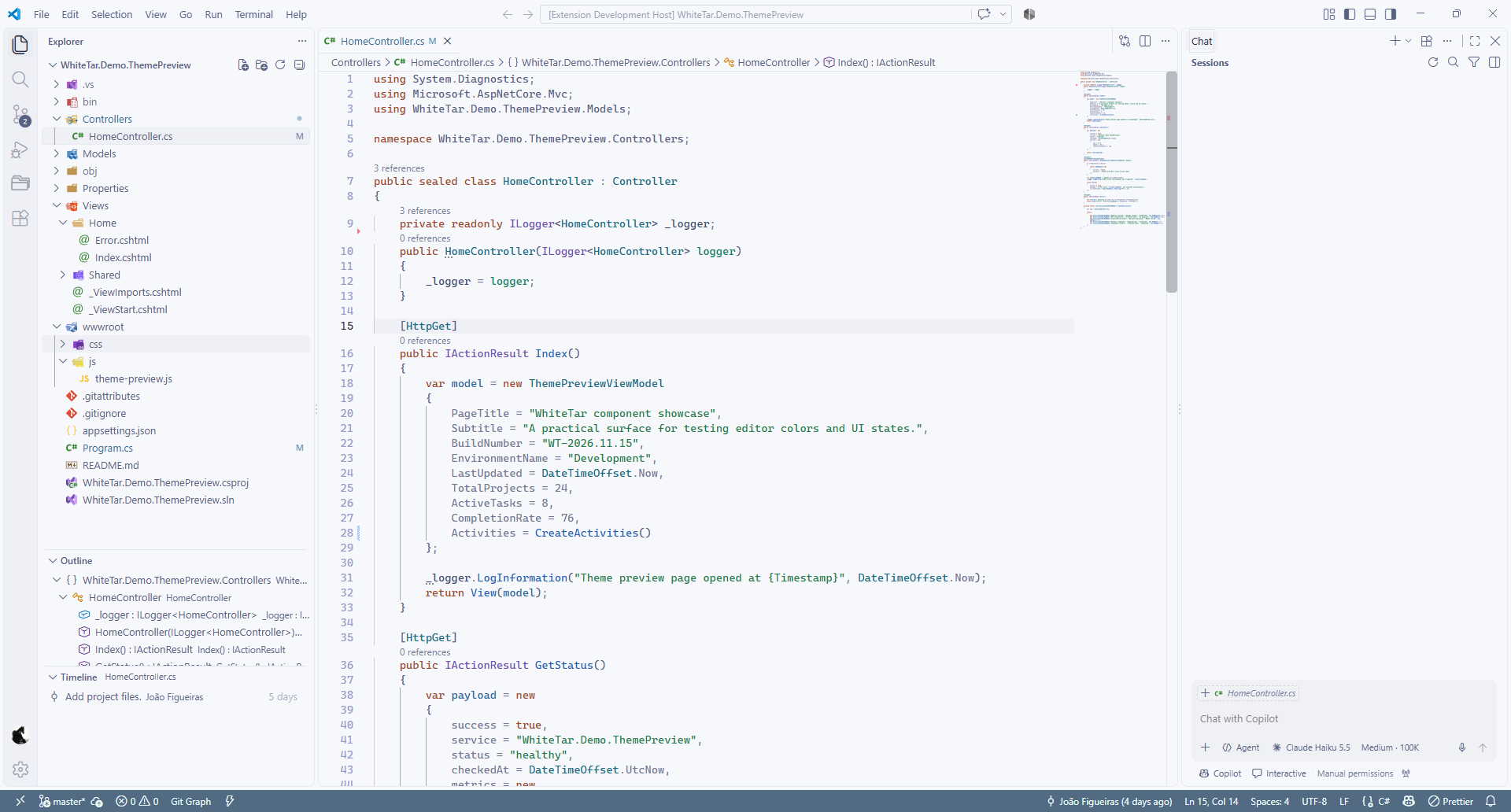
White Tar is a modern light theme for Visual Studio Code, featuring a refined color palette, balanced syntax highlighting, and carefully crafted UI colors for a clean, comfortable coding experience.
Installation
Launch VS Code Quick Open (Ctrl+P), paste the following command, and press enter.
White Tar is a carefully crafted light theme for Visual Studio Code, combining soft, cool-toned surfaces with expressive syntax highlighting and a cohesive visual identity.
Designed for developers who appreciate a clean workspace, White Tar brings clarity, balance, and personality to the IDE without unnecessary visual distractions.
Thoughtfully Designed
Soft, balanced colors — A refined light palette that feels comfortable and natural throughout the IDE.
Expressive syntax highlighting — Distinct, carefully selected colors for keywords, types, methods, strings, and more.
Consistent interface styling — Harmonized colors across tool windows, menus, dialogs, selections, and status indicators.
Carefully tuned contrast — A balance between readability and subtle visual elegance.
Built for everyday development — A focused environment for writing, exploring, and maintaining code.
Designed for Visual Studio Code
White Tar brings a distinctive light-mode experience to the modern Visual Studio Code interface, with a cohesive color palette and attention to the details that matter during daily development.