Manuscript Markdown
A specification, converter, and VS Code extension for roundtrip research paper and documentation editing between Markdown and Microsoft Word. Preserves change tracking, comments, tables, LaTeX equations, and citations in both directions, including Zotero bibliographic data.
Background
- Wanted plain-text editing for research papers
- Found CriticMarkup and a VS Code extension for it, which were used as starting points
- Needed a more comprehensive spec, and a converter, to collaborate with people who use Word and Zotero
What It Is
- A specification extending Markdown + CriticMarkup + Pandoc
- A converter (DOCX ↔ Markdown)
- A VS Code extension
New to VS Code or Markdown? The Getting Started guide walks you through everything from installation to your first document — no prior experience with code editors or plain-text tools required.
Quick Start
Installation
Install from the VS Code Marketplace or OpenVSX Registry. Alternatively, download the .vsix package from the releases page, or build from source.
Usage
- Annotations: Click Markdown Annotations in the toolbar or right-click menu for comment, highlight, addition, deletion, and substitution marks
- Formatting: Click Markdown Formatting for bold, italic, lists, headings, links, code, and table reflow
- DOCX Conversion: Right-click a
.docx file and select Export to Markdown, or use the Export to Word submenu to convert Markdown back to DOCX
- Navigation: Use
Alt+Shift+J / Alt+Shift+K to jump between changes
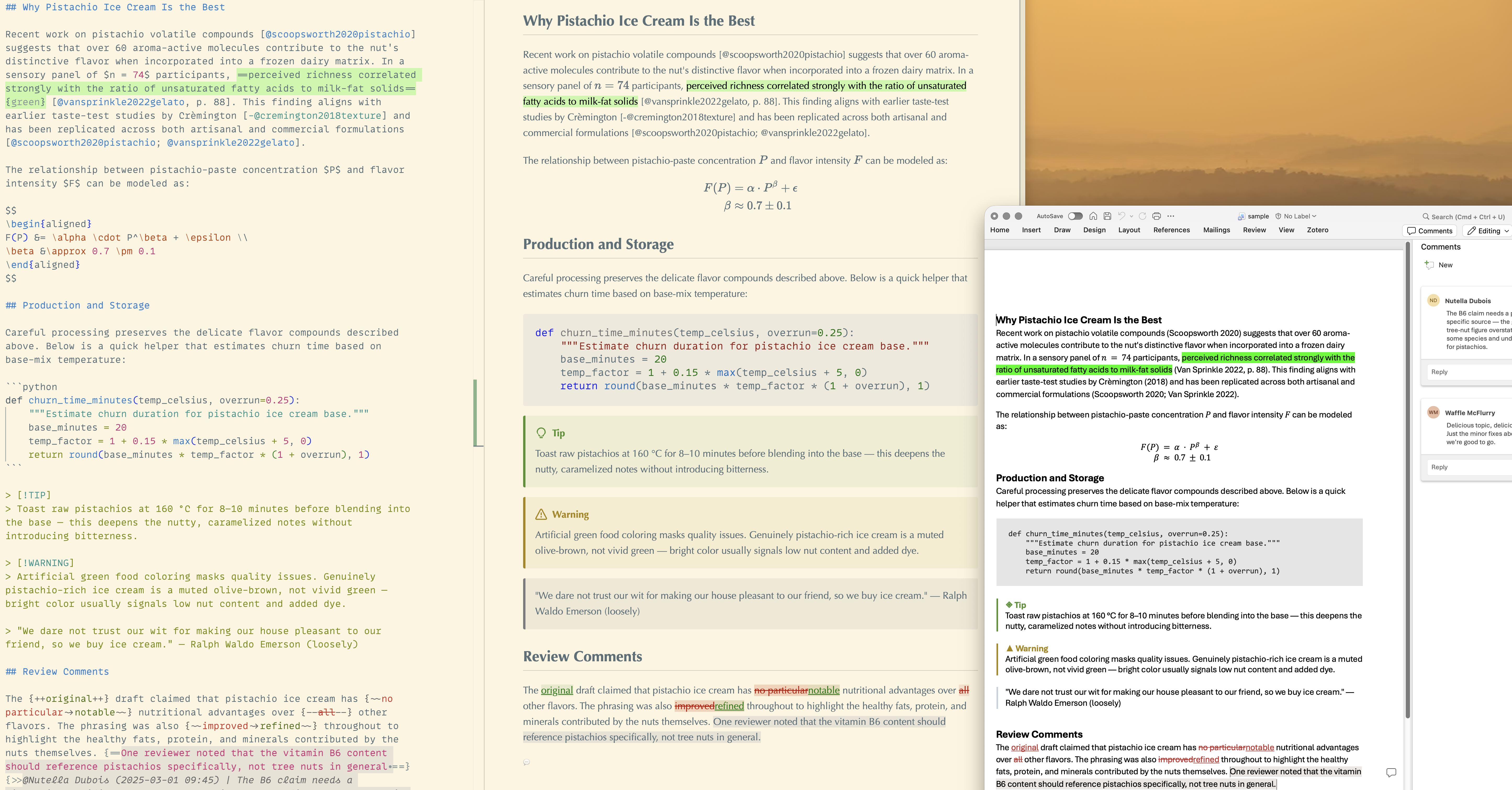
The sample file demonstrates citations, math, callouts, code blocks, comments, and track changes.
CLI
A standalone CLI tool is also available for terminal-based conversion. See CLI Tool for details.
manuscript-markdown paper.docx    # DOCX → Markdown
manuscript-markdown paper.md      # Markdown → DOCX
Features
Collaboration & Review
- CriticMarkup annotations: Track changes with comment attribution and timestamps
- Colored highlights: Highlight colors match Word's color palette
- Word count: Live word count in the status bar
- AI-friendly: Plain text in a git repository gives AI coding assistants full context — manuscript, bibliography, and revision history
Academic Writing
- Citations: Full Zotero roundtrip with BibTeX export and field code reconstruction
- Bibliographies: Format citations according to any CSL style (APA, Chicago, BMJ, IEEE, etc.); bundles the same 16 styles that ship with Zotero and downloads others as needed
- Equations: LaTeX equation support (inline and display math), automatically converted to/from Word OMML
- Rich Text Support: Markdown formatting toolbar for bold, italic, lists, headings, code, links, and tables
- Preview: Real-time syntax highlighting and Markdown preview rendering
- Embedded Tables: Embed tables from external .csv, .tsv, .xlsx, .dta, and .md files with a single directive
Document Conversion
- Import: DOCX to Markdown conversion preserving formatting, comments, change tracking, and citations
- Export: Markdown to DOCX export with template support
Known Limitations
- No marking comments as resolved (only delete)
- Multi-line patterns only render in the Markdown preview when starting at the beginning of a line (Word import/export and navigation are unaffected)
Documentation
License
This project is free and open-source software, licensed under GPLv3.
Contributions welcome!
| |


