Claude Persist
Persistent Claude Code sessions that survive window reloads. The conversation
runs in a background process on the server — a daemon — rather than inside your
editor window, so refreshing the page, closing the tab, losing the connection or
switching to your phone does not stop it.
Install from the VS Code Marketplace
or Open VSX
(code-server, VSCodium). Not affiliated with Anthropic.
Features
Sessions
- Reload-proof. Turns keep running with no window attached. Reload
mid-answer and the tab replays everything it missed, tool calls included.
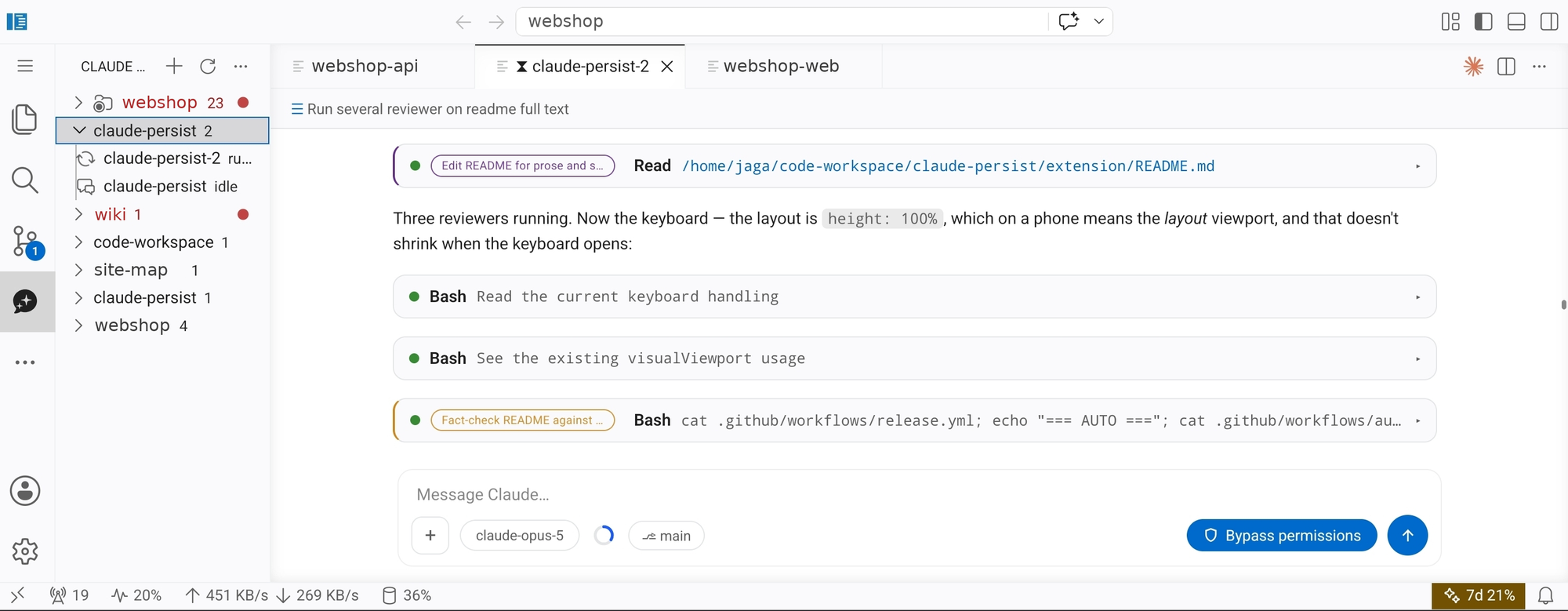
- Native editor tabs, reopened after a reload, plus a sidebar listing every
session grouped by folder with running/idle state and unread markers.
- Any session, from any window. One daemon per user, not per window.
- Survives its own upgrades. A turn in flight when the daemon restarts is
queued and resumed, not lost.
- Recovers from a stuck turn. Twenty minutes of silence from Claude counts
as a stall: the message is held and re-sent automatically, up to five
attempts, instead of leaving you staring at a spinner.
- Import your existing Claude Code conversations and carry on with their
full context.
- A newer build gets noticed. VS Code installs an update beside the running
one and loads it at the next window reload -- which, in a browser tab on a
phone, may never come. One window ran the same build for eight and a half days
with three newer ones sitting in the extensions folder, and nothing shipped in
them was ever reached. Nothing inside that window could tell: the daemon
agreed with the extension that spawned it, because both were the old build. So
the extensions folder is read directly, and a reload is offered.
- Sessions name themselves. A tab is named at the one moment nobody knows
what the work is -- when you create it. After the first turn the session works
out what it turned out to be about:
blooper2.0-preview becomes
blp|Video model receipt. Three letters for the project, then the work in at
most thirty-two characters.
- Fast to name, slow to rename. The first name comes at the first
finished turn. After that the name is looked at every fifteen minutes of
work in the tab, and a new name has to be proposed by two looks in a row
before the tab changes -- one detour is not the subject changing.
- A tab never goes back. A session covering two threads used to flip
between them all day ("Character sheet", "Zombie process cleanup",
"Character sheet"...): a quarter of all renames went back to a name the tab
had already had. The names a session has worn are remembered, and none of
them is taken again.
- The project tag is the consonants of the directory rather than its first
three letters, since
cld is only ever claude-persist while cla is also
claude-code, clang and classifier.
/clear and /new re-name the tab. They start a different conversation
in the same tab, so the name is owed again at the very next turn rather than
after two agreeing looks -- and it is read from the clear onwards, since
what came before is a conversation Claude can no longer see and is usually
most of the log.- No issue number. It rode in front of the name for a while and was
dropped: a number says which tab, never what it is about, and it cost a
third of the name to say it -- long enough to turn
Video continuation into
Video. The session is still read for its issues, and several at once still
tells the namer this is a run of fixes rather than one subject.
- The name comes from the branch first, because a person wrote that branch
to describe the change and it is the best evidence there is; then from what
the session keeps returning to, counted across its whole log; and last from
what you typed, which in a long session is mostly steering. Naming from
messages alone produced tabs called
Main merge and Backend mypy gate --
real things, and an hour of a week's work.
- Looking again is not renaming. Most of the time the work has simply carried
on, so the namer is told what the tab is called now and asked to keep it; a
rename that only rephrases is refused outright. Only a subject that has
become something else earns a new name.
- It runs on the session's own account through the same login your turns use --
no API key, no separate billing -- with tools switched off, which is what
makes it cost about a fortieth of an ordinary turn. Nothing is named while a
turn is parked on a rate limit, a name you set yourself is never replaced,
and a rename that only rephrases is declined so the strip does not shuffle
under you.
- Rename and delete sessions. Long histories load a window at a time.
The chat
- Streaming markdown, collapsible tool cards with IN/OUT, inline diffs for Edit
and Write, todo checklists, and clickable file paths that open in the editor.
- Permissions — Allow/Deny cards that survive a reload, plus a
bypass-permissions toggle you can flip mid-turn.
- Questions — when Claude asks you to choose, you get option cards, single
or multi-select, with a free-text alternative.
- Pinned prompts. An unanswered question or permission request stays beside
the composer while the conversation keeps scrolling, so you cannot miss it.
- Prompt bar. A sticky header names the exchange you are reading and
follows you as you scroll. Tap it for a list of every message in the loaded
history, and jump to one.
- Context ring — how full the context window is, against the model's real
size. Click it to have Claude summarise the conversation so far and free the
space back up.
- Model and reasoning-effort picker, per session, from the model pill —
the button showing the current model at the bottom of the chat.
- Interrupt a running turn from the working row, which also shows how long
the turn has been going. Finished turns show their duration and token count.
- Git branch and worktrees beside the composer: the branch name when there
is one place, a count when subagents have taken worktrees of their own. Tap it
for the list -- the worktrees this conversation's agents are working in, the
branch each sits on, and which one the session itself is in.
- Connection loss is visible. A heartbeat runs between the tab and the
daemon; when it stops answering, a border pulses around the chat until it
recovers.
Attachments
- Images are sent to Claude as images. PNG, JPEG, GIF and WebP up to 5 MB;
anything larger or of another type is attached as a file path instead.
- Add files by dragging them in, pasting from the clipboard, or from the
+ menu, which can also browse files on the server. Uploads from the browser
are chunked, show progress, and are capped at 10 MB.
- Inline previews with a full-size lightbox, including for image paths you
type or that a tool returns.
- Video previews. An
.mp4, .webm or .mov shows its first frame with a
play badge; pressing it opens the clip full-size and starts it. Nothing plays
on its own, so a transcript full of clips stays quiet. Works for a hosted
https:// clip as well as a file on disk.
- Download what a turn produced. An archive, PDF, spreadsheet, dump or log
named in the chat --
.zip, .tar.gz, .pdf, .csv, .xlsx, .log,
.sqlite and the like -- gets its name, its size and a ⤓. Pressing it sends
the file to your browser's downloads, which is the only place a phone can put
it. The panel cannot download anything itself: its iframe is sandboxed without
allow-downloads, so the extension serves the bytes on a loopback port and
the editor opens that. Files stream, so size is not a limit.
- Swipe between pictures. With one open, swipe left or right -- or use the
arrow keys -- to move through every picture in the transcript, in the order
they appear. The ends hold rather than wrapping.
- Pinch to zoom an opened picture on a phone, drag to pan, double-tap to
toggle.
- Screenshots are scaled only when they must be. Past twenty images, the API
applies a stricter per-image limit to every image in the request -- including
ones resent from earlier turns -- and rejects what exceeds it. Uploads keep
their full resolution until that threshold is in reach, then are resized to
fit it.
Accounts and rate limits
- Several accounts, switched from the model pill, each showing the limit
that will bite it first —
5h 12%, 7d 88% — so you can see which has room
before switching. Only the account in use has a live reading; the others carry
theirs with its age, since usage can only be read from a running session.
- Sign in inside the editor — a link to open and a box for the code. No
terminal, and it works over code-server, where a callback to
localhost
cannot.
- A dead login is visible before you pick it. An expired token is still on
disk, so an account with one looked as healthy as any other: rotation knew and
routed around it, but choosing it by hand switched in silence and the next
message failed. Such an account now reads
serokell — login expired in the
menu, and choosing it still switches -- that is what you asked for -- while
saying so and offering the sign-in that fixes it.
- Rate limits in the status bar, with the reset time in the tooltip.
- Automatic rotation. Hit a limit and your message is held, the next
account with room is activated, and the conversation resumes on its own. If every
account is spent it waits for the soonest reset and resumes then. Accounts
sharing one login count as one, since they share the quota. An account whose
login has expired is treated the same way -- skipped, and the conversation
carries on elsewhere -- since unlike a limit a dead token never comes back on
its own.
- A turn that could not start is retried, not reported. Occasionally the
bundled
claude binary fails to spawn -- it is 215 MB, and a momentary fork
failure is enough. The SDK reports that as a libc mismatch whatever the cause,
because it never reads the errno, which sent one glibc host hunting a musl
dynamic loader it does not need. The turn is retried every 20 seconds, five
times, and the notice says what is actually known: nothing was sent, so
nothing is half-done.
- An overloaded server is waited out, not given up on. A turn killed by a
529 used to stop where it stood until somebody came back and typed
continue. It now resends "restart and continue" every two minutes for up to
twelve hours, which covers an overnight run. No account is rotated for it: an
overload is server-wide, so a switch cannot help and would spend one a session
that really is rate limited needs.
- It says whose problem it is. While a turn is parked, and only then, the
panel asks status.claude.com once a minute. An
open incident is named -- "Elevated errors for multiple models" (major),
since 13:26 UTC -- so a failed turn reads as an outage with a scope rather
than something you did to your quota. When the incident closes the turn
resumes immediately instead of waiting out its interval. The page informs and
never gates: short overloads are never posted, an incident can narrow to one
model while the page stays green, and sending the message again is the only
real test of whether it will go through.
- Transcripts follow you between accounts, so switching mid-conversation
continues rather than starting over.
- One set of rules. Your
CLAUDE.md and skills apply to every account.
Subagents
- A live count beside the composer while subagents are working. Open it for
the list, and stop any one of them.
- Every message is badged with the subagent that wrote it. Colours are
assigned in order of appearance and stay put across a reload, so parallel
agents writing into one transcript stay legible.
On a phone or tablet
- Enter makes a new line on a touch keyboard, where it is the only key that
can. Cmd/Ctrl+Enter sends. On a hardware keyboard Enter sends, as usual.
- Swipe left and right to move between editor tabs.
- The chat resizes itself to whatever the on-screen keyboard leaves visible.
(Android plus code-server needs a one-line server-side patch as well; see the
repository README.)
Getting started
- Create a session — the Claude Persist icon in the activity bar, or
Claude Persist: New Session in the Command Palette. Pick the folder to
work in.
- Sign in, if you have never used Claude Code on this machine. Run
Claude Persist: Add Account (Sign In), or open the model pill at the
bottom of the chat and choose Log in to another account… — despite the
name, that is also how you add your first. You get a link and a box to paste
the code into. An existing Claude Code login is picked up automatically.
- Type a message.
There is also a Get Started with Claude Persist walkthrough in VS Code's
Welcome page.
Requirements
VS Code 1.85 or newer, or a code-server built on it.
A Claude account, or ANTHROPIC_API_KEY. On Claude Pro or Max there are
no API charges.
Claude Code itself — but only on platforms without a bundled build:
| Platform |
What you need |
| Linux x64 and arm64, macOS Intel and Apple silicon, Windows x64 |
Nothing. The Claude Code runtime is bundled. |
| Anything else: Alpine, ARM Windows, 32-bit |
Install Claude Code from https://claude.com/download or with npm i -g @anthropic-ai/claude-code, then reload the window. |
A folder you trust. The extension runs Claude against your files, so it
stays disabled in Restricted Mode, and in virtual workspaces where there is
no real working directory.
Settings
| Setting |
Default |
What it does |
claudePersist.switchAccountOnLimit |
true |
On a rate limit, move to the next account and resume. Applies to every session at once, and the new account starts with a cold prompt cache. |
claudePersist.defaultModel |
(empty) |
Model new and imported sessions start with. |
claudePersist.extraModels |
[] |
Extra model ids to offer in the picker, beyond the ones the SDK reports. |
claudePersist.connectionIndicator |
true |
Pulse a border around the chat when it loses contact with the server. |
claudePersist.daemonEntry |
(empty) |
Path to a daemon build, for developing this extension. Leave empty otherwise. |
Commands
All under the Claude Persist category in the Command Palette:
New Session, Open Session, Add Account (Sign In), Import Claude Code Session,
Rename Session, Delete Session, Refresh Sessions.
Troubleshooting
| Symptom |
What to do |
| The extension does not appear at all |
The folder is untrusted. Trust it, or open a different folder. |
| "Claude Code was not found on this machine" |
Install it (see Requirements) and reload the window. |
| Messages fail and the account menu says "not signed in" |
Run Claude Persist: Add Account (Sign In). |
| "OAuth session expired" |
The notice carries a Sign in to "" button — one click, no name to invent. |
| "Could not start claude-persist daemon" |
Look at ~/.claude-persist/daemon.log, and open an issue with what it says. |
| "An outdated daemon is running" |
The message names the process id. Stop it and reload the window. |
Sessions, logs and uploads live in ~/.claude-persist/; removing it discards
your conversations. Logins live in ~/.claude and ~/.claude-accounts and are
not touched by that.
Chat transcripts are stored unencrypted, so treat anything you paste into a
conversation as written to disk.
Source, architecture notes and issues:
https://github.com/jagajaga/claude-persist
| |

