
Auspice VSCode
Explore local phylogenetic datasets with the full Auspice viewer, running serverless inside VS Code. Dataset files are read directly through the editor and never leave your machine.
Installation
| Visual Studio Marketplace |
GitHub Releases |
 |
 |
Alternatively, search in the VS Code Extensions view for:
@id:ivan-aksamentov.auspice-vscode
To install from the command line:
code --install-extension ivan-aksamentov.auspice-vscode
To install the VSIX downloaded from GitHub Releases or built locally, run:
code --install-extension auspice-vscode.vsix
Alternatively, open the Extensions view, select Views and More Actions..., choose Install from VSIX..., and select the file.
Features
- Trees: Auspice v2
.auspice.json / .auspicejson, Newick .new / .nwk / .newick, and legacy v1 _meta.json + _tree.json pairs, including gzip variants.
- Sidecars: sibling
_tip-frequencies, _measurements, and _root-sequence files attach automatically.
- Metadata: apply CSV, TSV, XLSX, or node-data JSON to the active view.
- Comparison and narratives: open a second tree in a tangle view, or render a local Markdown narrative with its referenced datasets.
- Full sidebar: the stock Auspice controls for color, filters, dates, animation, layout, labels, and panels. The tab on its edge folds it away and back; the tree always fills the space beside it.
- Tree first: a viewer starts with only the tree. The sidebar has a toggle for each other panel of the dataset: Map, Entropy, Frequency, and Measurements.
- Downloads: the SVG, JSON, and NWK buttons above the tree save the current view as a figure, an Auspice dataset, or a Newick tree. The save dialog proposes a file next to the dataset, named after it.
Each primary dataset opens in its own tab with an independent store and file lifecycle.
Usage
Command palette -- run Auspice: Open in Auspice to open the active file, or Auspice: Toggle Auspice to switch the active file between the viewer and the text editor.
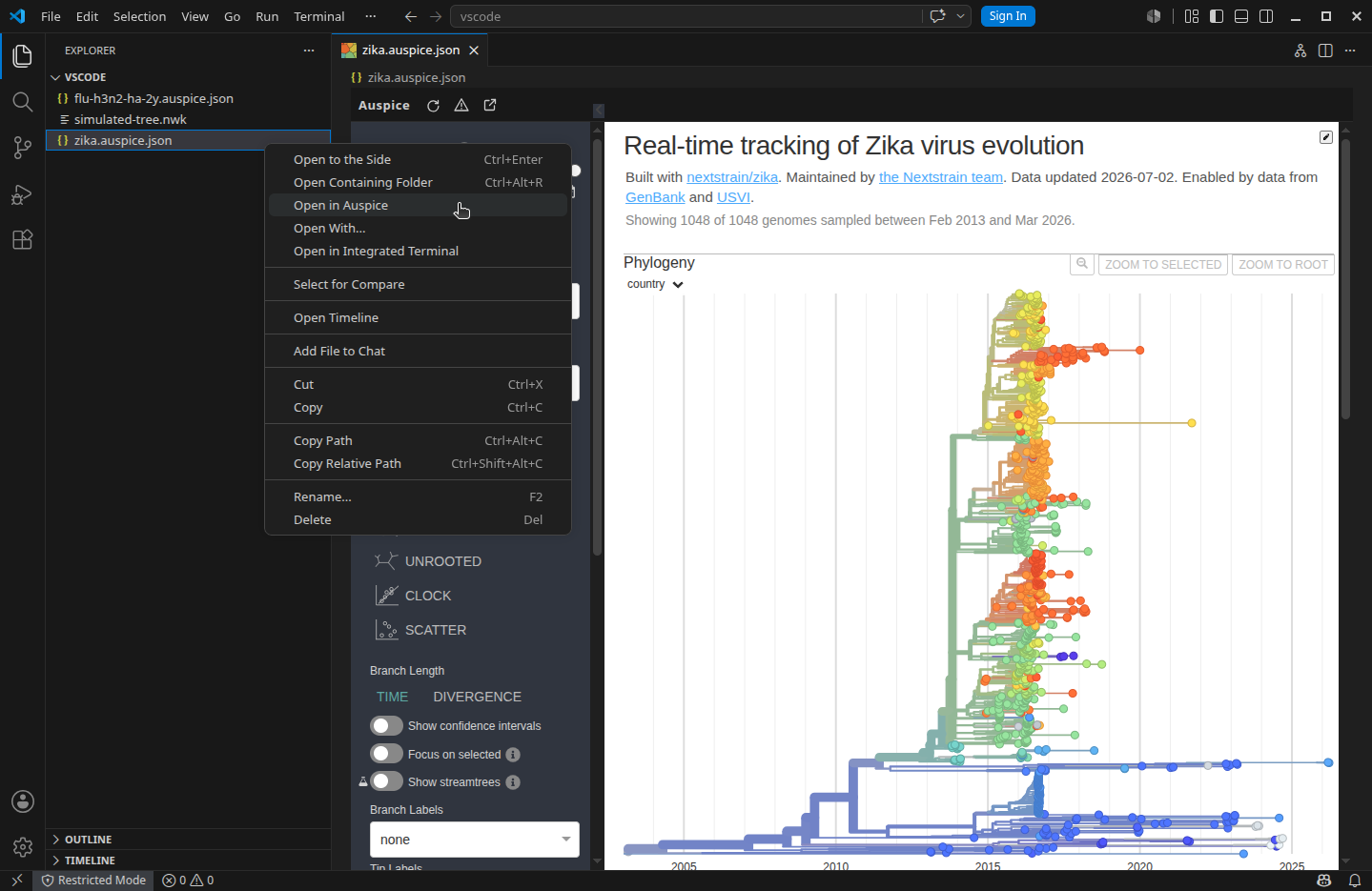
File context menu -- right-click a supported file in the Explorer sidebar and choose Open in Auspice.
Editor title button -- when a supported file is open, click the tree icon in the editor title bar to toggle between the viewer and the text editor.
Reopen with -- for any supported file, use View -> Reopen Editor With... and select Auspice Tree Viewer.
Default association -- to always open dedicated file types in the viewer, add to your settings:
"workbench.editorAssociations": {
  "*.auspice.json": "auspiceVscode.viewer",
  "*.auspicejson": "auspiceVscode.viewer",
  "*.auspice.json.gz": "auspiceVscode.viewer",
  "*.auspicejson.gz": "auspiceVscode.viewer",
  "*.nwk": "auspiceVscode.viewer",
  "*.newick": "auspiceVscode.viewer",
  "*.nwk.gz": "auspiceVscode.viewer",
  "*.newick.gz": "auspiceVscode.viewer",
}
All settings live under auspiceVscode.* and can be set globally or per workspace/folder:
{
  // Attach exact sibling sidecars and legacy v1 tree/meta pairs to the primary dataset.
  //   true [default]: discover and attach companions automatically
  //   false: open only the file you selected
  "auspiceVscode.companionDiscovery": true,

  // Panels shown when a tab is opened or reloaded. Narratives always show the panels of each slide.
  //   "tree" [default]: show only the tree; the sidebar keeps a toggle for each other panel of the dataset
  //   "dataset": show the panels that the dataset shows by default
  "auspiceVscode.initialPanels": "tree",

  // Show a performance advisory when a tree exceeds this many tips.
  //   integer >= 0 [default 5000]: tip-count threshold; 0 disables the advisory
  "auspiceVscode.largeTreeTipAdvisory": 5000,

  // Show maps and let background tiles load from OpenFreeMap (tiles.openfreemap.org). Dataset files always stay local.
  // Maps need WebGL; a window without it (e.g. with hardware acceleration disabled) hides the map and reports why.
  //   false [default]: maps off; no external tile requests
  //   true: maps on; background tiles load from OpenFreeMap
  "auspiceVscode.mapsEnabled": false,

  // Keep background tabs (open in the editor but not the one currently shown) fully alive, preserving each view's zoom, filters, and layout so switching back is instant. Takes effect after Reload Window.
  //   true [default]: keep background tabs alive
  //   false: rebuild a tab's view from scratch when it is shown again
  "auspiceVscode.preserveBackgroundViews": true,

  // Maximum size (MiB) of each input and of the combined expanded session data.
  //   integer 1-1024 [default 256]
  "auspiceVscode.resourceLimitMiB": 256,

  // Initial sidebar state for new or reloaded tabs.
  //   "open" [default]: open the Auspice controls when a viewer starts
  //   "closed": start with the controls folded
  //   "dataset": use the dataset's declared sidebar default
  "auspiceVscode.sidebarInitialState": "open",

  // Response when an open input changes on disk.
  //   "ask": ask before replacing the current view
  //   "reload" [default]: reload changed inputs automatically
  //   "keep": keep the current view and show a stale-data indicator
  "auspiceVscode.staleFileBehavior": "reload",

  // Viewer render scale.
  //   "auto" [default]: render at 100% regardless of editor zoom
  //   number: pin an explicit scale (1 follows editor zoom, 0.8 = 80%)
  "auspiceVscode.zoom": "auto",
}
Requirements
VS Code 1.74.0 or newer.
Maintenance
Building, quality checks, testing, and releasing
Building from source
bun install
bun run package
bun run build rebuilds the extension host and the bundled Auspice client. bun run package writes auspice-vscode.vsix.
Linking a development build
Compile the current checkout and link it into the default VS Code extensions directory:
bun run link:vscode
The command creates the stable symlink ~/.vscode/extensions/ivan-aksamentov.auspice-vscode, replacing older symlinks for the same extension. It stops without modifying regular extension directories, which should be uninstalled through VS Code first. Set VSCODE_EXTENSIONS_DIR when VS Code uses a different extensions directory. Run Developer: Reload Window afterward to load the build.
Quality checks
| Command |
Purpose |
bun run check |
Run all static checks (formatting, lint, typecheck) |
bun run fmt |
Auto-format with oxfmt |
bun run fmt:check |
Check formatting without writing |
bun run lint |
Lint with oxlint |
bun run lint:fix |
Lint and auto-fix |
bun run typecheck |
Type-check with tsc --noEmit |
Testing
| Command |
Purpose |
bun run test |
Run the full validation suite (unit, browser, VS Code host) |
bun run test:unit |
Unit tests only |
bun run test:browser |
Browser tests only |
bun run test:vscode |
VS Code host tests only |
Releasing
- Run
bun run check and bun run test.
bun run release <patch|minor|major> -- bumps the version, commits, and tags.git push --follow-tags -- the v* tag triggers release.yml, which builds the VSIX and publishes to GitHub Releases and the VS Code Marketplace.
VS Code Marketplace setup (one time)
- Create a publisher at Visual Studio Marketplace whose ID matches
publisher in package.json (ivan-aksamentov).
- Sign in to Azure DevOps with the same Microsoft account and create a personal access token with Organization: All accessible organizations and scope Marketplace: Manage.
- Add the token as
VSCE_PAT under the repository's Settings > Secrets and variables > Actions. Rotate before expiry.
License
Extension code is licensed under the MIT License (LICENSE). The bundled Auspice client remains under AGPL-3.0-only (assets/licenses/AUSPICE-LICENSE.txt), and bundled phylotree code under its own terms (assets/licenses/PHYLLOTREE-LICENSE.txt).
| |

