Git Branches Explorer



Overview
The intention behind this extension was to bring the Branches / Tags panel known from full Visual Studio directly into VS Code — while integrating it seamlessly with the native Source Control view rather than replacing it.
Visual Studio (full IDE) — the inspiration:
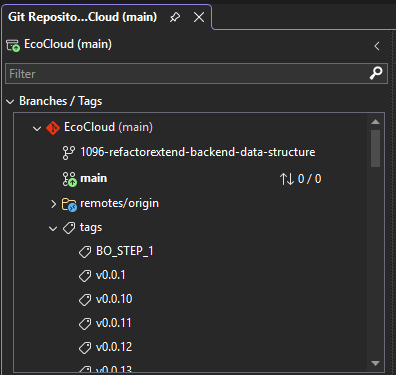
The full Visual Studio IDE provides a dedicated Branches / Tags tree inside its Git Repository window, giving developers a structured, at-a-glance overview of all local branches, remotes and tags in one place. This extension recreates that experience inside VS Code.
Git Branches Explorer — integrated with VS Code Source Control:
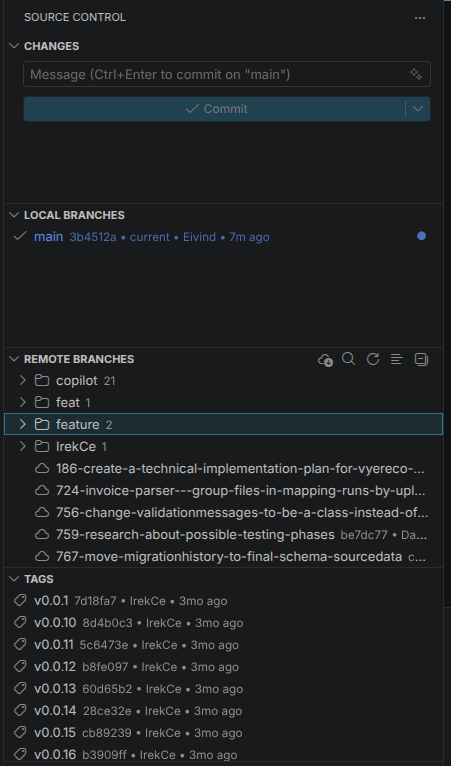
Three dedicated sections appear directly below the native Changes area of the Source Control view, so all Git context stays in one panel.
Installation
Install from VS Code Extensions (search for "Git Branches Explorer") or:
code --install-extension irek-cicherski.git-branches-explorer
View on VS Code Marketplace
Sections
Local Branches
Lists all local branches (refs/heads). The currently checked-out branch is marked with ✓ and shown at the top. Each row displays the short commit hash, last-commit author and a relative date (e.g. 7m ago). For the current branch, ↑ahead / ↓behind counts against the upstream are shown inline. Inline action icons on hover let you checkout, push, pull, or delete a branch without leaving the panel.
Remote Branches
Lists all remote-tracking references (refs/remotes/*). When more than one remote is configured, branches are automatically grouped by remote name — each group acts as a collapsible parent node. Each branch shows its short commit hash, author and relative date. Inline actions provide one-click checkout (creates a local tracking branch) and delete on remote. A per-group Fetch action is available both inline and in the context menu.
Lists all tags (refs/tags) with their short commit hash, tagger and relative date. Inline and context-menu actions cover checkout, cherry-pick, push tag, delete locally and delete on remote.
Highlights
- Inline action icons on hover (checkout / delete / push / pull) per ref.
- Quick Switch Quick Pick across all local + remote branches and tags. Default keybinding
Ctrl+Alt+B (Cmd+Alt+B on macOS).
- Cherry-pick from any branch, remote branch or tag (uses
Repository.cherryPick if available, falls back to git.run(['cherry-pick', …])).
- Per-view filter shown in the tree's
message area.
- Lazy ahead/behind for non-current local branches via
Repository.getBranch(), cached per repo, invalidated on state change.
- Last-commit author + relative date appended to each row's description, fetched lazily via
Repository.getCommit(), keyed by commit hash (cache survives state changes).
- Group remotes automatically when more than one is configured; per-group fetch.
Title-bar actions
| View |
Actions |
| Local Branches |
Create Branch • Quick Switch • Filter • Refresh |
| Remote Branches |
Fetch (all) • Filter • Refresh |
| Tags |
Create Tag • Filter • Refresh |
| Item |
Inline |
Menu |
| Local branch (other) |
Checkout, Delete |
Checkout • Merge • Rebase • Cherry-pick • Publish • Rename • Delete • Copy Name |
| Local branch (current) |
Push, Pull |
Push • Publish • Pull • Rename • Copy Name |
| Remote group |
Fetch |
Fetch (this remote) |
| Remote branch |
Checkout, Delete on Remote |
Checkout (tracking) • Merge • Rebase • Cherry-pick • Delete on Remote • Copy Name |
| Tag |
Checkout, Delete |
Checkout • Cherry-pick • Push Tag • Delete (Local) • Delete (Remote) • Copy Name |
Architecture
- Contributes three views to the built-in
scm view container.
- Uses official Git extension API (
vscode.git, version 1) — no shelling out.
- One
TreeDataProvider per view, filtering Repository.state.refs by RefType.
- Refresh on
Repository.state.onDidChange plus toolbar actions.
- Optional low-level
Repository.git.run() escape hatch for operations not exposed by the typed API (used as fallback for cherry-pick).
Develop
cd Src/Tools/VSCodeBranchesExplorer
npm install
npm run build       # bundles to dist/extension.js
npm run compile     # type-check only
# F5 in VS Code → "Run Extension"
Package as .vsix:
npx @vscode/vsce package
Roadmap
- Worktree awareness (when
vscode.git exposes it)
- Reset HEAD (soft / mixed / hard) on a selected ref
- Show last-commit author + date as item description (cached)
- Compare two branches (open
git.diff view)

