Skip to content
| Marketplace
Sign in
Visual Studio Code>SCM Providers>Interactive Git LogNew to Visual Studio Code? Get it now.
Interactive Git Log

Interactive Git Log

interactive-smartlog

interactive-git-log.com
|
11,358 installs
| (9) | Free
Visual Git GUI for VS Code — git graph, drag-and-drop rebase, branch management, and PR integration
Installation
Launch VS Code Quick Open (Ctrl+P), paste the following command, and press enter.
Copied to clipboard
More Info

Interactive Git Log

Stop switching between your editor and the terminal.
IGL puts your entire Git workflow — commits, branches, rebases, and PR status — into a single interactive panel inside VS Code.


Interactive Git Log — commit workflow


Why developers switch to IGL

  • One-click commits — stage, write a message, and commit without leaving your code
  • Visual branch graph — see exactly where your branch diverges and what's ahead
  • Drag-and-drop rebase — reorder, squash, and drop commits by dragging them
  • Live uncommitted changes — always know what's modified, staged, and untracked
  • PR status at a glance — see review state and CI checks inline on each branch
  • 100% free — no paywalls, no "Pro" tier, no feature gates

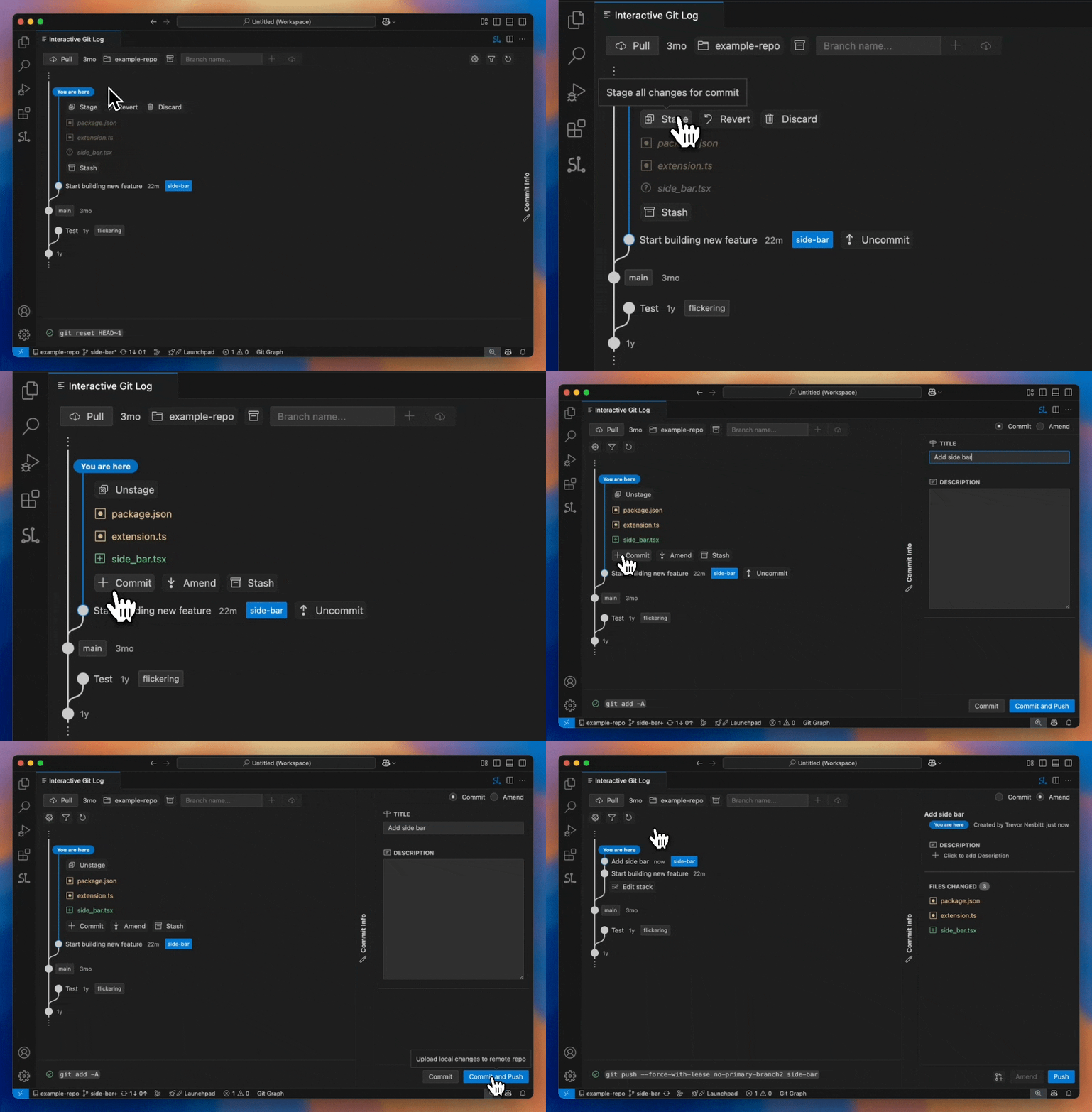
Commit in seconds

Uncommitted changes appear automatically — always in sync with git status. Click Commit or Amend, write your message in the side panel, and you're done.

No terminal. No context switching. No friction.

Commit flow

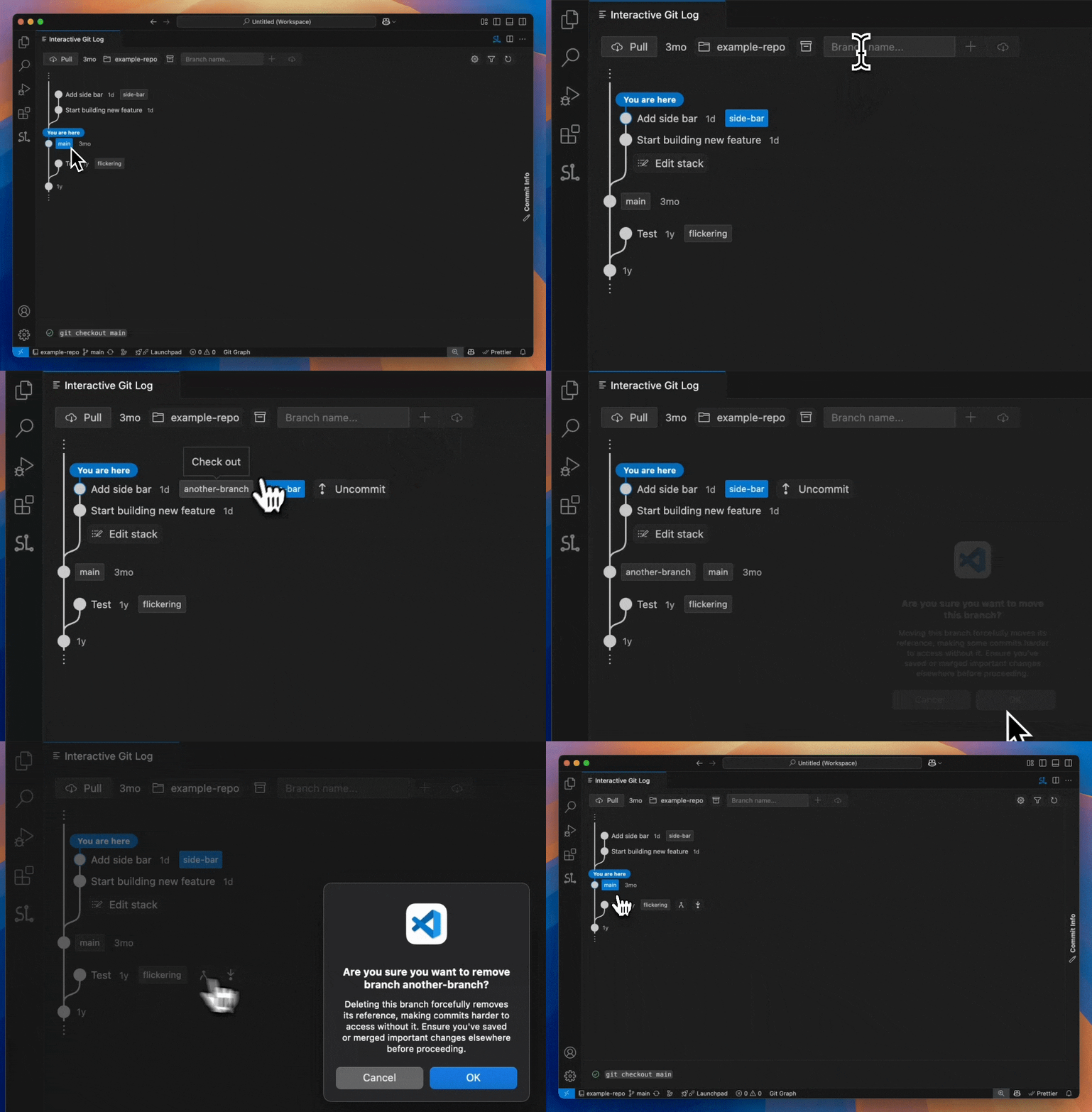
See your branches clearly

IGL renders a clean graph starting where your branch diverges from the remote default (origin/main, origin/master, etc.).

  • Click any branch tag to check it out instantly
  • Create, delete, and fetch branches from the panel

Branch management

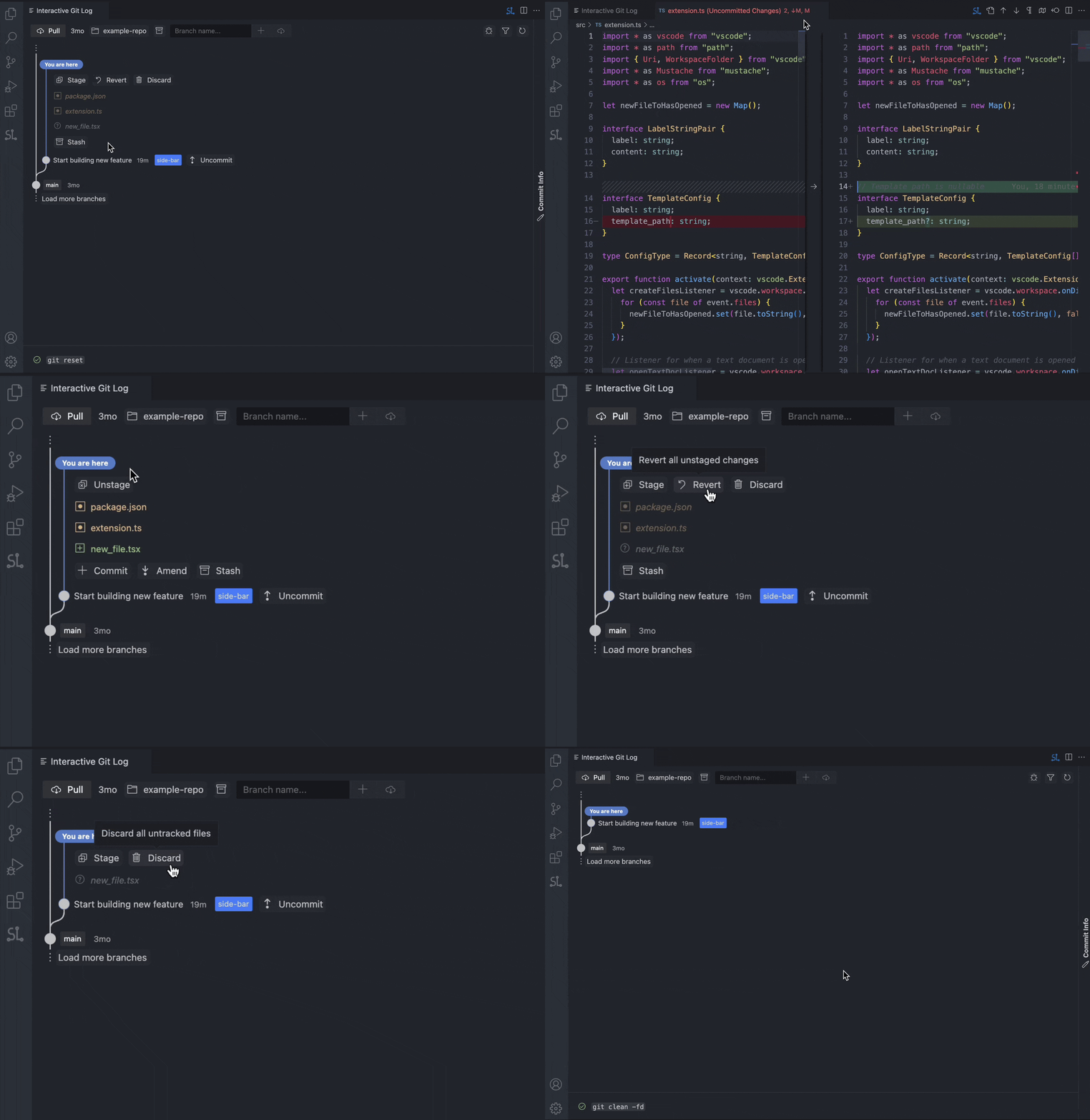
Stage, unstage, and revert — inline

Every uncommitted file is listed with color-coded status. Hover any file for one-click actions:

  • Stage / Unstage a single file
  • Revert changes to restore the last committed version
  • Open the file directly in your editor

Uncommitted changes

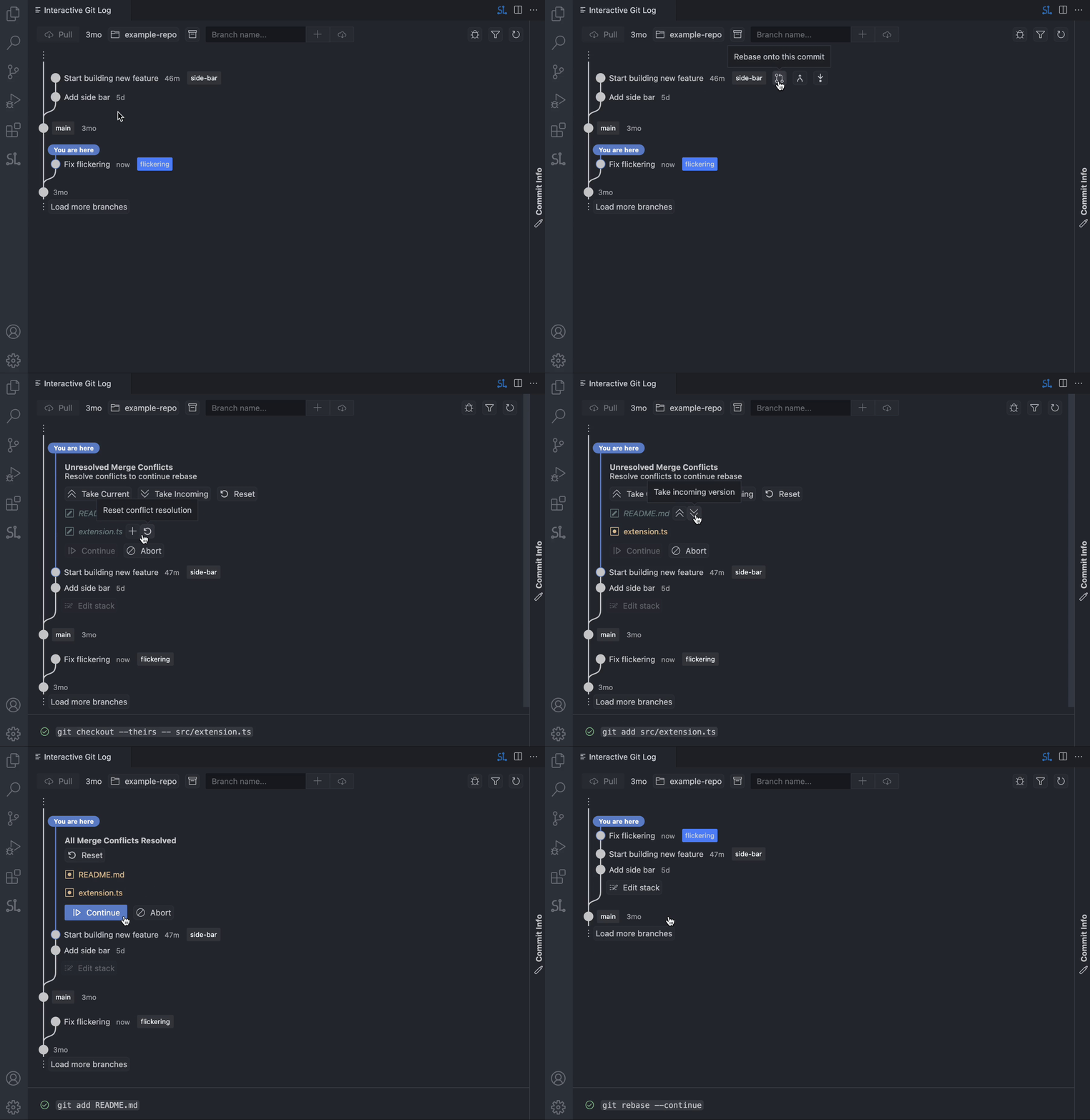
Rebase with confidence

Hover a branch and hit Rebase. If conflicts arise, they surface directly under Uncommitted Changes — resolve inline, mark as resolved, and continue. IGL shows the full Git command so you always know what's happening.

Rebase workflow

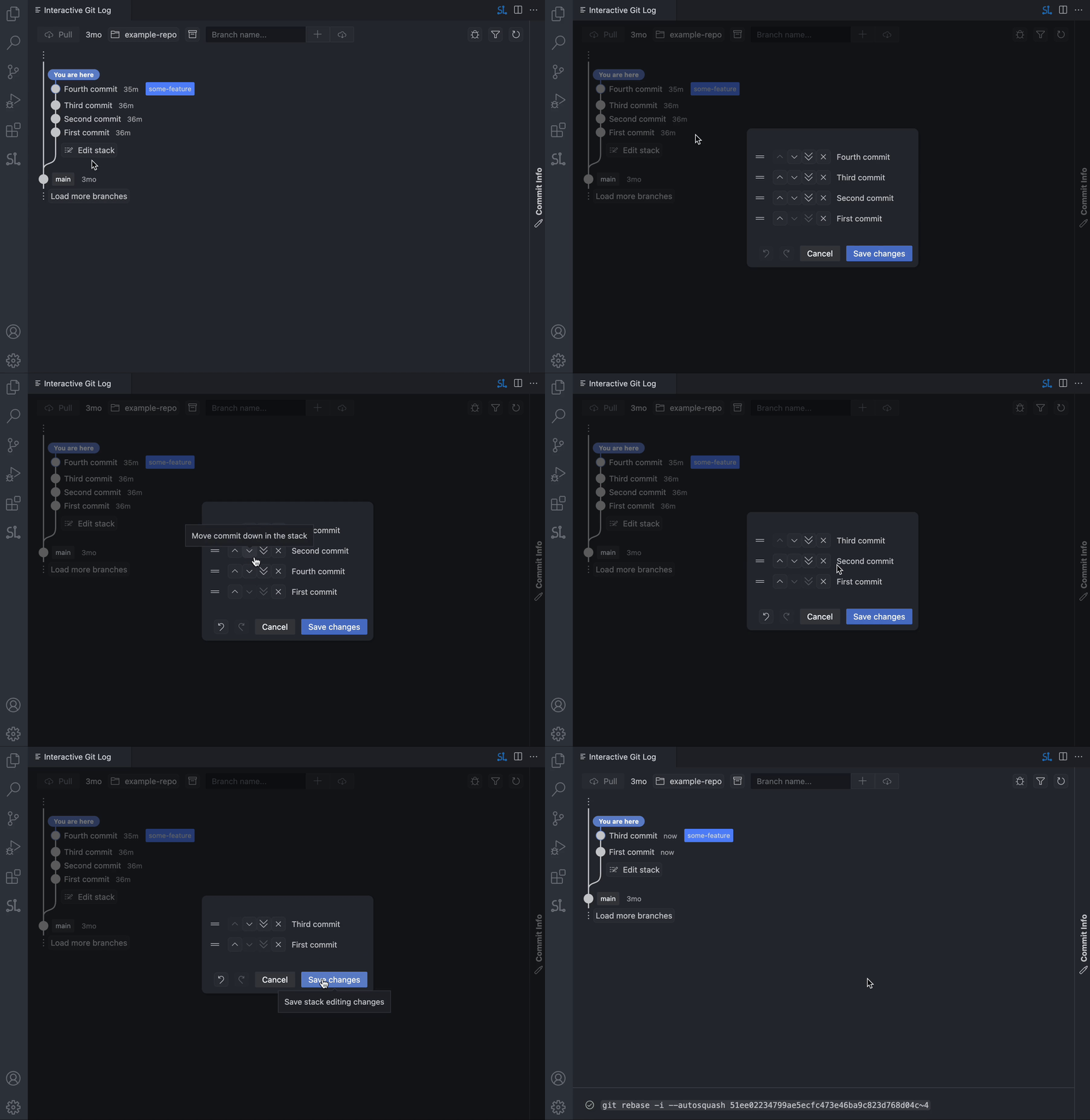
Reshape your commit history

When a branch has multiple commits, click Edit stack to open the interactive editor:

  1. Drag to reorder commits
  2. Squash adjacent commits together
  3. Drop commits you don't need
  4. Hit Save — IGL runs the rebase for you

Interactive rebase


How IGL compares

IGL GitLens Git Graph
Commit & amend from the graph view Yes No No
Stage / unstage / revert individual files Yes No No
Drag-and-drop commit reordering Yes Yes No
Visual rebase with conflict resolution Yes Partial Partial
Inline PR & CI status Yes No No
Fully free — no paid tier Yes No Yes

Supported languages

IGL is available in 11 languages:

  • English
  • Deutsch (German)
  • Español (Spanish)
  • Français (French)
  • Italiano (Italian)
  • 日本語 (Japanese)
  • 한국어 (Korean)
  • Português brasileiro (Brazilian Portuguese)
  • Русский (Russian)
  • Українська (Ukrainian)
  • 简体中文 (Simplified Chinese)

IGL automatically matches your VS Code display language. You can also change the language in the IGL settings menu.


Getting started

  1. Install the extension from the VS Code Marketplace
  2. Open a Git repository in VS Code
  3. Click the IGL icon in the Activity Bar
  4. Optional: Run gh auth login in your terminal to enable PR status features

Privacy & security

IGL does not handle, store, or transmit credentials. Authentication is delegated entirely to tools you already trust:

  • Git for all repository operations
  • GitHub CLI (gh) for PR status checks (only when you view PRs)
  • Telemetry via Microsoft's official vscode-extension-telemetry (can be disabled in VS Code settings)

License & attribution

Built on code from Sapling SCM by Meta, licensed under MIT. Grateful to the Sapling team for their excellent work on the original Interactive Smartlog interface.

  • Contact us
  • Jobs
  • Privacy
  • Manage cookies
  • Terms of use
  • Trademarks
© 2026 Microsoft