Claude Code Insights
A VS Code companion for Claude Code. See your usage, watch background agents work, browse every session, and approve commands — all without leaving the editor.
- Usage & rate limits in the status bar and sidebar
- Claude Lens — live view of background agents, conversation history, and search across every session
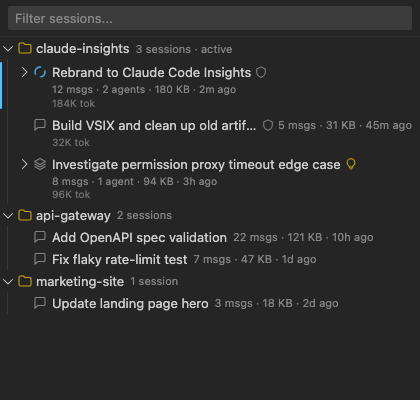
- Session browser — a tree of every Claude Code session in every workspace
- Permission proxy — approve background-agent commands from VS Code instead of the terminal
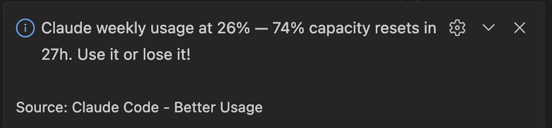
- Smart warnings — heads-up before you hit a limit, leave the week with credit unused, or bloat your context window
Previously published as Claude Code - Better Usage. Relaunched as Claude Code Insights at 0.1.0.
Install
- Install from the VS Code Marketplace (or
code --install-extension ijuani.claude-code-insights-vscode).
- Sign into Claude Code on the same machine — the extension reuses your existing OAuth token (Keychain on macOS,
~/.claude/.credentials.json elsewhere).
- Open any folder. Usage appears in the status bar within seconds; the Claude Sessions Activity Bar icon hosts the Session tree, Claude Lens, and Usage panels.
The permission-proxy hook installs itself into ~/.claude/hooks/ and registers in ~/.claude/settings.json on first activation. No manual setup.
Usage monitoring
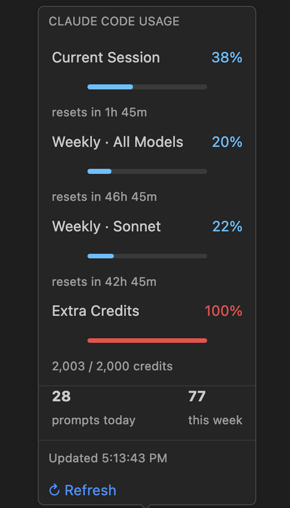
The status bar shows current usage, a countdown to reset, and weekly usage. Color shifts from blue (< 75%) to amber (≥ 75%) to red (≥ 90%); the background switches to VS Code's warning/error colors at the same thresholds.

Hover for a tooltip with per-limit progress bars and activity stats. Click to open the full sidebar panel with detailed breakdowns.
The sidebar covers three things:
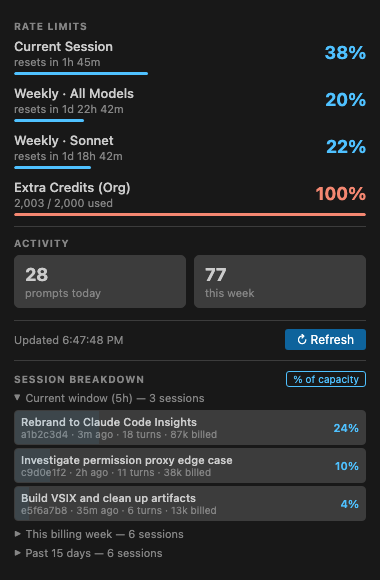
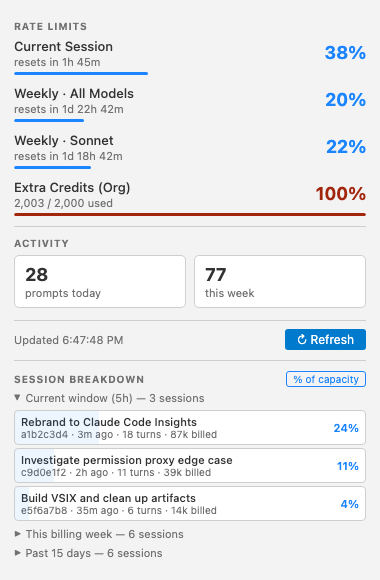
- All four usage buckets — current 5-hour session, the 7-day all-models window, the 7-day Sonnet window, and any extra/org credits.
- Prompt counts today and this week, read from
~/.claude/history.jsonl.
- Per-session token stats (input, output, cache read/write, turns) for every session touched in the last 15 days.
| Bucket |
Window |
| Current Session |
5-hour rolling |
| Weekly · All Models |
7-day |
| Weekly · Sonnet |
7-day Sonnet-specific |
| Extra Credits (Org) |
Monthly add-on credits |
Usage is fetched from the Anthropic API and cached at ~/.claude/claude-code-insights-cache.json (90-second TTL), so multiple VS Code windows share one cache. On HTTP 429 the extension backs off for 5 minutes. Polling interval is configurable (60 seconds by default).
Smart warnings
Warnings fire on activation, then again at +1 hour and +2 hours (capped at 3 per type per session):
| Warning |
Condition |
Severity |
| Session hot |
Session usage >= 80% with >= 1 hour until reset |
Warning |
| Weekly hot |
Weekly usage >= 80% with >= 24 hours until reset |
Warning |
| Use it or lose it |
Weekly usage < 60% with < 2 days until reset |
Info |
| Context bloat |
Average cache read > 300K tokens per message |
Warning |
The context bloat warning offers a "Continue in New Session" action that opens a terminal with claude --resume <sessionId>.
Claude Lens
Claude Lens is the live view into a Claude Code session: background agents, the full conversation, search, and approvals. Open it from the Claude Sessions sidebar, the Command Palette (Claude Lens), or the editor-title icon that appears whenever background agents are active.
Agents tab
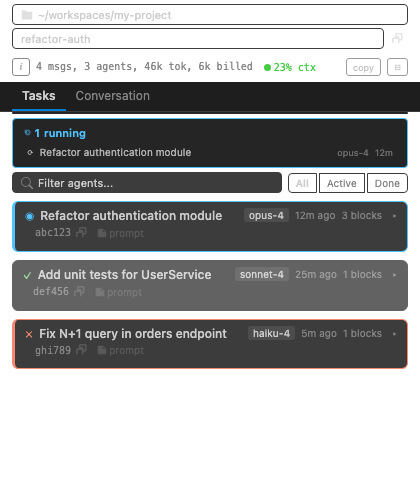
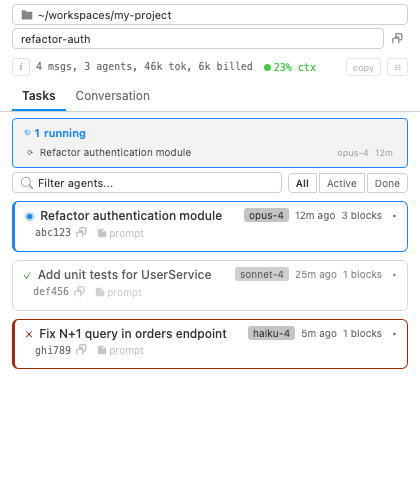
Each background agent appears as a collapsible card showing its status (running/completed/errored), description, model badge, elapsed time, and block count. The running tasks bar at the top lists all active agents and background commands — click any item to jump to it.
Expanding a card reveals the full agent output:
- Markdown rendering — headers, bold, italic, code blocks (with language detection), lists, tables, and horizontal rules
- Tool call pairs — each tool call shown as a collapsible
<details> block with the tool icon, a one-line command preview, and a result status indicator (checkmark, X, or spinner). Text blocks longer than 10 lines get a "Show more" toggle.
- Inline diffs —
Edit and NotebookEdit tool calls render a line-by-line diff with added (green), removed (red), and context lines. Context shows 3 unchanged lines around each change. Diffs are capped at 120 rendered lines; edits exceeding 200 total lines show a "too large to diff" summary instead.
- Background commands —
Bash commands run with run_in_background show a live-updating output section that streams the last 8 KB of the command's output file via fs.watch (with a 10-second polling fallback). Commands auto-complete after 5 minutes of no file changes.
- Typing indicator — running agents show an animation at the bottom of their content area
Each card also has:
- Copy ID button
- View prompt — opens a modal with the agent's full prompt
- Load more — cards start with the latest 50 blocks and load 50 more on each click
Controls above the task list:
- Search — filter agents by description, ID, model, session name, or content (2-character minimum)
- Status filter — All / Active / Done
- View mode — Flat or Grouped by session (the group toggle only appears when multiple sessions are in view)
Smart scrolling — active cards stick to the bottom as new output arrives. Scrolling up pauses auto-follow until you return to the bottom. Start/End jumpers appear on hover.
Expanded <details> blocks stay open across live updates, so a tool call you opened won't snap shut when new content arrives.
Full details: docs/claude-lens.md
Conversation tab
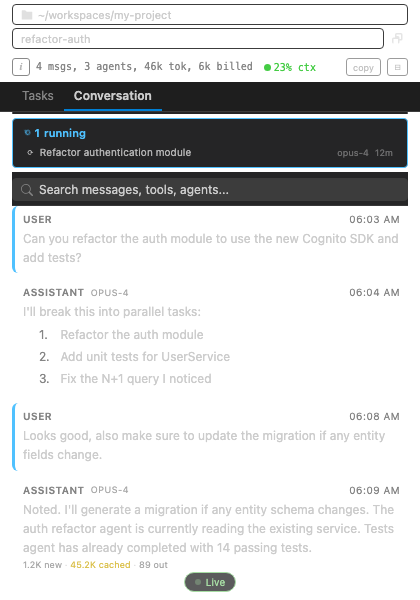
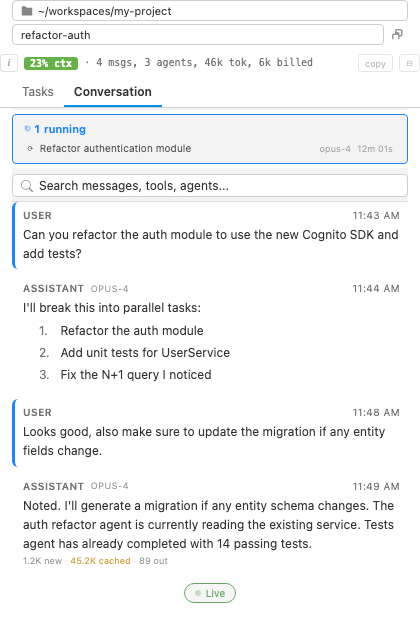
The full conversation, rendered exactly as Claude Code saw it. Messages load in batches of 50 — click "Load earlier messages" or flip the auto-load toggle to fetch more as you scroll up.
User messages are classified and rendered differently by type:
| Type |
Display |
| Normal text |
Standard message bubble |
Slash command (/compact, etc.) |
Badge with command name |
| Interrupted request |
"System" label with interrupt text |
| Context summary (continued session) |
Collapsible <details> block |
| Context compaction |
System badge with compaction icon |
| Task notification |
Status badge (completed/failed/running), command name, exit code, "Load result" button |
| Command stdout |
Monospace <pre> block |
| IDE context only |
Hidden entirely |
Assistant messages include:
- Model badge (e.g.,
opus-4, sonnet-4)
- Extended thinking indicator — shows "Extended thinking" when thinking blocks are present but content is redacted (Claude Code default); shows full content in a collapsible block when available
- Inline tool details — same rich rendering as the Agents tab (collapsible pairs, diffs, background command output)
- Token usage footer — input tokens, cached tokens (with tooltip), and output tokens. Values >= 1000 are formatted as K (e.g.,
45.2K cached). The footer only appears on the final message of a turn (output tokens > 0) to avoid duplicates from streaming chunks.
Long messages (more than 22 lines) collapse with a "Show more" button.
A Live pill appears at the bottom while new messages stream in, and a Jump to bottom button shows whenever you've scrolled away from the tail. When more than one session is in view, session chips let you swap between conversations.
Conversation search
The search bar at the top of the Conversation tab does full-text search across messages, tool calls, outputs, and slash commands:
- Scope — Workspace (current project) or Global (all Claude Code workspaces)
- Match Case and Whole Word toggle buttons
- Preview mode — Compact (one-line results) or Rich (full context with 4 lines around each match, up to 12 lines total)
- Result types — messages, tool calls (with tool icon), tool output (with 4 lines of context), task notifications, slash commands
- Matches highlighted with
<mark> tags
- Click a result to jump to that message in the conversation view; a "Back to search" banner appears for easy return
Search runs on a worker thread and caches the last 10 queries, so repeat searches are instant. Each search returns up to 200 results.
Diagnostics
Click the i button in the header bar to toggle the diagnostics panel:
- Summary line — message count, agent count, JSONL file size, total tokens, estimated billed tokens
- Context window badge — color-coded percentage: green (< 50%), yellow (50-74%), orange (75-89%), red (>= 90%). Tooltip shows exact token counts.
- Health checks — status dots (green/yellow/red) for message flow, webview responsiveness, task count sync, and file watcher liveness
- Live log — scrollable feed of the last 50 internal events with timestamps and severity levels (max 500 entries retained)
- Actions — "Copy diagnostics" exports full state as JSON (for bug reports), "Show logs" opens the output channel, "Clear" resets the log
Full details: docs/claude-lens.md
Permission proxy
Approve background-agent Bash commands without dropping to the terminal. A Claude Code hook catches tool calls before they run and hands them to VS Code for review.
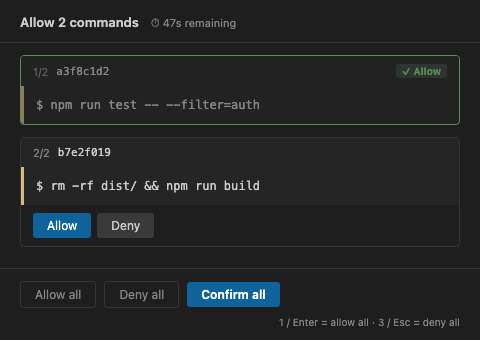
Four places can act on a pending request — they all stay in sync, so deciding in one resolves it everywhere:
| Surface |
When it appears |
| Inline banner |
Whenever Claude Lens is visible — per-command Allow/Deny in the panel header |
| Approval panel |
Opened from the "Open panel" button or the status bar — a webview with one card per command |
| Status bar countdown |
Always — shield icon with the agent ID, command summary, and a live timer |
| Quick pick |
Click the status bar item — Allow / Deny / Review Each / View Agent |
The dedicated panel supports keyboard-driven review:
| Key |
Action |
1 or Enter |
Allow all commands and submit |
3 or Escape |
Deny all commands and submit |
The panel grabs focus on open so the shortcuts work without a click. Once you submit, it stays open showing "No pending commands" — ready for the next batch.
Bursts of simultaneous requests are coalesced: the extension waits 400 ms before surfacing a notification, so a flood of parallel agents becomes one review pass.
Each request has a configurable timeout (60 seconds by default). On timeout the hook falls back to Claude Code's allowlist, and the UI shows the item as "timed out" for a 5-second grace period before clearing it. Dismissing a notification without deciding backs off exponentially (5s, 15s, 45s, up to 120s) before re-prompting.
The proxy can also intercept foreground Claude Code approval requests, not just background agents — those appear as a separate banner that expires after 60 seconds.
Full details: docs/permission-proxy.md
Session browser
A tree view in the Claude Sessions Activity Bar for browsing every Claude Code session on the machine — not just the current workspace.
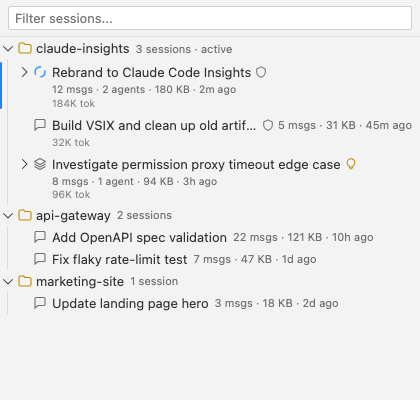
- Workspace > Session > Agent hierarchy — all workspaces visible, current workspace listed first
- Session display names — extracted from the first user message,
aiTitle, customTitle, or lastPrompt fields (reads the first and last 64 KB of each JSONL file)
- Permission mode badges — each session shows its mode as an icon (ask/auto/plan)
- Agent status icons — spinner (running), checkmark (completed), X (errored)
- Click to open — clicking a session opens its conversation in Claude Lens; clicking an agent focuses its card
- Copy IDs — right-click context menu on sessions and agents
- Quick search — filter by session name, ID, or agent status via the search icon
- Deep content search — full-text search through session messages and agent outputs across all workspaces (Command Palette:
Claude Sessions: Deep Search)
- Auto-refresh — file system watchers on
~/.claude/projects/ with a 10-second polling fallback; max 20 directory watchers (oldest evicted when cap is reached)
Commands
| Command |
Description |
Claude Code Insights: Refresh Usage |
Force-refresh usage data from the API |
Claude Code Insights: Open Usage Panel |
Focus the Usage sidebar |
Claude Lens |
Open the agent monitoring panel as a full editor |
Claude Lens: Toggle Debug Mode |
Show/hide workspace and session selectors in the toolbar |
Claude Lens: Copy Diagnostics |
Copy full diagnostic JSON to clipboard |
Claude Lens: Show Logs |
Open the "Claude Lens" output channel |
Claude Sessions: Search |
Quick-pick search across all sessions |
Claude Sessions: Deep Search |
Full-text content search across all workspaces |
Claude Sessions: Clear Search |
Clear the session tree filter |
Claude Sessions: Refresh |
Force-refresh the session tree |
Configuration
| Setting |
Default |
Description |
claudeCodeInsights.refreshInterval |
60 |
Usage data polling interval in seconds |
claudeCodeInsights.debugMode |
false |
Show debug toolbar with workspace/session selectors |
claudeCodeInsights.permissionProxy.enabled |
true |
Enable permission proxy for background agent commands |
claudeCodeInsights.permissionProxy.timeout |
60 |
Seconds before the hook falls back to Claude Code's allowlist |
claudeCodeInsights.permissionProxy.interceptForegroundNotifications |
true |
Show foreground Claude Code approval requests in the panel |
claudeCodeInsights.permissionProxy.externalNotificationMode |
notifications |
How to handle approval requests from sessions outside the current workspace — silent, notifications, or panel |
claudeCodeInsights.permissionProxy.localNotificationMode |
notifications |
Same, for in-workspace sessions when Claude Lens is not visible |
claudeCodeInsights.permissionProxy.focusBehavior |
idle |
When the approval panel opens, whether to steal focus — never, idle, or always |
claudeCodeInsights.permissionProxy.focusIdleMs |
3000 |
With focusBehavior: idle, how long (ms) the editor must be quiet before focus may be stolen |
How it works
Usage data — Credentials are read from the Claude Code OAuth token stored locally (macOS Keychain or ~/.claude/.credentials.json). Usage is fetched from api.anthropic.com/api/oauth/usage with an 8-second timeout and cached at ~/.claude/claude-code-insights-cache.json (90-second TTL) so multiple windows share one cache.
Agent monitoring — Session data is read from ~/.claude/projects/ JSONL files. Agent output files are discovered in both persistent subagent directories (~/.claude/projects/*/subagents/agent-*.jsonl) and temporary task directories. Files are parsed incrementally using byte offsets to avoid re-reading completed content. fs.watch provides real-time updates; a 1-second poll handles new file discovery only.
Permission proxy — A PreToolUse hook at ~/.claude/hooks/permission-proxy.sh intercepts background agent Bash commands. The hook writes request files to /tmp/claude-permissions/ and waits for a decision file. The extension polls that directory every second, presents the approval UI, and writes the decision. See docs/permission-proxy.md.
Conversation parsing — Session JSONL files are parsed to extract messages, tool calls, thinking blocks, token usage, and background command notifications. Files over 2 MB are read in 1 MB chunks with 512-byte overlap. Messages are capped at 500 per session. The HTML is pre-rendered server-side and delivered via postMessage for efficient webview updates.
Requirements
- VS Code 1.85 or newer
- Claude Code installed and signed in
- macOS recommended (Keychain credential reading); Linux/Windows work via
~/.claude/.credentials.json
Privacy
Your data stays local. The only outbound network call goes to api.anthropic.com/api/oauth/usage to fetch your own usage numbers, using the OAuth token Claude Code already stored. Session JSONLs, agent outputs, prompts, and permission decisions never leave ~/.claude/ and /tmp/.
Contributing & feedback
Issues and PRs welcome at github.com/IJuanI/claude-insights. For bug reports, run Claude Lens: Copy Diagnostics — it dumps version, session counts, and recent log lines as JSON, which covers most of what I'll ask for.
License
MIT

