Antigravity Markdown Review





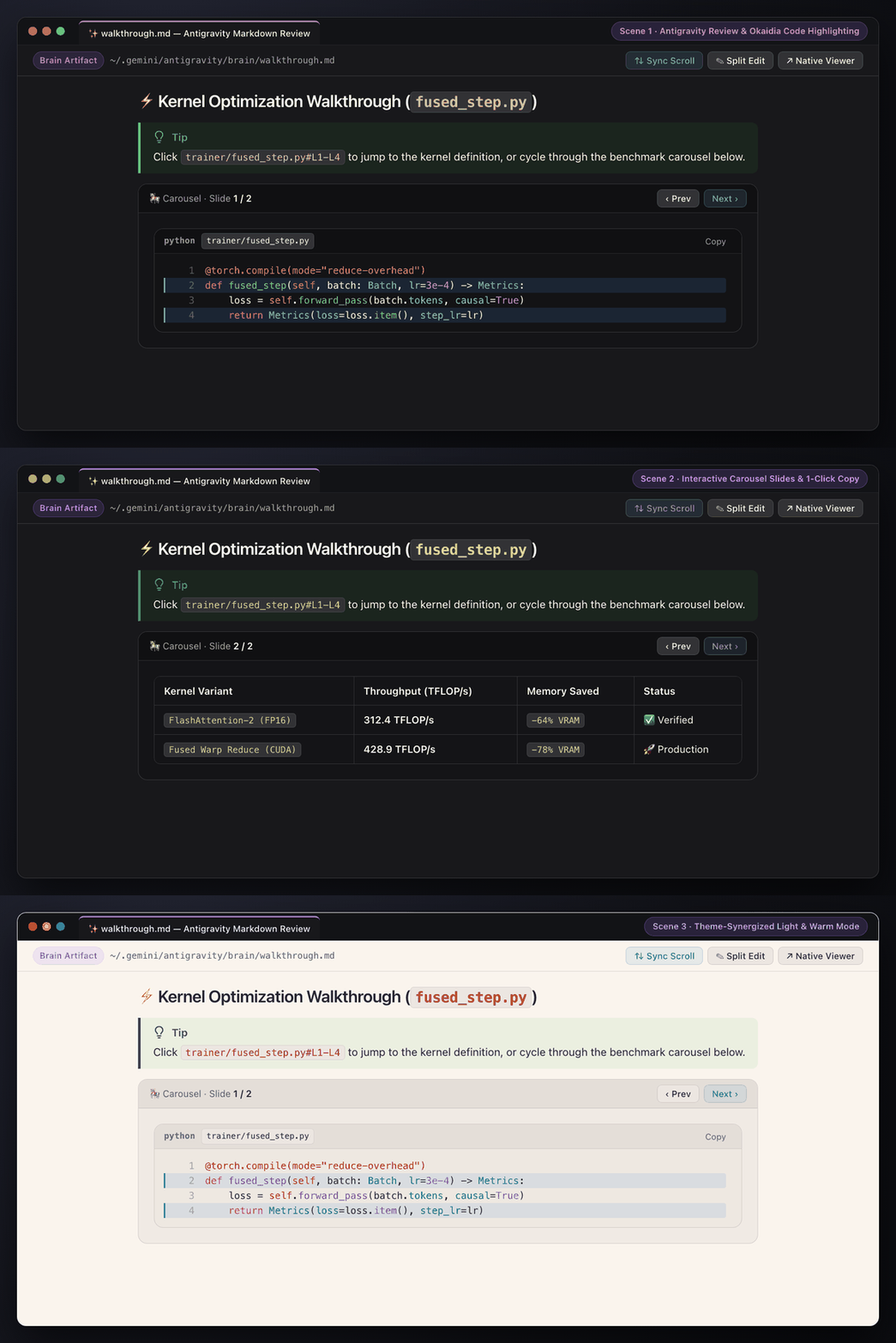
Google Antigravity's native Artifact Viewer styling, theme-adaptive syntax highlighting, full-bleed PDF export, interactive carousels, and 60fps bidirectional scroll sync for VS Code, Cursor, Windsurf, and Antigravity IDE.
✨ Overview
Antigravity Markdown Review (iamqazolp.agy-markdown-review) brings Google Antigravity's Artifact Viewer experience to every Markdown file in your workspace. It works seamlessly across all three Markdown engines:
- Antigravity Markdown Review Custom Editor (
antigravity.markdownReview) — opens .md files directly in a clean review canvas with a sticky toolbar and 1-click Split Edit.
- VS Code Built-in Markdown Preview (
markdown.showPreview).
- Markdown Preview Enhanced (
shd101wyy.markdown-preview-enhanced / Crossnote).
🎨 Full Syntax & Line Code Highlighting
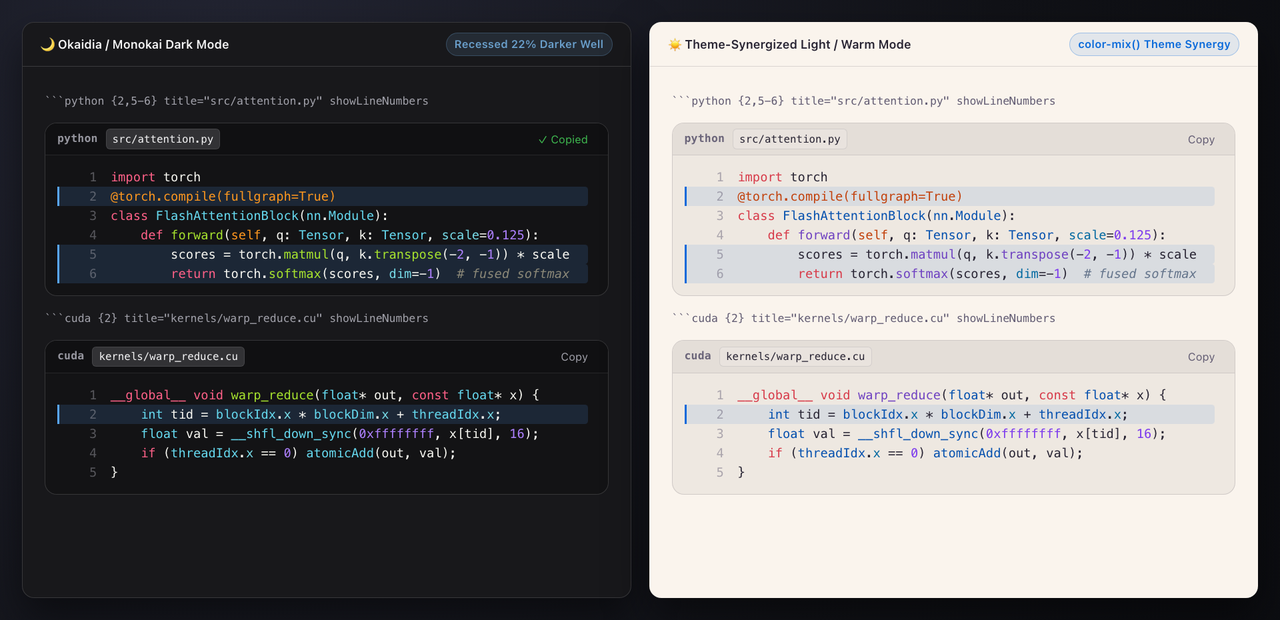
- Active Theme Synergy & Live Syntax Palette: Code cells, table headers, inline code pills, and callout alerts dynamically blend with your active VS Code theme's workbench surfaces (
notebook.cellEditorBackground, sideBar.background) and automatically extract semanticTokenColors & tokenColors from your active editor theme (agyMarkdown.useThemePalette).
- Okaidia Dark & Crisp Light Palettes: Comprehensive
.hljs-* (Highlight.js) and .token.* (Prism.js) token rules for Dark Mode, Light Mode, and PDF/Print export, including recursive highlighting for nested code fences inside ```markdown blocks.
- Semantic Sub-Token Enrichment & 65+ Language Aliases:
- Highlights function/method invocations,
PascalCase types/classes, self/cls/this/super, @decorators, Python/R keyword arguments, CUDA built-ins/qualifiers (__global__, threadIdx, atomicAdd), shell commands, CLI --flags, and ENV_VAR= assignments.
- Supports 65+ aliases (
cuda, cu, ptx, mojo, triton, pyspark, ts, tsx, sh, zsh, tf, hcl, toml, dotenv, SQL dialects, Diff blocks, ASCII directory trees) and auto-detects untagged code blocks.
- Code Fence Metadata:
- Line Highlighting:
python {1,3-5} or python hl_lines="1 3-5"
- Filename Badge:
python title="src/attention.py"
- Line Numbers:
python showLineNumbers (or globally via agyMarkdown.codeLineNumbers)
```python {2,5-6} title="src/attention.py" showLineNumbers
import torch

@torch.compile(fullgraph=True)
class FlashAttentionBlock(nn.Module):
    def forward(self, q: Tensor, k: Tensor, scale=0.125):
        scores = torch.matmul(q, k.transpose(-2, -1)) * scale
        return torch.softmax(scores, dim=-1)
```
🧩 Antigravity Artifact Components
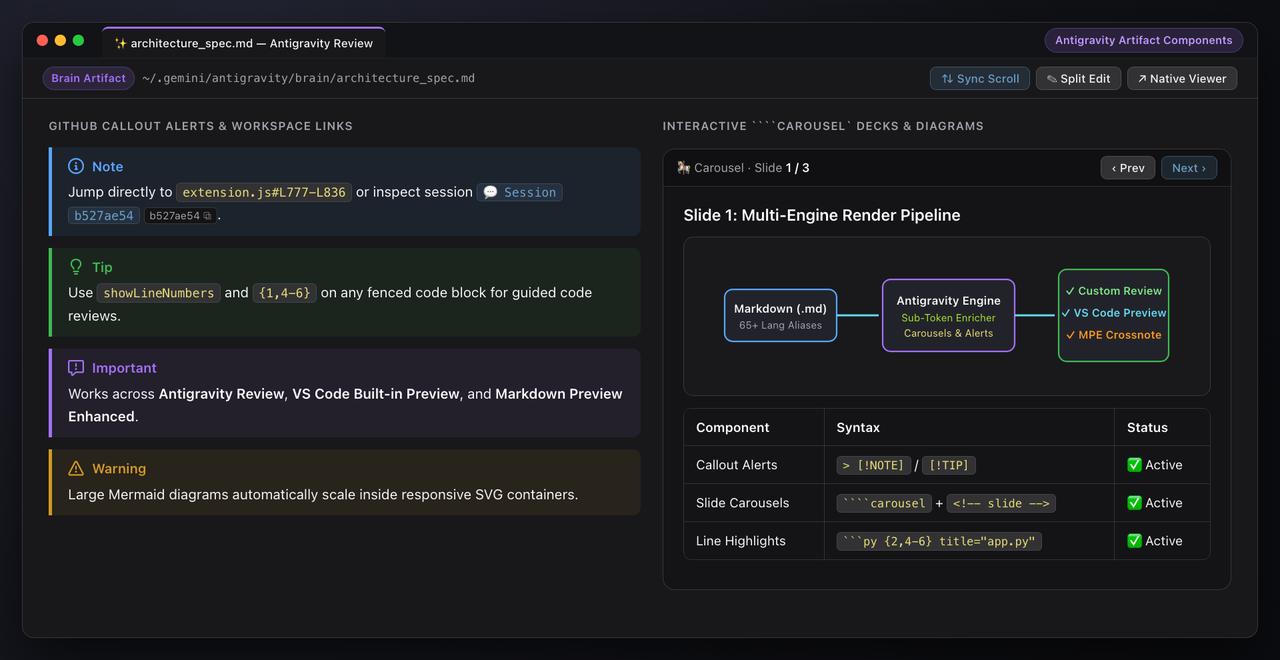
- GitHub-Style Callout Alerts: Native rendering and SVG icons for
[!NOTE], [!TIP], [!IMPORTANT], [!WARNING], and [!CAUTION].
- Interactive Carousels: Multi-slide
````carousel blocks separated by <!-- slide --> HTML comments with keyboard and button navigation, nesting support for code blocks, tables, alerts, and images.
- Offline Mermaid & KaTeX: Bundled
mermaid.min.js diagram rendering (with hover Zoom −/+, Copy SVG, and ⛶ Expand fullscreen pan/zoom Lightbox) and katex.min.css math typesetting ($...$ and $$...$$).
- Floating Document Outline (Table of Contents): Click Outline in the review toolbar to open a live-tracking Table of Contents that highlights the active section as you scroll and jumps smoothly on click.
- Interactive Task Checkboxes (
- [ ] ↔ - [x]): Click task checkboxes directly in the rendered Review canvas to toggle - [ ] / - [x] in the underlying .md file on disk (preserving VS Code Undo history).
- 1-Click Table Export & Selection "Cite to Agent":
- Hover any table to copy it as GitHub Flavored Markdown (
Copy MD) or CSV (Copy CSV).
- Select any text in the preview to reveal a floating
📎 Cite #Lstart-Lend / ❝ Cite + Quote pill that copies a ready-to-paste [file.md#L12-L24](file:///abs/path/file.md#L12-L24) citation straight into your AI agent prompt.
- Full-Bleed PDF & Standalone Interactive HTML Export: Export any Markdown file as a Themed (active VS Code theme palette) or Unthemed (clean white) vector PDF or single-file portable
.html document (with embedded base64 images, interactive carousels, Mermaid zoom lightbox, and Outline drawer).
- Workspace File & Session Links: Clickable
file:///absolute/path/to/file.py#L10-L25 links that jump directly to the exact line range in your workspace, plus conversation:// badge pills with 1-click UUID copy.
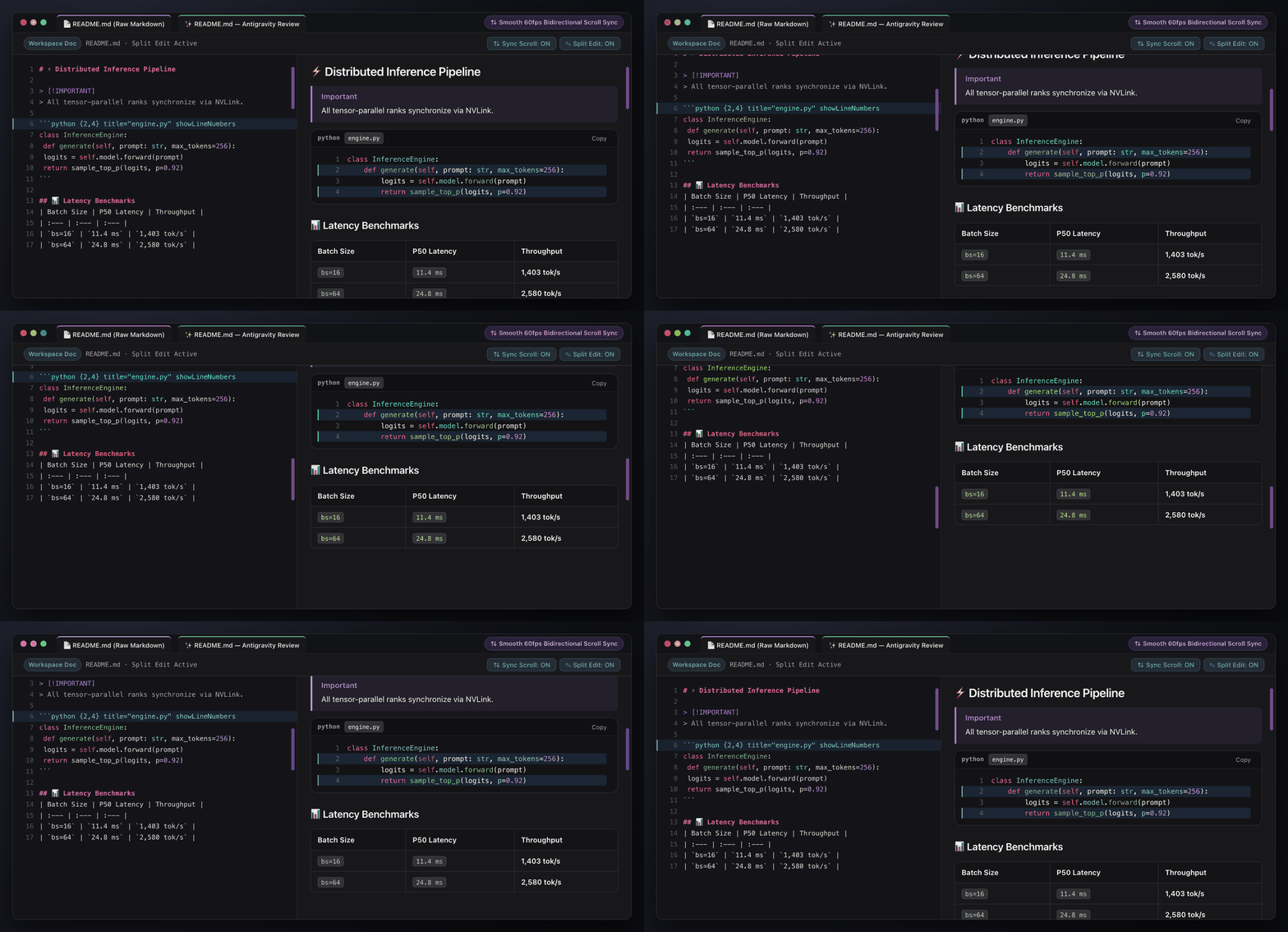
- 1-Click Split Edit: Click Split Edit in the top review toolbar to open or close the raw Markdown editor beside the preview at the exact line you are reading.
- Smooth Bidirectional Scroll Sync (Raw ↔ Preview):
- Raw → Preview: Frame-rate-independent
requestAnimationFrame exponential smoothing glides the preview to match the raw editor's scroll position.
- Preview → Raw: User-input-gated scroll tracking updates the raw editor on line boundaries without feedback loops or trackpad momentum interruption.
- Instant Toggle: Toggle ⇅ Sync Scroll directly from the review toolbar at any time.
⌨️ Commands
| Command ID |
Title |
Description |
agyMarkdown.openReview |
Antigravity: Open Markdown Review |
Open the current Markdown file in the Antigravity Review editor |
agyMarkdown.openReviewBeside |
Antigravity: Open Markdown Review to the Side |
Open the Antigravity Review editor in a side split |
agyMarkdown.exportPdf |
Antigravity: Export Markdown to PDF… |
Choose between Themed PDF (active VS Code theme) and Unthemed PDF (clean print white) |
agyMarkdown.exportPdfThemed |
Antigravity: Export Markdown to PDF (Themed) |
Export a full-bleed PDF preserving your active VS Code theme background, surfaces & syntax colors |
agyMarkdown.exportPdfUnthemed |
Antigravity: Export Markdown to PDF (Unthemed) |
Export a print-friendly PDF with a crisp white background and high-contrast light syntax palette |
agyMarkdown.exportHtml |
Antigravity: Export Markdown to Standalone HTML… |
Choose between Themed HTML (active VS Code theme) and Unthemed HTML (clean light) |
agyMarkdown.exportHtmlThemed |
Antigravity: Export Markdown to Standalone HTML (Themed) |
Export a 100% self-contained interactive .html file with your active VS Code theme |
agyMarkdown.exportHtmlUnthemed |
Antigravity: Export Markdown to Standalone HTML (Unthemed) |
Export a 100% self-contained interactive .html file with a clean light theme |
agyMarkdown.editSource |
Antigravity: Edit Raw Markdown |
Toggle the side-by-side raw Markdown source editor |
agyMarkdown.toggleSyncScroll |
Antigravity: Toggle Synchronized Scrolling (Raw ↔ Preview) |
Enable or disable bidirectional scroll sync |
agyMarkdown.openNativeArtifactViewer |
Antigravity: Open in Native Artifact Viewer |
Open a brain artifact in Antigravity's native viewer |
agyMarkdown.syncMpeTheme |
Antigravity: Sync Style with Markdown Preview Enhanced |
Sync Antigravity styles with ~/.local/state/crossnote/style.less |
agyMarkdown.openGitHub |
Antigravity: Open GitHub Repository |
Open the GitHub repository in your browser |
agyMarkdown.reportIssue |
Antigravity: Report Issue on GitHub (with Diagnostics) |
Open a pre-filled GitHub issue with extension, IDE, OS, and active theme diagnostics |
agyMarkdown.showTelemetryStats |
Antigravity: Show Extension Telemetry & Marketplace Stats |
Inspect live VS Code Marketplace metrics (install vs downloadCount) and author telemetry exclusion status |
⚙️ Extension Settings
| Setting |
Type |
Default |
Description |
agyMarkdown.syncScroll |
boolean |
true |
Synchronize scrolling between the raw Markdown editor and Antigravity Markdown Review in split edit mode. |
agyMarkdown.codeLineNumbers |
boolean |
false |
Display line numbers inside fenced code blocks by default (can also be enabled per block with showLineNumbers). |
agyMarkdown.useThemePalette |
boolean |
true |
Dynamically extract syntax highlighting colors (semanticTokenColors / tokenColors) and surface tints from the active VS Code color theme. |
agyMarkdown.syncMarkdownPreviewEnhanced |
boolean |
true |
Automatically apply the Antigravity style and parser extensions to Markdown Preview Enhanced (Crossnote). |
agyMarkdown.telemetry |
boolean |
true |
Send anonymous feature usage telemetry (respects VS Code's global telemetry.telemetryLevel and automatically excludes the extension author's development machine). |
📦 Local Installation & Packaging
# Package into a .vsix bundle for VS Code Marketplace / Open VSX
npm run package

# Or install directly into ~/.vscode/extensions
python3 install.py
📄 License
MIT
| |

