Live preview for HyperMarkDown (.hmd)
knowledge bases: source on the left, the rendered card on the right, keeping up
as you type.
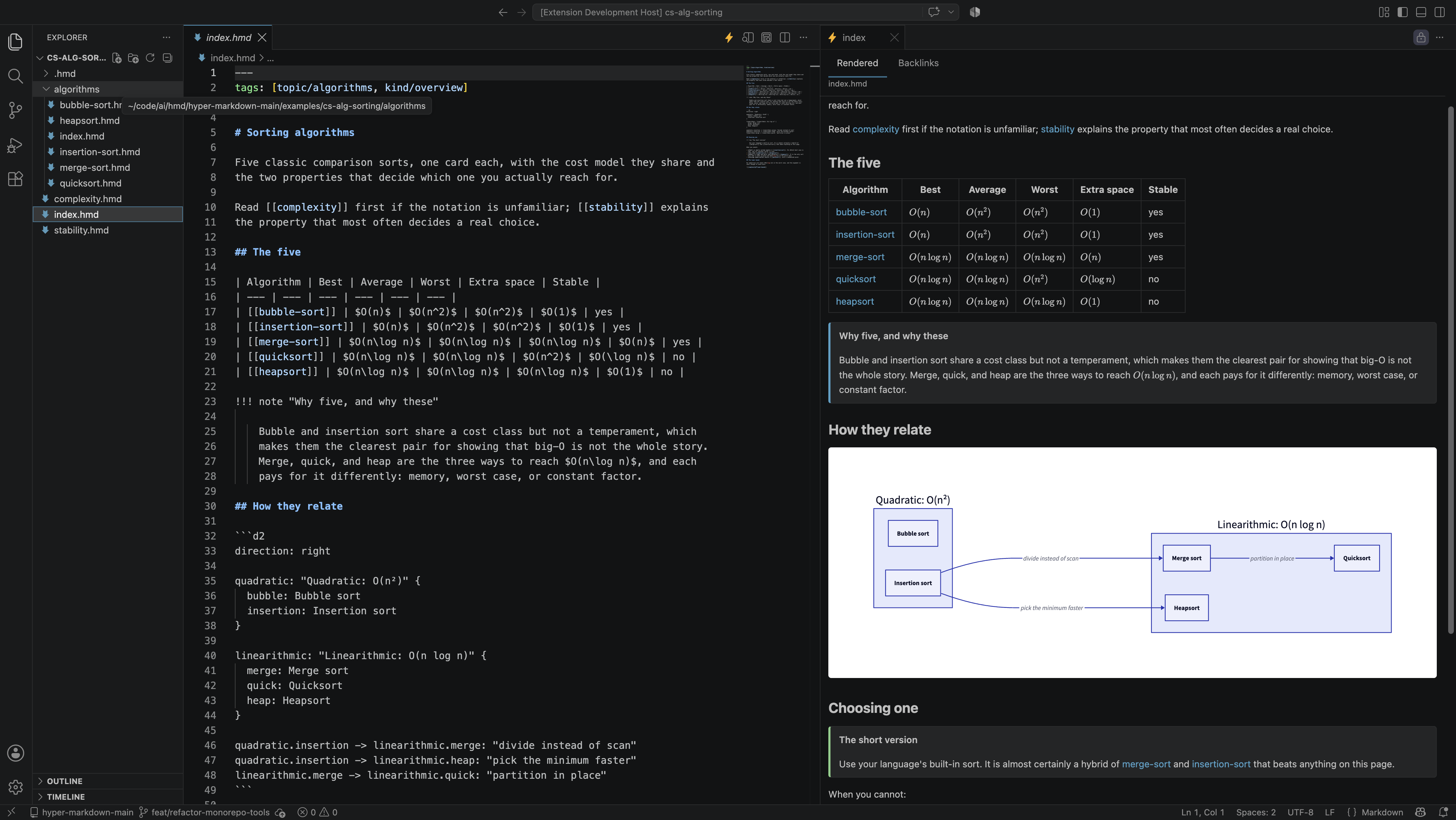
HyperMarkDown is ordinary markdown plus links into a knowledge graph: you write
the name of a card and it is resolved for you, a card can be built out of other
cards, and a linter checks the whole graph. Every .md file is already valid
.hmd. The format itself — every construct, the resolution rules, the rule IDs —
is documented at hypermarkdown.org. This page is
about the extension.
Install
ext install hypermarkdown.hmd
- VS Code —
the marketplace listing,
or search HyperMarkDown in the Extensions view.
- Cursor, Windsurf, VSCodium —
Open VSX.
- From a VSIX — every CI run attaches one, and each release carries it:
releases.
Then open any .hmd file and click the ⚡ at the top right of the editor.
Nothing else is required: no interpreter, no virtualenv, no configuration.
Requires VS Code 1.90 or newer.
Everything below is built and gated by tests. The publication model is not
ported yet, and it is one of several deliberate divergences from the CLI — see
Known gaps.
What it does
- Rendered preview, updating from the unsaved buffer, scroll-synced with the
editor in both directions.
- Embeds render as cards — labelled with the card and fragment they came
from, collapsible, and navigating to the embedded card rather than the
embedding one. An embed flattened into anonymous prose is a defect here.
- Red links for targets that do not resolve, with a create-the-card action.
- A graph of the vault, drawn in the preview: cards as nodes, link and embed
edges apart, and clicking one moves the preview to that card. Read it as the
whole network, or as the card you are on and its neighbours — what it links
to, or what links to it, which is what the backlinks tab used to list. Zoom,
fit, re-run the layout, or hand the graph the whole window with Full
screen — the editor drops into zen mode and
Escape brings it back.
- Diagnostics in the Problems panel using the
HMD001–HMD016 rule IDs,
identical to hmd lint.
- Math, callouts, and D2 diagrams. KaTeX ships inside the extension, and so
does
d2: the build for your platform carries a pinned
hypermarkdown-toolchain
release, the same binary the documentation site is built with, so a d2 fence
draws on a fresh install with nothing to configure and nothing downloaded at
run time. Set hyperMarkdown.diagram.d2Path to use a different d2.
- Syntax highlighting for
.hmd as its own language.
What it needs
The extension is the preview and the viewer, and it carries its own
implementation of the format for them. Nothing has to be installed to render a
card: no interpreter to find, no virtualenv to activate, and no subprocess
between a keystroke and the preview. The
hmd CLI remains the canonical
implementation and CI checks the two against a shared conformance corpus.
Completion and the other language-server features are not here yet. They arrive
with the Python language server, which lives with the canonical implementation
— so a later version will want Python for those, while the preview keeps
rendering without it.
Settings
| Setting |
Default |
Effect |
hyperMarkdown.root |
"" |
Namespace root for the workspace folder itself, for cards no vault claims. Empty discovers it from .hmd/config.toml, falling back to doc/wiki. |
hyperMarkdown.preview.scrollSync |
true |
Keep preview and editor on the same source line. |
hyperMarkdown.preview.embeds |
expanded |
Whether embed cards start expanded. |
hyperMarkdown.diagnostics.scope |
workspace |
Publish diagnostics for every indexed card — in every vault opened this session — or only for open ones. |
Commands
- HyperMarkDown: Open Preview in This Column — a preview tab in the editor
group you are in
- HyperMarkDown: Open Preview to the Side — the same, in the group beside it
- HyperMarkDown: Pin Preview to This Card — stop following the active editor
- HyperMarkDown: Create Missing Card — write the card a red link points at
- HyperMarkDown: Rebuild Index — drop every vault and re-scan from scratch
Several vaults in one folder
A vault is a directory carrying a .hmd/ directory, and one folder open in
the editor may hold several — a doc/wiki alongside a self-contained example
tree, say. The vault a card belongs to is found from the card: the extension
walks up from it to the nearest .hmd/, stopping at the workspace folder, the
way git finds its repository. Each vault is indexed, watched, and linted on
its own the first time you open a card in it.
Nothing resolves across a boundary. Two vaults are two namespaces, so a
[[wikilink]], an embed, and a backlink all stay inside the vault of the card
that wrote them.
A card with no .hmd/ above it belongs to the workspace folder itself, whose
root is hyperMarkdown.root when set, else wiki from the folder's
.hmd/config.toml, else doc/wiki, else the folder — so a bare directory of
cards works with no setup at all.
Where the preview appears
The preview is an editor tab, not a side-bar view. Click the ⚡ at the top right
of any editor group and a preview opens in that group — including when the
neighbouring group is locked, which is where "open to the side" gives up and
splits a third group instead.
A preview follows the active editor: click another card in the Explorer or the
tab bar and the preview re-renders on it. Clicking a [[wikilink]] moves the
preview to the target and opens its source alongside, leaving focus in the
preview so the next link is one click away.
Open as many as you like — each is titled after its card. To hold one on a card
while you read elsewhere, click the 📌 in its title bar; the breadcrumb shows
pinned while it is held. Tabs come back on their own cards after a window
reload.
Known gaps
Every divergence from the canonical hmd CLI is ledgered with its reason in
conformance-xfail.json,
and a ledgered entry that stops diverging fails the build. The ones worth knowing
about while you write:
- Raw HTML in a card is escaped rather than passed through. Deliberate, and
a divergence from the MkDocs build: a webview rendering HTML out of a
workspace is a script-injection surface reachable from any cloned repository.
- The graph draws what resolved. A red link has no card at the other end, so
it is absent from the picture; broken links are reported in the rendered
preview and in the Problems panel. The network view is capped at 400 cards,
keeping those nearest the one you are reading and saying how many it left
out.
What has changed is in
CHANGELOG.md;
work points are tracked in
doc/status/vsc-ext.md.
Bugs and questions go to
the issue tracker.
Contributing
The extension lives in
the HyperMarkDown repository;
its parser, resolver, and renderer come from
@hypermarkdown/core,
so a rendering fix usually belongs there rather than here.
DEVELOP.md
is the contributor's guide — how to build, run, and test the extension, and how
the VSIX is published — and links on to the specification behind it.
License
MIT — see
LICENSE.