
OpenRouter Maestro
One extension. Three AI coding agents. 500+ models.
Run any OpenRouter model in GitHub Copilot Chat, Claude Code and OpenAI Codex — from a single panel.


Why
Every AI coding agent wants its own provider setup, and each one stores it somewhere different — a VS Code API, a JSON settings file, a TOML config. Maestro learns all three so you don't have to:
| Agent |
How Maestro wires it |
What you get |
| GitHub Copilot Chat |
Registers a native LanguageModelChatProvider — your models appear right in the Copilot model picker |
Agent mode, tool calling, vision, thinking display, prompt caching, live token/cost readout |
| Claude Code |
Manages the env block in Claude Code's own settings, pointed at OpenRouter's native Anthropic-compatible endpoint |
The CLI and the VS Code extension run on any OpenRouter model — no proxy, no Anthropic login |
| OpenAI Codex |
Manages ~/.codex/config.toml: an openrouter provider (wire_api = "responses") plus the top-level model selection |
The Codex CLI and the IDE extension run on any OpenRouter model — no ChatGPT sign-in |
Everything it writes is reversible: a one-time backup, a snapshot of exactly the keys it touches, and a one-click switch back to the agent's own model.
Install
Search OpenRouter Maestro in the VS Code Extensions view, or:
code --install-extension husamettinulutas.openrouter-maestro
Quick start
- Open the OpenRouter Maestro icon in the activity bar.
- Click 🔑 and paste your OpenRouter API key — get one at openrouter.ai/settings/keys. It is stored in VS Code SecretStorage, never in a file.
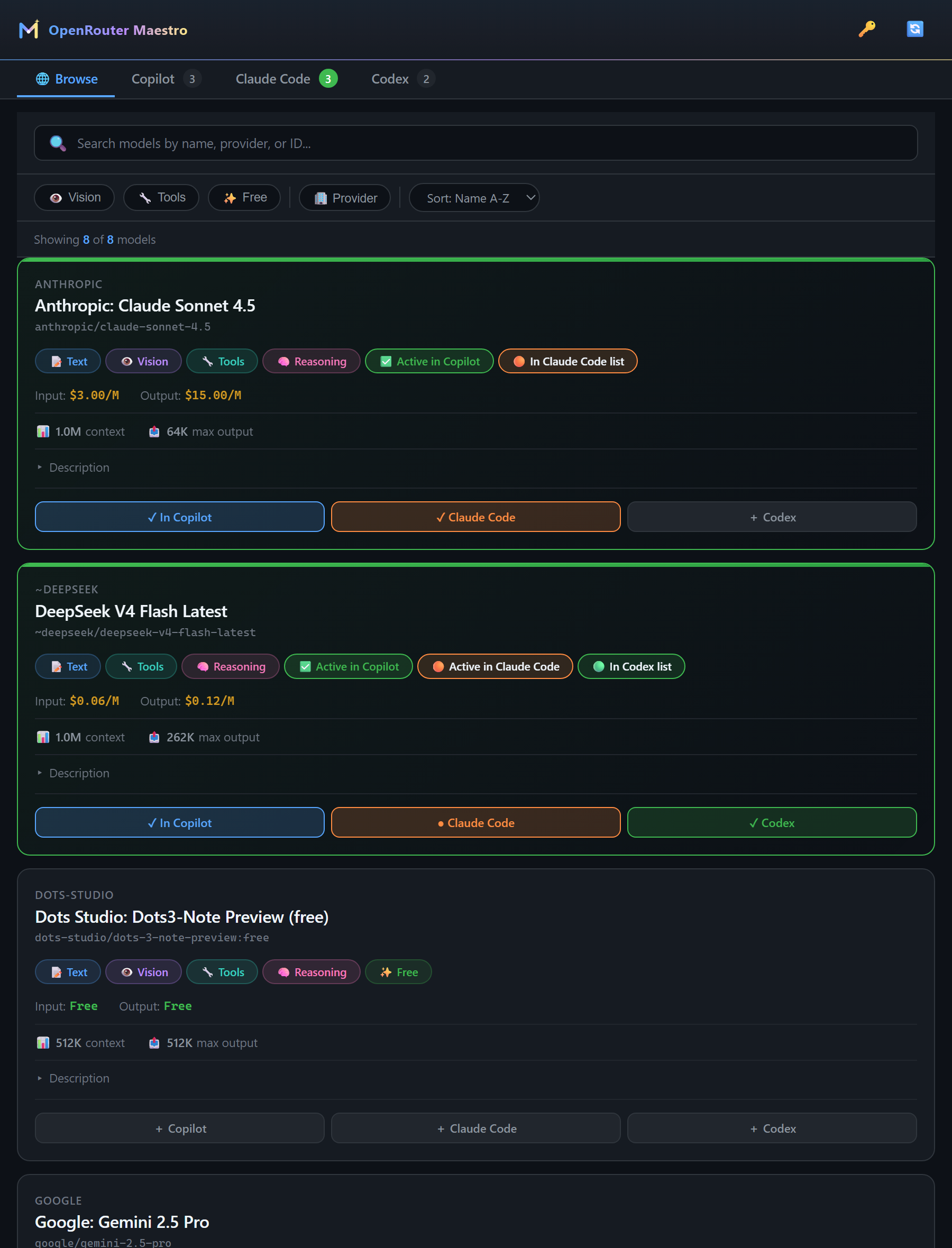
- Click 🔄 to sync the catalog, then browse: search, filter by vision / tools / free, sort by price or context length.
- Every model card carries three buttons — + Copilot, + Claude Code, + Codex. Press the ones you want. Each agent keeps its own saved list, so adding a model never drops the previous one.
Each agent then gets its own tab, and every tab shows the same card: capabilities, input/output price per million tokens, context window and max output.
Copilot Chat — every listed model is usable at once
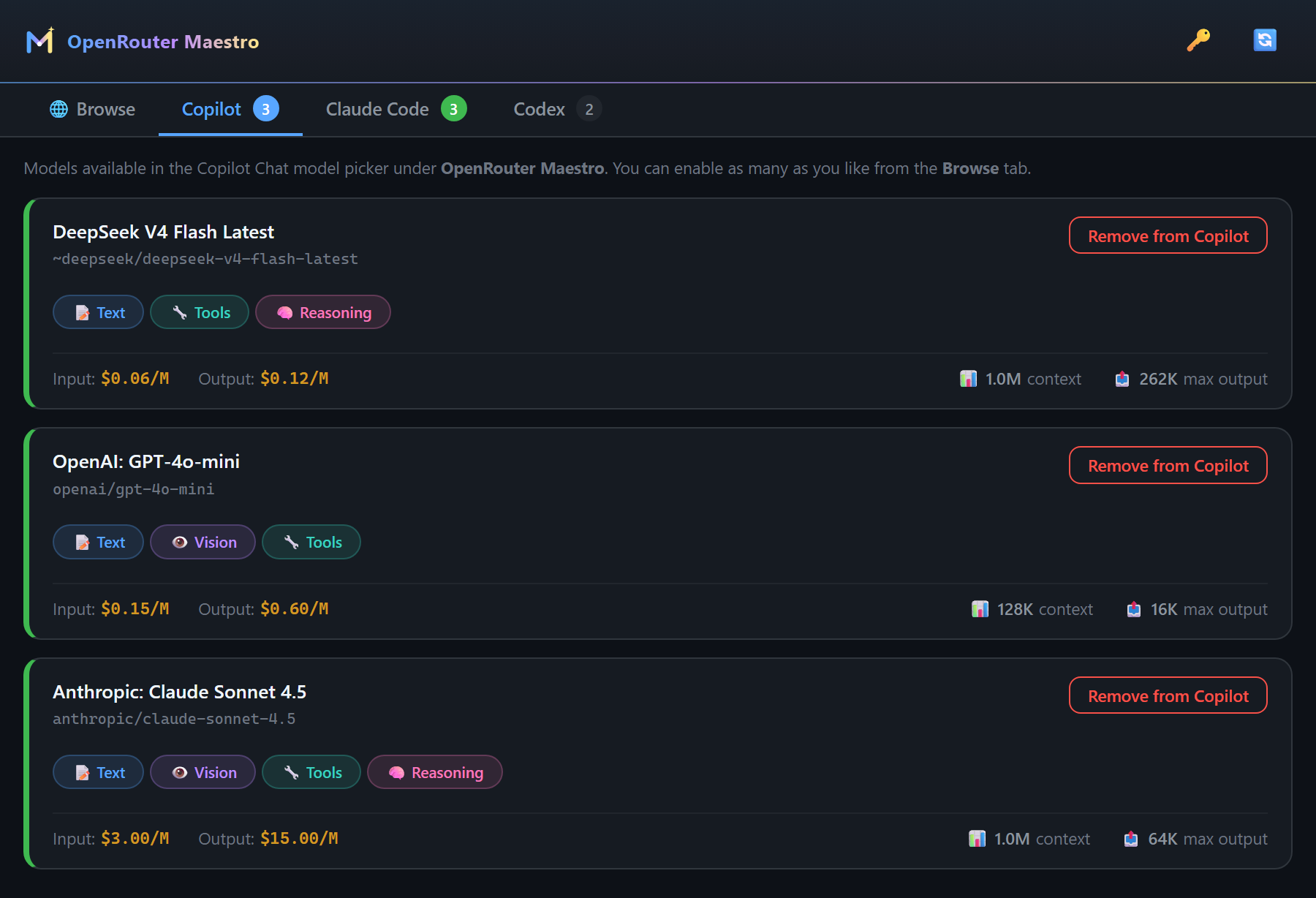
They show up in the Copilot Chat model picker under OpenRouter Maestro immediately — no reload, no config file.
Reasoning models also get a Thinking Effort submenu right in the Copilot model picker, so you can dial the reasoning depth per request. The Copilot tab's card carries the same control as a per-model default, and openrouterMaestro.defaultReasoningEffort sets a global fallback.
Claude Code — a saved list, one model live
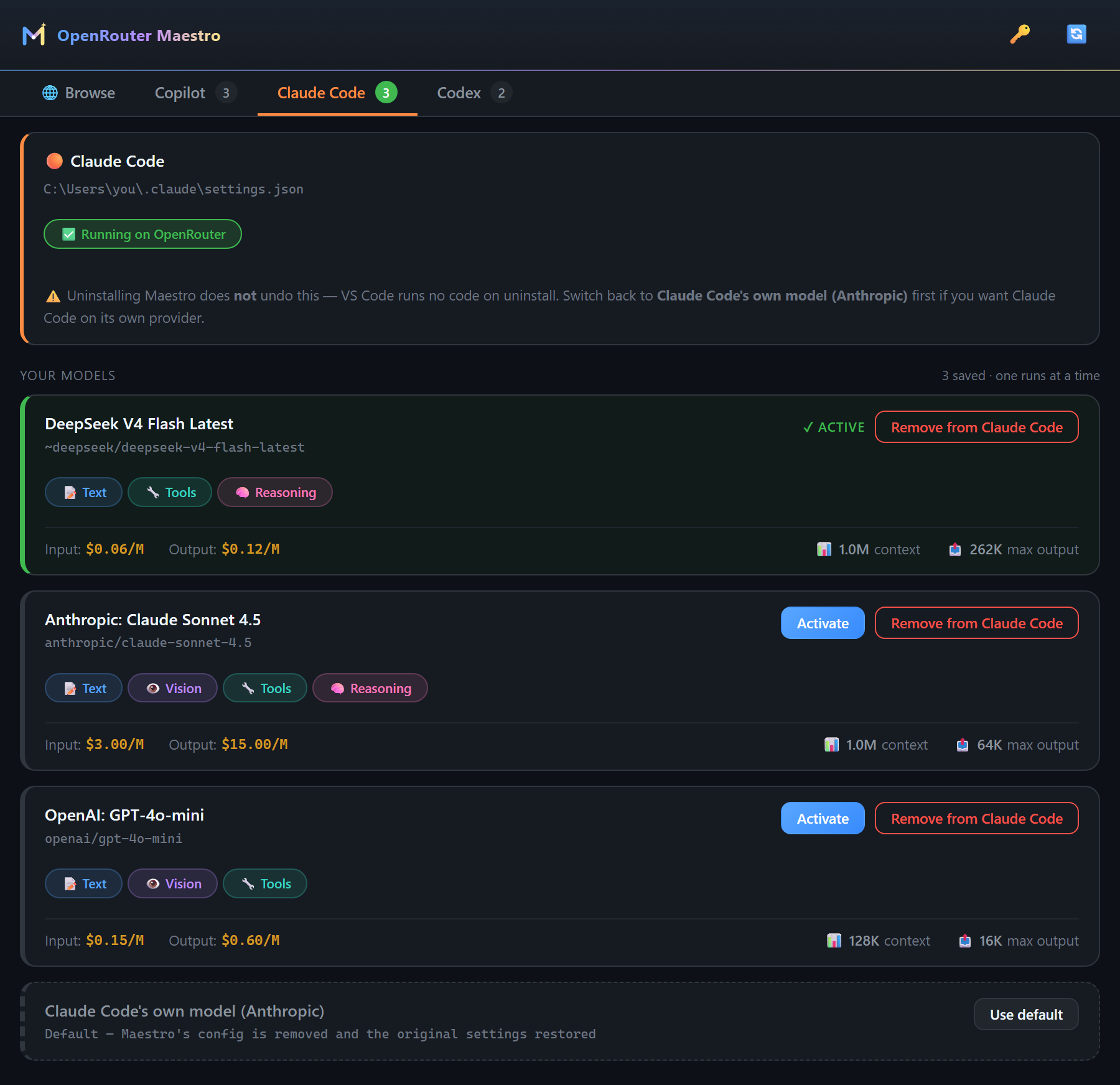
Claude Code and Codex can each run one model at a time, so keep as many as you like in the list and press Activate on the one you want. The green card is the one that is really wired in.
Codex — and the way back
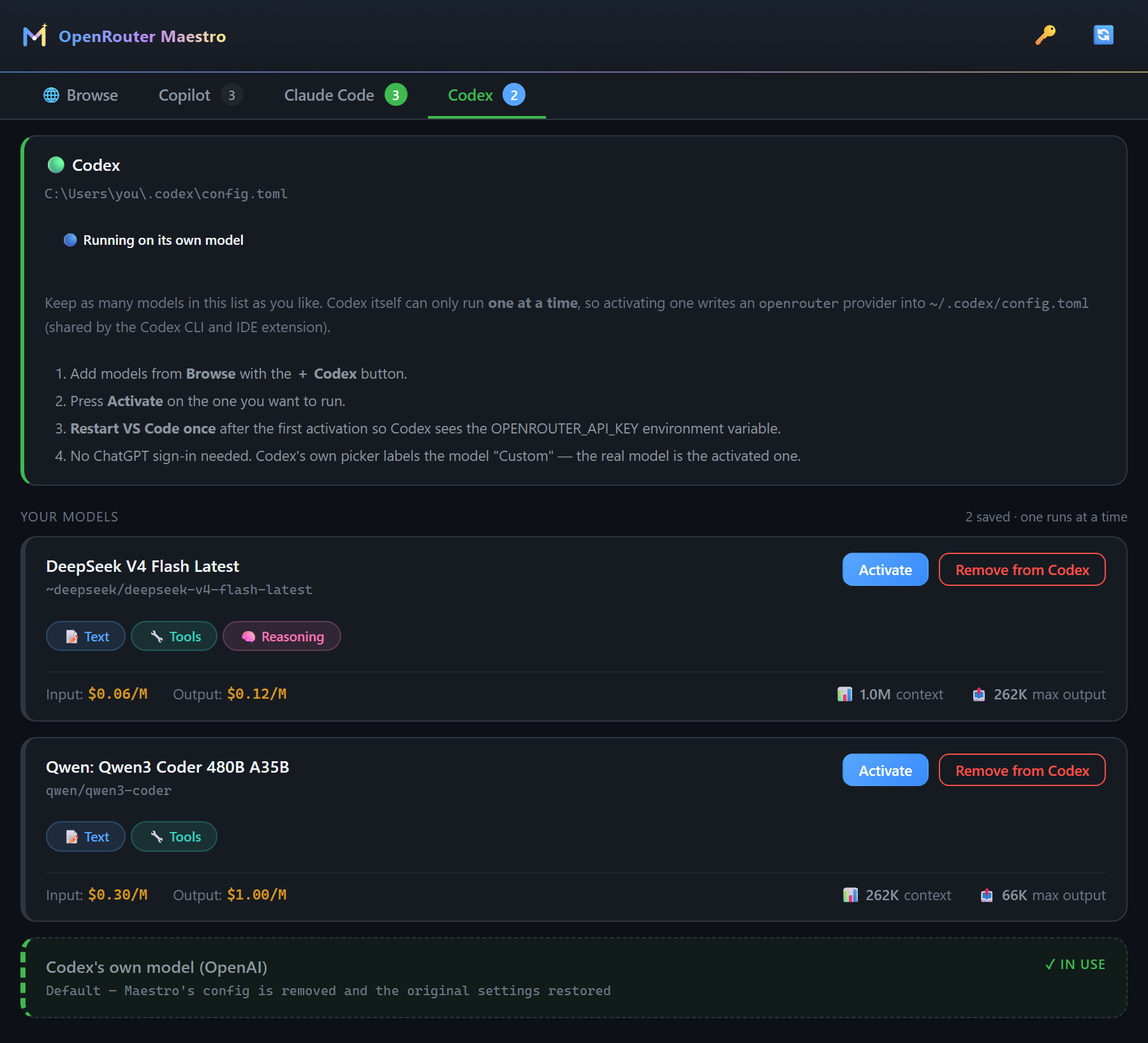
The dashed row at the bottom of every list — “…'s own model” — is the default. Pick it and Maestro removes its config, restores the original settings exactly as they were, and keeps your list for next time.
Reload the window after switching. Claude Code and Codex read their config when they start, so a session that is already open keeps the model it started with — including after you switch back to the default. Maestro shows a Reload Window button whenever you change something. A CLI running in a terminal has to be restarted on its own.
All of it is available from the command palette too: OpenRouter Maestro: … (Browse Models, Use Model in Claude Code, Use Model in Codex, Restore …, Show Integration Status).
How each integration works
Copilot Chat — native, in-process
Maestro registers a VS Code language-model provider (vendor openrouter-maestro). Requests stream from the extension host straight to https://openrouter.ai/api/v1/chat/completions with:
- full agent-mode tool calling (streamed tool-call deltas),
- vision input (base64 data URLs),
- reasoning / thinking content rendering,
- automatic prompt caching (
cache_control), which cuts Anthropic input costs sharply in agent mode,
- base64 sanitization, so long encoded blobs don't trip OpenRouter's guardrails,
- retry with backoff on 429/5xx, a request timeout, and a status-bar token/cost readout.
Claude Code — config-managed
OpenRouter natively speaks the Anthropic Messages API (POST https://openrouter.ai/api/v1/messages), so no translation proxy is involved. Maestro writes:
// ~/.claude/settings.json  (or .claude/settings.local.json with the "project" scope setting)
{
  "env": {
    "ANTHROPIC_BASE_URL": "https://openrouter.ai/api",
    "ANTHROPIC_AUTH_TOKEN": "sk-or-v1-…",              // your OpenRouter key
    "ANTHROPIC_API_KEY": "",                            // explicitly empty — blocks fallback auth
    "ANTHROPIC_MODEL": "<openrouter-model-id>",
    "ANTHROPIC_DEFAULT_OPUS_MODEL": "<openrouter-model-id>",
    "ANTHROPIC_DEFAULT_SONNET_MODEL": "<openrouter-model-id>",
    "ANTHROPIC_DEFAULT_HAIKU_MODEL": "<small/fast model, or the same one>",
    "CLAUDE_CODE_SUBAGENT_MODEL": "<openrouter-model-id>",
    "CLAUDE_CODE_DISABLE_EXPERIMENTAL_BETAS": "1",      // beta request fields 400 on non-Anthropic gateways
    "CLAUDE_CODE_MAX_CONTEXT_TOKENS": "<model context>", // so "prompt is too long" can't beat compaction to it
    "CLAUDE_CODE_AUTO_COMPACT_WINDOW": "<~80% of context>",
    "CLAUDE_CODE_MAX_OUTPUT_TOKENS": "<min(model max, 32000)>"
  }
}
Gateway model discovery (CLAUDE_CODE_ENABLE_GATEWAY_MODEL_DISCOVERY) is deliberately not enabled: a model picked from Claude Code's own /model list persists as a top-level model key that silently overrides Maestro's selection and can go stale. Switch models from Maestro instead.
The credential is also mirrored into VS Code's claudeCode.environmentVariables setting, which the Claude Code VS Code extension reads before launching. A one-time settings.json.maestro-backup is written before the first change, and choosing Claude Code's own model restores every key exactly as it was.
Codex — config-managed
Codex has only spoken the Responses API wire format since Feb 2026 (wire_api = "chat" was removed), and OpenRouter serves a compatible endpoint. Maestro manages the user-level ~/.codex/config.toml (project-local configs cannot define providers):
model = "<openrouter-model-id>"       # top-level keys must come before any [section]
model_provider = "openrouter"
show_raw_agent_reasoning = true       # written for reasoning-capable models
model_reasoning_effort = "high"       # minimal|low|medium|high|xhigh
model_reasoning_summary = "auto"

[model_providers.openrouter]
name = "OpenRouter"
base_url = "https://openrouter.ai/api/v1"
env_key = "OPENROUTER_API_KEY"
wire_api = "responses"
Management is semantic, not comment-based: Codex rewrites this file with its own TOML serializer, so Maestro locates sections and keys by name and leaves everything else byte-for-byte intact. A one-time config.toml.maestro-backup is written before the first change.
On Windows the API key is also persisted as a user environment variable, because the GUI-launched IDE extension doesn't inherit shell exports — restart VS Code and your terminals afterwards. Switching back to Codex's own model deletes that variable again (or restores the value you had before), so no live key is left behind. On macOS/Linux, add export OPENROUTER_API_KEY="…" to your shell profile.
Good to know
- Uninstalling the extension does not undo the agent configs. VS Code runs no extension code on uninstall. Switch Claude Code and Codex back to their own model before uninstalling (or restore the
.maestro-backup files by hand).
- Billing moves to OpenRouter. While an override is active, your Claude or ChatGPT subscription is not being used. Switching back to the default returns you to it.
- Your usage is labelled on the OpenRouter dashboard. Everything Maestro wires up — Copilot, Claude Code and Codex alike — sends
HTTP-Referer and X-OpenRouter-Title, so Activity → Apps shows one OpenRouter Maestro entry that links back to this repo, instead of three piles of unattributed tokens. No usage data leaves your machine beyond the request itself.
- Rolling-alias ids start with
~ (e.g. ~deepseek/deepseek-v4-flash-latest). The tilde is part of the id and is written verbatim — the de-tilded form is rejected by OpenRouter.
- Codex hides thinking steps for most OpenRouter models, and no setting fixes it. Measured against Codex 0.148 / IDE 26.810: OpenRouter streams raw chain-of-thought as
response.reasoning_text.delta / .done, while Codex's stream handler only recognises the summary events (response.reasoning_summary_text.delta, response.reasoning_summary_part.added) and drops the rest. The model does reason — turn.completed reports reasoning_output_tokens > 0, and you are billed for them — there is simply no event Codex will render. model_catalog_json (successor to the removed model_supports_reasoning_summaries key) was tested and changes nothing. Models whose provider emits real summaries display normally. This one needs a fix in Codex.
- Claude Code with non-Anthropic models: DeepSeek, Qwen, GLM and friends route fine, but tool-call translation can get imperfect in very long agentic loops.
Why not just Copilot's built-in OpenRouter BYOK?
VS Code's built-in BYOK has included OpenRouter since 2026, but it hides :free variant models, exposes no provider-routing or request options, and does nothing at all for Claude Code or Codex. Maestro shows the full catalog (free models included) with pricing and capability filters, adds prompt caching, guardrail-safe base64 sanitization and live cost readouts — and manages all three agents from one panel.
Settings
| Setting |
Default |
Description |
openrouterMaestro.apiEndpoint |
https://openrouter.ai/api/v1 |
OpenRouter base URL (for proxies) |
openrouterMaestro.claudeCode.settingsScope |
user |
Write Claude Code env to ~/.claude/settings.json (user) or .claude/settings.local.json (project) |
openrouterMaestro.claudeCode.smallFastModel |
(empty) |
Cheaper model for Claude Code background/haiku-class tasks |
openrouterMaestro.codex.configPath |
(empty) |
Override for ~/.codex/config.toml |
openrouterMaestro.enablePromptCaching |
true |
cache_control prompt caching for Copilot requests |
openrouterMaestro.sanitizeBase64Content |
true |
Strip long base64 blobs to avoid guardrail 403s |
openrouterMaestro.defaultReasoningEffort |
(catalog default) |
Fallback thinking effort (none/minimal/low/medium/high/xhigh/max); the Copilot picker overrides it per session |
openrouterMaestro.defaultTemperature / defaultMaxTokens |
(model default) |
Copilot request parameters |
openrouterMaestro.requestTimeoutSeconds / maxRetries |
60 / 3 |
Copilot request resilience |
openrouterMaestro.cache.ttlMinutes |
60 |
Model-list cache TTL |
openrouterMaestro.logLevel |
info |
Output-channel verbosity |
Development
npm install
npm run watch      # esbuild in watch mode — then press F5 for an Extension Development Host
npm run compile    # tsc --noEmit type check
npm run build      # production bundle
npm run package    # build a .vsix
Requires VS Code 1.104+ (the release where the language-model provider API was finalized).
Contributing
Issues and pull requests are welcome at github.com/husamettinulutas/openrouter-maestro. Bug reports are most useful with the agent involved, its version, and the relevant lines from the OpenRouter Maestro output channel.
Successor to openrouter-copilot-model-manager, extended from Copilot-only to all three agents.
Credits
The Copilot model-picker Thinking Effort integration was adapted from @Irvingouj's fork of the predecessor project (c2dc1de), with the model-id heuristic removed and without enabling proposed APIs, so this build stays installable from the Marketplace on stable VS Code.
License
MIT — see LICENSE.

