
OneProvider Maestro
One extension. Three AI coding agents. One prepaid key.
Run any OneProvider model in GitHub Copilot Chat, Claude Code and OpenAI Codex — and watch the balance drain in real time.


Why
Every AI coding agent wants its own provider setup, and each one stores it somewhere different — a VS Code API, a JSON settings file, a TOML config. Maestro learns all three so you don't have to:
| Agent |
How Maestro wires it |
What you get |
| GitHub Copilot Chat |
Registers a native LanguageModelChatProvider — your models appear right in the Copilot model picker |
Agent mode, tool calling, vision, thinking display, live token/cost readout |
| Claude Code |
Manages the env block in Claude Code's own settings, pointed at OneProvider's Anthropic-native endpoint |
The CLI and the VS Code extension run on any OneProvider Claude model — no proxy, no Anthropic login |
| OpenAI Codex |
Manages ~/.codex/config.toml: a oneprovider provider (wire_api = "responses") plus the top-level model selection |
The Codex CLI and the IDE extension run on any OneProvider model — no ChatGPT sign-in |
And because OneProvider keys are prepaid, a fourth tab answers the question the other three raise: what is this costing me?
Everything Maestro writes is reversible: a one-time backup, a snapshot of exactly the keys it touches, and a one-click switch back to the agent's own model.
Install
Search OneProvider Maestro in the VS Code Extensions view, or:
code --install-extension husamettinulutas.oneprovider-maestro
Quick start
- Open the OneProvider Maestro icon in the activity bar.
- Click ◈ Key and paste your OneProvider API key — get one from @oneprovider_robot (format
sk-…). It is stored in VS Code SecretStorage, never in a file.
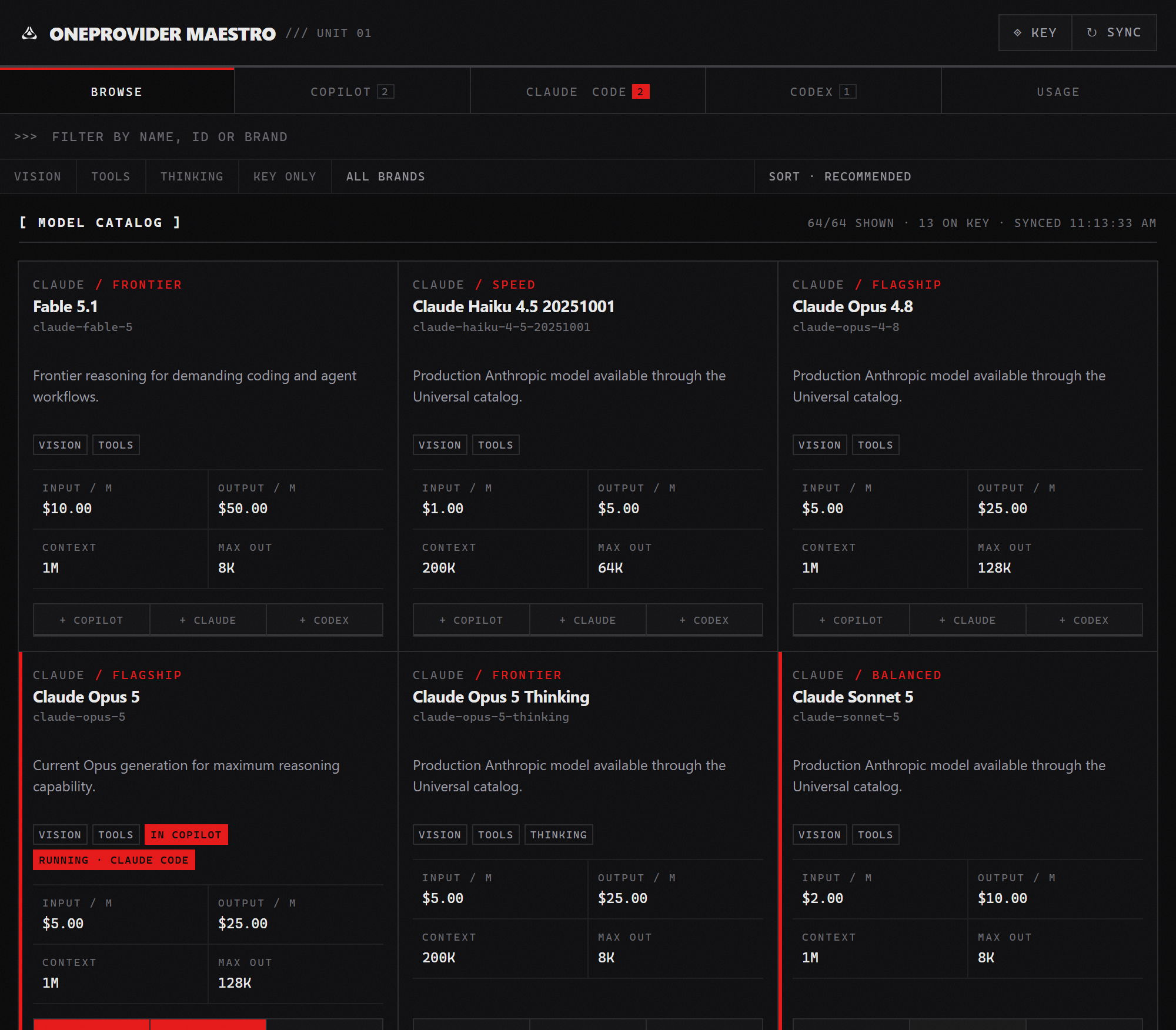
- The catalog syncs on its own. Browse it: search, filter by vision / tools / thinking, sort by price or context length.
- Every model card carries three buttons — + Copilot, + Claude, + Codex. Press the ones you want. Each agent keeps its own saved list, so adding a model never drops the previous one.
Each agent then gets its own tab, and every tab shows the same card: capabilities, input/output price per million tokens, context window and max output.
Copilot Chat — every listed model is usable at once
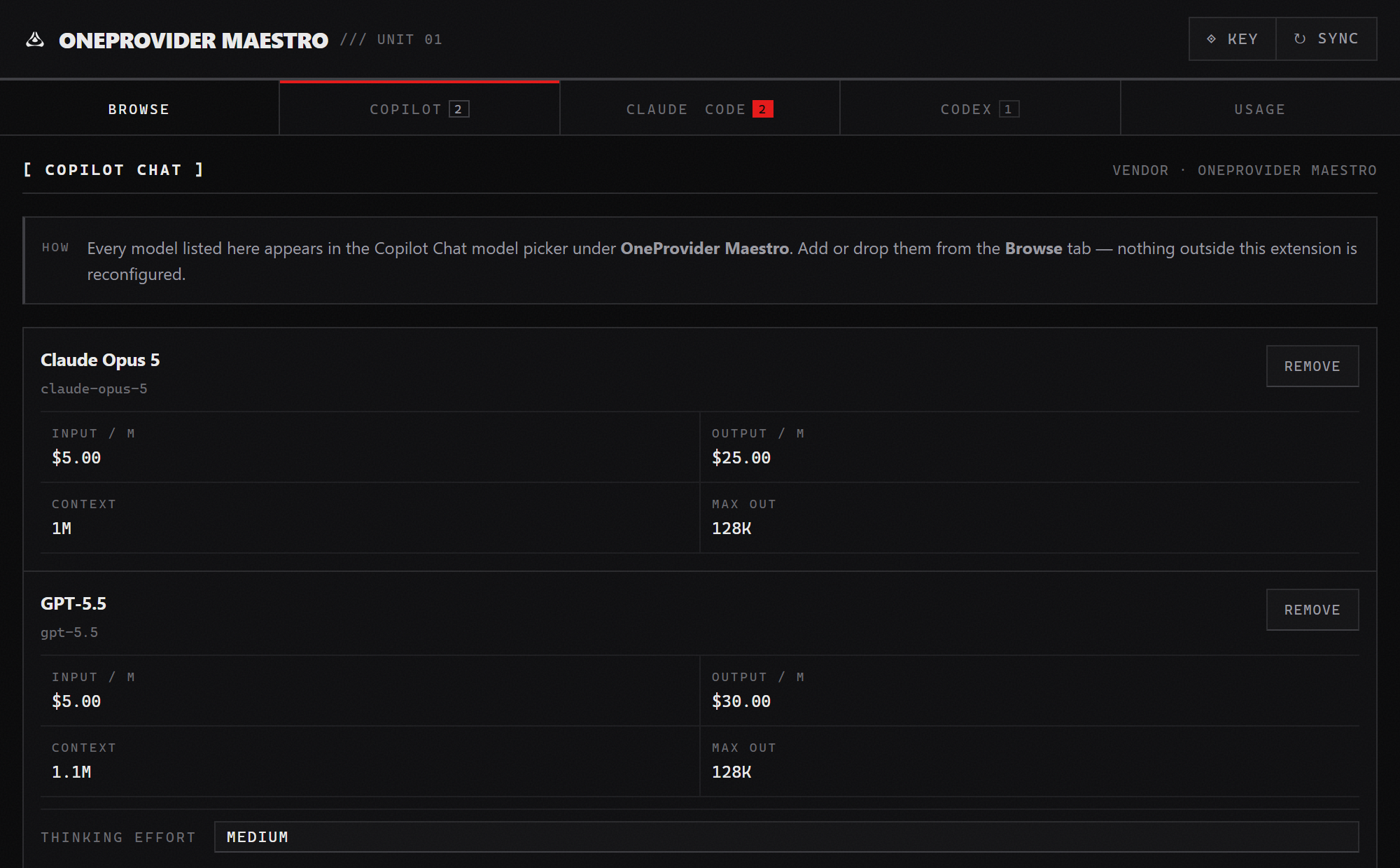
They show up in the Copilot Chat model picker under OneProvider Maestro immediately — no reload, no config file.
Models that accept OpenAI-style reasoning_effort also get a Thinking Effort submenu right in the Copilot model picker, so you can dial reasoning depth per request. The Copilot tab's card carries the same control as a per-model default.
Claude Code — a saved list, one model live
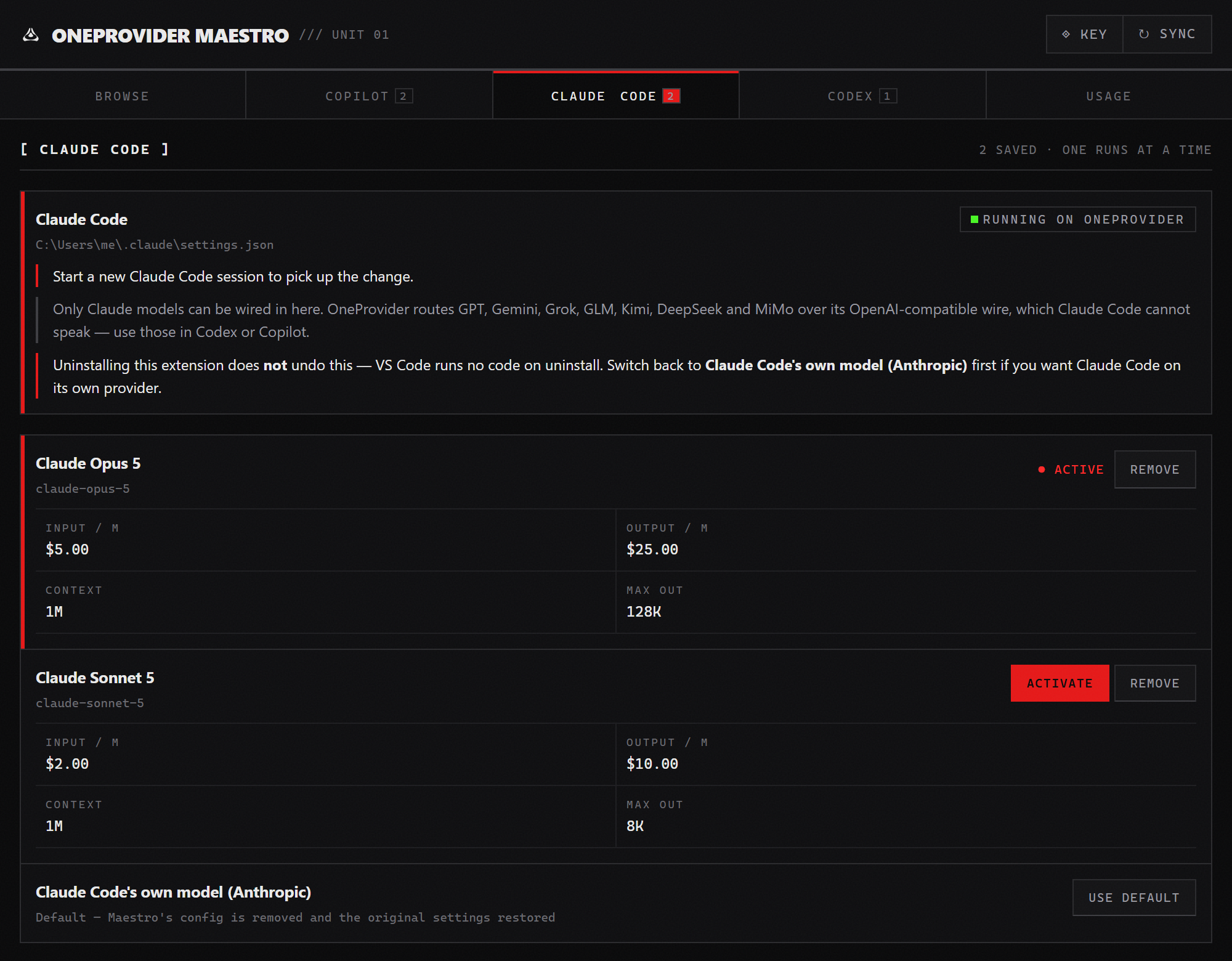
Claude Code and Codex can each run one model at a time, so keep as many as you like in the list and press Activate on the one you want. The hazard-marked card is the one that is really wired in.
Codex — and the way back
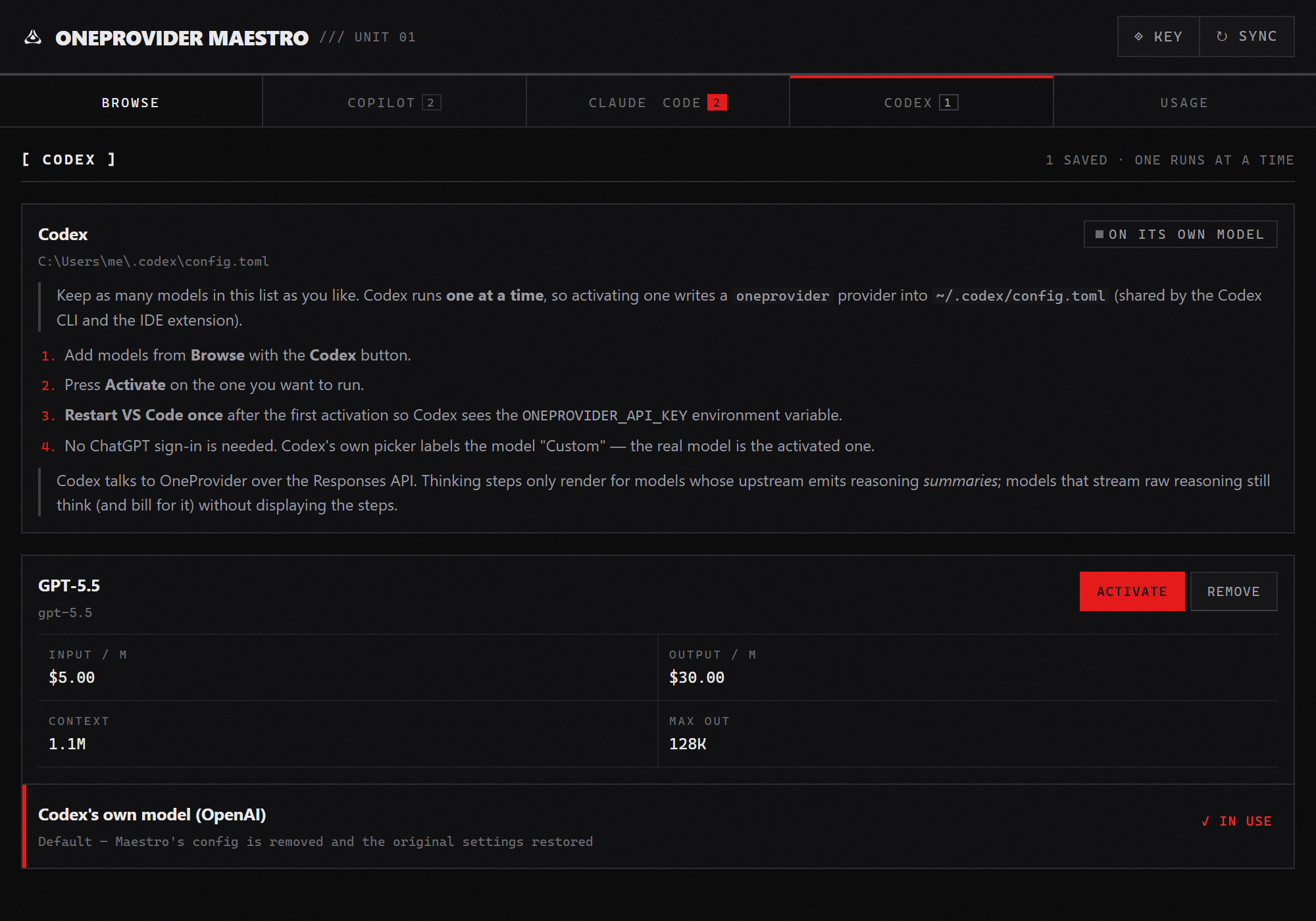
The row at the bottom of every list — “…'s own model” — is the default. Pick it and Maestro removes its config, restores the original settings exactly as they were, and keeps your list for next time.
Reload the window after switching. Claude Code and Codex read their config when they start, so a session that is already open keeps the model it started with — including after you switch back to the default. Maestro shows a Reload Window button whenever you change something. A CLI running in a terminal has to be restarted on its own.
Usage — the prepaid key, in the open
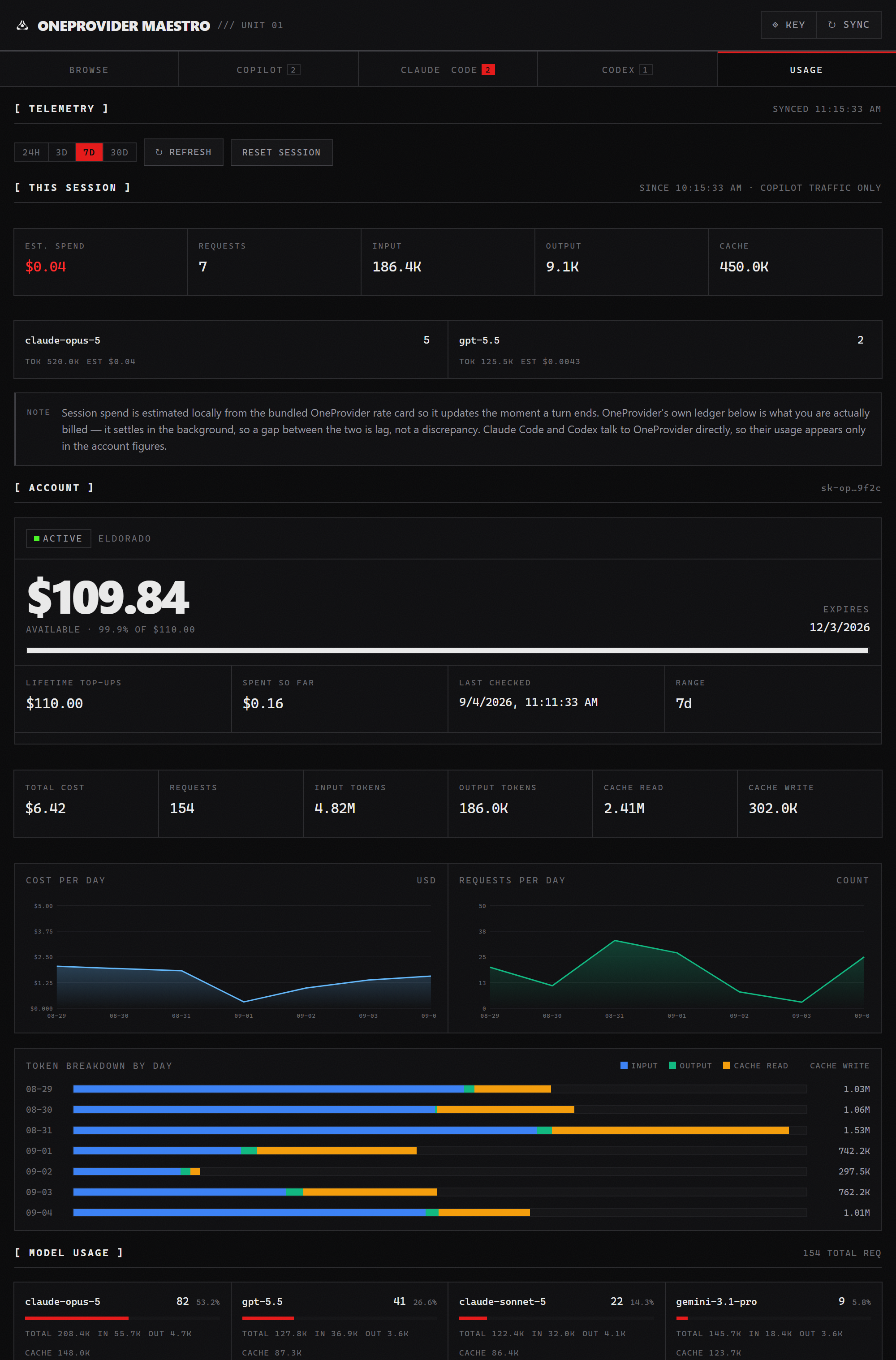
Balance, lifetime top-ups, spend, expiry and key status; cost and request charts; token breakdown by day; per-model usage; and the recent request log — the same figures the OneProvider web dashboard shows, without leaving the editor.
Above them sits this session: what the current window has burned, priced locally the moment each Copilot turn ends. The status bar carries both:
⏱ $0.0431 · 7 req 💳 $109.84
oneproviderMaestro.statusBar.mode picks what it shows (session / balance / both / hidden). It turns amber below 10% of lifetime top-ups.
All of it is available from the command palette too: OneProvider Maestro: … (Browse Models, Use Model in Claude Code, Use Model in Codex, Refresh Balance & Usage, Restore …, Show Integration Status).
How each integration works
The model catalog — why it ships with the extension
OneProvider's GET /v1/models returns the ids your key can call — and nothing else. No pricing, no context window, no capability flags, and OneProvider publishes no endpoint that carries them.
So this extension ships the public OneProvider catalog (64 models across Claude, ChatGPT, Gemini, Grok, DeepSeek, GLM, Kimi and MiMo) and merges the two:
| Badge |
Meaning |
| (none) |
Returned by /v1/models for your key — callable now. |
CATALOG ONLY |
Known to the bundled catalog but not returned for your key. Listed dimmed rather than hidden, because a key can be scoped and hiding them would make a scoped key look like a broken extension. It may 404 at request time. |
Use the Key only filter to hide catalog-only entries, or turn them off entirely with oneproviderMaestro.showCatalogOnlyModels.
Pricing on a card comes from the bundled catalog; refresh it by updating the extension. OneProvider's own billing is always authoritative.
Model ids are flat slugs (claude-opus-5, gpt-5.4-mini), not vendor/model paths. A malformed id is rejected before it can reach an agent config.
Copilot Chat — native, in-process
Maestro registers a VS Code language-model provider (vendor oneprovider-maestro). Requests stream from the extension host straight to https://api.oneprovider.dev/v1/chat/completions with:
- full agent-mode tool calling (streamed tool-call deltas),
- vision input (base64 data URLs),
- reasoning / thinking content rendering,
- retry with backoff on 429/5xx and transient network errors, honoring
Retry-After,
- a request timeout and a status-bar token/cost readout.
The extension also sets chat.byokUtilityModelDefault to mainAgent on first run (only if you have not set it yourself), otherwise Copilot fails its own utility calls with "No utility model is configured for copilot-utility-small".
Thinking effort. OneProvider handles reasoning two different ways, and the UI follows suit:
- Separate model ids. Claude thinking is its own model (
claude-opus-5-thinking), and Gemini bakes the budget into the id (gemini-3-pro-high). Picking the id is picking the effort — these take no parameter, and sending one is a 400.
reasoning_effort on the request. OpenAI-family models accept the field, and those get the Thinking Effort submenu.
Which ids get the control is governed by oneproviderMaestro.reasoningEffortModelPattern (default ^gpt-5). Widen it only if you know your models accept the field. none omits the field entirely rather than sending the string "none".
Claude Code — config-managed
OneProvider natively speaks the Anthropic Messages API (POST https://api.oneprovider.dev/v1/messages), so no translation proxy is involved. Maestro writes:
// ~/.claude/settings.json  (or .claude/settings.local.json with the "project" scope setting)
{
  "env": {
    "ANTHROPIC_BASE_URL": "https://api.oneprovider.dev",
    "ANTHROPIC_AUTH_TOKEN": "sk-…",                      // your OneProvider key
    "ANTHROPIC_API_KEY": "",                            // explicitly empty — see below
    "ANTHROPIC_MODEL": "claude-opus-5",
    "ANTHROPIC_DEFAULT_OPUS_MODEL": "claude-opus-5",
    "ANTHROPIC_DEFAULT_SONNET_MODEL": "claude-opus-5",
    "ANTHROPIC_DEFAULT_HAIKU_MODEL": "<small/fast model, or the same one>",
    "CLAUDE_CODE_SUBAGENT_MODEL": "claude-opus-5",
    "CLAUDE_CODE_DISABLE_NONESSENTIAL_TRAFFIC": "1",
    "CLAUDE_CODE_DISABLE_EXPERIMENTAL_BETAS": "1",      // beta request fields 400 on non-Anthropic gateways
    "CLAUDE_CODE_MAX_CONTEXT_TOKENS": "<model context>", // so "prompt is too long" can't beat compaction to it
    "CLAUDE_CODE_AUTO_COMPACT_WINDOW": "<~80% of context>",
    "CLAUDE_CODE_MAX_OUTPUT_TOKENS": "<min(model max, 32000)>"
  }
}
Only Claude models can be wired in here. OneProvider routes GPT, Gemini, Grok, GLM, Kimi, DeepSeek and MiMo over its OpenAI-compatible wire, which Claude Code cannot speak; those cards' Claude button is disabled with an explanation rather than silently failing at request time.
A few details worth knowing:
- The key goes in
ANTHROPIC_AUTH_TOKEN, and ANTHROPIC_API_KEY is cleared. Both headers reach OneProvider — its /v1/messages accepts Authorization: Bearer and x-api-key alike — but Claude Code treats a value in ANTHROPIC_API_KEY as a custom API key that must be approved before use, recording the answer in ~/.claude.json under customApiKeyResponses. Launched from an IDE panel there is nowhere to answer that prompt, so Claude Code falls back to its stored OAuth session and reports "OAuth session expired and could not be refreshed" without ever calling the gateway. ANTHROPIC_AUTH_TOKEN carries no such gate.
- The context and output caps are declared from the model's real limits. Claude Code otherwise assumes a Claude-sized window and reserves 64k output on every request, which a prepaid gateway can refuse outright.
- A top-level
"model" key shadows ANTHROPIC_MODEL. Claude Code's own /model picker writes it; activation removes it and restore puts it back.
The credential is also mirrored into VS Code's claudeCode.environmentVariables setting and claudeCode.disableLoginPrompt is set, both of which the Claude Code VS Code extension reads before launching — without them it shows its Anthropic login screen instead of using the gateway. A one-time settings.json.maestro-backup is written before the first change.
Codex — config-managed
Codex has only spoken the Responses API wire format since Feb 2026 (wire_api = "chat" was removed), and OneProvider serves a compatible endpoint. Maestro manages the user-level ~/.codex/config.toml (project-local configs cannot define providers):
model = "gpt-5.5"                     # top-level keys must come before any [section]
model_provider = "oneprovider"
show_raw_agent_reasoning = true       # written for reasoning-capable models
model_reasoning_effort = "high"
model_reasoning_summary = "auto"

[model_providers.oneprovider]
name = "OneProvider"
base_url = "https://api.oneprovider.dev/v1"
env_key = "ONEPROVIDER_API_KEY"
wire_api = "responses"
Management is semantic, not comment-based: Codex rewrites this file with its own TOML serializer and relocates comments, so Maestro locates sections and keys by name and leaves everything else byte-for-byte intact. Top-level keys are read only before the first [section] header. A one-time config.toml.maestro-backup is written before the first change.
On Windows the API key is also persisted as a user environment variable, because the GUI-launched IDE extension doesn't inherit shell exports — restart VS Code once afterwards. Switching back to Codex's own model deletes that variable again (or restores the value you had before), so no live key is left behind. On macOS/Linux, add export ONEPROVIDER_API_KEY="…" to your shell profile.
Codex's own picker labels custom models as "Custom"; the real model is the activated one.
Balance & usage — where the numbers come from
OneProvider's documentation advertises GET /v1/dashboard/balance, but that route answers 404 on the live API. The figures the OneProvider web dashboard itself renders come from POST https://dashboard.oneprovider.dev/api/dashboard/lookup, which takes the key in the request body rather than an Authorization header. That is the endpoint this extension uses, and the URL is configurable via oneproviderMaestro.usage.endpoint so a documented route can be pointed at without an extension update.
This means your API key is sent to dashboard.oneprovider.dev — the vendor's own host, the same one the browser dashboard posts it to. If you would rather it never left the machine, set oneproviderMaestro.usage.enabled to false; the Usage tab then shows only local session tracking.
The tab shows two accountings side by side, because they legitimately disagree:
- Session — priced locally from the bundled rate card the instant a Copilot turn finishes. Immediate, and it only covers traffic this extension sent.
- Account — OneProvider's own ledger. Authoritative, covers every client (Claude Code and Codex talk to OneProvider directly), and settles in the background — so it lags.
A gap between the two is lag, not a discrepancy.
Restoring, and uninstalling cleanly
Every integration snapshots the pre-Maestro state on the first apply, so switching models repeatedly never loses the original, and a .maestro-backup copy of every file is written before the first modification.
One agent at a time — press Use default in its tab, or run OneProvider Maestro: Restore Claude Code Defaults (Anthropic) / Restore Codex Defaults (OpenAI).
Everything at once — OneProvider Maestro: Restore All Agents & Clear Settings. This hands all three agents back, empties the Copilot model list, and removes the VS Code settings the extension wrote (claudeCode.environmentVariables, claudeCode.disableLoginPrompt, and chat.byokUtilityModelDefault if Maestro was the one that set it).
Uninstalling runs a vscode:uninstall hook the next time VS Code starts, which removes:
- the
ANTHROPIC_* / CLAUDE_CODE_* block from ~/.claude/settings.json, putting back any value you had under those names beforehand,
- the
[model_providers.oneprovider] section and top-level model selection from ~/.codex/config.toml, likewise restoring your own,
- the
ONEPROVIDER_API_KEY user environment variable on Windows,
- its own
.maestro-backup files, once their contents have been folded back in.
Two things it deliberately does not touch:
- Your API key stays in SecretStorage, so reinstalling does not mean typing it in again. Nothing outside the extension can read it; run
Restore All Agents & Clear Settings first if you would rather it were gone with everything else.
- VS Code's own
settings.json. The hook is a bare Node process and VS Code may be holding that file in memory, so an edit from outside would just be written back over. Those keys are cleared by the restore commands instead — which is why running Restore All before uninstalling leaves the cleanest result.
A custom oneproviderMaestro.codex.configPath is also unreachable from the hook (it lives in VS Code's settings), so a relocated Codex config has to be cleaned by restoring before you uninstall.
Good to know
- Billing moves to OneProvider. While an override is active, your Claude or ChatGPT subscription is not being used. Switching back to the default returns you to it.
- Uninstalling cleans up after itself, but only on the next VS Code start — that is when VS Code runs uninstall hooks. See Restoring, and uninstalling cleanly.
- OneProvider keys are prepaid and can expire. The Usage tab shows the real status the provider reports for your key, not just whether requests happen to be working right now.
- Model ids are flat slugs, not
vendor/model. Ported configs from other gateways will not work verbatim.
- Codex hides thinking steps for models whose upstream streams raw reasoning. Codex renders reasoning summaries only; those models still think, and you are billed for it, but there is no event Codex will display.
Settings
| Setting |
Default |
Description |
oneproviderMaestro.apiEndpoint |
https://api.oneprovider.dev/v1 |
OpenAI-compatible base URL (for proxies) |
oneproviderMaestro.anthropicBaseUrl |
https://api.oneprovider.dev |
Anthropic-native base URL for Claude Code |
oneproviderMaestro.showCatalogOnlyModels |
true |
List models the live endpoint did not return |
oneproviderMaestro.reasoningEffortModelPattern |
^gpt-5 |
Ids that accept reasoning_effort |
oneproviderMaestro.defaultReasoningEffort |
(none) |
Fallback effort for matched models |
oneproviderMaestro.usage.enabled |
true |
Fetch live balance/usage |
oneproviderMaestro.usage.endpoint |
dashboard lookup URL |
Where balance is read from |
oneproviderMaestro.usage.autoRefreshMinutes |
5 |
Background refresh interval (0 = manual) |
oneproviderMaestro.usage.defaultRangeDays |
1 |
Range the Usage tab opens with |
oneproviderMaestro.statusBar.mode |
both |
session / balance / both / hidden |
oneproviderMaestro.defaultTemperature / defaultMaxTokens |
(model default) |
Copilot request parameters |
oneproviderMaestro.maxInputTokensOverride |
(none) |
Force earlier conversation compaction |
oneproviderMaestro.requestTimeoutSeconds / maxRetries |
60 / 3 |
Copilot request resilience |
oneproviderMaestro.cache.ttlMinutes |
60 |
Model-list cache TTL |
oneproviderMaestro.claudeCode.settingsScope |
user |
Write Claude Code env to ~/.claude/settings.json (user) or .claude/settings.local.json (project) |
oneproviderMaestro.claudeCode.smallFastModel |
(empty) |
Cheaper model for background/haiku-class tasks |
oneproviderMaestro.codex.configPath |
(empty) |
Override for ~/.codex/config.toml |
oneproviderMaestro.logLevel |
info |
Output-channel verbosity |
Troubleshooting
401/403 from the model — the key is wrong or expired. Re-enter it with ◈ Key; the Usage tab shows the key's real status.
402 / "no balance left" — top the key up, then press Refresh in the Usage tab. Balances sync in the background, so it can take a minute.
404 on a model — you probably picked a CATALOG ONLY entry. Sync the catalog and use the Key only filter.
Claude Code still answers as the old model — a running session keeps the config it started with. Reload the window and start a fresh session; a CLI in a terminal has to be restarted itself.
Claude Code says "OAuth session expired and could not be refreshed" — it is using its own Anthropic login instead of the gateway. Check that ~/.claude/settings.json has env.ANTHROPIC_AUTH_TOKEN set to your key and env.ANTHROPIC_API_KEY empty (Maestro writes it that way; a key in ANTHROPIC_API_KEY needs an approval Claude Code cannot ask for from a panel). Then re-activate the model and start a fresh session.
Codex says ONEPROVIDER_API_KEY is missing — restart VS Code once after the first activation, so the process inherits the new user variable.
Session cost and account cost disagree — expected; see Balance & usage above.
The OneProvider Maestro output channel has the full request log; raise oneproviderMaestro.logLevel to debug for details.
Privacy
- The API key is stored in VS Code SecretStorage, never in
settings.json.
- Chat requests go to
api.oneprovider.dev only.
- Balance lookups go to
dashboard.oneprovider.dev and include the key in the body — disable with oneproviderMaestro.usage.enabled.
- Session usage is tracked in memory and never leaves the machine.
- When an agent is wired up, the key is written into that agent's config file (and, on Windows for Codex, a user environment variable) so the agent can authenticate. Restore removes both.
Development
npm install
npm run watch      # esbuild in watch mode — then press F5 for an Extension Development Host
npm run compile    # tsc --noEmit type check
npm test           # node:test via tsx — no VS Code host needed
npm run build      # production bundle
npm run package    # build a .vsix
Requires VS Code 1.104+ (the release where the language-model provider API was finalized).
The unit tests deliberately cover the parts whose failure is silent or expensive: key validation, model-id validation (a bad id corrupts an agent config), the catalog merge, effort resolution, and token/cost extraction.
Contributing
Issues and pull requests are welcome at github.com/husamettinulutas/oneprovider-maestro. Bug reports are most useful with the agent involved, its version, and the relevant lines from the OneProvider Maestro output channel.
Sibling project: openrouter-maestro, the same idea for OpenRouter.
License
MIT — see LICENSE.

