
Antigravity Maestro
One extension. A pool of Google accounts. Three AI coding agents.
Run Antigravity's models in GitHub Copilot Chat, Claude Code and OpenAI Codex,
from a pool that rotates itself when a quota runs out.




Installation ·
Quick start ·
Models ·
Gateway API ·
Configuration ·
Security
Overview
Antigravity Maestro turns the Google accounts you already have into a single, self-managing model
pool. Sign in once per account; the extension tracks each one's quota, serves every request from
whichever account can afford it, and exposes the whole pool to three clients at once — natively
inside Copilot Chat, and over a local OpenAI/Anthropic-compatible gateway for Claude Code and Codex.
Not affiliated with, endorsed by, or sponsored by Google. "Antigravity" and "Gemini" are
trademarks of Google LLC. The extension talks to the same endpoints the Antigravity client uses,
authenticated with credentials you sign in with yourself.
Capabilities
|
|
| Account pool |
Add any number of Google accounts. Refresh tokens live in VS Code SecretStorage — never in settings, never in plaintext on disk. |
| Quota telemetry |
Remaining quota per model, reset countdowns, subscription tier, and both the 5-hour and weekly rolling windows, for every account. |
| Automatic rotation |
A rate-limited or exhausted account hands off to the next eligible one, and the in-flight request is retried transparently. |
| Copilot Chat |
Models register as a first-class provider in Copilot's picker. Requests run in-process — no proxy hop. |
| Claude Code & Codex |
A loopback gateway speaks the Anthropic and OpenAI wire formats; each agent's own config is rewritten, with backups, to point at it. |
| Commit messages |
Choose which model writes VS Code's generated commit messages instead of spending Copilot credits on them. |
| Usage accounting |
Token spend per account and per model, with retained quota history. |
Installation
From the VS Code Marketplace:
code --install-extension husamettinulutas.antigravity-maestro
Or search for Antigravity Maestro in the Extensions view. Requires VS Code 1.104 or newer.
Quick start
Open the Antigravity Maestro view in the activity bar.
Select Add account and complete Google sign-in in your browser. Repeat for each account —
the first one becomes active.
Wire up the clients you use:
| Client |
Action |
| Copilot Chat |
Set up on the Copilot Chat row, then Manage Models → Antigravity Maestro in the model picker, and tick the models you want. |
| Claude Code |
Use model on the Claude Code row (or run Antigravity Maestro: Use Model in Claude Code), then restart any running session. |
| Codex |
Use model on the Codex row. On Windows, restart VS Code once so Codex picks up the key. |
Restore returns any agent to its own provider. Every config file is copied to
<file>.antigravity-maestro-backup before the first write.
What the panel shows
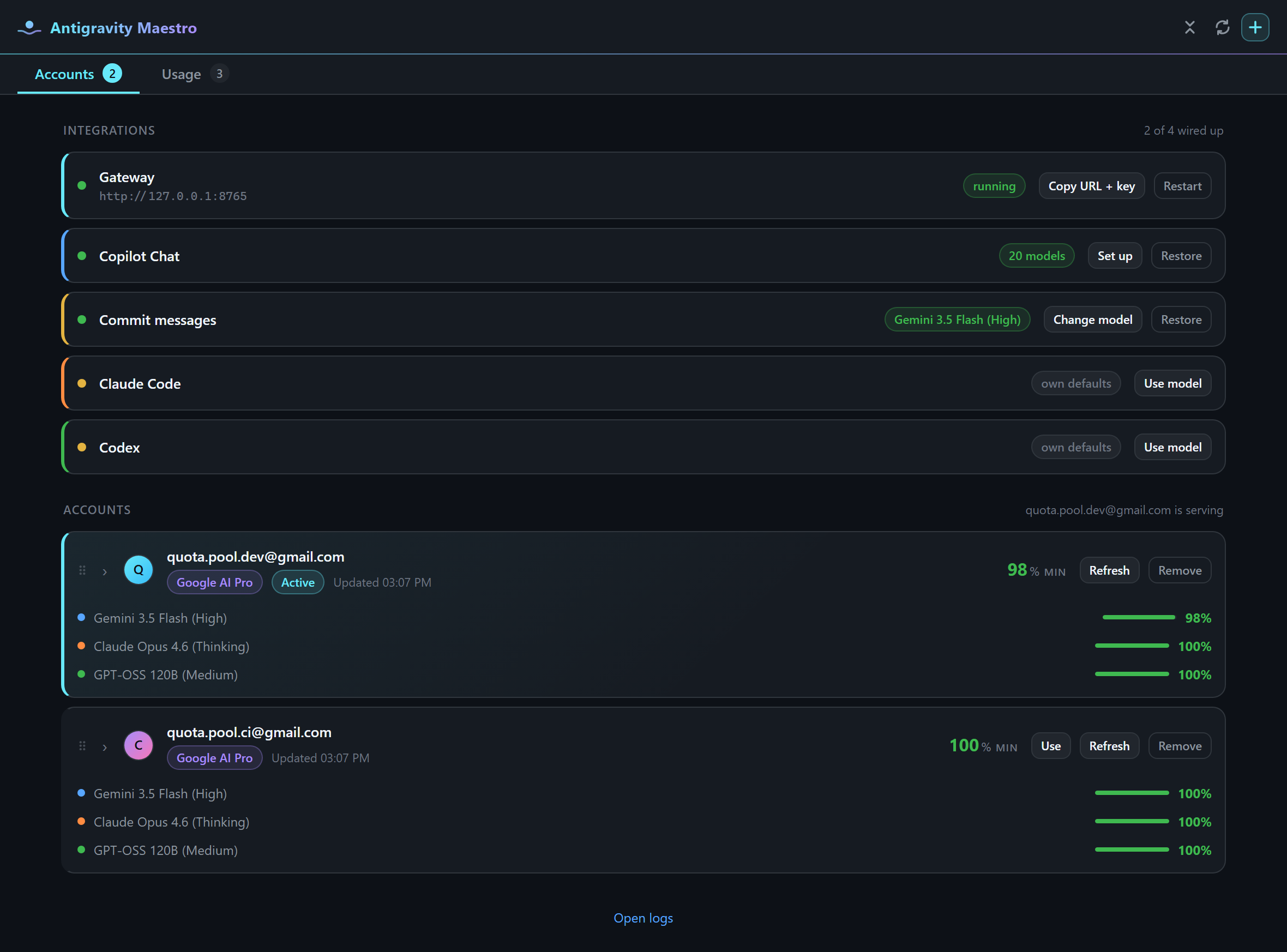
The Accounts tab opens on Connections: whether the gateway is running, with its URL a click
away, and which agents are wired to the pool. Below it, the account serving right now gets the
whole stage, with a ring gauge per model family (Claude, Gemini, GPT-OSS) and when each one resets.
If it is spending fast, the card says when it will run dry. If another account has more of that
family left, the card offers to switch to it in one click. Under that, the 5-hour and weekly rolling
windows. The rest of the pool is listed in rotation order, each account with its status in words, a
pill per family, and Use to serve from it. Drag the list to set the order rotation falls back
down. Refreshing, reordering and removing an account are in its ⋯ menu.
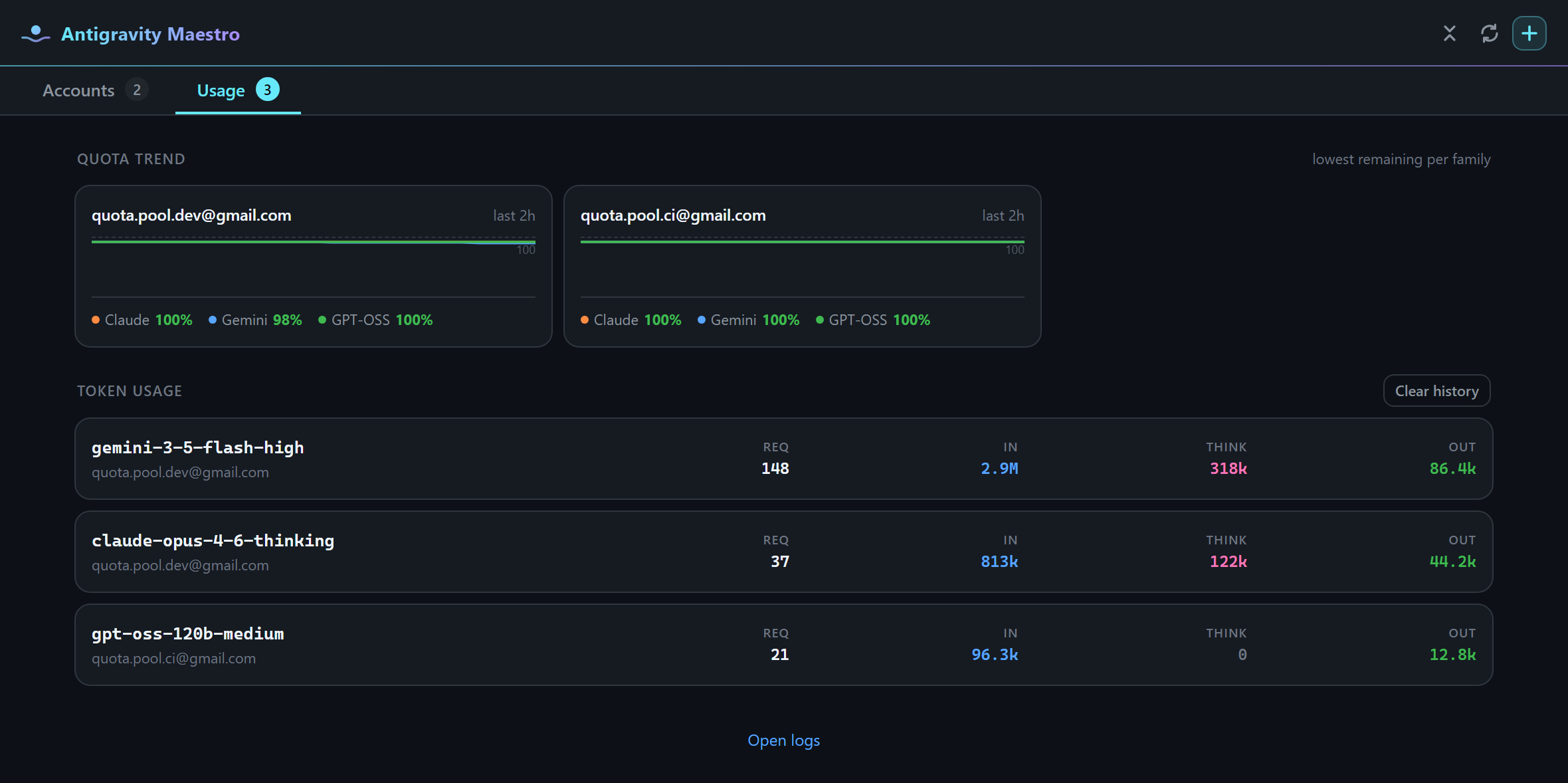
The Usage tab tracks what the pool actually spent, over the range you pick: this hour, today,
yesterday, 7 days, 30 days or all of it. It starts with the total tokens served and the input /
thinking / output mix; today and yesterday show each other for comparison, and the longer ranges add
a bar per day. Then it breaks the spend down per model, each with its own input, thinking and output
figures and the accounts that served it, and per account. Last, a quota history per account shows how
fast each family is draining. Clear history… asks how much to remove: a recent span, everything
older than a week or a month, or everything.
Models
Model ids are passed through exactly as upstream reports them — nothing is renamed. Where a model
exposes separate reasoning tiers, those are distinct ids upstream with different thinking budgets,
so they appear as distinct models here:
gemini-3.1-pro-high      gemini-3.5-flash-high      claude-opus-4-6-thinking
gemini-3.1-pro-low       gemini-3.5-flash-medium    claude-sonnet-4-6-thinking
gemini-3-flash           gemini-3.5-flash-low       gpt-oss-120b-medium
The authoritative list comes from each account's own quota response, so it reflects what Google
actually serves that account.
The *-tiered Gemini Flash models are the exception: one id whose effort each request chooses.
Copilot's model picker offers a Thinking Effort control for them where VS Code supports it —
Low, Medium or High, about 1K or 4K tokens of thinking or the model's full budget — and
antigravityMaestro.copilot.thinkingEffort sets the default. Claude Code's --effort and Codex's
model_reasoning_effort set the same budgets, on every model that thinks, and the model is told the
effort it runs at. Claude Code's ultracode reaches the model the same way: while it is on, the model
is told to run substantive tasks as workflows, without being asked each time.
Each model in Copilot's picker shows the size of its context window, because the windows differ by
an order of magnitude — around 1M tokens for the Gemini models against 200K for the Claude ones.
Switching a long conversation to a smaller window makes Copilot Chat compact it first ("Compacting
conversation…"), and that summary is a model turn like any other: it is charged to the account.
Starting a new chat for the new model avoids it.
Gateway API
Claude Code and Codex speak HTTP, so the extension runs a server on 127.0.0.1:8765 (configurable),
protected by a bearer key generated per install and held in SecretStorage. The three supported
integrations are wired up for you by Use model — the gateway is there for everything else.
| Route |
Protocol |
Client |
POST /v1/messages |
Anthropic Messages (streaming + blocking) |
Claude Code |
POST /v1/responses |
OpenAI Responses |
Codex |
POST /v1/chat/completions |
OpenAI Chat Completions |
generic clients |
GET /v1/models |
model list |
both |
GET /health |
liveness (unauthenticated) |
you |
curl -s http://127.0.0.1:8765/health
curl -s http://127.0.0.1:8765/v1/models -H "authorization: Bearer $KEY"
Run Antigravity Maestro: Copy Local Gateway URL and Key to obtain $KEY, or use Copy URL + key
on the gateway row to point a CLI, a script, or another editor at the pool. Restart rebinds the
server after a port change, or if requests stop going through.
Copilot Chat does not use the gateway; those requests never leave the extension host.
Several windows, several accounts
Each VS Code window keeps its own serving account, and each project folder remembers the one it was
on. Open two projects side by side, pick a different account in each, and neither moves the other.
A window you have never picked in starts on the account you picked last.
Every window runs a gateway, and only one of them can hold the preferred port. The others start on
the next free port but give agents the preferred address, so Claude Code and Codex configs always
name 127.0.0.1:8765. When the window that holds the port closes, another window takes it over
within seconds. Agents send their window's name with each request, so whichever window's gateway
answers, the request runs on that window's account.
With the default highest-quota-first rotation, a window whose account runs out falls back to the
next account in the list, which may be the one another window is using. Set
antigravityMaestro.rotation.strategy to manual to keep every window on its own account.
Configuration
| Setting |
Default |
Purpose |
antigravityMaestro.gateway.port |
8765 |
Preferred gateway port, shared by every window; a window that cannot bind it uses the next free port. |
antigravityMaestro.gateway.autoStart |
true |
Start the gateway with VS Code. |
antigravityMaestro.rotation.strategy |
highest-quota-first |
manual, round-robin, or highest-quota-first. |
antigravityMaestro.rotation.cooldownMinutes |
15 |
Fallback cooldown after a rate limit. |
antigravityMaestro.quota.autoRefreshMinutes |
10 |
Background quota refresh (0 disables it). |
antigravityMaestro.upstreamProxyUrl |
"" |
HTTP(S) proxy for all Google traffic. |
antigravityMaestro.oauth.clientId / .clientSecret |
"" |
Sign in with your own approved OAuth client. |
antigravityMaestro.copilot.thinkingEffort |
high |
Thinking effort for the *-tiered Gemini Flash models in Copilot Chat, where the model picker does not offer the choice itself. |
antigravityMaestro.claudeCode.settingsScope |
user |
Write ~/.claude/settings.json or the workspace's .claude/settings.local.json. |
antigravityMaestro.claudeCode.smallFastModel |
"" |
Cheaper model for Claude Code's background tasks. |
antigravityMaestro.codex.configPath |
"" |
Alternative config.toml path. |
Under manual rotation the active account never changes on its own. Under the other strategies it
changes only when the account you picked cannot serve the request.
Architecture
Copilot Chat ──► LanguageModelChatProvider ─┐
                                            ├─► account lease ──► Cloud Code endpoints
Claude Code ──► /v1/messages ──┐            │      (rotation,        (streamGenerateContent)
Codex ────────► /v1/responses ─┴► gateway ──┘       quota, tokens)
The account lease decides which signed-in account serves each request, refreshes its access token as
needed, and records the token spend. Protocol translation is confined to src/protocol/, so a
change to one wire format never touches the others.
Security
- Refresh tokens are stored in VS Code SecretStorage. They are never written to settings, logs,
or workspace files.
- The gateway binds to
127.0.0.1 only and requires a bearer key generated per install.
- OAuth client credentials are injected at build time from a git-ignored
.env and are never
committed. See Building from source.
- Agent config files are backed up to
<file>.antigravity-maestro-backup before any write, and
Restore reverts them.
Report a vulnerability privately through
GitHub Security Advisories.
Building from source
git clone https://github.com/husamettinulutas/antigravity-maestro.git
cd antigravity-maestro
npm install
cp .env.example .env      # then fill in your OAuth client
| Command |
Purpose |
npm run watch |
esbuild in watch mode; press F5 to launch the Extension Development Host. |
npm run compile |
Type-check only. |
npm test |
Protocol mapper tests. |
npm run build |
Production bundle. |
npm run package |
Build a .vsix. |
.env supplies AGM_OAUTH_CLIENT_ID and AGM_OAUTH_CLIENT_SECRET, which esbuild.js bakes into
the bundle at build time. Building without it is supported — the result simply has no built-in
client, and sign-in then requires the antigravityMaestro.oauth.* settings. Google issues the Cloud
Code scopes only to approved clients, so the client you supply must be one of them.
Contributing
Issues and pull requests are welcome at
github.com/husamettinulutas/antigravity-maestro.
Run npm run compile && npm test before opening a pull request, and never commit credentials.
License
MIT © Hüsamettin Ulutaş

