中文使用手冊 | English
Holtek HT32 VS Code Extension
A VS Code extension for Holtek HT32 series Cortex-M microcontrollers (M0+/M3/M4). Converts Keil uVision and HT32-IDE projects to a Makefile workflow, or creates new projects from scratch — with one-click build, flash, and debug via the bundled OpenOCD and e-Link32 probe.
Features
| Feature |
Description |
| Create Project |
Wizard-driven project generator from HT32 FWLib (standard & 49x series) |
| Convert uVision |
Import Keil .uvprojx / .uvmpw projects — Makefile, linker script, clangd config auto-generated |
| Convert HT32-IDE |
Import Eclipse CDT .project/.cproject projects |
| Build / Clean |
One-click or toolbar buttons; compound post-build task support |
| Download (Flash) |
Flash firmware via bundled OpenOCD + e-Link32 Pro/Lite |
| Debug |
Cortex-Debug + bundled OpenOCD; Flash & Debug or Attach mode |
| HT32 Settings |
WebView panel for compiler flags, debug interface, post-build commands |
| Project File Tree |
Source groups view with add/remove files and groups |
| clangd / IntelliSense |
Auto-generates .clangd and merged compile_commands.json |
| Configuration Wizard |
Visual editor for HT32 config files (conf.h, system_ht32.c, usbdconf.h, startup.s) — Keil-compatible wizard syntax |
Requirements
| Item |
Description |
| OS |
Windows x64 |
| Debug probe |
Holtek e-Link32 Pro or e-Link32 Lite (recommended); J-Link and ST-Link also supported |
| FWLib |
Required; supports HT32F1xxxx / HT32F4xxxx / HT32F5xxxx / HT32F490x1 / HT32F491x3 / HT32F493x5 |
GCC toolchain: Auto-detected on startup; installed automatically via winget if not found, or set manually in settings.
OpenOCD: Bundled — no separate installation needed.
Extension dependencies: Cortex-Debug and Holtek HT32 Configuration Wizard are installed automatically.
Installation
Option A — From VSIX
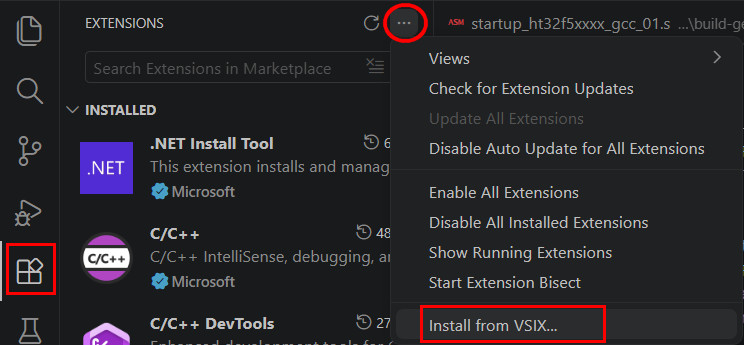
- VS Code → Extensions →
... → Install from VSIX...
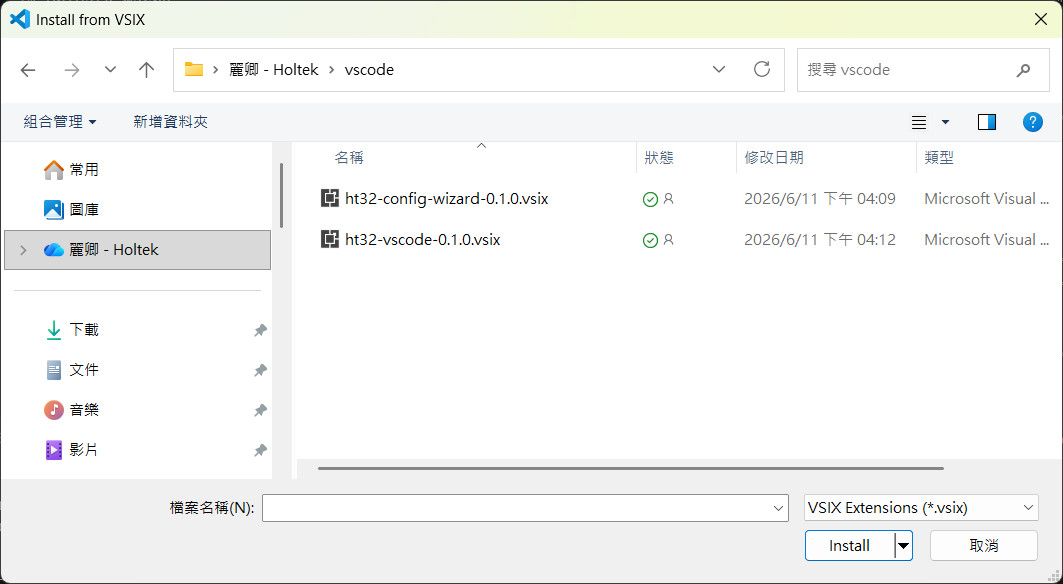
- Select
ht32-vscode-x.x.x.vsix
Option B — From Marketplace
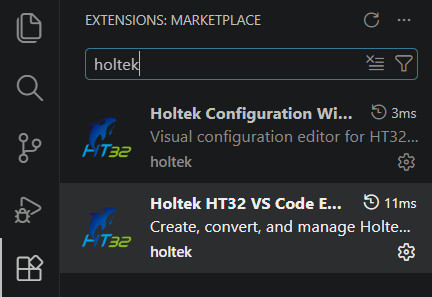
- Search
Holtek HT32 VS Code Extension in the Extensions view
- Click Install
Interface Overview
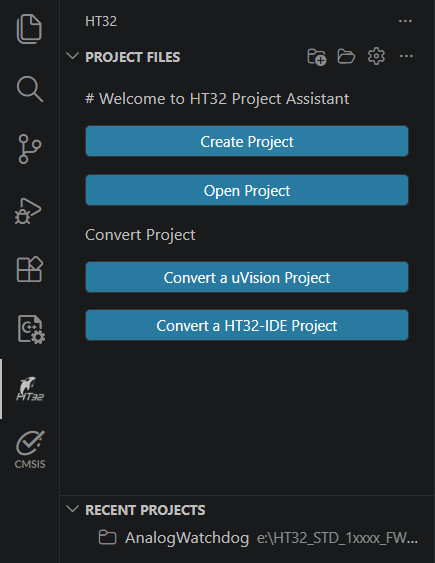
After installation, the HT32 icon appears in the Activity Bar. Click it to open the HT32 panel.
When no project is open: shows Create / Open / Convert buttons, plus a Recent Projects list below for quick access.
Toolbar buttons (visible when a project is loaded):
| Button |
Action |
| Build |
Compile (runs make) |
| Debug |
Start Cortex-Debug session via OpenOCD |
| Clean |
Delete the build/ output directory |
| Download |
Flash firmware without starting a debug session |
| Settings |
Open HT32 Settings WebView |
{} Generate Config |
Regenerate tasks.json and launch.json |
Project File Tree (bottom of the HT32 panel) shows source groups — the same group concept as Keil uVision.
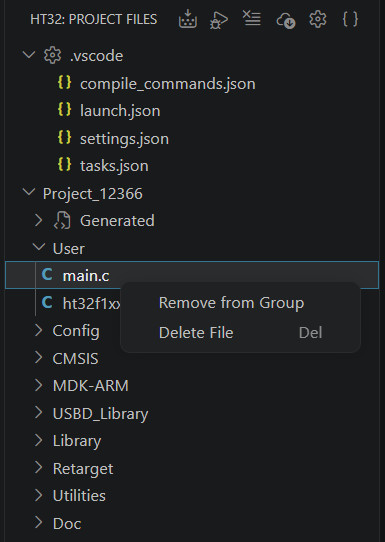
Right-click menu:
| Target |
Actions |
| Project root |
Add group |
| Group |
Add file, Remove group |
| File |
Remove from group, Delete from disk |
Getting Started
Create a New Project
Requires HT32 FWLib downloaded from the Holtek website.
- Click the HT32 icon in the Activity Bar → Create Project (the
+ button)
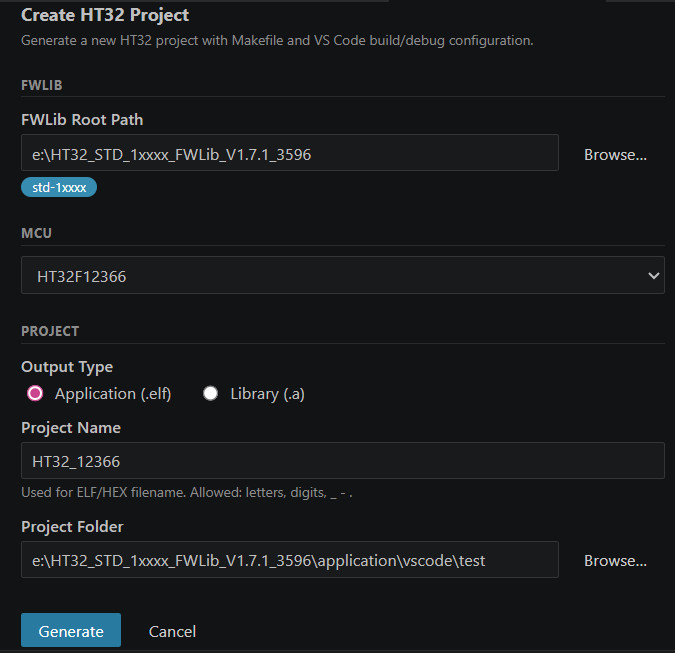
- Follow the wizard:
| Step |
Action |
| ① |
Select the HT32 FWLib root folder |
| ② |
Choose MCU model |
| ③ |
Choose output type: Application or Library |
| ④ |
Enter project name and save location |
Generated File Structure
<workspace>/
├── .clangd
├── src/
│   ├── main.c
│   ├── ht32fxxxx_it.c
│   ├── system_ht32fxxxx.c
│   ├── ht32fxxxx_conf.h
│   └── ht32_op.c
└── .vscode/
    ├── tasks.json
    ├── launch.json
    ├── compile_commands.json
    └── build-gen/
        ├── Makefile
        ├── linker_script.ld
        ├── startup_ht32fxxxx_gcc_xx.s
        ├── ht32_syscalls.c
        ├── ht32_retarget_gnu.c
        └── *.json
49x series (HT32F490x / 491x / 493x): src/ includes board support files (ht32fXXXxX_board.c/h) instead of ht32_op.c.
Convert a Keil uVision Project
- Click Convert uVision Project in the HT32 panel
- Select the
.uvprojx (single project) or .uvmpw (multi-project workspace) file
For .uvmpw, all sub-projects are converted at once, each into its own .vscode/build-gen-{project-name}/ directory.
Auto-generated:
Makefile (MCU, compiler flags, source files)linker_script.ld (converted from Keil scatter file)startup_xxx_gcc.s (converted from Keil startup)compile_commands.json / tasks.json / launch.json
Single .uvprojx — output to .vscode/build-gen/
.uvmpw multi-project — one directory per sub-project, e.g. Project_IAP.uvprojx + Project_AP.uvprojx:
.vscode/
├── tasks.json
├── launch.json
├── build-gen-iap/
│   ├── Makefile
│   ├── linker_script.ld
│   └── *.json
└── build-gen-ap/
    ├── Makefile
    ├── linker_script.ld
    └── *.json
Conversion warnings (e.g. prebuilt .lib files that cannot be used with GCC) appear in the VS Code Problems panel.

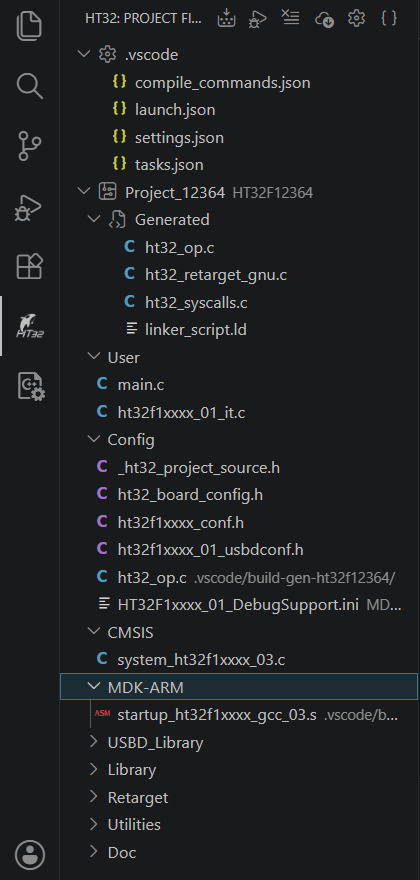
Convert an HT32-IDE Project
- Click Convert HT32-IDE Project in the HT32 panel
- Select the project folder containing
.project / .cproject (Eclipse CDT format)
If the folder contains multiple sub-projects, all are converted at once, each into its own build-gen-{suffix}/ directory. Conversion warnings appear in the VS Code Problems panel.
Build
- Click Build in the HT32 toolbar
- Or press Ctrl+Shift+B to access VS Code tasks (Build, Build All, Clean, Download)
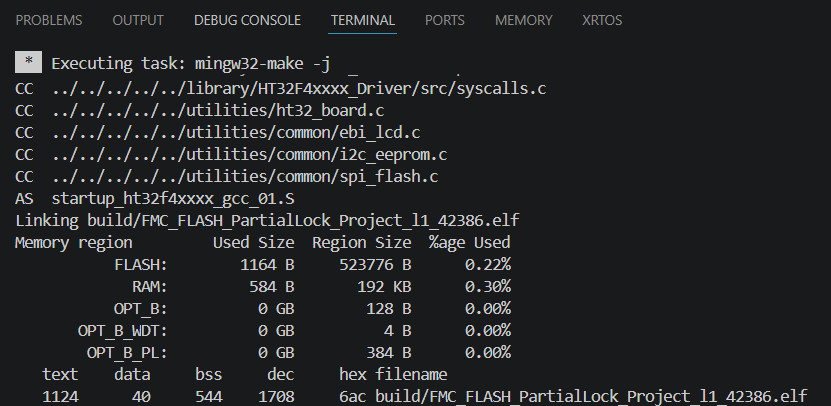
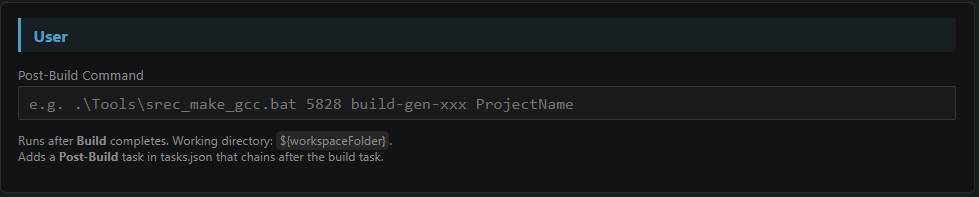
A Post-Build command can be configured in Settings to run automatically after a successful build (e.g. CRC calculation).
Clean
- Click Clean in the HT32 toolbar
- Deletes all compiled output under
.vscode/build-gen/build/
Flash Firmware
Requires Holtek e-Link32 Pro or e-Link32 Lite connected.
- Confirm the e-Link32 is connected and the driver is working
- Click Download in the HT32 toolbar
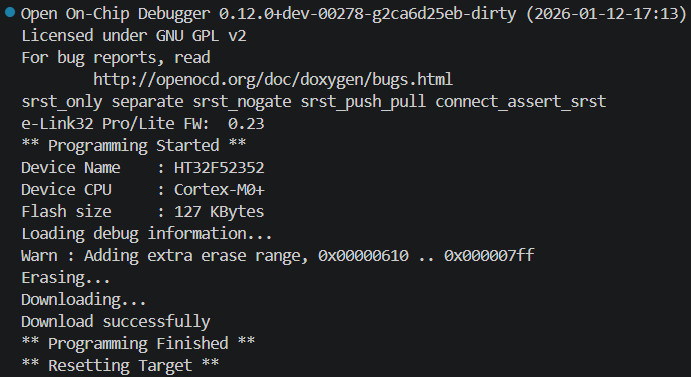
- Firmware is flashed automatically; progress is shown in the Terminal
| Setting |
Options |
| Debug Interface |
CMSIS-DAP (e-Link32) / J-Link / ST-Link |
| Erase Mode |
Erase Sector (default) / Erase Chip / None |
Debug
Cortex-Debug is a dependency and is installed automatically.
Full Debug Flow
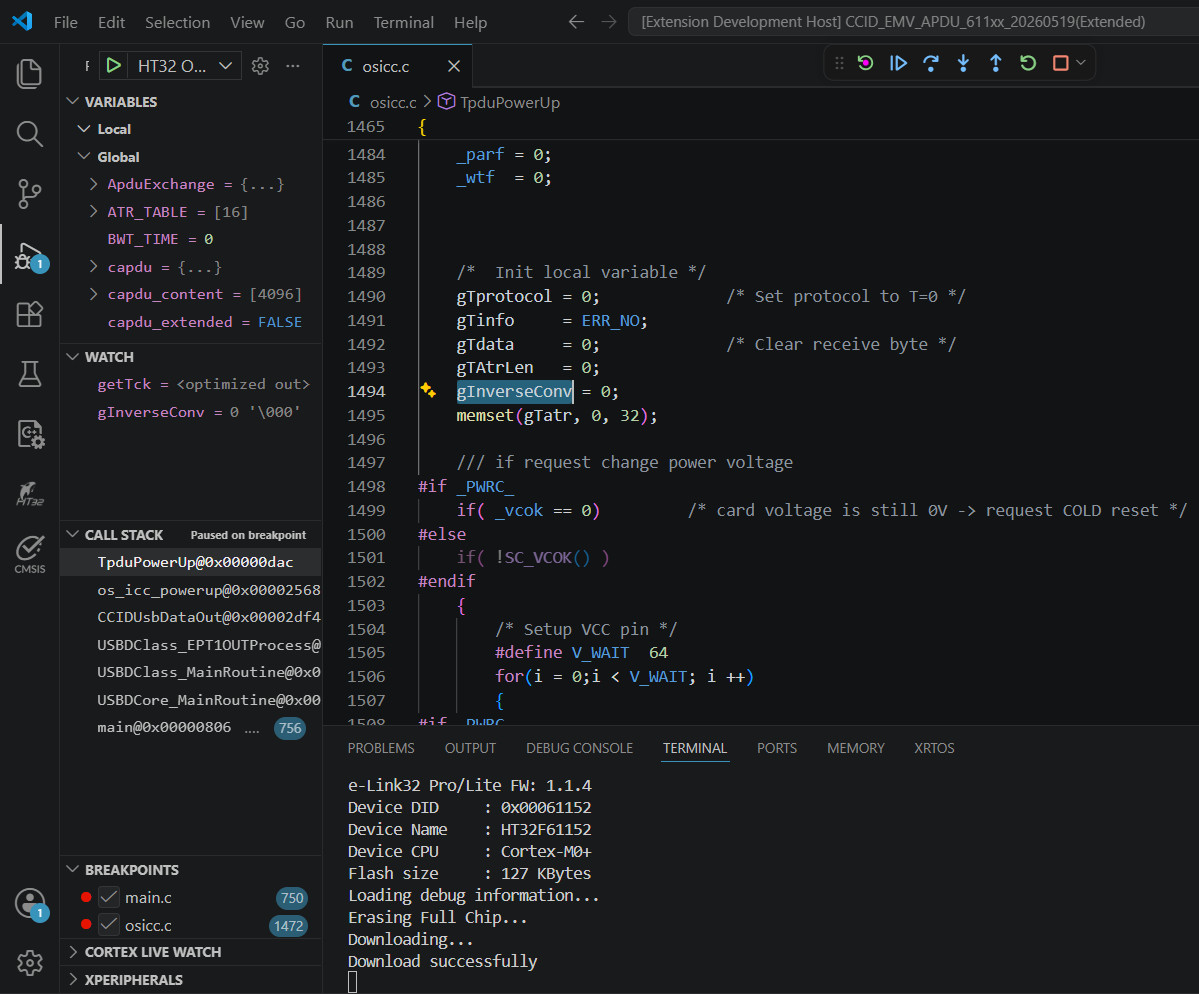
- Click Debug in the HT32 toolbar
- The extension compiles, flashes, and starts an OpenOCD + GDB debug session
Attach Mode (connect to an already-running target)
Use this when the target board is already running and you don't need to reflash.
- Confirm the target board is powered and running
- Press F5 or open Run and Debug (Ctrl+Shift+D)
- Select HT32 OpenOCD Attach from the dropdown, then press ▶
Attach does not compile or flash — it connects directly via OpenOCD and halts the CPU.
| Mode |
Description |
| HT32 OpenOCD Debug |
Compile → Flash → Start debug session |
| HT32 OpenOCD Attach |
Connect to running target without flashing |
HT32 Settings
Open via the Settings button in the HT32 toolbar. The panel has three tabs. Settings auto-save 3 seconds after any change and are stored in .vscode/build-gen/project.settings.json.
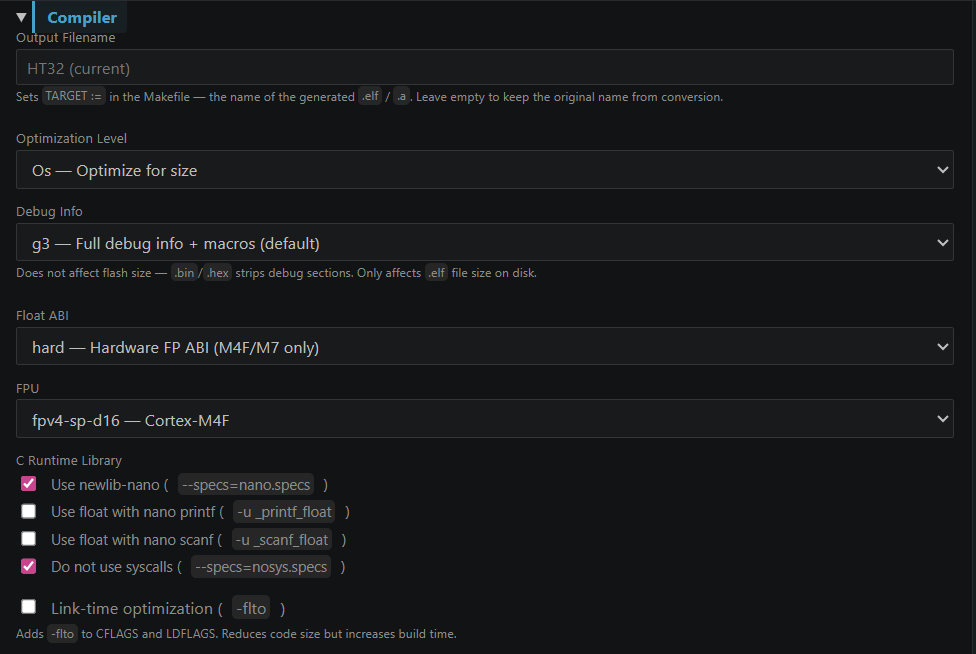
Compiler Tab
| Setting |
Options |
| Output Name |
Override the output filename (ELF/HEX) |
| Optimization |
-O0 / -O1 / -O2 / -O3 / -Os (default) / -Og |
| Debug Info |
-g3 (default, full debug) / -g (standard) / -g1 (line numbers only) / -g0 (none, for release) |
| Float ABI |
soft (M0/M3) / softfp / hard (M4F) |
| FPU |
none / fpv4-sp-d16 (M4F) / fpv5-sp-d16 (M7) / fpv5-d16 (M7) |
| C Runtime |
nano (newlib-nano) / nosys — can combine both |
| printf float |
Enable floating-point printf (-u _printf_float) |
| scanf float |
Enable floating-point scanf (-u _scanf_float) |
| LTO |
Enable -flto |
| Extra Lib Names |
Library names (-lName) with optional search path (-L"dir") |
| Extra Include Paths |
Additional -I paths appended to CFLAGS/ASFLAGS |
| Extra CFLAGS |
Additional compiler flags, e.g. -DDEBUG |
| Extra LDFLAGS |
Additional linker flags |
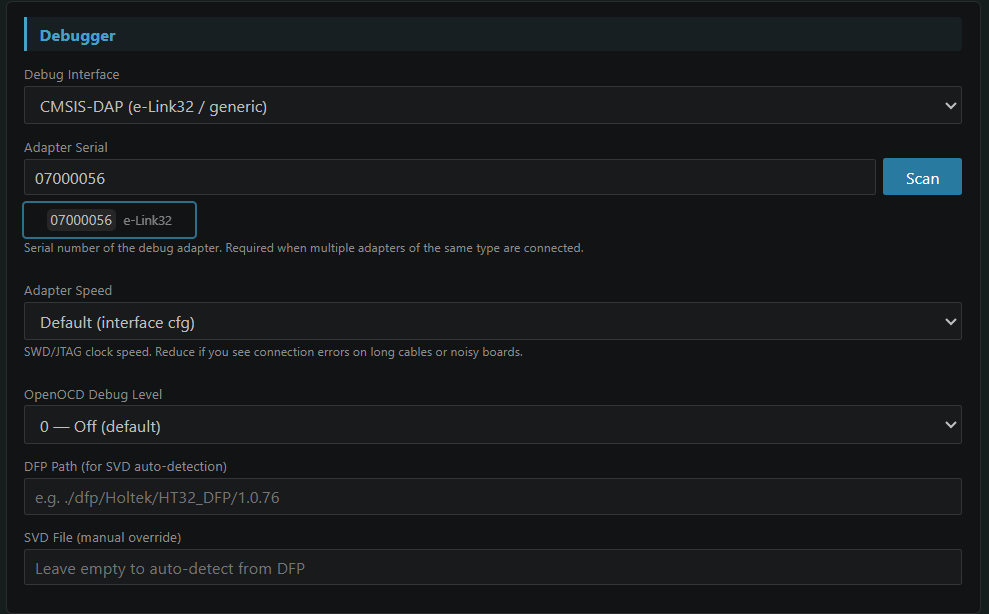
Debugger Tab
| Setting |
Options |
| Debug Interface |
CMSIS-DAP (e-Link32) / J-Link / ST-Link |
| Adapter Serial |
Specify probe serial (blank = auto) |
| Adapter Speed |
Transfer rate in kHz (blank = interface default) |
| OpenOCD Debug Level |
0 = off / 1–3 = increasing verbosity |
| DFP Path |
Custom DFP path for SVD auto-detection |
| SVD File |
Peripheral register SVD file (blank = auto-detect) |
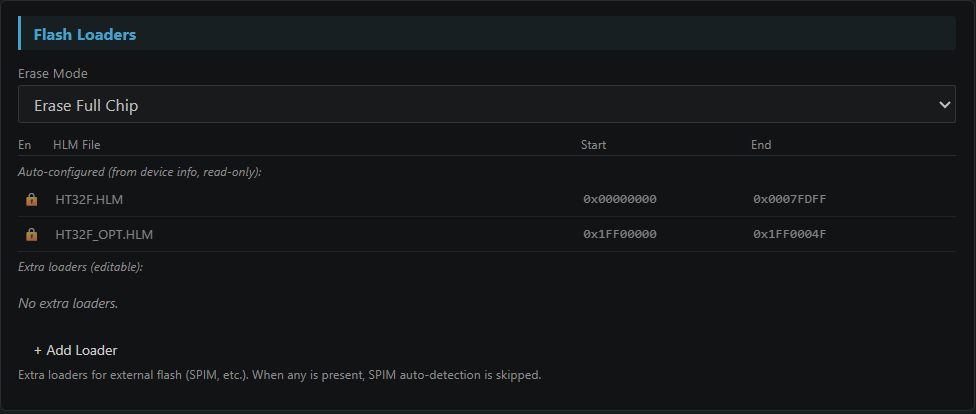
| Erase Mode |
erase_sector (default) / erase_chip / none |
| Flash Loaders |
Add external flash loaders (e.g. SPI Flash) |
Build Tab
| Setting |
Description |
| Post-Build |
Command to run after a successful build (working dir: ${workspaceFolder}) |
| GCC Path |
arm-none-eabi-gcc path (blank = auto-detect) — machine-wide |
| OpenOCD Path |
OpenOCD path (blank = use bundled OpenOCD) — machine-wide |
Toolchain paths are stored in VS Code User Settings and shared across all projects.
Configuration Wizard
The Holtek HT32 Configuration Wizard extension (installed automatically) provides a visual editor for HT32 firmware configuration files, compatible with Keil MDK Configuration Wizard syntax.
Supported files:
| File |
Purpose |
ht32fxxxx_conf.h |
Retarget (printf/scanf port, baudrate, library enable) |
system_ht32fxxxx_NN.c |
Clock (PLL, HSE/HSI, HCLK, WDT) |
ht32fxxxx_NN_usbdconf.h |
USB endpoint configuration |
startup_ht32fxxxx_NN.s |
Stack and heap size |
How to open:
- Editor title button (recommended): Open a supported
.h / .c / .s file, then click the Preview button in the editor title bar. Click Go to File to switch back to text editing.
- Right-click menu: Right-click the file in Explorer → Open in Holtek HT32 Configuration Wizard
- Command Palette:
Ctrl+Shift+P → HT32: Open in Holtek HT32 Configuration Wizard
Control types:
| Type |
Description |
Checkbox (<q>) |
Toggle on/off |
Dropdown (<o> with options) |
Select from predefined list |
Number (<o> with range) |
Enter value within allowed range |
Enable Section (<e>) |
Master switch that enables/disables a group of settings |
Heading (<h>) |
Collapsible group |
Changes are written back to the source file immediately; only the modified value is updated — all comments and surrounding code are preserved.
IntelliSense (clangd)
After conversion or project creation, the extension auto-generates:
.clangd (workspace root) — include paths, compiler flags.vscode/compile_commands.json — merged for clangd
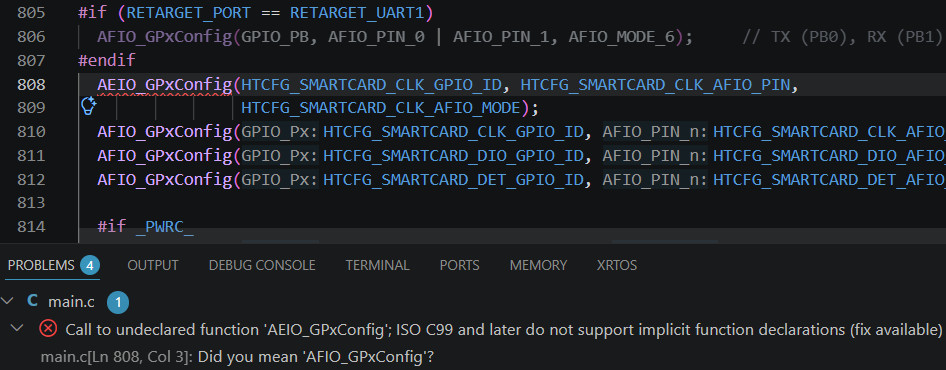
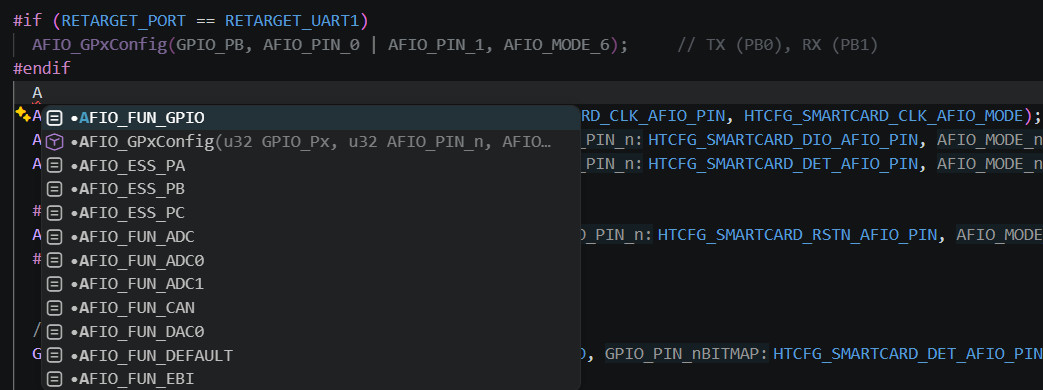
Recommended: install the clangd extension (llvm-vs-code-extensions.vscode-clangd) and disable the built-in C/C++ IntelliSense to avoid conflicts.
Output Structure
After conversion or project creation:
<workspace>/
├── .clangd                       ← clangd config (workspace root)
├── src/                          ← User source files
│   ├── main.c
│   ├── ht32fxxxx_it.c
│   └── ...
└── .vscode/
    ├── tasks.json
    ├── launch.json
    ├── compile_commands.json     ← Merged for clangd
    └── build-gen/
        ├── Makefile
        ├── linker_script.ld
        ├── startup_xxx.s
        ├── ht32_syscalls.c
        ├── ht32_retarget_gnu.c
        ├── compile_commands.json
        ├── sources.list
        ├── project.meta.json
        ├── project.settings.json
        └── build.meta.json
Commands (Ctrl+Shift+P → "HT32")
| Command |
Description |
HT32: Create Project |
Open Create Project wizard |
HT32: Open Project |
Open an existing HT32 project folder |
HT32: Convert uVision Project |
Import Keil .uvprojx / .uvmpw |
HT32: Convert HT32-IDE Project |
Import Eclipse CDT .project |
HT32: Build |
Run build task |
HT32: Download |
Flash firmware |
HT32: Debug |
Start debug session |
HT32: Clean |
Clean build output |
HT32: Open Settings |
Open HT32 Settings WebView |
HT32: Generate Build & Debug Config |
Regenerate tasks.json and launch.json |
Supported Devices
141 HT32 devices across 6 series:
| Core |
Series |
Examples |
| Cortex-M0+ |
HT32F5xxxx |
HT32F52352, HT32F52341, HT32F0008 |
| Cortex-M0+ |
HT32F5xxxx (extended) |
HT32F61352, HT32F62030, HT32F67232 |
| Cortex-M3 |
HT32F1xxxx |
HT32F12345, HT32F12366 |
| Cortex-M4 |
HT32F4xxxx |
HT32F40316, HT32F45369 |
| Cortex-M4 |
HT32F490x / 491x / 493x |
HT32F49163, HT32F49395 |
| Cortex-M33 |
HT32F675xx |
HT32F67575, HT32F67595 |
Flash/download support (via bundled OpenOCD + HLM loaders) is available for ~100 devices. Devices without an MCU cfg file can still be built and debugged with a custom OpenOCD configuration.
Bundled Assets
| Asset |
Description |
openocd/ |
OpenOCD Windows x64 + ~90 HT32 MCU .cfg files + HLM flash loaders |
bin/win32-x64/make.exe |
GNU Make Windows x64 |
dfp/Holtek/HT32_DFP/ |
CMSIS DFP (multiple versions) — SVD files for peripheral register view |
templates/M0_GNU_ARM/ |
Cortex-M0 startup .s, linker script template |
templates/M3_GNU_ARM/ |
Cortex-M3/M4 startup .s, linker script template |
Third-Party Licenses
See THIRD_PARTY_LICENSES.md for license information for bundled components (OpenOCD, GNU Make, HT32 DFP, fast-xml-parser).
License
MIT — see LICENSE