

Markdy for Visual Studio Code & Cursor
Markdy for VS Code & Cursor
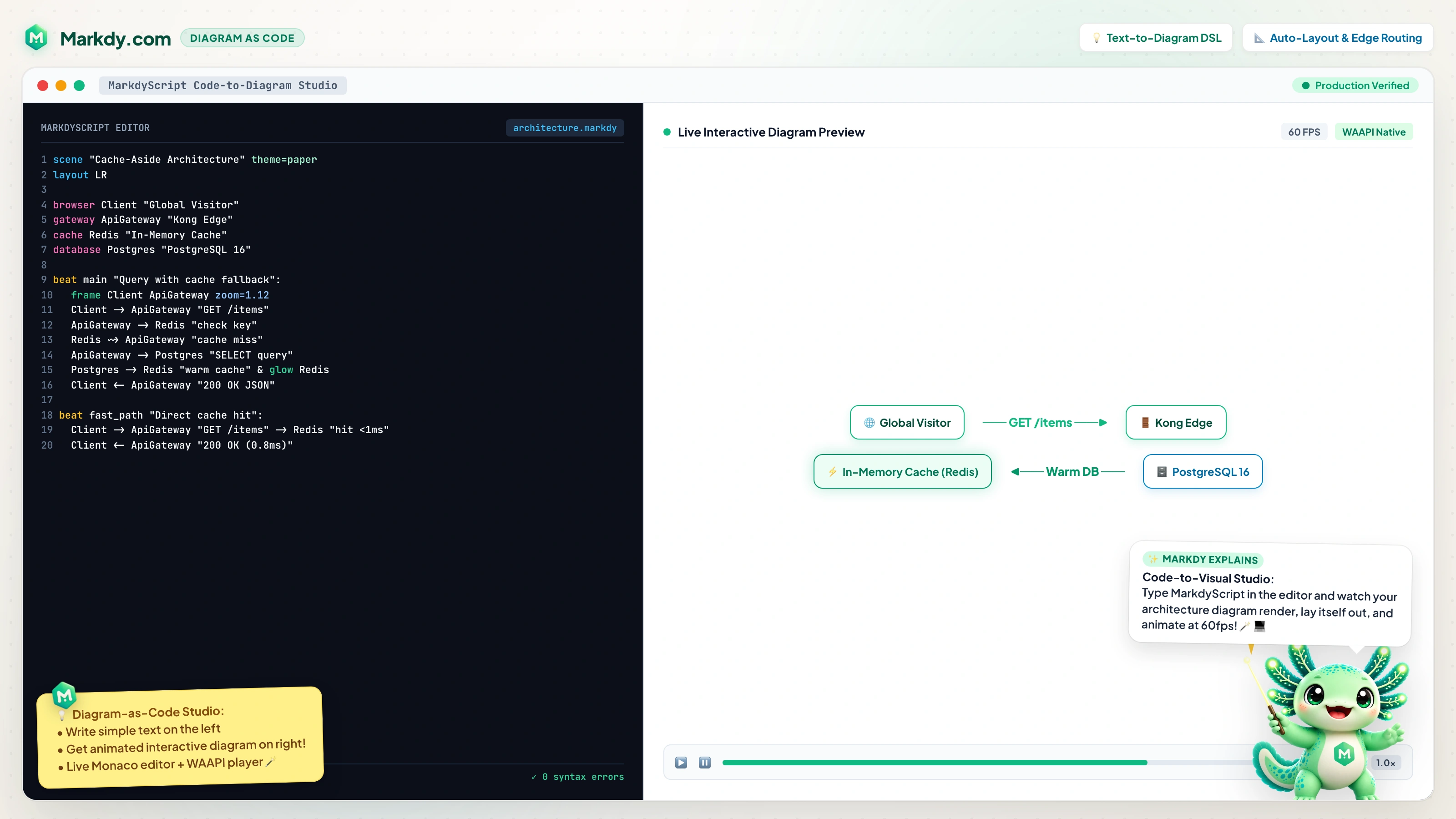
The official diagram-as-code extension for animated architecture & system design diagrams.
⚡ Web Studio • 📖 Documentation • 🌟 33 Blueprints • 🤖 AI & Agent Guide
📥 InstallationMarkdy is officially published on both the VS Code Marketplace and the Open VSX Registry, supporting all major VS Code forks out of the box.
📦 Manual / Direct / Offline Installation (.vsix)
⚡ Quick Start (60 Seconds)
✨ Key Features
⌨️ Command Palette & ShortcutsCommands (
|




| Command | Keybinding | Description |
|---|---|---|
Markdy: Live Preview |
Cmd+K V / Ctrl+K V |
Opens live animated preview panel beside editor |
Format Document |
Shift+Alt+F |
AST-aware document formatting |
Markdy: Export SVG |
- | Exports vector .svg diagram |
Markdy: Export PNG |
- | Exports high-resolution .png image |
Markdy: Copy SVG |
- | Copies raw vector SVG XML to clipboard |
Markdy: Copy PNG |
- | Copies PNG Data URL to clipboard |
Markdy: Insert Template... |
- | Scaffolds curated architecture models at cursor |
Markdy: New From Template... |
- | Creates a new .markdy document from template |
Markdy: AI Prompt Helper |
- | Compiles LLM prompt bundle with AST & rules |
Markdy: Import Diagram... |
- | Transpiles Mermaid, Compose, K8s, Terraform, or Draw.io |
Markdy: Open in Web Studio |
- | Opens diagram in browser at markdy.com/playground |
Markdy: Copy Web Link |
- | Copies compressed playground link to clipboard |
Markdy: Restart Server |
- | Restarts background language server worker |
Preview Panel Keyboard Shortcuts
When the Preview panel is focused:
| Key | Action |
|---|---|
Space / K |
Play / Pause animation |
R |
Restart animation from beginning |
← / J |
Previous narrative beat |
→ / L |
Next narrative beat |
F |
Fit view / reset viewport transforms |
S |
Cycle playback speed (0.5x → 1.0x → 1.5x → 2.0x) |
T |
Cycle official theme (midnight, paper, blueprint, nebula, etc.) |
🖱️ Right-Click Context Menu
Right-click anywhere in a .markdy editor or in the Explorer tree to open the nested Markdy > submenu:
Right-click ──▶ Markdy ▶ ──┬── Live Preview
                           ├── Insert Template...
                           ├── AI Prompt Helper
                           ├── ───────────────────────
                           ├── Export SVG / PNG
                           ├── Copy SVG / PNG
                           ├── ───────────────────────
                           ├── Open in Web Studio
                           ├── Copy Web Link
                           └── Import Diagram...
⚙️ Extension Settings
| Setting | Default | Options / Description |
|---|---|---|
markdy.preview.theme |
"auto" |
"auto", "midnight", "paper", "blueprint", "nebula", "editorial", "graphite", "terminal", "sketchy", "ink", "doodle" |
markdy.preview.autoplay |
true |
Automatically play diagram animations when preview opens |
markdy.preview.loop |
true |
Continuously loop diagram animations |
markdy.preview.progressBar |
true |
Show interactive timeline scrubber and progress bar |
markdy.trace.server |
"off" |
"off", "messages", "verbose": language server tracing |
📄 License
MIT © Hoang Yell. Built with ❤️ for software architects, systems engineers, and technical storytellers.