Material Theme Revived (Atom Fork)
A community-maintained fork of Atom Material Theme by tobiasalthoff. This extension keeps the beloved Material Design dark theme alive for VS Code with ongoing maintenance and compatibility updates. Requires VS Code 1.90.0+.
About This Fork
This extension is a fork of the original Atom Material Theme, preserved and maintained by the community. The original author @tobiasalthoff created an excellent port of the Atom editor's Material UI and Material Syntax themes for VS Code. This fork exists to ensure the theme remains available and compatible with current versions of VS Code.
What Makes This Fork Different
- Community maintained — actively updated for VS Code compatibility
- Same beloved look — retains the exact Material Design palette from the original
- Design philosophy preserved — borders are subtle or invisible, hover effects use gentle brightness shifts, diff fills use a lighter line tint with a stronger word tint so line-level and word-level changes stay distinguishable, and teal is reserved for active indicators, focus rings, and primary action buttons
- Enhanced workbench colors — 470+ UI color entries covering bracket pair colorization, indent guides, minimap and scrollbar, diff view, merge editor, debug UI, search highlights, terminal ANSI, notifications, testing panel, inline chat, and more
- Expanded syntax highlighting — 100+ token color rules for Rust, modern TypeScript/JS, Python type hints, JSX attributes, CSS preprocessors, Go, Java, C#, Ruby, PHP, and SQL
- No extra complexity — still a single, hand-authored theme file with zero dependencies
Preview
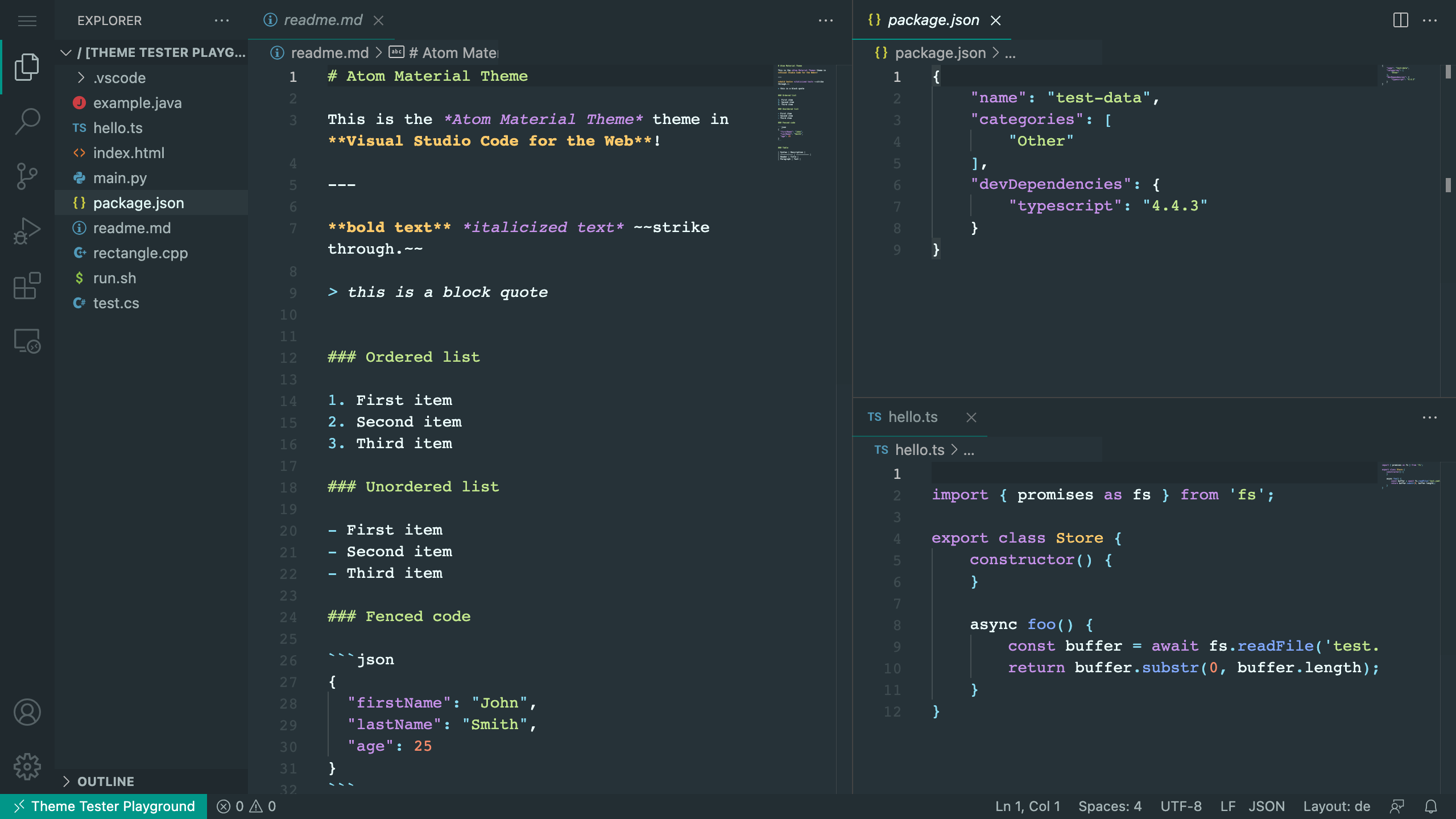
Color Palette
This theme uses a carefully curated dark Material palette with a consistent background hierarchy:
Background Hierarchy
| Layer |
Hex Code |
Usage |
| Darkest |
#20292e |
Input fields, sidebar headers, dropdowns |
| Dark |
#232e33 |
Tabs, sidebar, panels, status bar |
| Base |
#263238 |
Editor background |
| Lighter |
#273237 |
Terminal, panel backgrounds |
| Hover / border |
#2c383d |
Hover states, borders, separators |
| Selection |
#3b4d56 |
Editor selection, minimap selection marker |
| Focus outline |
#00BFA5 at 60% |
Keyboard focus rings, list focus |
Syntax Colors
| Role |
Hex Code |
| Default text |
#EEFFFF |
| Comments (italic) |
#4f6875 |
| Strings |
#C3E88D |
| Keywords |
#C792EA |
| Functions |
#82AAFF |
| Classes/Types |
#FFCB6B |
| Numbers |
#F78C6A |
| HTML Tags |
#F07178 |
| Operators |
#89DDF3 |
| Accent (teal) |
#009688 |
this / super |
#FF5370 |
UI Accent Colors
| Role |
Hex Code |
| Error / Deletion — fills, gutter, icons |
#EF5350 |
| Error — text on dark surfaces |
#FF8A80 |
| Error — solid surface (status bar) |
#D32F2F |
| Warning / Modification |
#FFCA28 |
| Success / Addition |
#8BC34A |
| Info |
#4FB6F7 |
| Accent / primary action (teal) |
#009688 |
| Accent hover, focus ring |
#00BFA5 |
Diff Overlay Fills
Diff fills use the deep end of the palette — a bright tint over the editor background lifts it enough to drown the comment color, so the fill stays dark and the hue carries the signal:
| Region |
Hex Code |
| Inserted, word level |
#1B5E20 at 42% |
| Inserted, line level |
#1B5E20 at 16% |
| Deleted, word level |
#B71C1C at 28% |
| Deleted, line level |
#B71C1C at 12% |
Text & UI Grays
| Role |
Hex Code |
| Primary text |
#EEFFFF |
| Secondary text, icons, scrollbar |
#A7B6B8 |
| Muted, inactive titles |
#8A9BA1 |
| Inlay hints |
#7A8C93 |
| Disabled, inactive tabs |
#6A777A |
| Line numbers, CodeLens |
#6B7C83 |
| Comments |
#4F6875 |
Quick Install
- Open Extensions (
Ctrl+Shift+X / Cmd+Shift+X)
- Search for Material Theme Revived
- Click Install
- Select the theme: File > Preferences > Color Theme > Material Theme Revived (Atom Fork)
Recommended Editor Settings
For the best reading experience with this theme, try these settings in your settings.json:
{
  "editor.fontSize": 16,
  "editor.lineHeight": 1.5,
  "editor.letterSpacing": 0.5
}
Supported Languages
Syntax highlighting covers 30+ languages including:
- Web: JavaScript, TypeScript, JSX/TSX, HTML, CSS, SCSS, Less, Sass
- Backend: Python, Ruby, Rust, Go, Java, C#, SQL, PHP, Perl
- Data: JSON, YAML, Markdown, XML, GraphQL
- Mobile: Objective-C
- Others: Shell scripts, INI config files, CoffeeScript
FAQ
Is this the original Atom Material Theme?
No. This is a community fork. The original was created by @tobiasalthoff and ported the atom-material-ui and atom-material-syntax themes from the Atom editor to VS Code. This fork preserves the same visual design while keeping it maintained.
Why a fork?
The original extension may no longer be actively maintained. This fork ensures the theme remains available and compatible with the latest versions of VS Code.
Contributing
Found a scope that isn't highlighted correctly? Have a suggestion?
- Issues: Report bugs or missing language support on GitHub
- Pull Requests: The theme is a single JSON file — feel free to propose scope additions or color tweaks
Credits
License
See LICENSE.md. The original Atom Material Theme was created by tobiasalthoff. This fork is maintained by Hex.
| |



