NoEffect
Identifies CSS declarations that have no effect in the rendered page, powered by a real Chromium engine via the Chrome DevTools Protocol.



Requires a Chromium-based browser — Chrome, Edge, or Chromium. It's auto-detected, or set noEffect.chromiumPath. Everything runs locally: loopback-only server, isolated temp browser profile, nothing leaves your machine.
Demo
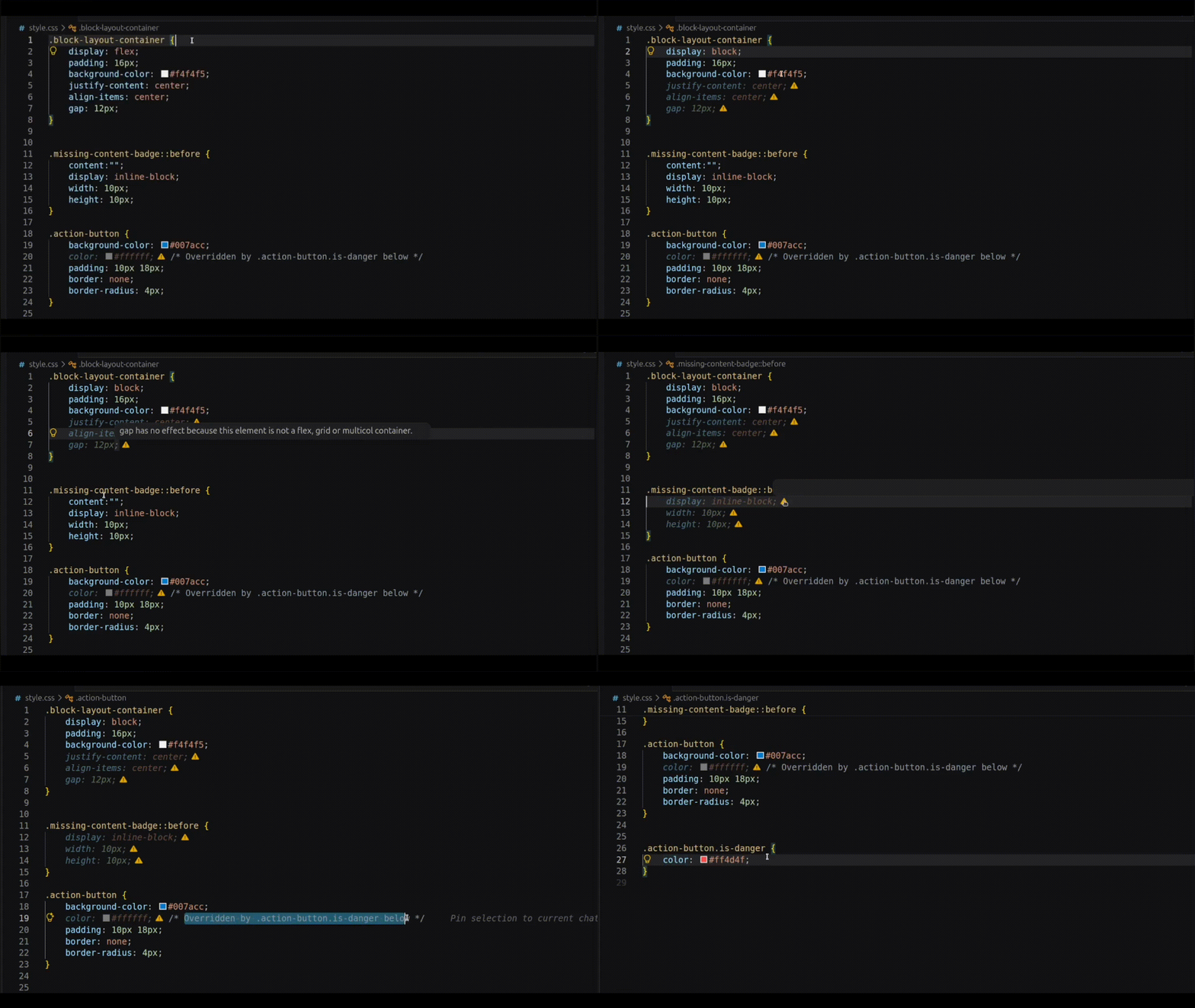
Inactive declarations are dimmed and flagged inline, with a DevTools-style tooltip explaining why.
Key Features
- Real Chromium ground truth. A real browser computes every verdict — matched styles, formatting context, pseudo-elements. No static heuristics, no guessing about the cascade.
- Covers everywhere CSS lives. Stylesheets, embedded
<style> blocks, and inline style="" attributes. No linking HTML beside the file? NoEffect finds companion pages across the project and analyzes up to noEffect.maxCompanions of them.
- Only dims what's really dead. A declaration is marked inactive only when no analyzed page gives it effect — one effective page anywhere keeps it alive.
- DevTools-inspired UX. Inactive properties are dimmed with an inline warning icon, hover tooltips explain the cause, and overridden duplicates jump straight to the cascade winner.
- Fast and self-contained. Content-addressed caches, a persistent browser session, and a skip gate keep warm re-analyses at ~10–40 ms. The single runtime dependency is bundled — nothing is downloaded at install.
How It Works
CSS/HTML file → parse (exact ranges) → resolve companion pages → persistent Chromium over CDP
  → per-node LayoutContext (display, position, pseudo-boxes, replaced-ness)
  → per-declaration rule verdict → merge across pages → dim + icon + tooltip
Every declaration is judged against the layout context the browser actually built, through 9 rule families and 32 standardized reason codes — structural rules, not per-property hardcoding.
Requirements & Quick Start
| Requirement |
Notes |
| Browser |
Chrome, Edge, or Chromium; auto-detected (override → PATH → platform defaults), or set noEffect.chromiumPath |
| VS Code |
^1.85.0 |
| Trusted workspace |
Required — analysis launches a local browser |
- Install NoEffect from the VS Code Marketplace.
- Open and trust the workspace.
- Analysis runs automatically on save (
noEffect.analyzeOnSave). No setup wizard, no API keys.
Commands
| Command |
Description |
NoEffect: Analyze CSS Inactive Properties |
Run analysis on the current file |
NoEffect: Clear All Highlights |
Remove all visual indicators |
NoEffect: Jump To Overriding Declaration |
Jump to and flash the rule that wins the cascade |
NoEffect: Show Status |
Status bar state, coverage, and companion evidence |
NoEffect: Diagnose Setup |
Check browser, workspace, and configuration |
NoEffect: Restart Analysis Session |
Force a clean browser session |
NoEffect: Clear Cache |
Reset all analysis caches |
NoEffect: Show Output Logs |
Open the logging channel |
Configuration
| Setting |
Default |
Description |
noEffect.enabled |
true |
Master switch |
noEffect.analyzeOnSave |
true |
Analyze on save of CSS/HTML files |
noEffect.analyzeOnType |
false |
Analyze after a typing pause (experimental; saved files only) |
noEffect.debounceMs |
1500 |
Debounce delay for analyze-on-type |
noEffect.highlightStyle |
"both" |
"both", "iconOnly", or "dimOnly" |
noEffect.chromiumPath |
"" |
Custom browser executable; empty = auto-detect |
noEffect.ignoredFiles |
[] |
Glob patterns to skip (plus built-in ignores: node_modules, dist, minified CSS, …) |
noEffect.maxFileSizeKb |
512 |
Skip files larger than this |
Companion search (advanced):
| Setting |
Default |
Description |
noEffect.companionSearchDepth |
6 |
Max directory depth of the companion-HTML search |
noEffect.companionMaxCandidates |
500 |
Max scan operations per companion search |
noEffect.maxCompanions |
3 |
Max analyzed pages per CSS file |
Known Limitations
- Analysis reads saved files from disk — unsaved changes are skipped with a
FILE_UNSAVED notice until you save (analyze-on-type is experimental and off by default).
- It's an evidence budget, not a proof system — with the default 3 companions, a property used only on an unanalyzed page may be missed; with no companion HTML at all, class selectors fall back to a synthetic page and uncertain rules are simply not dimmed.
- Some selectors are never judged — pseudo-classes (
:hover), attribute selectors, and sibling combinators produce no verdict; responsive @media width queries are evaluated across representative viewports (a declaration active in any viewport stays active); var() tokens aren't resolved in explanations.
- No bundled browser — if auto-detection misses your install, set
noEffect.chromiumPath and run NoEffect: Diagnose Setup.
- Trusted workspaces only, no virtual workspaces — override jumps resolve within the documents actually analyzed.
Contributing & License
Bugs, ideas, and discussion: GitHub Issues · Repository
Licensed under the PolyForm Noncommercial License 1.0.0 — free for personal, educational, and non-commercial open-source use; commercial use requires a separate license.
Development:
npm install
npm run compile            # strict tsc — the type gate
npm run lint               # eslint
npm test                   # unit tests
npm run test:integration   # real-Chromium integration tests
npm run test:smoke:all     # packaged host smoke on VS Code 1.85.0 + stable
| |


