Skip to content
| Marketplace
Sign in
Visual Studio Code>Programming Languages>Guardmarly — Offline SAST Security ScannerNew to Visual Studio Code? Get it now.
Guardmarly — Offline SAST Security Scanner

Guardmarly — Offline SAST Security Scanner

Guardmarly

|
3 installs
| (0) | Free
Zero-dependency SAST for Python, JS/TS, Go, Java & C#. Built-in IDOR detection. 100% CVE recall. Trace-backed findings inline while you code.
Installation
Launch VS Code Quick Open (Ctrl+P), paste the following command, and press enter.
Copied to clipboard
More Info

Guardmarly for VS Code

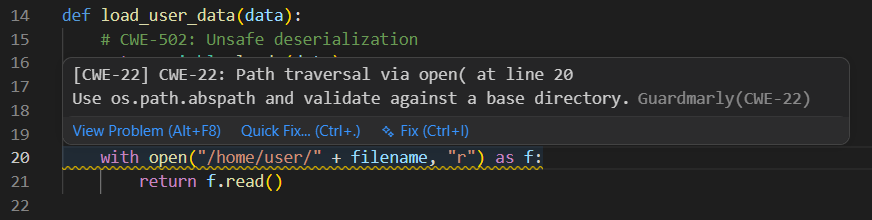
Guardmarly catching CWE-22 path traversal in VS Code

Zero-dependency SAST scanner inline in your editor. Catches IDOR, SQL injection, XSS, path traversal, and 30+ more CWE types as you code — fully offline, no API keys.

1183 tests passing

Features

  • 🔍 Real-time scanning — findings appear inline as you type
  • 🛡️ IDOR detection — catches authorization bugs other tools miss
  • 📊 Trace-backed findings — see the full taint path from source to sink
  • 🌐 5 languages — Python, JavaScript/TypeScript, Go, Java, C#
  • 📋 SARIF output — one-click export for GitHub Code Scanning
  • 🔒 100% offline — no cloud, no API keys, no telemetry
  • ⚡ Auto-detects guardmarly CLI — works with pip, pipx, or python -m

Installation

Install from the VS Code Marketplace or:

code --install-extension guardmarly.guardmarly

Usage

  1. Open any Python, JavaScript, Go, Java, or C# file
  2. Guardmarly scans automatically on open and on save
  3. Findings appear as inline diagnostics with severity badges
  4. Run Guardmarly: Scan workspace from the command palette for a full scan

Settings

Setting Default Description
guardmarly.enabled true Enable/disable scanning
guardmarly.failOn "high" Minimum severity to highlight

Commands

Command Description
Guardmarly: Scan file Scan the active file
Guardmarly: Scan workspace Scan all files in the workspace

100% CVE recall · Zero false positives on clean code · MIT Licensed

  • Contact us
  • Jobs
  • Privacy
  • Manage cookies
  • Terms of use
  • Trademarks
© 2026 Microsoft