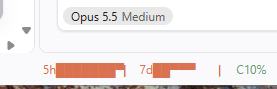
Claude 5-hour / weekly usage limits as stacked bars on the right of the VS Code status bar.
VS Code counterpart of bar-claude-meter.
5h█████▀▀⠀▏ 7d██▀▀▀⠀⠀⠀▏ C62%
Each bar: top half = quota left, bottom half = time left in the window (█ both, ▀ quota only, ▄ time only).
C62%: context window used by the latest Claude Code session in this workspace.
Hover for the two-color bars, % left and reset time. Click to refresh.
Background turns yellow at 80% used, red at 90%.
How it gets the numbers
Usage: reads Claude Code's own login (~/.claude/.credentials.json, or the macOS Keychain) and calls
api.anthropic.com/api/oauth/usage. No separate login. The token is only read, never refreshed or stored.
This endpoint is undocumented and rate-limited, so it is called only when a window opens, when a
Claude Code turn starts and ends (seen from its transcript file), and on click. Readings are shared
across windows for 30 s, and a 429 pauses all requests for 5 minutes.
Context: the last main-loop request's input + cache tokens in ~/.claude/projects/<workspace>/*.jsonl.
Settings
Setting
Default
barClaudeMeter.barWidth
8
Cells per bar
barClaudeMeter.showNumbers
false
Show % left and time left next to bars
barClaudeMeter.showContext
true
Show C%
Install
From the Marketplace, or search "Claude Usage Bar Meter" in the Extensions view.