GitGlasses
The maintained, open git lens for VS Code and Open VSX: free on private
repos, no account, no telemetry.
Visual Studio Marketplace ·
Open VSX ·
Changelog ·
Source and issues
GitGlasses adds inline blame, a Commit Graph, file and line history, commit
search, an interactive rebase editor, worktrees and a pull request inbox to
VS Code, VSCodium, Cursor, Windsurf, Theia, code-server and other editors
built on VS Code. Every feature is free, on private repositories as on
public ones.
Why GitGlasses
- Nothing is held back. There is no paid tier, no trial and no feature
that stops at a private repository.
- No account, no telemetry, no GitGlasses servers. History, blame and
search are read on your machine. The network is used only by features that
need it, and Privacy lists each one.
- On both stores. The same release goes to the Visual Studio Marketplace
and to Open VSX, with packages for Windows, macOS, Linux (glibc and Alpine)
and the browser.
- Fast on large repositories. A native engine reads the repository in
process and streams results, and runs apart from the editor, so a problem
in it never takes the editor down.
- Safe in untrusted folders. In Restricted Mode GitGlasses runs no git at
all, so nothing a repository configures can run; reading history still
works.
- Open source. MIT licensed, developed in the open.
Get started
- Install GitGlasses from the
Marketplace
or Open VSX.
- Open a folder that contains a git repository. The GitGlasses glasses icon
in the Activity Bar opens its views, and the current line shows who last
changed it.
- Run GitGlasses: Show Commit Graph, or GitGlasses: Get Started for a
short tour.
Features
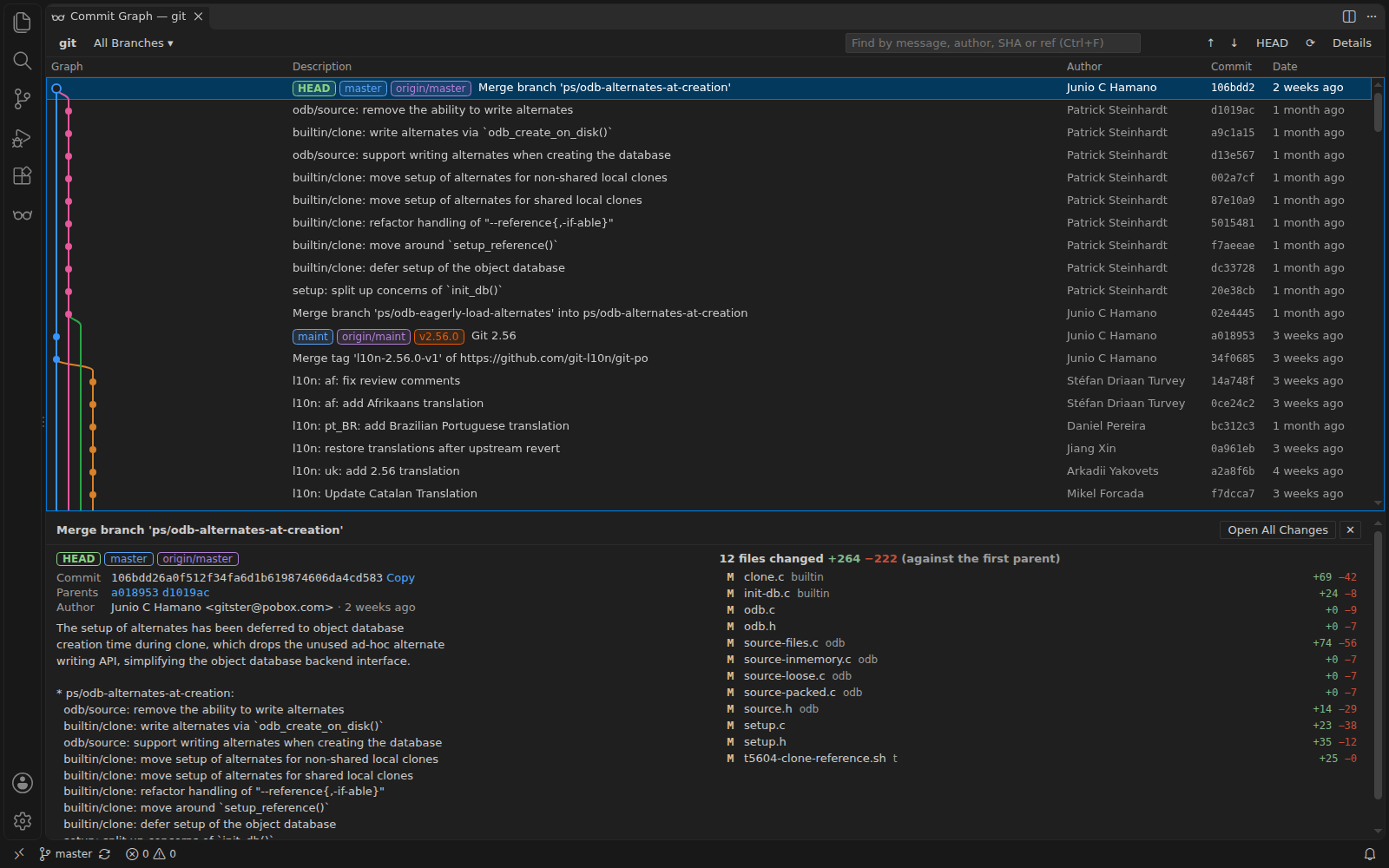
Commit Graph
Branches, merges, tags, stashes and uncommitted changes in one scrollable
graph that loads more as you scroll. Open a commit to
read its full message and the files it changed, and merge, rebase,
cherry-pick, reset or revert from a commit's context menu, each behind a
confirmation. The graph button in the Source Control title bar opens it on
that repository.
Limits: changing the repository needs a trusted workspace and git; on the
web the graph is read-only.
Blame, annotations and CodeLens

Inline blame on the current line and in the status bar, hovers with the
commit message and linked issues, whole-file blame in the gutter, a recency
heatmap, a changes annotation, and CodeLens above files and symbols. Unsaved
edits are blamed correctly. Zen mode hides all of it, and Review mode
turns gutter blame on for every file you open.
Blame follows git: .mailmap names, the repository's
.git-blame-ignore-revs (or blame.ignoreRevsFile), and optionally -w
and moved-line detection. The status bar item steps aside when VS Code's own
blame item is showing, so a line is never described twice. Inline and status
bar text, date style and delay are configurable (see Settings).
Why this line?, the first link in the hover (also in the editor's context
menu and the Command Palette), opens a Line Story beside the editor: the
line's blame, its commit in full, the pull request that merged it with its
state, merge date, comment counts and the start of its description, the
issues they name, and the line's earlier versions, each with its diff.
Pull requests come from GitHub, GitHub Enterprise Server or GitLab once that
integration is connected; until then the story offers to connect and still
links the pull request the commit message names. Earlier versions come from
git log -L. In Restricted Mode, where GitGlasses runs no git and asks no
forge, the story is the blame and the commit.
Limits: without git (or in Restricted Mode) blame comes from the engine's
built-in reader instead of git blame. Files tracked with Git LFS show where
their content last changed instead of line blame, since git only stores a
pointer for them. Blame pauses while a file has more than 8 MB of unsaved
changes.
Declared AI provenance
Commits that declare an AI agent took part carry an AI badge in the
Commit Graph, a line in the blame hover such as AI-assisted (declared via
Co-authored-by: Claude Opus 4.7) · session link, a Provenance row in
Commit Details, and a sparkle in the Commits and File History views. A graph
filter dims everything but agent-declared commits, or everything but the
rest. GitGlasses reads only what commits declare: git-ai notes in
refs/notes/ai, Co-authored-by, Assisted-by and Generated-by trailers,
and authors or committers that are known agent identities (Claude, Cursor,
GitHub Copilot, Codex, Devin, Jules, Aider, Amp). It never infers authorship
from the code, and a commit that declares nothing is unknown, not human.
Turn it off everywhere with gitglasses.provenance.enabled.
Limits: provenance is per commit, not per line. git does not fetch notes by
default; Fetch git-ai Notes with Every Fetch… adds a refspec to the remote
after you confirm. Fetched notes go to refs/notes/ai-remote/<remote>, as
git-ai names it, so your own refs/notes/ai is never overwritten; GitGlasses
reads both. Session links are shown, never fetched.
File and line history
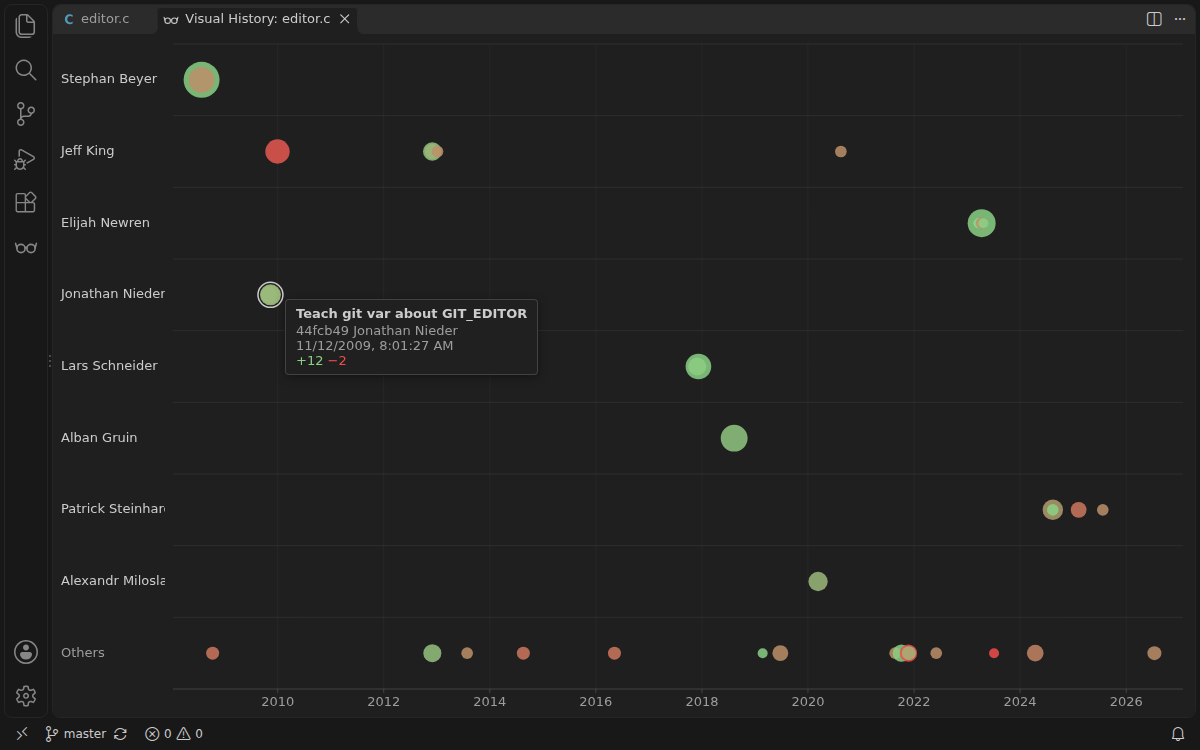
The File History view follows the active file across renames, Visual File
History plots each revision by size and author, and Show Line History for
Selection traces the selected lines. Open any revision, or compare it with
the one before.
Limits: file and line history run git log, so they need git and a
trusted workspace, and are not available on the web.
Search commits
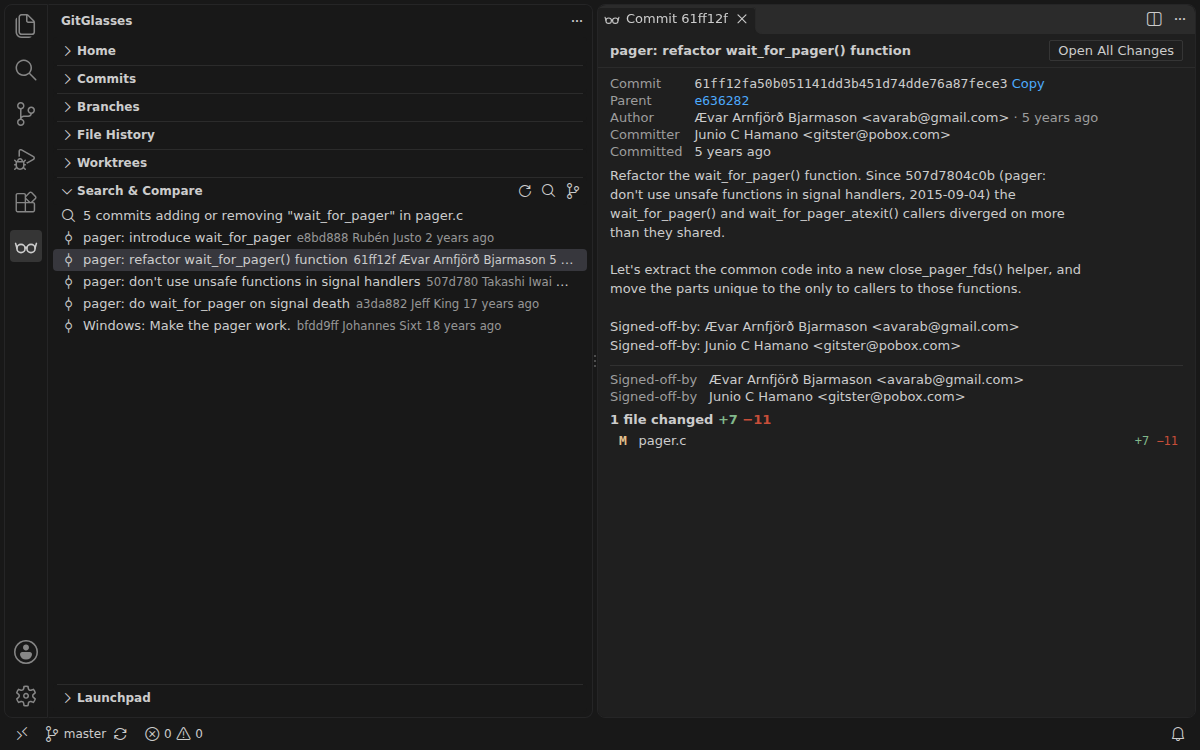
GitGlasses: Search Commits… finds commits by message text, and narrows
with author:alice (or @alice), change:fooBar for commits that add or
remove that code, diff:"regex" for changed lines matching a pattern,
file:src/app.ts, and after:2025-01-01 / before: (or after:30d, 2w,
6m, 1y). A lone hex string is a commit id. Results stream into Search &
Compare, and a long search shows a notification you can cancel.
Limits: code and file criteria run git log, so they need git and a
trusted workspace; message, author, date and sha searches work everywhere,
including the web. Without git, a date search reads the newest 5,000 commits
that match its other criteria, and says so when older history was not
searched. In a partial (blobless) clone, code searches do not download
missing file contents, and say so.
Interactive rebase, branches and worktrees
Reorder commits by drag and drop or Alt+↑/↓, and pick, reword, edit,
squash, fixup, drop or autosquash them in the rebase editor. It checks the
working tree first (offering to stash), refuses a plan the branch has moved
past, and pauses on conflicts with Continue, Skip and Abort while you fix the
files. With gitglasses.rebaseEditor.enabled it also edits the list of a
git rebase -i started in a terminal.
Act from the sidebar: switch, create, rename, delete, merge, rebase, push and
compare branches; create, push and delete tags; apply, pop, drop and show
stashes; fetch, prune, add and remove remotes. Create, switch, merge, push
and pull from the Home view and GitGlasses: Git Commands… too, keep
several branches checked out at once with worktrees, and stage or unstage
single hunks from the editor.
The Worktrees view shows each worktree's state at a glance, which helps when
several coding agents work in parallel worktrees: uncommitted changes,
commits ahead of and behind a base branch, whether it would merge cleanly
into the base (checked with git merge-tree, git 2.38 or later, without
touching any checkout), its last activity, and the agent it appears to belong
to (Claude Code, Cursor, Codex, Copilot and VS Code agent sessions, going by
where the worktree lives, its branch name or the trailers on its commits).
Compare with Base opens everything a worktree changed since it left the
base, uncommitted work included, and Remove Worktree and Branch… deletes
both after one confirmation that lists what goes. The base is the branch
checked out in the main worktree unless you pick another with Choose Base
for Worktrees…. Statuses are read again on git activity in any worktree,
every minute while the view is open and when you come back to the window.
Limits: everything that changes the repository needs git and a trusted
workspace, and none of it is available on the web.
Launchpad, Start Work and Suggest Change
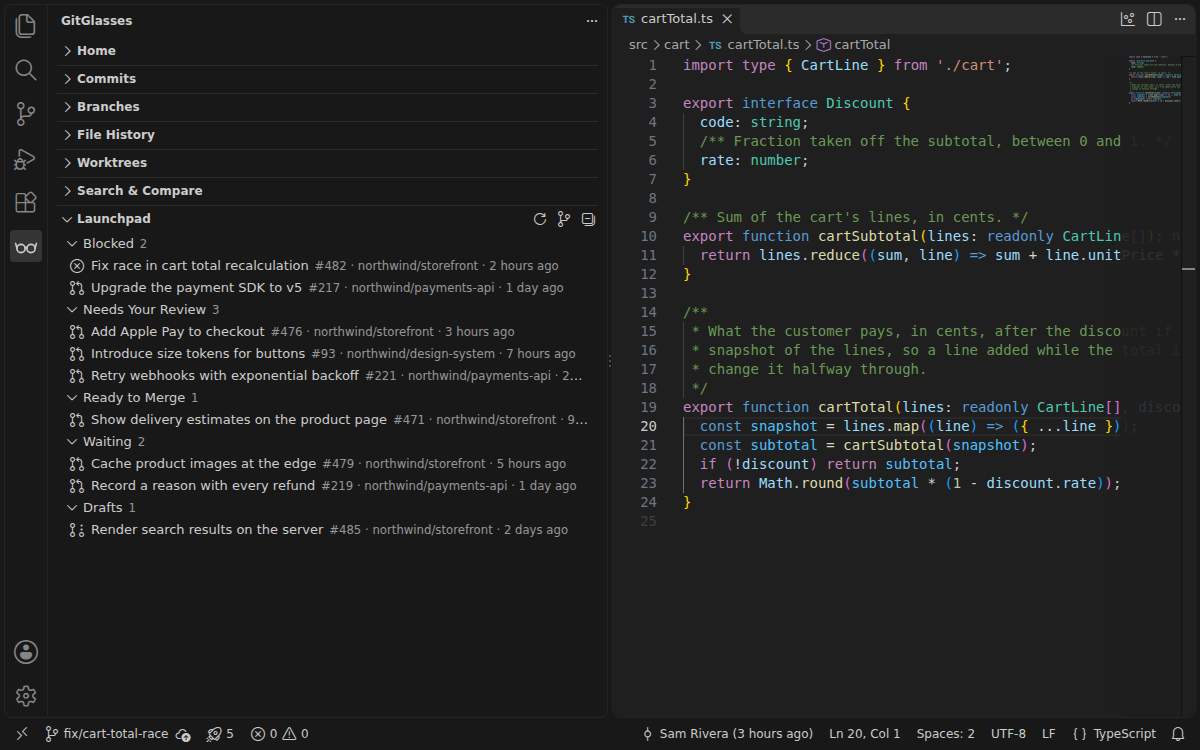
Connect GitHub, GitHub Enterprise, GitLab (cloud or self-managed), Bitbucket
Cloud or Data Center, or Azure DevOps, and Launchpad gathers your pull
requests by what they need from you, branches show their pull request, and
Suggest Change turns an editor selection into a review suggestion. Start
Work creates a branch from a GitHub, Jira Cloud or Linear issue. Tokens stay
in the editor's secret storage and are sent only to the host they belong to.
Limits: Launchpad refreshes by asking each provider's API while the view is
visible, rather than receiving pushed updates, and each account uses its own
API quota. Suggest Change is available for GitHub and GitLab. What each
provider supports is in
docs/integrations.md.
AI: your models, your keys, or none
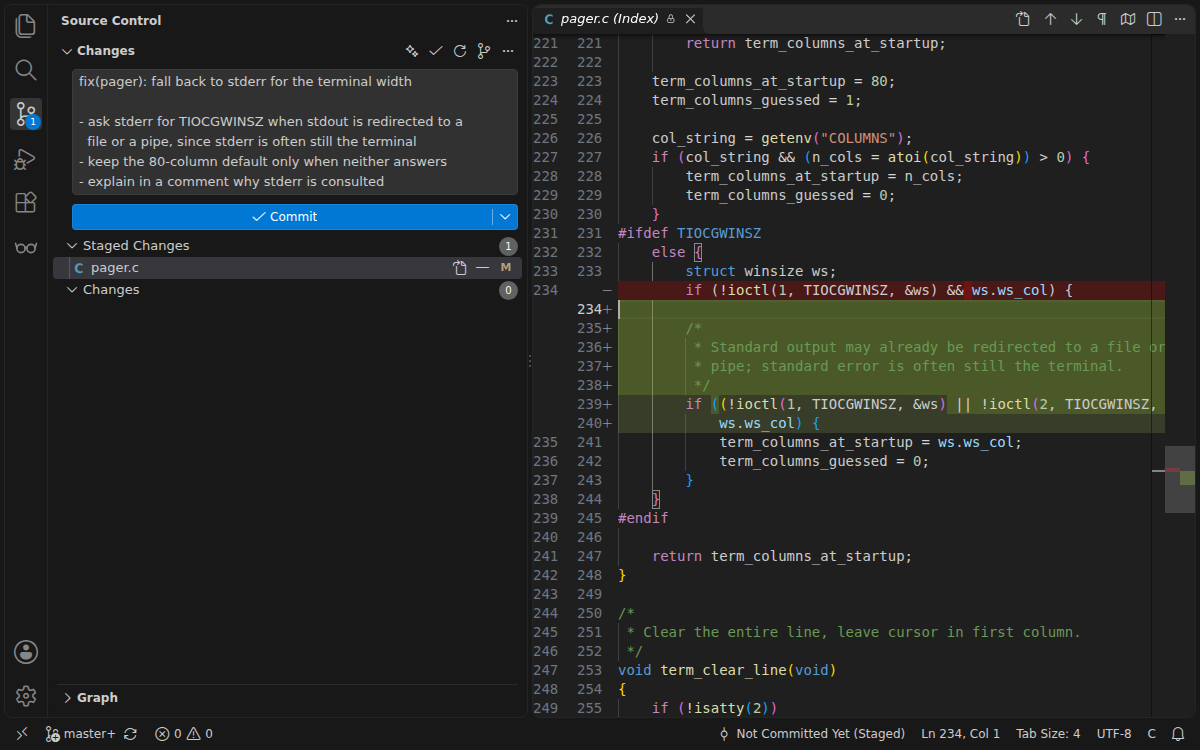
Explain a commit or your working changes, generate a commit message with the
sparkle button in Source Control, and search history in plain language
("commits by alice about the login crash last month"). The first AI command
asks where requests go:
- A model your editor already provides to extensions, such as GitHub
Copilot in VS Code. This choice appears only when the editor has one.
- Ollama, running on your machine: nothing is sent over the network.
- Your own API key for Anthropic, OpenAI (or any OpenAI-compatible
endpoint) or Google Gemini.
Limits: there is no hosted AI quota; you bring the model. Explain Commit
sends the commit's own diff, capped at about 6,000 tokens and largest files
trimmed first; for a very large commit, only its 30 most relevant files are
read. AI output is shown without loading any images or HTML it contains.
Open Patches
Share uncommitted changes, a stash or a commit as a patch file, a secret gist
or snippet, or an encrypted envelope, and apply one with a three-way merge.
Limits: a secret gist is unlisted, not private: anyone with its link can
read it. Use Share Encrypted… for anything sensitive.
On the web
On vscode.dev with a local folder that contains a .git
directory, a WebAssembly engine provides blame, the commit list, the graph,
search and AI, read-only. Repositories opened on github.dev, which have no .git
folder, are not supported yet.
Coming from Git Graph or GitLens
GitGlasses is an independent project; it is not affiliated with either.
- From Git Graph: GitGlasses: Show Commit Graph opens the graph in an
editor tab, with branches, tags, stashes and uncommitted changes, and commit
actions in the context menu. Blame, history, search and rebase come in the
same extension. Both extensions can stay installed side by side.
GitGlasses: Coming from Git Graph? carries your
git-graph.* settings
over where GitGlasses has an equivalent and lists what it mapped.
- Keyboard shortcuts are off by default, so none of the editor's own are
taken over. Turn on
gitglasses.keyboardShortcuts.enabled for
Ctrl+Alt+G (Cmd+Alt+G on macOS) followed by a letter, such as G for
the Commit Graph.
- From GitLens: inline blame, file annotations, the Commit Graph, file
and line history, commit search, worktrees, Launchpad, Start Work,
interactive rebase and AI commit messages all have a GitGlasses
counterpart, and they work on private repositories without an account. What
differs, and why, is in
Known limitations.
If both are installed, turn off one extension's inline blame so lines are
not annotated twice.
Privacy
GitGlasses has no servers of its own and sends no telemetry. This is
everything that can reach the network, and when:
- Reading history (blame, the graph, file history, search, diffs) reads
the repository on disk. The exception is a partial (blobless or treeless)
clone, which by design lacks some file contents: when a feature runs git
for one of those (blame, file history, a commit's diff for Explain
Commit), git downloads it from your own remote, as
git show or
git blame would. Code-change searches never download them.
- Fetch, pull, push and publish run
git against your remotes with your
own git credentials, only when you run them.
- Integrations do nothing until you connect one. Then GitGlasses calls
that host's API with the token you gave it: when Launchpad loads (once at
startup, then periodically while the view is visible and the window
focused), when a branch's pull request chip is shown, and when you run
Start Work, Suggest Change or share a patch to a gist or snippet. Each token
is stored in the editor's secret storage and sent only to its own host.
- AI does nothing until you run an AI command. The request goes to the
provider you chose, with what you asked about: the diff, commit messages,
file paths, and author names and email addresses. A hosted provider is
asked about once per workspace before anything is sent. Ollama on your
machine keeps everything local; an editor-provided model sends it wherever
that model's extension does.
- Open on Remote opens a link in your browser; Copy Remote URL only
copies it.
In Restricted Mode no git runs at all, so nothing a repository configures
(hooks, filters, credential helpers, ssh commands) can either.
| Platform |
Package |
| Windows x64 and arm64 |
native engine |
| macOS Intel and Apple silicon |
native engine |
| Linux x64 and arm64 (glibc 2.28 or newer) |
native engine |
| Alpine Linux x64 and arm64 |
static native engine |
| vscode.dev |
WebAssembly engine, read-only |
The editor picks the right package. Outside the browser, features that run
git need git on PATH; 2.34 or newer is recommended. The Worktrees view's
merge check needs 2.38 or newer (2.45 in a partial clone), which GitGlasses
checks and otherwise skips. Without git, blame, the graph, commit details and
message search still work.
Troubleshooting
- Nothing shows, or views say the engine is not responding: run
GitGlasses: Restart Engine, then look in Output › GitGlasses. Set
gitglasses.engine.logLevel to debug for more detail.
- History, rebase or fetch are greyed out: the folder is in Restricted
Mode. Trust it (Workspaces: Manage Workspace Trust) to let GitGlasses run
git.
- "needs the git command line": install git, or make sure it is on the
PATH the editor sees.
- AI requests fail: run GitGlasses: Choose AI Provider… to see which
providers this editor can use, or set a key with GitGlasses: Set AI API
Key….
- Something else? Open an issue
and include the version, your editor and OS, and the GitGlasses output.
Settings
Every setting, generated from the extension manifest:
| Setting |
Default |
Description |
gitglasses.rebaseEditor.enabled |
false |
Open the todo list of an interactive rebase started outside GitGlasses, such as git rebase -i in a terminal, in the GitGlasses rebase editor. Git must use VS Code as its editor, for example git config --global sequence.editor "code --wait". Turn it on before git opens the list: git goes on as soon as any editor of the list closes, so reopening a list that is already open as text hands it to git unchanged. Read from user settings only. |
gitglasses.mode |
"normal" |
GitGlasses mode; switch via the status bar item or the Switch Mode command. One of normal, zen, review. |
gitglasses.keyboardShortcuts.enabled |
false |
Turn on GitGlasses keyboard shortcuts: Ctrl+Alt+G (Cmd+Alt+G on macOS), then G Commit Graph, B inline blame, Shift+B file blame, H visual file history, F search commits or C Git Commands. Off by default, so none of the editor's own shortcuts are taken over. On Windows keyboard layouts where AltGr+G types a character, leave this off and bind the commands in Keyboard Shortcuts instead. |
gitglasses.currentLine.enabled |
true |
Show blame at the end of the line the cursor is on. GitGlasses: Toggle Inline Blame flips this setting. The status bar item follows gitglasses.statusBar.blame on its own. |
gitglasses.currentLine.delay |
75 |
Milliseconds the cursor rests on a line before its inline and status bar blame show. After an edit, blame always waits at least 300 ms so typing does not blame every keystroke. |
gitglasses.currentLine.format |
"${author}, ${date} • ${summary}" |
Text of the current-line blame. Tokens: ${author} (author name), ${email} (author email), ${date} (author date in the gitglasses.blame.dateStyle style), ${ago} (author date, relative), ${summary} (first line of the message), ${sha} (short sha). |
gitglasses.statusBar.blame |
"auto" |
Status bar blame for the current line, independent of gitglasses.currentLine.enabled. Its tooltip shows the full commit like the hover does, and clicking it opens the commit's details. In auto, GitGlasses steps aside while VS Code's built-in git.blame.statusBarItem.enabled is showing (it does not while git.enabled is off); set this to show (and optionally turn the built-in item off) to use the GitGlasses item instead. One of auto, show, hide. |
gitglasses.statusBar.format |
"${author}, ${date}" |
Text of the status bar blame, with the tokens of gitglasses.currentLine.format. |
gitglasses.hovers.enabled |
true |
Show the blamed commit when hovering a line: author and dates, the full message, the pull request it came from when the message names one, and links to the commit's details and changes, the file before the commit, the sha and the commit on the remote. |
gitglasses.blame.dateStyle |
"relative" |
How ${date} renders in the current-line and status bar blame. One of relative, absolute, iso. |
gitglasses.blame.ignoreWhitespace |
false |
Ignore whitespace-only changes when attributing lines (git blame -w). |
gitglasses.blame.detectMovedLines |
"off" |
Move and copy detection. Slower on large histories. Needs the git CLI; without it blame works as with off. One of off, withinFile, acrossFiles. |
gitglasses.blame.useIgnoreRevsFile |
true |
Look through the commits listed in the files blame.ignoreRevsFile names, or in the repository's .git-blame-ignore-revs when that git setting is unset, as GitHub does. A file that does not exist, or that git cannot read (an abbreviated sha, say), is skipped with a note in the GitGlasses output. Needs the git CLI. |
gitglasses.views.pageSize |
50 |
Commits loaded per page in the Commits and File History views |
gitglasses.graph.pageSize |
200 |
Rows loaded per page in the Commit Graph and Visual File History |
gitglasses.graph.maxLanes |
20 |
Most branch lanes the Commit Graph draws side by side. Lanes past it fold into one column marked +N, so commit messages stay readable on merge-heavy repositories. The graph also never takes more than 40% of the panel's width. |
gitglasses.codeLens.enabled |
true |
Show git blame CodeLens above files and top-level symbols |
gitglasses.provenance.enabled |
true |
Show the AI provenance commits declare: an AI badge and a filter in the Commit Graph, a line in the blame hover and in Commit Details, and a mark in the Commits and File History views. Only declarations are read: git-ai notes in refs/notes/ai, Co-authored-by, Assisted-by and Generated-by trailers, and authors or committers that are known agent identities. Nothing is inferred from the code. Turn off to hide provenance everywhere. |
gitglasses.engine.path |
"" |
Path to gitglasses-engine (defaults to the bundled binary) |
gitglasses.web.maxRepoBytes |
209715200 |
Web only: maximum total bytes mirrored into the in-memory wasm engine before GitGlasses aborts with an error (default 200 MB) |
gitglasses.engine.logLevel |
"warn" |
Engine log level (logs go to the GitGlasses output channel) One of trace, debug, info, warn, error. |
gitglasses.integrations.hosts |
[] |
Git hosting instances beyond github.com, gitlab.com and bitbucket.org, e.g. [{ "domain": "github.example.com", "provider": "github-enterprise" }]. Azure DevOps takes dev.azure.com plus an organization. |
gitglasses.integrations.issues |
[] |
Issue tracker integrations, e.g. [{ "provider": "jira", "host": "mycompany.atlassian.net" }] |
gitglasses.ai.provider |
"none" |
Where GitGlasses AI requests go. Until a provider is chosen, the first AI command offers the ones this editor can use; change it any time with GitGlasses: Choose AI Provider…. Saving an API key with GitGlasses: Set AI API Key… switches to that provider. One of none, vscode-lm, anthropic, openai, gemini, ollama. |
gitglasses.ai.model |
"" |
Deprecated. Use the per-provider model settings instead, such as gitglasses.ai.anthropic.model; GitGlasses moves this value there when it switches provider. Model id for the selected AI provider (empty = provider default) |
gitglasses.ai.anthropic.model |
"" |
Anthropic model id, such as claude-sonnet-5-5 or claude-haiku-5-5 (empty = claude-opus-5-5) |
gitglasses.ai.openai.model |
"" |
OpenAI model id, or the model name an OpenAI-compatible endpoint expects (empty = gpt-6-luna) |
gitglasses.ai.gemini.model |
"" |
Gemini model id (empty = gemini-3.8-flash) |
gitglasses.ai.ollama.model |
"" |
Ollama model name (empty = gemma4 when installed, otherwise the first installed model) |
gitglasses.ai.vscodeLm.model |
"" |
Id, family or name of the editor language model to use (empty = the first available, preferring GitHub Copilot) |
gitglasses.ai.openai.baseUrl |
"" |
Base URL for OpenAI-compatible endpoints (empty = https://api.openai.com/v1) |
gitglasses.ai.ollama.host |
"" |
Ollama server URL (empty = http://localhost:11434) |
gitglasses.autolinks |
[] |
Custom autolink patterns applied to commit messages, e.g. [{ "regex": "TICKET-(\d+)", "urlTemplate": "https://tracker.example.com/browse/TICKET-$1" }] |
Commands
Every command in the Command Palette, by area. Commands marked trusted
workspace change the repository or contact a remote, so they are disabled
in Restricted Mode.
Blame and annotations
| Command |
Id |
Needs |
| GitGlasses: Toggle Inline Blame |
gitglasses.toggleLineBlame |
|
| GitGlasses: Toggle File Blame Annotations |
gitglasses.toggleFileBlame |
|
| GitGlasses: Toggle File Heatmap Annotations |
gitglasses.toggleHeatmap |
|
| GitGlasses: Toggle File Changes Annotations |
gitglasses.toggleChanges |
|
| GitGlasses: Clear File Annotations |
gitglasses.clearAnnotations |
|
| GitGlasses: Switch Mode… |
gitglasses.switchMode |
|
History and the Commit Graph
| Command |
Id |
Needs |
| GitGlasses: Open Changes with HEAD |
gitglasses.diffWithHead |
|
| GitGlasses: Open File at Revision |
gitglasses.openFileAtRevision |
|
| GitGlasses: Show Line History for Selection |
gitglasses.showLineHistory |
trusted workspace |
| GitGlasses: Why This Line? |
gitglasses.showLineStory |
|
| GitGlasses: Show Commit Graph |
gitglasses.showGraph |
|
| GitGlasses: Show Visual File History |
gitglasses.showFileHistory |
trusted workspace |
Search
| Command |
Id |
Needs |
| GitGlasses: Search Commits… |
gitglasses.searchCommits |
|
Branches, changes and worktrees
| Command |
Id |
Needs |
| GitGlasses: Git Commands… |
gitglasses.gitCommands |
trusted workspace |
| GitGlasses: Interactive Rebase… |
gitglasses.interactiveRebase |
trusted workspace |
| GitGlasses: Add Worktree… |
gitglasses.worktrees.add |
trusted workspace |
| GitGlasses: Choose Base for Worktrees… |
gitglasses.worktrees.chooseBase |
|
| GitGlasses: Stage Selected Hunk(s) |
gitglasses.stageSelectedHunks |
trusted workspace |
| GitGlasses: Unstage Selected Hunk(s) |
gitglasses.unstageSelectedHunks |
trusted workspace |
| GitGlasses: Create Tag… |
gitglasses.tag.create |
trusted workspace |
| GitGlasses: Add Remote… |
gitglasses.remote.add |
trusted workspace |
| GitGlasses: Show Paused Rebase |
gitglasses.rebase.show |
|
| GitGlasses: Continue Rebase |
gitglasses.rebase.continue |
trusted workspace |
| GitGlasses: Skip Commit and Continue Rebase |
gitglasses.rebase.skip |
trusted workspace |
| GitGlasses: Abort Rebase |
gitglasses.rebase.abort |
trusted workspace |
Pull requests, issues and remotes
| Command |
Id |
Needs |
| GitGlasses: Connect Integration… |
gitglasses.connectIntegration |
|
| GitGlasses: Disconnect Integration… |
gitglasses.disconnectIntegration |
|
| GitGlasses: Start Work on Issue… |
gitglasses.startWork |
trusted workspace |
| GitGlasses: Refresh Launchpad |
gitglasses.launchpad.refresh |
|
| GitGlasses: Suggest Change for Pull Request… |
gitglasses.suggestChange |
trusted workspace |
| GitGlasses: Open File on Remote |
gitglasses.openOnRemote |
|
| GitGlasses: Copy Remote File URL |
gitglasses.copyRemoteUrl |
|
| GitGlasses: Remove Integration… |
gitglasses.removeIntegration |
|
Patches
| Command |
Id |
Needs |
| GitGlasses: Create Patch… |
gitglasses.createPatch |
trusted workspace |
| GitGlasses: Apply Patch… |
gitglasses.applyPatch |
trusted workspace |
AI
| Command |
Id |
Needs |
| GitGlasses: AI Explain Commit |
gitglasses.ai.explainCommit |
|
| GitGlasses: AI Explain Working Changes |
gitglasses.ai.explainWip |
|
| GitGlasses: AI Generate Commit Message |
gitglasses.ai.generateCommitMessage |
trusted workspace |
| GitGlasses: AI Search Commits (Natural Language) |
gitglasses.ai.nlSearch |
|
| GitGlasses: Choose AI Provider… |
gitglasses.ai.chooseProvider |
|
| GitGlasses: Set AI API Key… |
gitglasses.ai.setApiKey |
|
| GitGlasses: Clear AI API Key… |
gitglasses.ai.clearApiKey |
|
Workspace and setup
| Command |
Id |
Needs |
| GitGlasses: Restart Engine |
gitglasses.restartEngine |
|
| GitGlasses: Refresh Views |
gitglasses.refreshViews |
|
| GitGlasses: Create Repo Group from Workspace |
gitglasses.groups.create |
|
| GitGlasses: Open Repo Group in New Window |
gitglasses.groups.open |
|
| GitGlasses: Delete Repo Group |
gitglasses.groups.delete |
|
| GitGlasses: Export Repo Group… |
gitglasses.groups.export |
|
| GitGlasses: Import Repo Group… |
gitglasses.groups.import |
|
| GitGlasses: Continue Merge, Rebase, Cherry-pick or Revert |
gitglasses.continueOperation |
trusted workspace |
| GitGlasses: Abort Merge, Rebase, Cherry-pick or Revert |
gitglasses.abortOperation |
trusted workspace |
| GitGlasses: Get Started |
gitglasses.openWalkthrough |
|
| GitGlasses: Select Repository… |
gitglasses.selectRepository |
|
| GitGlasses: Coming from Git Graph? |
gitglasses.comingFromGitGraph |
|
| GitGlasses: Fetch git-ai Notes with Every Fetch… |
gitglasses.provenance.fetchNotes |
trusted workspace |
Contributing and license
GitGlasses is MIT licensed. Building, testing and the contribution rules are
in the repository, including the
clean-room policy
every contribution follows. Report security issues privately as
SECURITY.md
describes.
GitGlasses is not affiliated with, endorsed by, or sponsored by GitKraken,
Axosoft or the authors of Git Graph. "GitLens" and "GitKraken" are trademarks
of their respective owners, referenced here only to describe compatibility.
| |

