TodoPad
Your tasks, right where you code.
Personal todos, project tasks, code comment scanning, Jira tickets, GitLab merge requests, GitHub pull requests, and reminders — all in your VS Code sidebar.


Overview ·
Features ·
Getting Started ·
Jira Integration ·
Git MR/PR Integration ·
Configuration ·
Support
Free forever. Fueled by caffeine and sponsors.
Why TodoPad?
You already live in your editor. Why should your task list live somewhere else?
TodoPad gives you a clean, fast, keyboard-friendly task manager right in the sidebar — no accounts to create, no browser tabs to juggle, no sync services to configure. It works offline, starts instantly, and stays out of your way until you need it.
Whether you're tracking personal goals across projects, managing workspace-specific tasks with your team, or keeping an eye on your Jira backlog — TodoPad handles it without ever pulling you out of flow.
Features
Dual-Scope Tasks
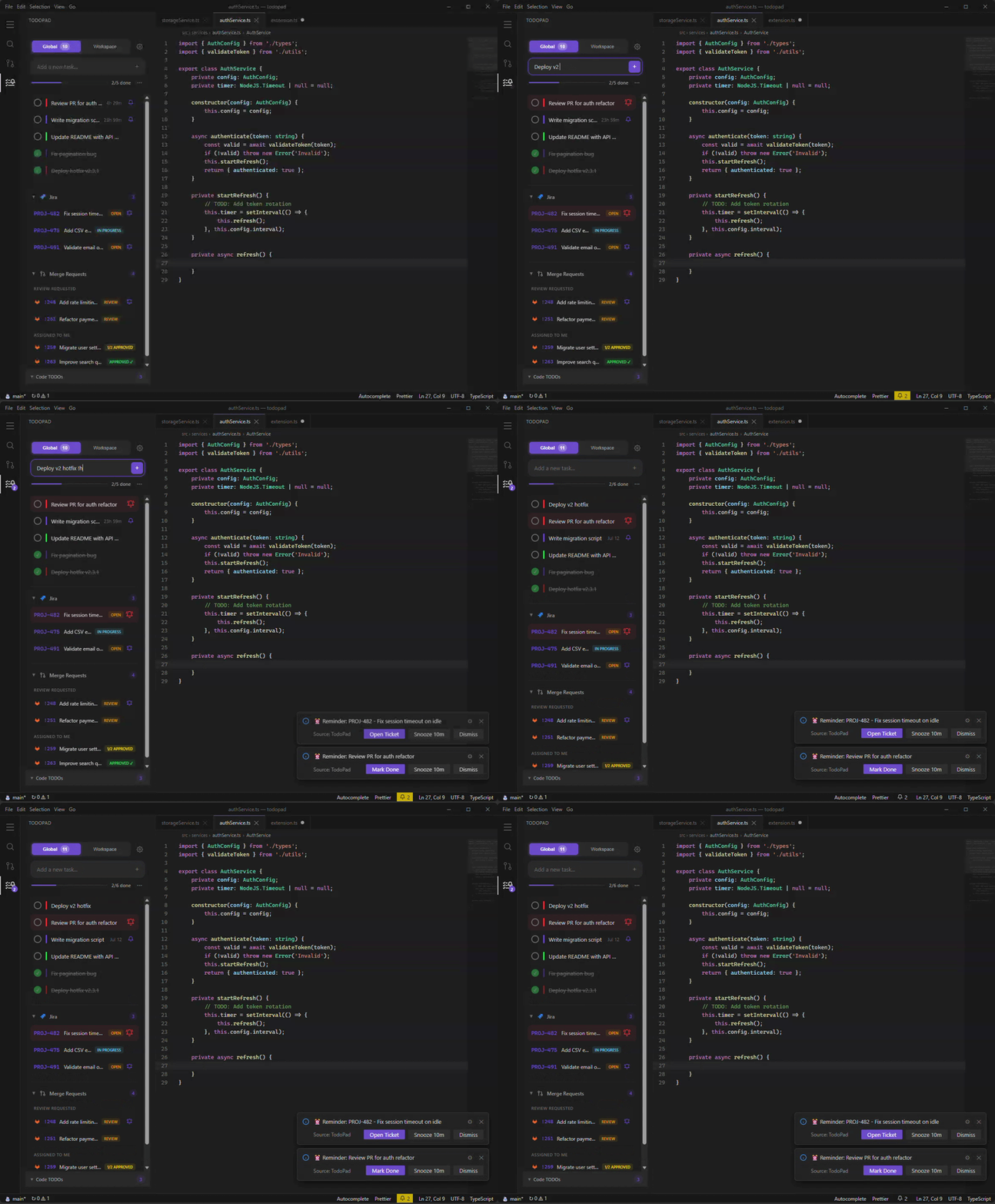
Two task lists, one panel. Switch between them with a single click.
- Global scope — Personal tasks that follow you across all workspaces. Syncs across multiple VS Code windows in real time.
- Workspace scope — Project-specific tasks tied to the current workspace.
Quick Add with Priority
Type a task and hit Enter. Append !h for high priority or !l for low — no menus, no friction.
Fix auth redirect bug !h
Update dependencies
Clean up old migrations !l
Reminders That Actually Remind You
Set a date and time on any task. When it's due, TodoPad will:
- Show a notification with Mark Done, Snooze, and Dismiss actions
- Re-fire every 60 seconds if ignored — it won't let you forget
- Pulse the status bar bell so you never miss it
- Display a badge count on the sidebar icon
Reminders work on todos, Jira tickets, and merge requests. Snooze duration is configurable (default: 10 minutes). Reminders persist across editor restarts.
Code TODO Scanner
TodoPad automatically finds TODO, FIXME, HACK, and XXX comments across your entire workspace. Results update in real-time as you save files.
- Click any result to jump directly to the line
- Supports 20+ languages: TypeScript, JavaScript, Python, Java, Go, Rust, C/C++, C#, Ruby, PHP, Swift, Kotlin, Scala, shell scripts, YAML, TOML, and more
- Configurable include/exclude patterns
Jira Integration
Connect your Jira Cloud instance to see your assigned tickets right alongside your todos.
- View tickets filtered by status, project, or custom JQL
- Separate filters for Global and Workspace scopes
- Set reminders on Jira tickets (same snooze/notification system as todos)
- Click to open any ticket in your browser
- Auto-refreshes on a configurable interval
Git Merge Request Integration
Connect GitLab and GitHub (including self-hosted instances) to track merge requests and pull requests that need your attention.
- Review Requested — MRs/PRs where someone asked for your review, with reminder support so you don't forget
- Assigned to Me — Your own open MRs with live approval status (
0/2 Approved, 1/3 Approved, Approved ✓)
- Support for both platforms simultaneously (e.g. work GitLab + personal GitHub)
- Separate Global and Workspace scope filters
- Filter by project paths, toggle draft visibility
- Click to open any MR/PR in your browser
- Auto-refreshes on a configurable interval
- HTTPS enforced for all connections
Drag & Drop Reordering
Grab any task and drag it to reorder. Your priority, your order.
Rich Edit Modal
Click a task to open a detail editor — update the title, add a description, change priority, or set a reminder date. All without leaving the sidebar.
Progress Tracking
A live progress bar at the top shows your completion rate at a glance. Satisfying to watch fill up.
Status Bar Indicator
When reminders are due, a pulsing bell appears in your status bar with a count. Click it to jump straight to TodoPad.
Getting Started
- Open the Extensions panel in your editor, search for TodoPad, and click Install
- Click the TodoPad icon in the Activity Bar
- Start typing tasks
No accounts. No configuration. No internet required.
Jira Integration
- Open the settings gear in the TodoPad panel
- Navigate to Integrations > Jira
- Enter your Jira Cloud URL, email, and an API token
- Click Connect
Once connected, your assigned tickets appear below your todo list. Filter them per-scope, set reminders, and click through to Jira when you need the full context.
Git Merge Request Integration
GitLab
- Open the settings gear in the TodoPad panel
- Navigate to Integrations > GitLab
- Enter your GitLab URL (e.g.
https://gitlab.com or your self-hosted instance)
- Enter a Personal Access Token with
read_api scope (generate one under Access Tokens in your GitLab user settings)
- Click Connect
GitHub
- Open the settings gear in the TodoPad panel
- Navigate to Integrations > GitHub
- Enter a Personal Access Token (generate one here)
- Click Connect
How it works
Once connected, your merge requests appear in a collapsible section below your todos, grouped into:
- Review Requested — MRs/PRs where your review is needed. Set reminders on these so you don't forget.
- Assigned to Me — Your own open MRs. Shows approval progress (
1/2 Approved) so you know when you can merge.
Configure workspace project paths in the settings to filter MRs for the current project only.
Configuration
| Setting |
Default |
Description |
todopad.codeScan.enabled |
true |
Scan workspace for TODO/FIXME/HACK/XXX comments |
todopad.codeScan.includePatterns |
**/*.{ts,js,py,...} |
Glob pattern for files to scan |
todopad.codeScan.excludePatterns |
**/node_modules/**,... |
Glob patterns to exclude from scanning |
todopad.snoozeDuration |
10 |
Snooze duration in minutes (1–1440) |
Design Philosophy
- Zero runtime dependencies. Ships as a single bundled file. No
node_modules at runtime.
- Instant startup. No network calls needed to show your tasks.
- Theme-aware. Every color adapts to your VS Code theme — light, dark, or high contrast.
- Privacy-first. Nothing is sent to external servers beyond your configured integrations.
- Keyboard-friendly. Quick-add from the input, Enter to submit, shortcuts for common actions.
Support the Project
TodoPad is free and always will be. Sponsorships keep the caffeine flowing and the features shipping.

Other ways to help:
Contributing
Contributions are welcome! Fork the repo, create a branch, make your changes, and open a PR.
npm install       # Install dev dependencies
npm run build     # Build the extension
npm test          # Run tests
npm run format    # Format code with Prettier
Press F5 to launch the Extension Development Host for testing.
License
MIT — no strings attached. But a star or a sponsor never hurts.

