

ImpEx language support for SAP Commerce (Hybris) projects in VS Code and Cursor. The extension reads the items.xml files of your project, so completion and validation know your real item types, including the ones from your custom extensions.
Features
Completion based on your type system
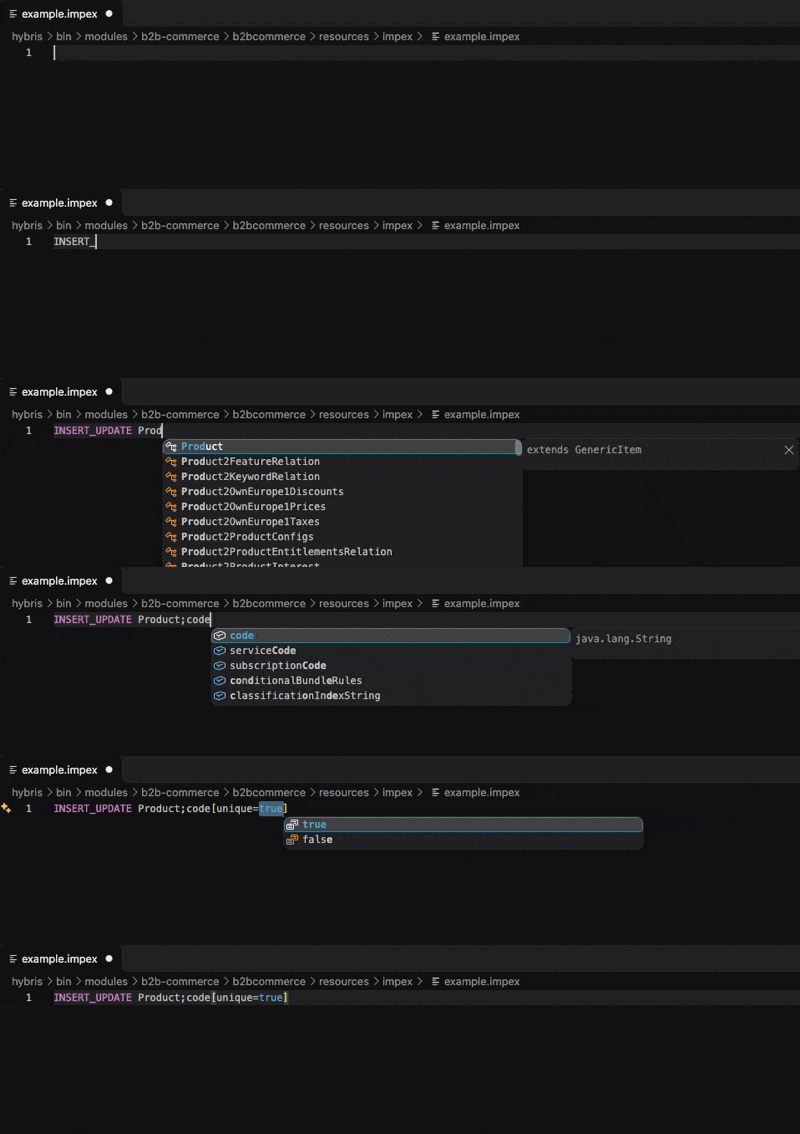
Type INSERT_UPDATE Prod to get item type suggestions. After the ;, the attributes of the type are suggested, including inherited attributes and the ones added by relations. Inside [ ], the ImpEx modifiers are suggested, with their accepted values.
Validation while you type
- Undefined macros, such as
$catalogVersion used without $catalogVersion = ....
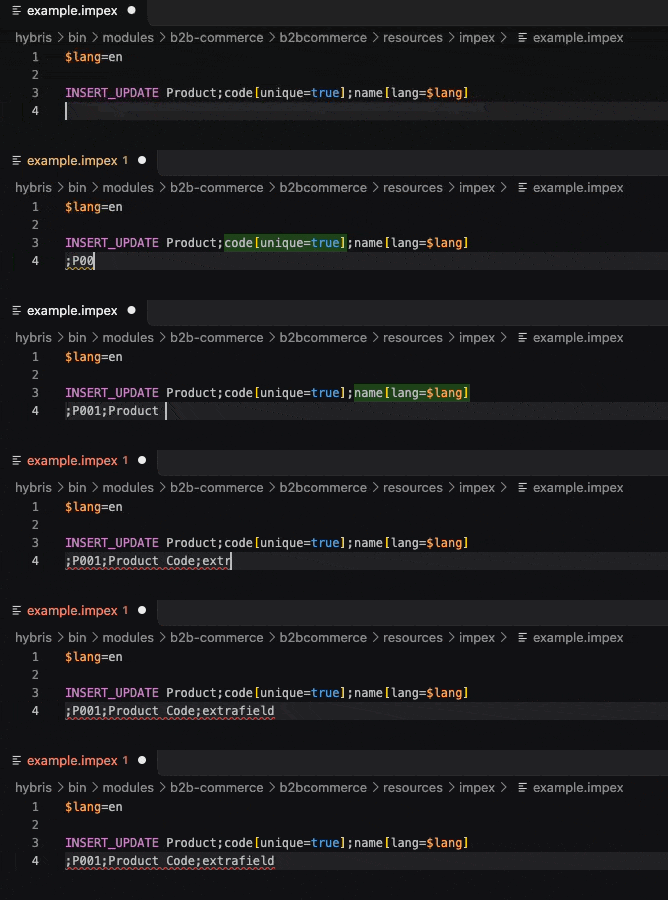
- Data rows with more columns than the header declares (error) or fewer (warning).
Quoted values, multi-line values, \ line continuations, $config- properties and the $START_USERRIGHTS section are handled, so valid files stay free of false errors.
Syntax highlighting
Modes, types, attributes, modifiers, macros and comments are highlighted, including nested references such as catalogVersion(catalog(id),version)[unique=true] and type modifiers such as Product[batchmode=true].
Macro navigation
Hover a macro to see its value, and use Go to Definition to jump to the line where it is defined.
Type index that stays up to date
All *-items.xml files are indexed, including enums and relations. The index is rebuilt automatically when one of them changes.
Getting started
- Install the extension from the VS Code Marketplace or, in Cursor, from the Extensions view (Open VSX).
- Open your SAP Commerce project.
- If the platform (
hybris/bin) is outside the open folder, run SAP Commerce Tools: Add Platform Path... and select it. This is needed to resolve base types such as Product.
- Open an
.impex file.
To check what was indexed, run SAP Commerce Tools: Show Type Attributes... and pick a type.
Commands
| Command |
What it does |
| SAP Commerce Tools: Show items.xml Found |
Lists the items.xml files that were found |
| SAP Commerce Tools: Add Platform Path... |
Adds a folder outside the workspace to the index |
| SAP Commerce Tools: Rebuild Type Index |
Rebuilds the type index |
| SAP Commerce Tools: Show Type Attributes... |
Shows the inheritance and attributes of a type |
Settings
| Setting |
Description |
sapCommerceTools.additionalItemsXmlRoots |
Absolute paths of additional folders to scan for items.xml files |
Known limitations
- A macro counts as defined if it appears anywhere in the file, even after it is used.
- The
$START_USERRIGHTS section is highlighted but not validated.
collectiontypes and maptypes are not indexed.
Planned
- FlexibleSearch support.
- Validation of ImpEx attributes against the type system.
items.xml editing support.
Plans can change, and there are no dates yet.
Feedback
If the extension helps you, a rating on the Marketplace or on Open VSX helps other SAP Commerce developers find it. Questions, problems and suggestions are welcome in the issue tracker.
License
See the LICENSE file included with this extension. SAP, SAP Commerce and Hybris are trademarks of SAP SE. This is an independent project, not affiliated with or endorsed by SAP SE.

