gguf-cline
Autonomous AI coding agent that lives in your IDE
An advanced AI-powered coding assistant that combines deep code understanding with autonomous execution capabilities. It can create, edit, and refactor code, run commands, browse the web, and integrate with external tools through the Model Context Protocol (MCP).
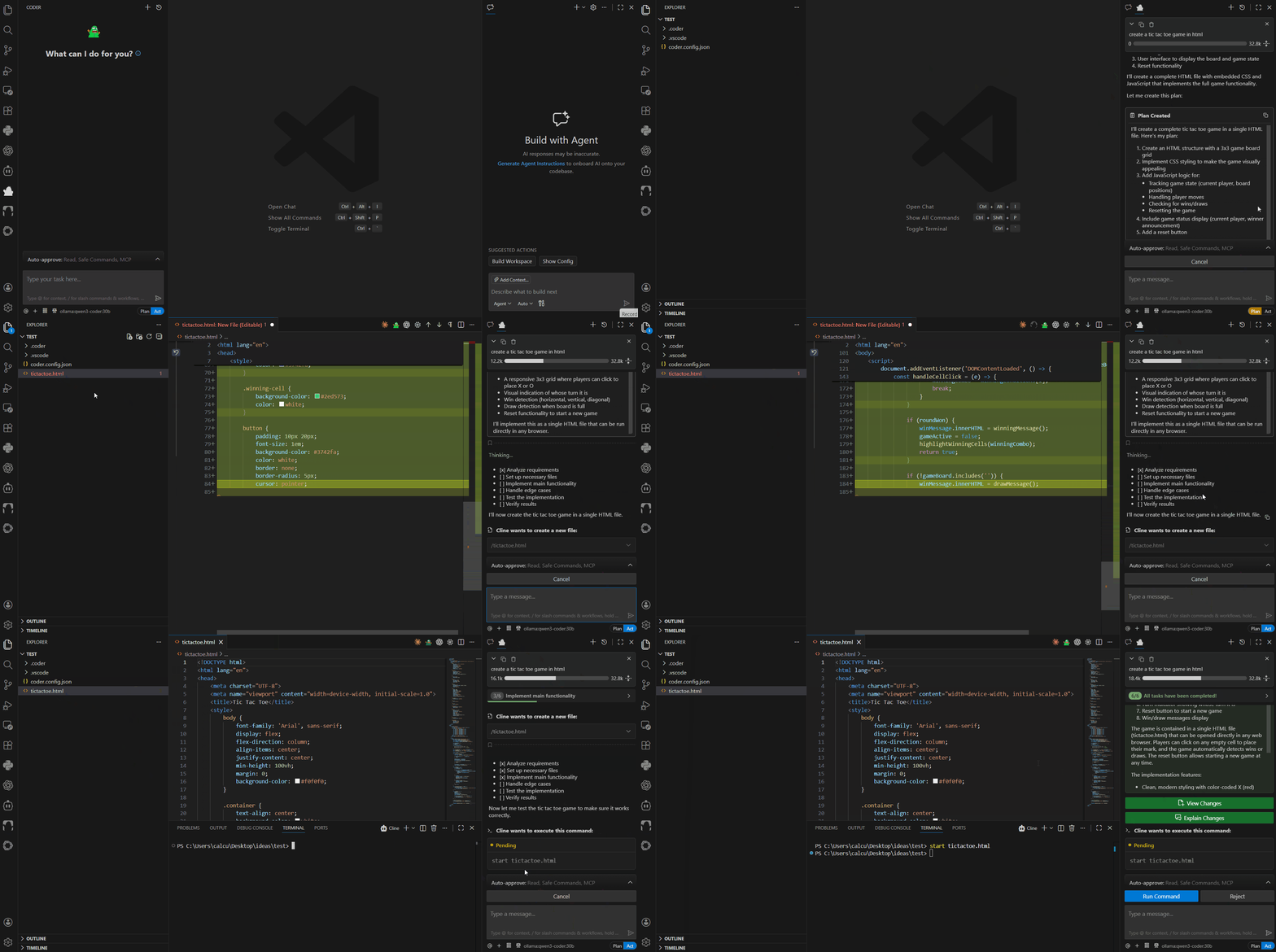
🌟 Key Features
- 🧠 Deep Code Understanding: Analyzes entire codebases to provide context-aware assistance
- ⚡ Autonomous Execution: Plans, implements, and tests code changes with minimal oversight
- 🔧 Multi-Platform Support: Available as VSCode extension, CLI tool, and JetBrains plugin
- 🤖 Multiple AI Providers: Supports Anthropic Claude, OpenAI GPT, Google Gemini, and more
- 🔌 MCP Integration: Extensible through Model Context Protocol servers
- 🎯 Plan/Act Mode: Separate planning and execution phases for better control
- 🌐 Browser Automation: Can interact with web applications and APIs
- 📝 Task History: Persistent conversation and task tracking
- 🔒 Secure: API keys stored securely, user approval required for actions
🚀 Quick Start
VSCode Extension
- Install from VSCode Marketplace
- Configure your AI provider (Anthropic, OpenAI, etc.) in settings
- Start coding - use
Ctrl+' (or Cmd+' on Mac) to add selected code to chat
Core Components
- Webview UI: React-based frontend providing the chat interface and settings
- Controller: Central state management and orchestration layer
- Task Executor: Handles AI API requests, tool execution, and streaming responses
- MCP Hub: Manages connections to external Model Context Protocol servers
🛠️ Development
Prerequisites
- Node.js 18.0.0 or higher
- VSCode 1.84.0 or higher
- Git
Project Structure
coder/
├── src/                   # Core extension code
│   ├── core/              # Main application logic
│   │   ├── controller/    # State management & webview communication
│   │   ├── task/          # AI task execution
│   │   └── webview/       # Webview provider
│   ├── api/               # AI provider integrations
│   ├── services/          # External services (MCP, etc.)
│   └── shared/            # Shared types and utilities
├── webview-ui/            # React frontend
├── cli/                   # CLI implementation
├── proto/                 # Protocol buffer definitions
├── docs/                  # Documentation site
├── testing-platform/      # Testing infrastructure
├── evals/                 # Evaluation scripts
└── scripts/               # Build and development scripts
📋 Architecture Overview
Coder follows a modular architecture designed for reliability and extensibility:
graph TB
    subgraph "User Interfaces"
        VSCode[VSCode Extension]
        CLI[CLI Tool]
        JetBrains[JetBrains Plugin]
    end

    subgraph "Core Engine"
        Webview[React Webview UI]
        Controller[Controller<br/>State Management]
        Task[Task Executor<br/>AI Requests & Tools]
    end

    subgraph "AI Providers"
        Anthropic[Anthropic Claude]
        OpenAI[OpenAI GPT]
        Gemini[Google Gemini]
        OpenRouter[OpenRouter]
        Bedrock[AWS Bedrock]
        Ollama[Ollama]
        Other[Other Providers...]
    end

    subgraph "Extensions"
        MCP[MCP Servers<br/>External Tools]
    end

    VSCode --> Webview
    CLI --> Task
    JetBrains --> Webview

    Webview --> Controller
    Controller --> Task
    Task --> AI Providers
    Task --> MCP

    style Webview fill:#bbf
    style Controller fill:#bfb
    style Task fill:#ffb
Building
# Install dependencies
npm install

# Build the extension
npm run compile

# Build webview
npm run build:webview

# Package for distribution
npm run package
Development Workflow
- Setup: Clone and install dependencies
- Development: Use
npm run dev for hot reloading
- Testing: Run
npm test for unit tests, npm run e2e for integration tests
- Building: Use
npm run compile to build the extension
- Packaging: Use
npm run package to create VSIX for distribution
Key Scripts
npm run dev - Start development with hot reloadingnpm run compile - Build the extensionnpm run test - Run all testsnpm run protos - Generate protocol buffer codenpm run lint - Run linting and formatting
🤝 Contributing
We welcome contributions! Please see our Contributing Guide for details.
Development Guidelines
- Follow the established patterns in the codebase
- Add appropriate tests for new features
- Update documentation as needed
- Use the provided linting and formatting tools
- Follow semantic commit messages
Adding New Features
When adding new AI providers, tools, or MCP integrations:
- Follow existing patterns in the respective directories
- Update protocol buffer definitions if needed (
npm run protos)
- Add comprehensive tests
- Update documentation
- Create a changeset for version management
🔧 Configuration
Coder supports extensive configuration:
AI Providers
Configure multiple AI providers with different models.
lmstudio example:
{
  "coder": {
    "providers": [
      {
        "name": "lmstudio",
        "models": [
          "openai/gpt-oss-120b"
        ],
        "baseUrl": "http://localhost:1234"
      }
    ]
  }
}
ollama example:
{
  "coder": {
    "providers": [
      {
        "name": "ollama",
        "models": [
          "gpt-oss:120b"
        ],
        "baseUrl": "http://localhost:11434/v1"
      }
    ]
  }
}
🧪 Testing
Coder includes comprehensive testing:
- Unit Tests: Core logic and utilities
- Integration Tests: VSCode extension functionality
- E2E Tests: Full user workflows with Playwright
- Evaluation Suite: AI model performance testing
# Run unit tests
npm run test:unit

# Run integration tests
npm run test:integration

# Run E2E tests
npm run test:e2e
📦 Distribution
This package is distributed through multiple channels:
- VSCode Marketplace:
gguf.gguf-cline
- OpenVSX: For other editors
🛡️ Security & Privacy
- API keys are stored securely using VSCode's secrets storage
- User approval is required for all tool executions
- MCP servers run locally or in controlled environments
📄 License
MIT - see LICENSE for details.
🙏 Acknowledgments
Coder (aka gguf-cline) builds upon the work of many open-source projects and AI research. Special thanks to:
- Cline team for their groundbreaking work on the project
- The Anthropic team for Claude
- OpenAI for GPT models
- The Model Context Protocol community
- All other contributors and users
Coder - Making AI-assisted coding autonomous, reliable, and accessible to everyone.

