Skip to content
| Marketplace
Sign in
Visual Studio Code>Programming Languages>Hono Route ExplorerNew to Visual Studio Code? Get it now.
Hono Route Explorer

Hono Route Explorer

Genesis Guerrero

|
2 installs
| (0) | Free
Browse Hono routes in a sidebar, grouped by prefix, and jump to their definitions. Also reads Express, Fastify, and NestJS.
Installation
Launch VS Code Quick Open (Ctrl+P), paste the following command, and press enter.
Copied to clipboard
More Info

Hono Route Explorer

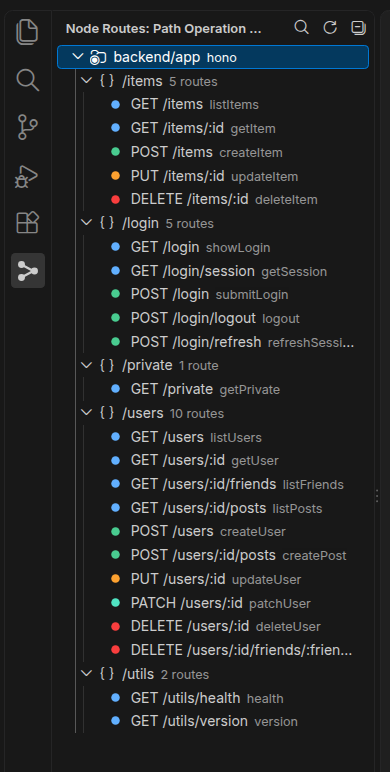
Browse Hono routes in a sidebar, grouped by prefix, and jump to their definitions.

Path Operation Explorer on a Hono app

Install

Marketplace

Marketplace · Install in VS Code

GitHub may not make the vscode: link clickable. Use the Marketplace link if it does not open.

code --install-extension gengue.nodejs-path-explorer

Features

Hono:

  • new Hono() and new Hono().basePath('/x')
  • get, post, put, patch, delete, all, and on, including chains such as app.get(...).post(...)
  • app.route('/prefix', subApp) across files, including nested mounts
  • @hono/zod-openapi (OpenAPIHono and createRoute); {id} is shown as :id
  • Monorepo imports via tsconfig paths and package exports

Express is secondary: app and router methods, route chains, and app.use('/prefix', router) across files. Fastify plugins and NestJS controller decorators are read when they are in the workspace.

Usage

Open Path Operation Explorer from the Node Routes icon in the activity bar. Each mounted prefix is a group (/items, 5 routes). Click a route or a group to jump to the definition. The tree updates when you save a source file.

Command What it does
Node Routes: Search Path Operations... Quick-pick a route and jump to it
Node Routes: Refresh Path Operations Scan again
Node Routes: Collapse All Collapse every prefix group
Copy Path Context menu on a route or group

Settings

Setting Default
nodePathExplorer.include **/*.{js,jsx,mjs,cjs,ts,tsx}
nodePathExplorer.exclude node_modules, dist, build, out, coverage, *.d.ts, tests

License

MIT

  • Contact us
  • Jobs
  • Privacy
  • Manage cookies
  • Terms of use
  • Trademarks
  • Your Privacy Choices
  • Consumer Health Privacy
© 2026 Microsoft