Skip to content
| Marketplace
Sign in
Visual Studio Code>Snippets>json2csharpNew to Visual Studio Code? Get it now.
json2csharp

json2csharp

Gasrulle

|
3 installs
| (0) | Free
Paste JSON as C# classes or records
Installation
Launch VS Code Quick Open (Ctrl+P), paste the following command, and press enter.
Copied to clipboard
More Info

Paste JSON as C#

Visual Studio Marketplace Version License: MIT

A simple and fast VS Code extension to paste JSON from your clipboard as C# classes or records.

Perfect for quickly converting JSON from REST API documentation into C# request/response objects.

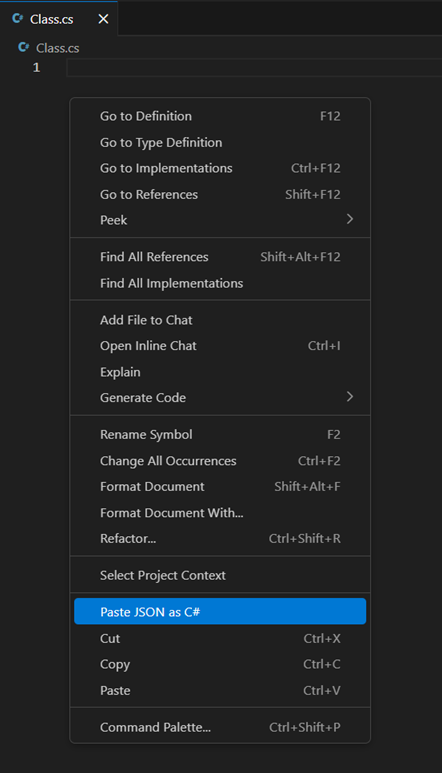
json2csharp - Context menu

Features

  • Context Menu Integration: Right-click in any .cs file to see "Paste JSON as C#"
  • JSON Validation: Validates clipboard content before conversion with helpful error messages
  • Configurable Root Class Name: Choose to always use a default name or be prompted each time
  • Type Styles: Generate classes, positional records, or records with properties
  • Collection Types: Choose between Array, List, IList, IEnumerable, or IReadOnlyList
  • Nullable Support: Handle nullable reference types with annotations or default values
  • Namespace Detection: Optionally include file-scoped namespace from .csproj structure
  • Serialization Attributes: Optionally add [JsonPropertyName] (System.Text.Json) or [JsonProperty] (Newtonsoft.Json) when JSON keys differ from C# names
  • Instant Rename: Root class name is selected as a linked placeholder after paste — just start typing to rename all occurrences at once

Usage

  1. Copy JSON to your clipboard
  2. Open a .cs file in VS Code
  3. Right-click where you want to insert the code
  4. Select "Paste JSON as C#"
  5. Enter a root class name (or use the default)
  6. If you kept the default name, it's highlighted — just type to rename all occurrences instantly

Example

Input JSON:

{
  "id": 123,
  "name": "John Doe",
  "email": "john@example.com",
  "roles": ["admin", "user"],
  "address": {
    "street": "123 Main St",
    "city": "New York"
  }
}

Output C#:

public class Root
{
    public long Id { get; set; }
    public string Name { get; set; }
    public string Email { get; set; }
    public IEnumerable<string> Roles { get; set; }
    public Address Address { get; set; }
}

public class Address
{
    public string Street { get; set; }
    public string City { get; set; }
}

Extension Settings

Setting Default Description
json2csharp.alwaysUseRootClassName false Skip the prompt and always use the default root class name
json2csharp.rootClassName "Root" Default root class name
json2csharp.typeStyle "class" Type style: class, recordPositional, or recordProperties
json2csharp.collectionType "IEnumerable" Collection type: Array, List, IList, IEnumerable, IReadOnlyList
json2csharp.nullableReferenceTypes "none" Nullable handling: none, nullable (?), or defaultValues
json2csharp.inferEnums false Attempt to infer enum types from JSON values
json2csharp.inferDateTimes true Attempt to infer DateTime types from strings
json2csharp.namespaceMode "withoutNamespace" Namespace inclusion: withoutNamespace (single menu, no namespace), withNamespace (single menu, always namespace), or choose (submenu with both options)
json2csharp.serializationAttributes "SystemTextJson" Serialization attributes: none, SystemTextJson, or NewtonsoftJson
json2csharp.attributeRendering "whenDifferent" When to render attributes: whenDifferent or always. Only applies when serializationAttributes is SystemTextJson or NewtonsoftJson

Requirements

  • VS Code 1.96.0 or later

Known Issues

  • Complex union types may not convert perfectly
  • Very large JSON files may take a moment to process

License

MIT

  • Contact us
  • Jobs
  • Privacy
  • Manage cookies
  • Terms of use
  • Trademarks
© 2026 Microsoft