Claude Session Meter
A status bar badge for VS Code that shows how much of your Claude Code 5-hour session you have used.
Claude Code warns you at 95%, but a single large prompt can use up the rest before you have time to react, for example to write a handoff. You set your own limit (for example 90%). The badge text starts green, moves through yellow and orange, and turns red as usage gets closer to that limit. At the limit, the badge gets a red background.
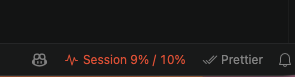
The badge is for information only. It does not block Claude Code.
Features
- Shows the same session percentage as Claude's Account & usage screen.
- Changes color gradually as usage gets closer to your limit.
- Shows a red background when usage reaches the limit.
- Tooltip shows session usage, time until reset, weekly usage, when the data was last updated, and which account file it reads.
- Refreshes usage in the background every 2 minutes. The refresh makes no model call and uses 0 tokens.
- Supports several Claude accounts through
CLAUDE_CONFIG_DIR.
- No dependencies and no build step. It does not change any Claude Code settings.
Install
Install Claude Session Meter from the Visual Studio Marketplace:
In VS Code, open the Extensions view, search for Claude Session Meter, and click Install.
Or run this command:
code --install-extension g13ydson.claude-session-meter
The badge appears in the status bar after VS Code starts. You must have Claude Code installed and logged in.
Install from source
git clone https://github.com/g13ydson/claude-session-meter.git
code --extensionDevelopmentPath "$PWD/claude-session-meter"
This starts VS Code in extension development mode with the extension loaded.
Usage
- Click the badge, or run Session Meter: Set limit from the Command Palette, to change the limit.
- Run Session Meter: Refresh now to update usage at once.
- Hover over the badge to see the details.
Settings
| Setting |
Default |
Description |
sessionMeter.limitPercent |
90 |
Usage percentage at which the badge turns red. |
sessionMeter.claudeConfigDir |
"" |
Claude Code config folder to read, for example ~/.claude-personal. Leave it empty to detect the folder automatically. |
sessionMeter.refreshSeconds |
120 |
How often to refresh usage in the background. The minimum is 60. Set it to 0 to turn off the refresh. |
sessionMeter.claudePath |
"" |
Path to the claude binary used for the refresh. Leave it empty to use the binary that comes with the Claude Code extension, or claude from PATH. |
Multiple Claude accounts
If you keep one Claude account per config folder with CLAUDE_CONFIG_DIR, the badge reads the account that belongs to the current VS Code window. It looks for the folder in this order:
- The
sessionMeter.claudeConfigDir setting.
CLAUDE_CONFIG_DIR in claudeCode.environmentVariables, which is a setting of the Claude Code extension.CLAUDE_CONFIG_DIR in the environment that VS Code started with.- The default Claude Code location,
~/.claude.json.
For example, you can use one wrapper per account:
code-work() {
  CLAUDE_CONFIG_DIR="$HOME/.claude-work" \
    code -n --user-data-dir "$HOME/.vscode-work" "$@"
}
VS Code applies the environment only when it starts a new process. The separate --user-data-dir makes sure each account gets its own process.
How it works
Claude Code saves the numbers from its usage screen in .claude.json, under cachedUsageUtilization. That file is $CLAUDE_CONFIG_DIR/.claude.json, or ~/.claude.json when the variable is not set. The extension checks the file every 2 seconds and updates the badge when the file changes.
Claude Code writes those numbers only when it loads usage data, for example when you open Account & usage. To keep the badge current, the extension runs this command in the background, with CLAUDE_CONFIG_DIR set for the current account:
claude -p /usage --no-session-persistence --output-format json --setting-sources "" --strict-mcp-config
/usage runs locally in Claude Code. It asks for the same data as the usage screen and makes no model call, so it uses 0 tokens.--setting-sources "" and --strict-mcp-config stop your hooks, plugins and MCP servers from starting for this run.--no-session-persistence keeps the run out of your session history.- The extension uses Claude Code's own login and never reads your credentials.
Known limitations
- The badge can be up to one refresh interval behind. With the default setting, the numbers can be up to 2 minutes old. Claude Code also skips a fetch when the last one was less than 60 seconds ago. The tooltip shows when the data was last updated.
- Each refresh starts a short
claude process, which takes about 2 seconds.
- If the refresh fails, the tooltip shows the error. The badge keeps the last known numbers.
- After the session reset time, the badge shows 0% until Claude Code saves new numbers.
- The badge shows the 5-hour session window only. The weekly usage appears in the tooltip.
- The extension depends on an internal Claude Code cache format, which a future Claude Code version can change.
License
MIT
This is a community project. It is not made or endorsed by Anthropic. Claude and Claude Code are trademarks of Anthropic.

