Vitesse Theme Dark Custom for VS Code
安装
VSCode 扩展市场安装Vitesse Dark Custom
使用
// .vscode/setting.json
{
  "workbench.colorTheme": "Vitesse Dark Custom",
  "workbench.preferredDarkColorTheme": "Vitesse Dark Custom",
  "workbench.preferredLightColorTheme": "Vitesse Light Custom"
}
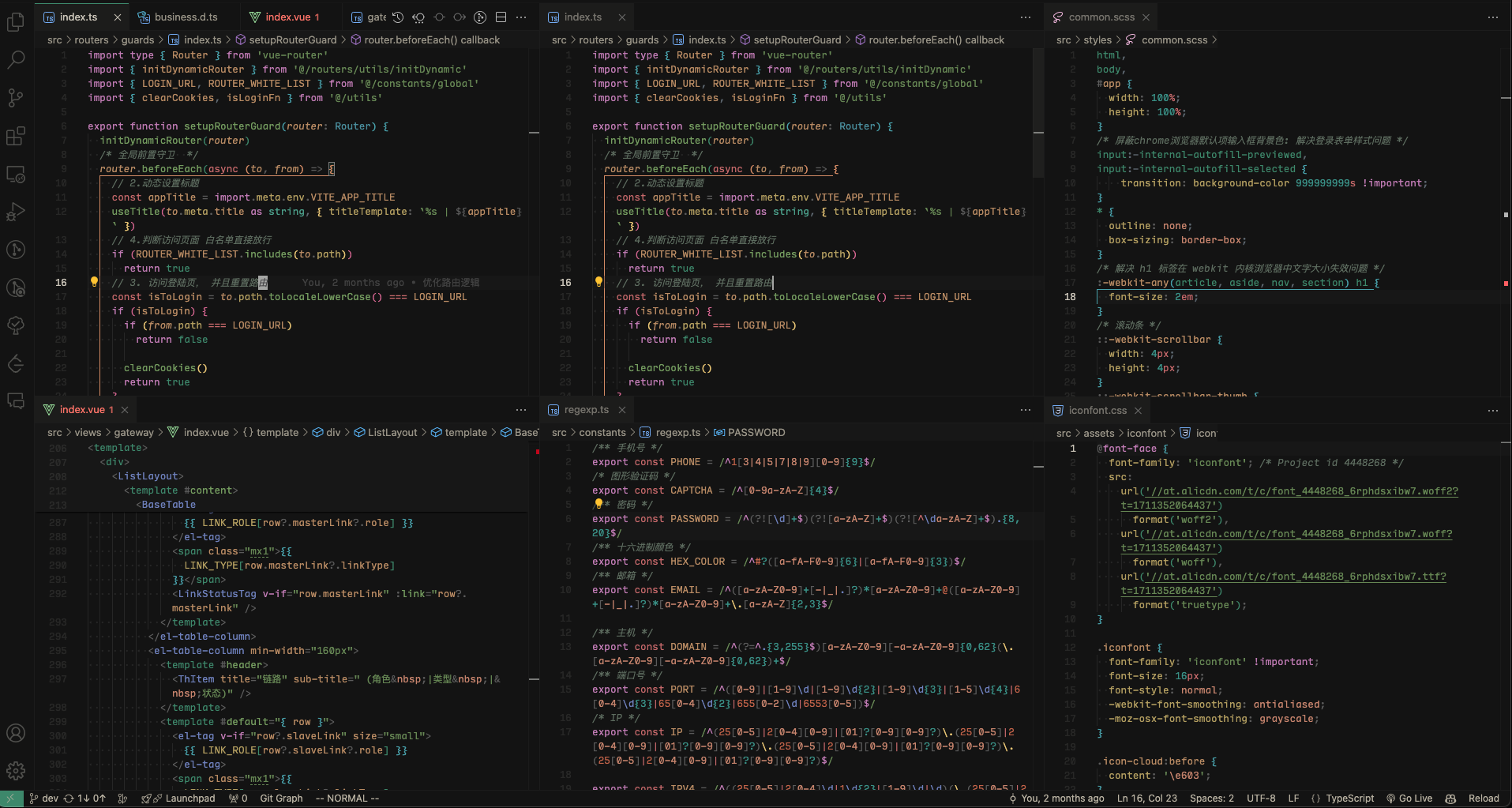
预览
Vitesse Light Custom(亮色主题)
亮色主题文件位于 themes/vitesse-light.json,提供与 Vitesse Dark Custom 同套定制的亮色外观。
启用方式:
// .vscode/setting.json
{
  "workbench.colorTheme": "Vitesse Light Custom",
  "workbench.preferredDarkColorTheme": "Vitesse Dark Custom",
  "workbench.preferredLightColorTheme": "Vitesse Light Custom"
}
开启 window.autoDetectColorScheme 后,VSCode 可跟随系统亮暗模式在这两套主题间自动切换。
说明:在本次更新 README 之前,本扩展只包含 Vitesse Dark Custom 这一定制暗色主题,并不提供亮色主题;Vitesse Light Custom 亮色主题是后新增的,本 README 随之补充了对应的主题文件与使用说明。
特性
根据自己使用习惯,基于 Vitesse Dark Theme 主题做了以下自定义修改。
- 新增亮色主题 Vitesse Light Custom,可跟随系统亮暗模式自动切换
- 工作区边框线变明显
- 光标选中文字背景色变明显
- 非当前行号前景变淡
- 加深 Tab 激活背景色
- 新增输入框选项按钮边框色
- 逗号/分号提亮(解决与 copilot 提示分不清问题)
- 突显CSS/SCSS 关键字、this 关键字
- 注释/函数参数改为斜体
- 突显文件列表中当前激活、聚集的文件,顶部命令中心聚焦背景色
- 增加 Vim 聚焦在文件列表时高亮边框样式
- 稍微减淡字符串前景色
- 将字符串颜色改为主色调绿色
简化自己的 VSCode 全局配置
// .vscode/setting.json
{
  "workbench.colorTheme": "Vitesse Dark Custom",
  "workbench.preferredDarkColorTheme": "Vitesse Dark Custom",
  "workbench.preferredLightColorTheme": "Vitesse Light Custom"
}
之前配置
{
  /* 自定义工作台主题 */
  "workbench.colorCustomizations": {
    "[Vitesse Dark]": {
      // 文件 Tab 选项卡
      "tab.hoverBackground": "#1e1e1e",
      "tab.activeBorderTop": "#3D886B",
      // 选中的文本背景色
      "editor.selectionBackground": "#3d6baac7",
      "tab.activeBackground": "#333",
      "tab.inactiveBackground": "#090909",
      "editorLineNumber.foreground": "#333",
      "sideBar.border": "#222",
      "sideBarSectionHeader.background": "#222",
      "activityBar.activeBackground": "#222",
      "panel.border": "#222",
      "panel.background": "#101010",
      "sideBar.background": "#101010",
      "menu.selectionBackground": "#21252b",
      "menu.background": "#181a21",
      "list.activeSelectionBackground": "#3d886b5c",
      "list.focusOutline": "#3d886b5c",
      "list.hoverBackground": "#1e1e1d",
      "list.focusBackground": "#1e1e1d",
      "list.focusAndSelectionOutline": "#3d886b5c",
      "list.activeSelectionForeground": "#f5f5f5",
      "list.inactiveSelectionBackground": "#3d886b37",
      // 命令行中心弹出的列表 聚焦背景色
      "quickInputList.focusBackground": "#222",
      // 输入框里的选项被选中的边框颜色
      "inputOption.activeBorder": "#3D886B"
    }
  }
}
// 编辑区自定义代码高亮
{
  "editor.tokenColorCustomizations": {
    "textMateRules": [
    // js,ts,vue文件分号
      {
        "name": "Semicolons",
        "scope": [
          "punctuation.terminator.expression",
          "punctuation.terminator.statement"
        ],
        "settings": {
          "foreground": "#8e8e8e"
        }
      },
      // 逗号
      {
        "name": "Commas",
        "scope": [
          "punctuation.separator.comma"
        ],
        "settings": {
          "foreground": "#8e8e8e"
        }
      },
      {
        "name": "Separators (key/value, namespace, inheritance, pointer, hash, slice, etc)",
        "scope": [
          "entity.other.attribute-name.placeholder punctuation",
          // 伪类、伪元素冒号
          "entity.other.attribute-name.pseudo-class punctuation",
          "entity.other.attribute-name.pseudo-element punctuation",
          "punctuation.definition.entity.other.inherited-class",
          "punctuation.separator.dictionary.key-value",
          "punctuation.separator.inheritance",
          "punctuation.separator.key-value",
          "punctuation.separator.namespace"
        ],
        "settings": {
          "foreground": "#aa7babcf"
        }
      },
      // css scss 关键字
      {
        "name": "CSS/SCSS keywords",
        "scope": [
          "keyword.control.at-rule"
        ],
        "settings": {
          "foreground": "#aa7bab"
        }
      },
      // this
      {
        "name": "this",
        "scope": [
          "variable.language.this"
        ],
        "settings": {
          "foreground": "#b86795"
        }
      },
      {
        "name": "Function parameters",
        "scope": [
          "entity.name.variable.parameter",
          "meta.at-rule.function variable",
          "meta.at-rule.mixin variable",
          "variable.parameter"
        ],
        "settings": {
          "fontStyle": "italic"
        }
      },
      // 注释
      {
        "name": "Comments",
        "scope": [
          "comment"
        ],
        "settings": {
          "fontStyle": "italic"
        }
      }
    ]
  }
}
注意
运行vsce package前需要删除 node_modules文件夹,否则会报错
Links
prism-theme-vars - where the theme born.
Vitesse Dark Custom - what the theme was for.
Thanks
This project is based on Vitesse Dark Theme.
License
MIT - Copyright (c) 2023 fxzer

