
DepDetect
English | 简体中文
Check and update npm, PyPI, Go module, and Maven dependency versions without leaving VS Code.


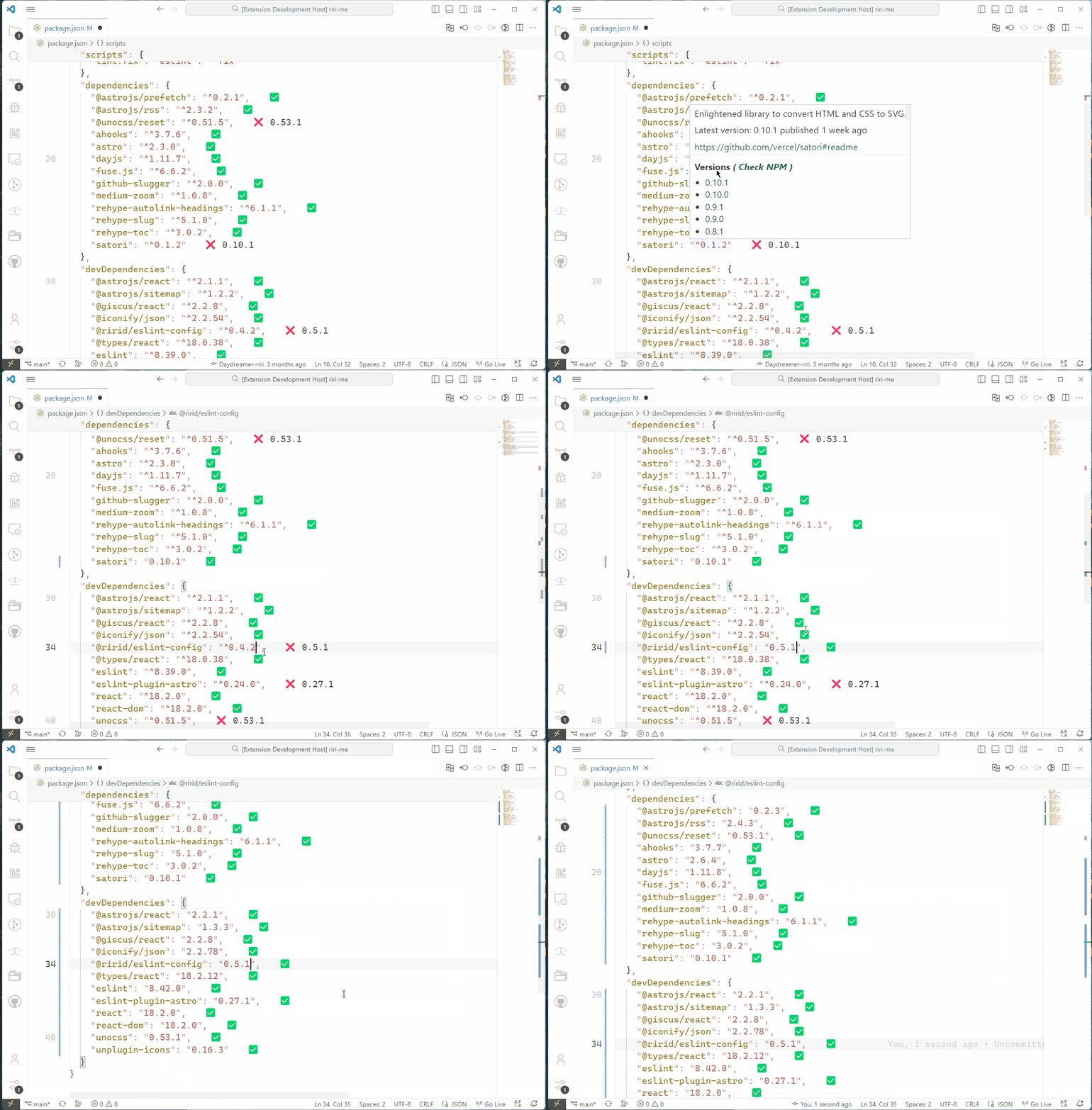
DepDetect adds version status markers directly to supported dependency files. Hover over a dependency to browse published versions, open its registry page, or replace the current version with one click.
Highlights
- See dependency status inline while you work.
- Browse stable published versions from the editor hover.
- Click any version in the hover to apply it immediately.
- Follow the current npm registry configuration, including scoped registries.
- Avoid repeated network requests with per-session and persistent caching.
Supported files
| Ecosystem |
File |
Detected declarations |
Version source |
| Node.js |
package.json |
dependencies, devDependencies |
Configured npm registry |
| Python |
requirements.txt |
Versioned PEP 508-style requirements |
PyPI |
| Python |
pyproject.toml |
PEP 621 dependencies, optional dependencies, dependency groups, build requirements, and Poetry dependencies |
PyPI |
| Go |
go.mod |
Single and block require directives |
Go module proxy |
| Java |
pom.xml |
Dependencies with an explicit <version> |
Maven Central |
Prerelease versions are excluded. Deprecated npm releases and yanked PyPI releases are excluded as well.
Getting started
- Install DepDetect from the Visual Studio Marketplace.
- Open a supported dependency file.
- Wait for
DepDetect: OK in the status bar.
- Hover over a dependency's status marker to inspect available versions.
- Select a version to replace the current one.
For npm dependencies, choosing an individual version preserves a leading ^ or ~ constraint. For plain-text formats, DepDetect replaces only the version text and leaves the surrounding declaration in place.
Status markers
| Marker |
Meaning |
✅ |
The current constraint is compatible with the latest stable release. |
❌ <version> |
The latest stable release is outside the current constraint. |
❗ |
Version information could not be resolved or the version is invalid. |
The marker text can be customized in VS Code settings.
Commands
Open the Command Palette and search for DepDetect:
| Command |
Description |
| DepDetect: Retry to fetch the active dependency file |
Bypass cached metadata and fetch dependency versions again. |
Version links shown in dependency hovers use an internal command and are not intended to be run manually.
Refresh behavior
DepDetect fetches version metadata when a supported file is opened for the first time. Editing or saving the file reparses the document and updates marker positions without repeatedly contacting registries. Source control diff views also avoid starting registry requests.
Run DepDetect: Retry to fetch the active dependency file after adding a dependency or whenever you want fresh registry data. Registry responses are cached for faster subsequent checks.
Registry and authentication behavior
PyPI, Go Module Proxy, and Maven Central requests use the Node.js runtime's native fetch with a shared 10-second timeout, explicit User-Agent, and response status and parsing checks. npm requests intentionally remain on npm-registry-fetch so the extension keeps its existing npm registry, proxy, certificate, and request behavior.
For npm, the registry URL is read with npm config get registry; scoped packages also use npm config get @scope:registry. The extension currently does not read npm auth tokens or other credentials into the request options. Public registries and private registries that do not require authentication work normally, while packages that require private-registry authentication may show ❗ until npm authentication support is added explicitly.
Settings
| Setting |
Default |
Description |
depdetect.compatibleDecorator |
✅ |
Marker template for a compatible dependency. Use ${version} to include the latest version. |
depdetect.incompatibleDecorator |
❌ ${version} |
Marker template when the latest version is outside the current constraint. |
depdetect.errorDecorator |
❗ |
Marker shown when dependency information cannot be resolved. |
Settings can be changed globally or per workspace. Empty marker text hides that marker.
Current limitations
- Newly added dependencies are checked only after an explicit retry or after the file is reopened in a new VS Code session.
- Maven versions referenced through properties such as
${revision} are intentionally not edited.
- Unversioned dependencies, local paths, Git URLs, workspace references, and other non-registry specifications are not update targets.
Feedback and source
Found a bug or have a feature request? Open an issue on GitHub. The source code is available in the DepDetect repository.
DepDetect is inspired by crates and is a modified fork of Riri's vscode-ext-packages. The original work is Copyright © 2023 Riri; modifications are Copyright © 2026 funkpopo. Full notices are retained in the MIT License.

