Claude.ai Token TrackerCompanion readout for the Claude Token Tracker Chrome extension. Shows your live Claude.ai quota in the VS Code status bar. Does not work standalone — the Chrome extension is required. Installation Launch VS Code Quick Open ( Ctrl+P), paste the following command, and press enter.Copied to clipboard |

Claude.ai Token TrackerSee your Claude.ai quota usage in the VS Code status bar. Session, weekly and model-specific limits, all without leaving your editor. When Anthropic ships a new model with its own weekly cap, it shows up here automatically — no update needed.
Setup (in this exact order)
If you skip step 1, this extension cannot work. There is no API key fallback, no manual data entry, no standalone mode. The Chrome extension is what reads your live Claude.ai session — this extension just shows what it found. Status bar at a glance
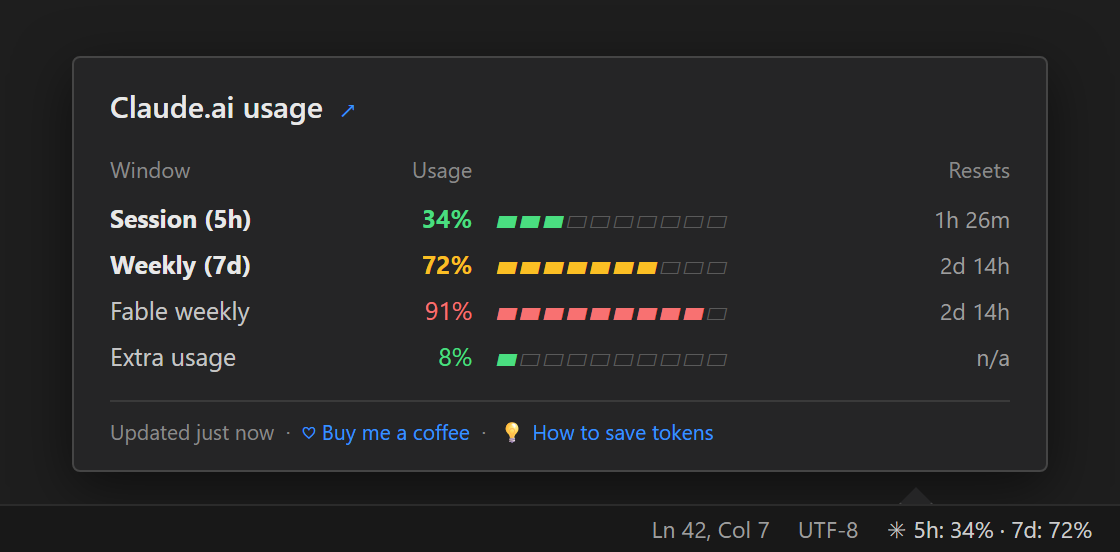
Hover the status bar item for a detailed breakdown of every window: Session, Weekly, per-model weekly caps (Opus, Fable, ...) and Extra usage. Click it for a full quick-pick list, including how much of your extra-usage budget you have spent in your own currency. How to save tokensClick the status bar item and choose "How to save tokens" for practical tips on getting more out of your Claude quota: prompt strategies, model switching, CLI usage and what to do when you are near the limit. Settings
How it worksThe Chrome extension POSTs your quota snapshots to a local port in the
PrivacyZero outbound network calls. Zero analytics. The extension only:
No conversation content, no API keys, no personal data. Like this extension?Built solo by Frederiek Pascal. Free. No tracking, no ads, no upsell screens. If it saved you a quota crash, three things help most:
LicenseMIT |