CoverLens
Three-state code coverage visualization for VS Code — see covered, partially covered, and uncovered lines at a glance.
VS Code Marketplace:



Open VSX:



Features
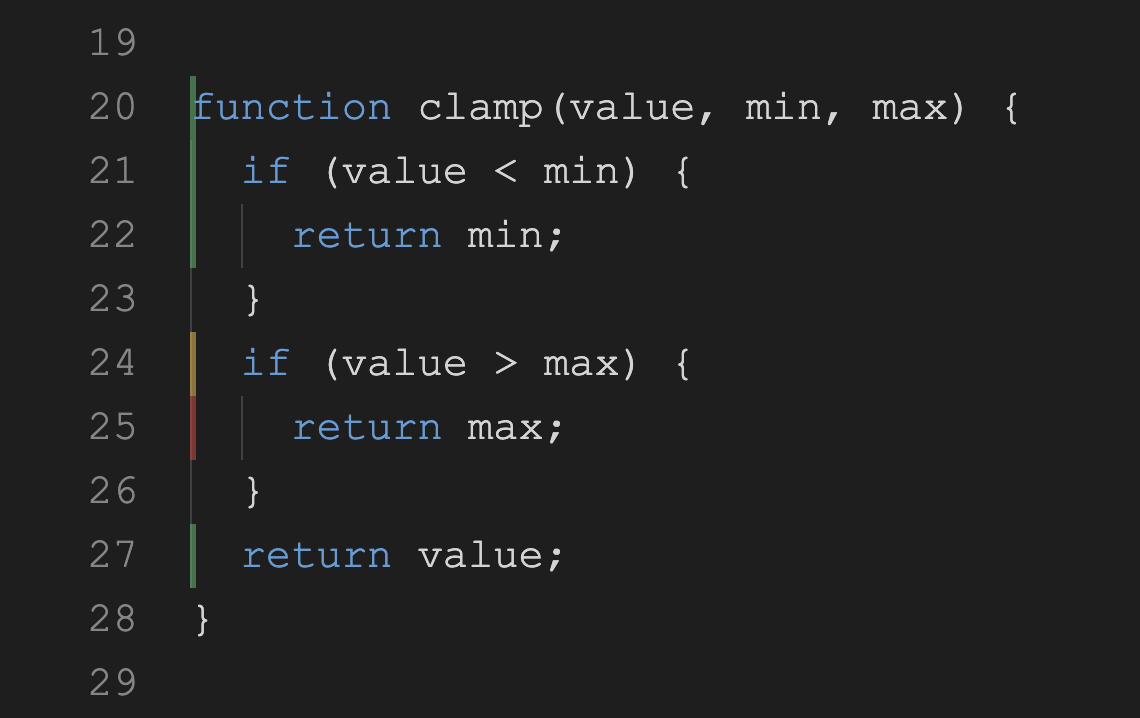
- Three coverage states — covered (green), partial branches (yellow), uncovered (red)
- Two display modes — minimal left border or border + background highlight
- No gutter conflicts — uses line decorations instead of gutter icons, so coverage display never interferes with debugger breakpoints
- Diff mode — show coverage only on lines changed vs a base branch
- Built-in test runner — run tests with coverage in one click; scoped runs for changed packages
- Smart auto-run — on save, runs tests only for the affected package (Go, Jest, Vitest, pytest, Dart, Flutter)
- Coverage delta — shows coverage change vs session start or vs base branch in diff mode
- Stale coverage — dims or hides decorations while tests run or after edits
- Monorepo support — auto-detects pnpm/npm/yarn workspaces, aggregates coverage
- Explorer panel — tree view with per-file coverage percentages and threshold icons
- Status bar — project-wide coverage %, spinner during test runs, click to run full tests
- Auto-reload — watches coverage files and updates decorations on change
| Language |
Test Runner |
Coverage Format |
| JavaScript / TypeScript |
Jest, Vitest |
LCOV, Istanbul JSON |
| Python |
pytest |
LCOV, Cobertura XML |
| Go |
go test |
Go coverage profile |
| Rust |
cargo-tarpaulin |
LCOV |
| C# / .NET |
dotnet test + Coverlet |
LCOV, Cobertura XML |
| Dart |
dart test |
LCOV |
| Flutter |
flutter test |
LCOV |
| Java / Kotlin |
Gradle, Maven |
JaCoCo XML |
Auto-detects format by file content — works with any tool that outputs a supported format.
Getting Started
- Install CoverLens from the Marketplace
- Generate coverage with your test runner:
# JavaScript (Jest)
npx jest --coverage

# TypeScript (Vitest)
npx vitest run --coverage

# Python
python -m pytest --cov=. --cov-report=lcov:lcov.info

# Go
go test ./... -coverprofile=coverage.out

# Rust
cargo tarpaulin --out Lcov

# .NET
dotnet test /p:CollectCoverage=true /p:CoverletOutputFormat=lcov

# Dart (requires the `coverage` dev_dependency)
dart test --coverage=coverage
dart run coverage:format_coverage --lcov --in=coverage --out=coverage/lcov.info --report-on=lib --package=.

# Flutter
flutter test --coverage
- Open a source file — coverage appears automatically
Or use CoverLens: Run Tests with Coverage (Cmd+Shift+P) to generate coverage and visualize in one step.
Coverage States
| State |
Color |
Meaning |
| Covered |
Green |
Line executed, all branches taken |
| Partial |
Yellow |
Line executed, but some branches not taken |
| Uncovered |
Red |
Line never executed |
Most coverage tools only show binary covered/uncovered. CoverLens shows partial branch coverage as a distinct state — helping you find untested edge cases.
Display Modes
Border mode (default)
Minimal vertical bar on the left edge — clean, non-intrusive, works great with any theme.
Highlight mode
Vertical bar + background fill — maximum visibility for reviewing coverage.
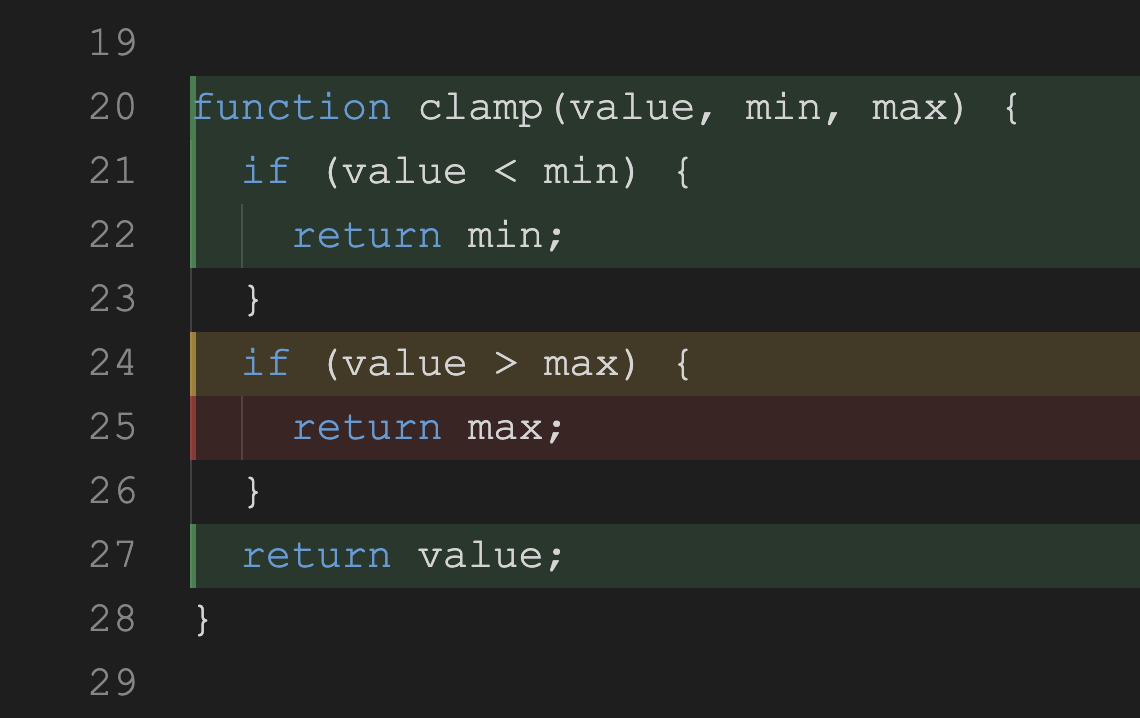
Set via coverlens.decorationStyle. Both modes use line decorations (not gutter icons), so they never conflict with debugger breakpoints — you can set breakpoints freely while coverage is visible.
Diff Mode
Focus on what matters during code review — show coverage only on lines you changed.
CoverLens: Toggle Diff Mode
Uses git diff against a configurable base ref:
"coverlens.diffBase": "origin/main"
Monorepo Support
CoverLens automatically detects packages from:
pnpm-workspace.yamlpackage.json workspaces (npm/yarn)
Coverage from all packages is aggregated into one unified view. Configure manually if needed:
"coverlens.monorepo.packages": ["packages/*", "apps/*"]
Commands
| Command |
Description |
| CoverLens: Toggle Coverage |
Show or hide coverage decorations |
| CoverLens: Toggle Diff Mode |
Switch between all-lines and changed-lines view |
| CoverLens: Run Tests with Coverage |
Execute test runner and reload coverage |
| CoverLens: Reload Coverage Files |
Re-read coverage files from disk |
| CoverLens: Show Coverage Summary |
Display current coverage % and delta |
| CoverLens: Stop Running Tests |
Cancel the currently running test suite |
| CoverLens: Reset Coverage Baseline |
Reset the session baseline for delta tracking |
Settings
| Setting |
Default |
Description |
coverlens.enabled |
true |
Enable coverage visualization on startup |
coverlens.coverageFiles |
["**/lcov.info", ...] |
Glob patterns to find coverage files |
coverlens.excludePatterns |
["**/node_modules/**", ...] |
Patterns to exclude from search |
coverlens.decorationStyle |
"border" |
Display mode: "border" or "highlight" |
coverlens.overviewRuler |
false |
Show coverage colors in the scrollbar |
coverlens.onEdit |
"dim" |
Stale coverage behavior: "hide", "dim", or "keep" |
coverlens.runOnSave |
"package" |
Auto-run tests on save: "off", "package" (affected package only), or "all" (full suite) |
coverlens.colors.covered |
— |
Custom color for covered lines |
coverlens.colors.partial |
— |
Custom color for partial branch lines |
coverlens.colors.uncovered |
— |
Custom color for uncovered lines |
coverlens.diffMode |
false |
Show coverage only for changed lines |
coverlens.diffBase |
"HEAD" |
Git ref for diff mode comparison |
coverlens.testRunner.mode |
"auto" |
Test runner: auto, jest, vitest, pytest, go, cargo, dotnet, dart, flutter, custom |
coverlens.testRunner.customCommand |
— |
Custom shell command for test runner |
coverlens.monorepo.enabled |
true |
Auto-detect monorepo packages |
coverlens.monorepo.packages |
[] |
Manual package glob patterns |
coverlens.thresholds.low |
50 |
Below this % coverage → red icon in tree |
coverlens.thresholds.medium |
80 |
Below this % coverage → yellow icon in tree |
coverlens.showDelta |
true |
Show coverage delta in status bar |
Default Coverage File Patterns
CoverLens searches for these files automatically:
**/lcov.info                    LCOV (Jest, Vitest, pytest, Dart, Flutter, tarpaulin, Coverlet)
**/coverage.lcov                LCOV (alternative name)
**/coverage.xml                 Cobertura XML (coverage.py, Coverlet)
**/coverage.cobertura.xml       Cobertura XML (.NET)
**/jacoco.xml                   JaCoCo XML (Java/Kotlin)
**/target/site/jacoco/jacoco.xml  JaCoCo XML (Maven default)
**/coverage.out                 Go coverage profile
**/*.coverprofile               Go coverage profile (alternative)
**/coverage.json                Istanbul JSON (Jest, NYC, c8)
**/coverage-final.json          Istanbul JSON (NYC default)
Add custom patterns in settings if your tool outputs to a different path.
License
MIT

