BigView
Huge file viewer for VS Code — open, search, filter and tail multi-gigabyte logs, JSON Lines and CSV files without loading them into memory.
VS Code Marketplace:



Open VSX:



Screenshots
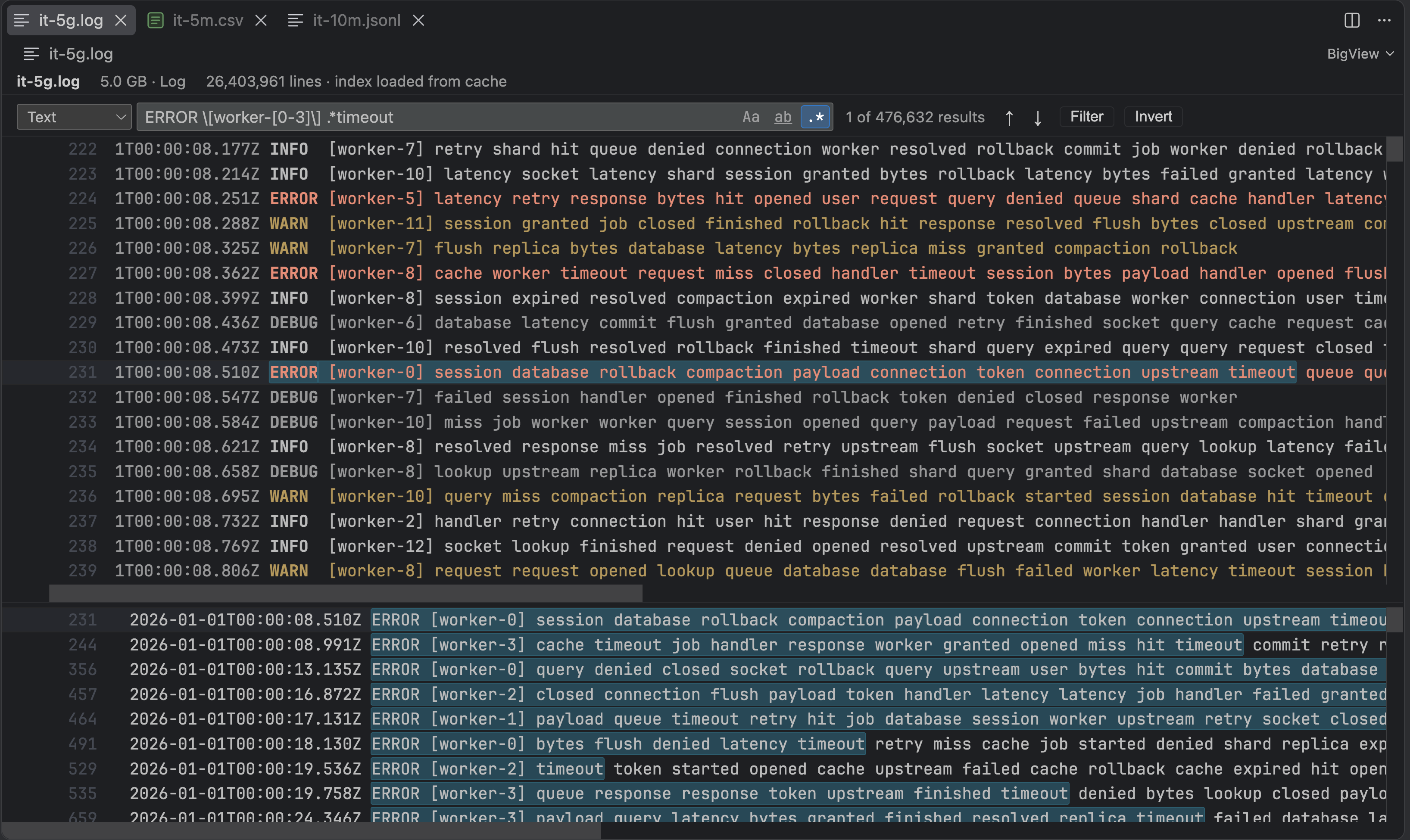
Log
A 1 GB log with 5 million lines — a regular expression search across the whole file, levels and timestamps highlighted.
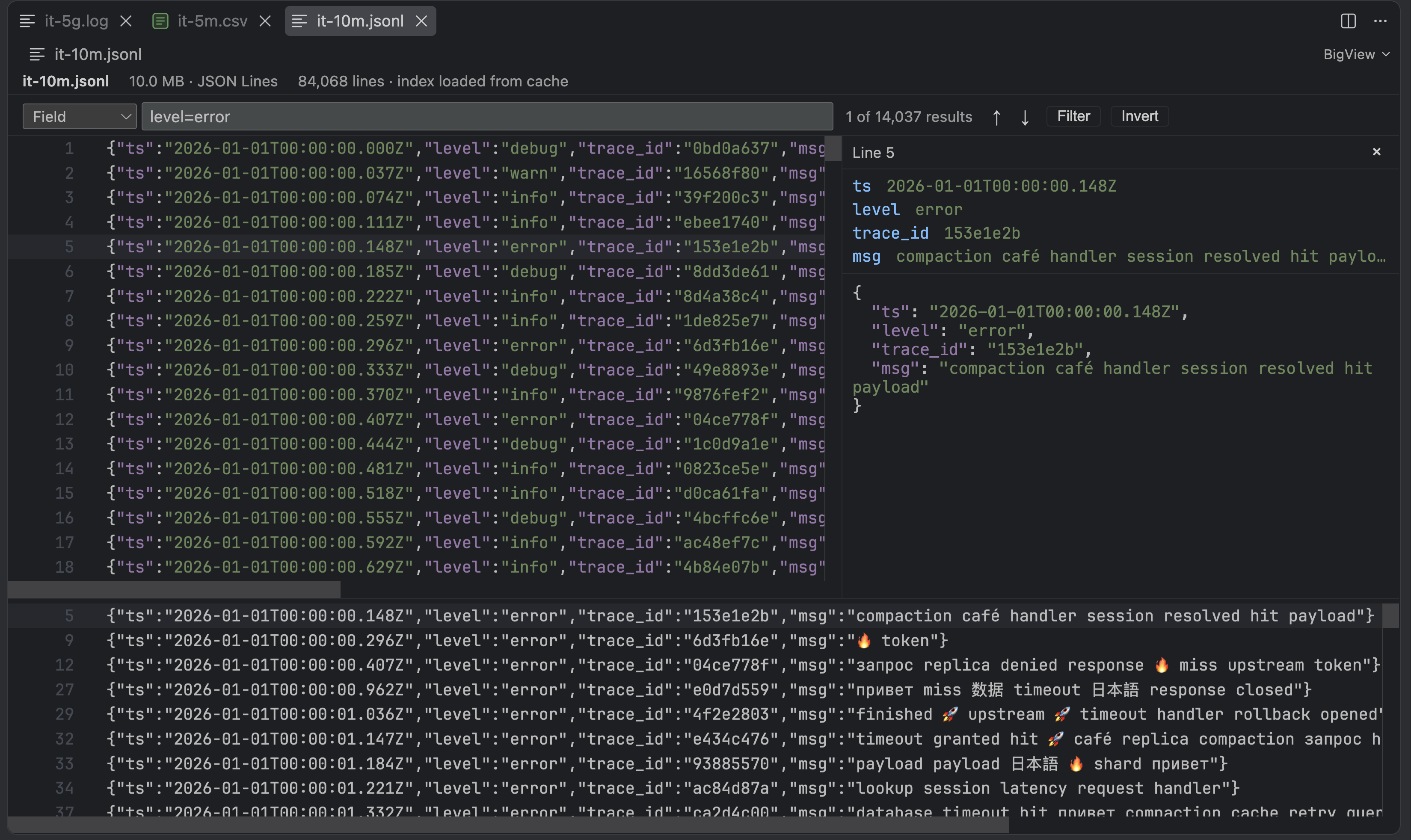
JSON Lines
Field filter, syntax highlighting in your theme's colors and a details panel for the selected line.
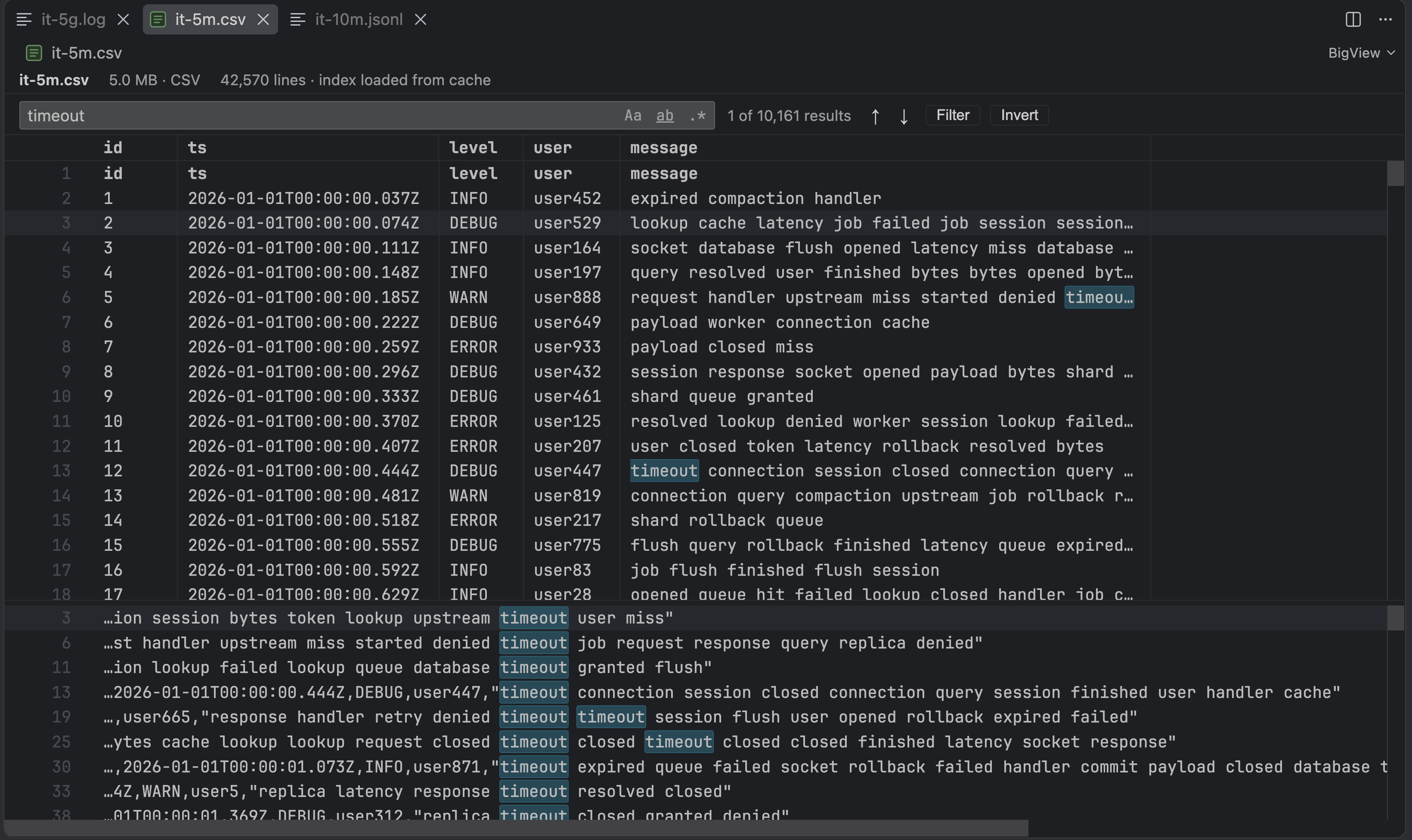
CSV
Table view with a header row and resizable columns; matches are highlighted inside cells.
Features
- Any file size — opens multi-gigabyte files right away; the first page appears in tens of milliseconds while the file is indexed in the background
- Low memory — keeps a compact line index, never the file itself; only the lines on screen are read
- Instant reopen — the index is cached on disk and reused until the file changes
- Whole-file search — plain text, match case, whole word or regular expression, with streaming results, progress and a results panel
- Filter — show only the matching lines, or invert to hide them; switching is instant
- Export — write the filtered lines to a new file
- Log files — lines colored by level, timestamps recognized, time range filter
- JSON Lines — syntax highlighting in the colors your theme uses for JSON, a details panel with fields and pretty-printed JSON, field filters like
level=error
- CSV / TSV — delimiter detection, header row, table view with resizable columns
- Tail — new lines appear as the file grows; the view follows them when scrolled to the end, and an active search or filter keeps up
- Log rotation — renamed, truncated, deleted or recreated files are detected and indexed again
- Theme-aware — adapts to any VS Code color theme
- Read-only and offline — never changes your file and sends nothing anywhere
|
1 GB log |
5 GB log |
| First page |
~50 ms |
~50 ms |
| Full index |
~0.3 s |
~1.5 s |
| Reopen (index cached on disk) |
instant |
instant |
| Literal search, whole file |
~0.5 s |
~3 s |
Measured on an Apple M-series laptop with an SSD. Your numbers depend on the disk.
Getting Started
- Install BigView from the Marketplace
- Open a
.log, .jsonl, .ndjson, .csv or .tsv file — BigView is the default editor for them
- Or right-click any file in the Explorer → Open File in BigView
To open one of these files in the regular text editor, use Reopen Editor With… → Text Editor.
| Format |
Detected by |
Features |
| Log |
.log, content |
Level colors, timestamps, time range filter |
| JSON Lines |
.jsonl, .ndjson, content |
Syntax highlighting, details panel, field filters |
| CSV / TSV |
.csv, .tsv, content (, tab ; \|) |
Table view, header row, resizable columns |
| Plain text |
anything else |
Search, filter, export, tail |
The format is detected from the extension and the first lines of the file. Change it with BigView: Change Format… or by clicking the format in the status bar; the choice is remembered per file.
Field filters (JSON Lines)
| Filter |
Matches |
level=error |
Field equals the value |
user.id=42 |
Nested field |
msg~timeout\|refused |
Field matches a regular expression |
Click a field in the details panel to filter by its value.
Commands
| Command |
Description |
| BigView: Open File in BigView |
Open any file in BigView |
| BigView: Go to Line... |
Jump to a line number |
| BigView: Find in File |
Focus the search bar |
| BigView: Find Next / Find Previous |
Jump between matches |
| BigView: Toggle Filter (Show Only Matching Lines) |
Show only the matching lines |
| BigView: Invert Filter (Show Only Non-Matching Lines) |
Hide the matching lines |
| BigView: Export Filtered Lines |
Save the filtered lines to a new file |
| BigView: Change Format... |
Choose Log, JSON Lines, CSV, TSV or plain text |
Keyboard Shortcuts
| Action |
Windows / Linux |
macOS |
| Find |
Ctrl+F |
Cmd+F |
| Next / previous match |
F3 / Shift+F3 |
Cmd+G / Shift+Cmd+G |
| Go to Line |
Ctrl+G |
Ctrl+G |
| Match case / whole word / regex |
Alt+C / Alt+W / Alt+R |
Alt+C / Alt+W / Alt+R |
| Close search |
Escape |
Escape |
Limitations
BigView is built for reading and searching. It does not do the following:
- No sorting of lines or CSV columns — sorting a multi-gigabyte file needs a copy of it
- No editing — the file is read-only
- Local files only — no remote, SSH or virtual file systems yet
- UTF-8 only — UTF-16 and other encodings are not decoded; files with NUL bytes in the first 4 MB are treated as binary and not opened
- Timestamps without a time zone are taken as UTC — unusual timestamp layouts may not be recognized by the time range filter
- CSV fields containing line breaks are shown as separate lines — BigView's unit is a line
- Search works line by line — a pattern cannot match across a line break
- Very long lines are cut at 16 KB in the view (search and export still see the whole line); the JSON details panel reads up to 1 MB of a line
- Legacy
.tmTheme color themes — JSON Lines highlighting falls back to default colors
- Index cache lives in VS Code's extension storage — at most 500 MB in total, entries unused for 30 days are removed
Build
npm install
npm run build              # extension, workers and webview bundles
npm run watch              # dev mode with auto-rebuild
npm test                   # unit tests
npm run test:integration   # VS Code integration tests (BIGVIEW_LARGE=1 / BIGVIEW_HUGE=1 add 1 GB / 5 GB files)
npm run bench              # memory and speed per phase
Press F5 in VS Code to launch the Extension Development Host.
License
MIT
| |

