
Code WalkthroughGuided, highlighted code walkthroughs in your editor, driven by Claude Code. Installation Launch VS Code Quick Open ( Ctrl+P), paste the following command, and press enter.Copied to clipboard |

Code Walkthrough
English · Español ↓ You ask in plain language; Claude Code explains your code and highlights & scrolls your editor to whatever it's talking about — line by line, function by function, or following a flow across files.
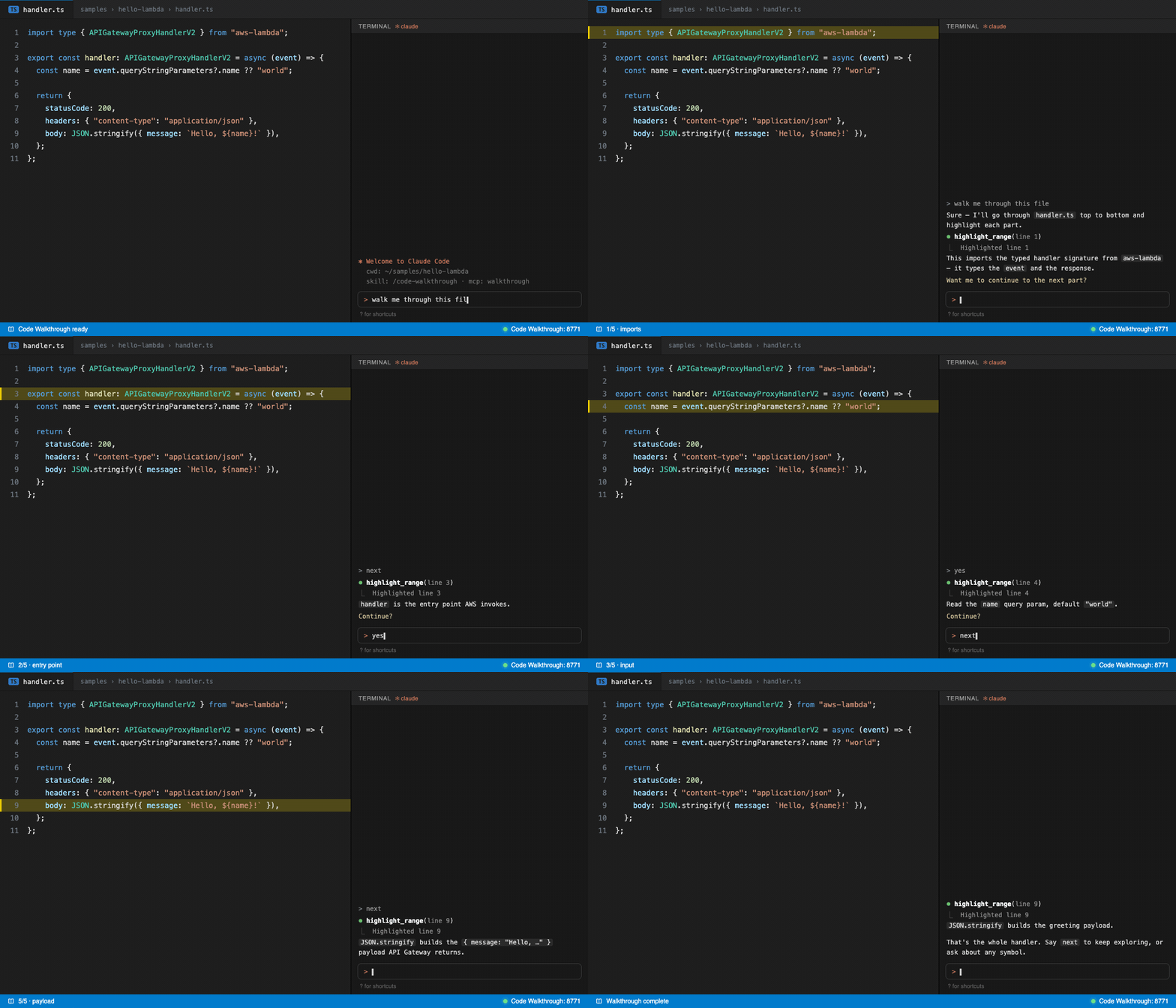
Line by line — Claude marks each line, explains it, and waits for your “next”.
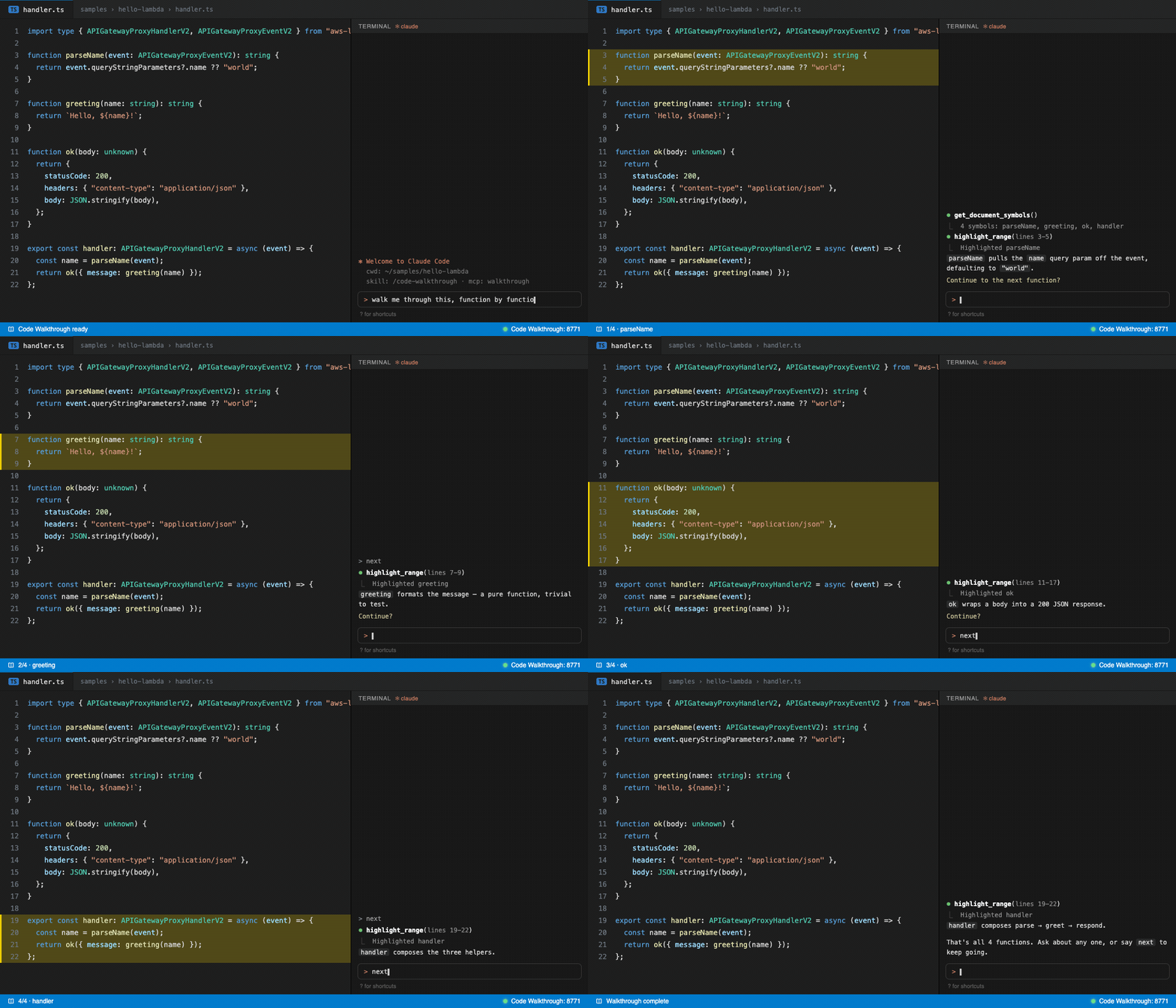
…or function by function — it lists the symbols and walks one at a time. EnglishRequirements
Install
That's all — a small local server starts automatically (a compass icon appears in the status bar). Use it
To dismiss a highlight, click ✕ Clear above it (a CodeLens) or the button in the editor's title bar. Good to know
Commands (
|
| Setting | Default | What it does |
|---|---|---|
walkthroughMcp.port |
8771 |
Local port (bound to 127.0.0.1). If it's busy, the next free port is used automatically. |
walkthroughMcp.autoStart |
true |
Start the server when VS Code opens. |
walkthroughMcp.highlightColor |
rgba(255, 221, 0, 0.25) |
Highlight color. |
Español
Recorridos guiados de código resaltados en tu editor, con Claude Code: preguntás en lenguaje natural y Claude Code explica tu código y resalta/desplaza tu editor a lo que está hablando — línea por línea, función por función, o siguiendo un flujo entre archivos.
Requisitos
- VS Code 1.120+
- Claude Code — el razonamiento corre con tu suscripción de Claude.
Instalar
- Instalá Code Walkthrough desde la vista de Extensiones (buscá “Code Walkthrough”), el VS Marketplace o Open VSX.
- Corré el comando Code Walkthrough: Instalar integración con Claude Code (
⇧⌘P). Conecta Claude Code con la extensión y te pregunta dónde: Global (todos los proyectos) o Este proyecto.
Listo — un server local chiquito arranca solo (aparece un ícono de brújula en la barra de estado).
Usarlo
- Abrí el archivo que querés entender.
- En la terminal integrada corré
claude(o usá el panel de Claude Code) y pedí, por ej. “hacé un walkthrough de este archivo.” - Claude explica en el chat y resalta y hace scroll en tu editor a cada parte. Lo manejás como quieras:
| Vos decís… | Qué pasa |
|---|---|
| “Hacé un walkthrough de este archivo” | Pregunta la granularidad, resalta la primera parte y la explica. |
| “Línea por línea” / “función por función” | Fija el tamaño del paso — una línea, o una función entera, por paso. |
| “Siguiente” | Mueve el resaltado a la siguiente parte. |
“Saltá a la función handler” |
Revela y resalta ese símbolo. |
| “Explicá el flujo del request desde la ruta hasta la DB” | Recorre el camino archivo por archivo, resaltando cada salto. |
| “¿Por qué está esto acá?” | Responde en contexto sobre el código resaltado. |
Para quitar un resaltado, clickeá ✕ Clear encima (un CodeLens) o el botón en la barra de título del editor.
Bueno saber
- Solo resalta, revela y hace scroll — nunca edita tu código. Seguro para correr en cualquier cosa.
- Todo corre local (
127.0.0.1); la extensión no manda tu código a ningún lado — el razonamiento es Claude Code, con tu suscripción. - UI en inglés y español (sigue el idioma de tu VS Code).
Comandos (⇧⌘P)
- Instalar / Desinstalar integración con Claude Code
- Iniciar / Detener / Reiniciar servidor
- Limpiar resaltados
- Copiar URL del MCP server — útil con varias ventanas de VS Code abiertas.
Settings
| Setting | Default | Qué hace |
|---|---|---|
walkthroughMcp.port |
8771 |
Puerto local (bind a 127.0.0.1). Si está ocupado, usa el próximo libre automáticamente. |
walkthroughMcp.autoStart |
true |
Arranca el server al abrir VS Code. |
walkthroughMcp.highlightColor |
rgba(255, 221, 0, 0.25) |
Color del resaltado. |
Development
Open source (MIT). Build from source: npm install → npm run build → npm run package.
Releases publish to the VS Marketplace and Open VSX automatically when a version bump is merged to main.