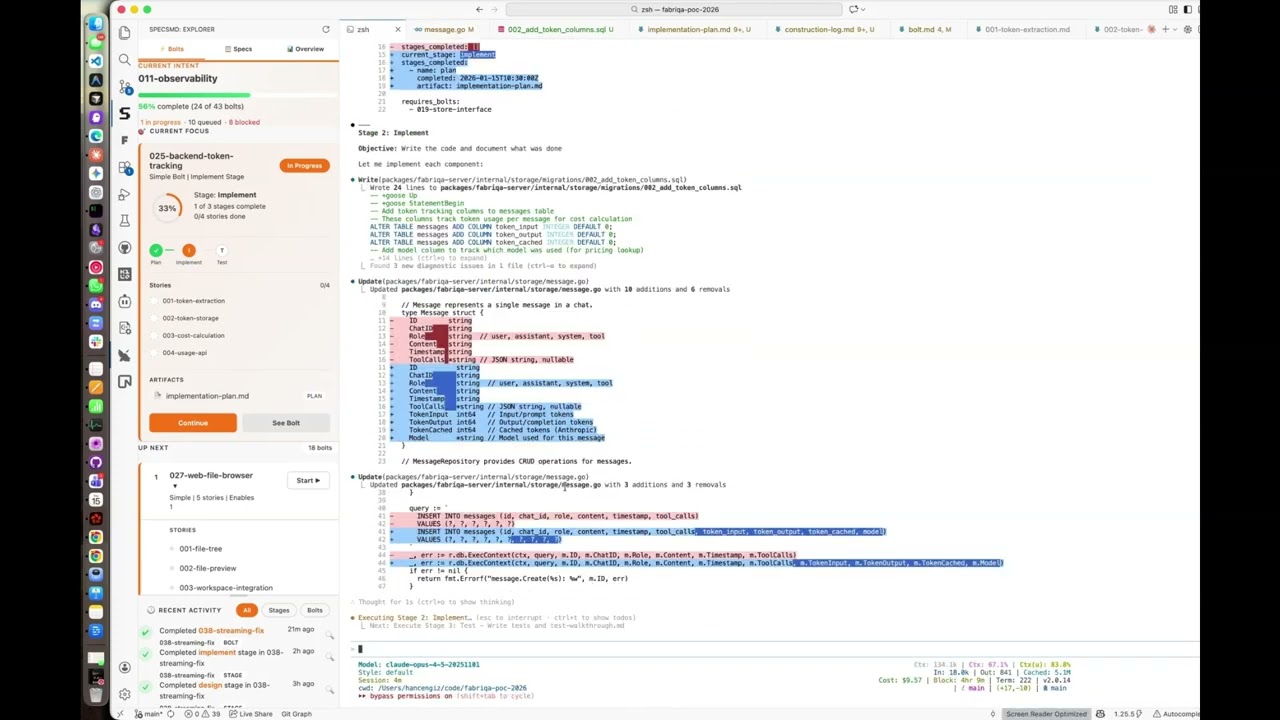
SpecsMD VS Code Extension

A VS Code extension for managing AI-DLC (AI Development Life Cycle) artifacts including intents, units, stories, and bolts.
Visit specs.md | Full Documentation

The extension provides a sidebar panel with three tabs:
Bolts Tab
The default view showing bolt execution status and progress.
Current Focus Section
Shows active bolts being worked on with stage progress.
Selection Rules:
- Shows all bolts with
status: in-progress
- Sorted by
startedAt timestamp (most recently started first)
- Multiple active bolts are supported (all shown in expandable cards)
Data Displayed:
- Bolt name and type (DDD, Simple, Spike)
- Current stage name
- Progress ring showing stages complete percentage
- Stage pipeline with status indicators
- Stories list with completion status
Up Next Queue
Shows pending bolts ready to be started.
Selection Rules (Priority Order):
- Unblocked bolts first - Bolts with no incomplete dependencies
- Higher impact first - Among unblocked, sorted by
unblocksCount (bolts that enable more work)
- Blocked bolts last - Bolts waiting on other bolts
- Alphabetical - Final tiebreaker by bolt ID
Blocking Logic:
- A bolt is blocked if any bolt in its
requires_bolts array has status != complete
blockedBy shows which bolts are blocking this one
unblocksCount shows how many bolts are waiting for this one
Display Limit: Top 5 bolts shown
Recent Activity
Timeline of bolt and stage completions.
Event Types:
| Event |
Source |
Icon |
bolt-created |
created timestamp in bolt frontmatter |
+ |
bolt-start |
started timestamp in bolt frontmatter |
▶ |
stage-complete |
completed timestamp in stage entry |
✓ |
bolt-complete |
completed timestamp in bolt frontmatter |
✔ |
Selection Rules:
- Events derived from bolt timestamps (created, started, completed)
- Stage completion events from each stage's
completed field
- Sorted by timestamp descending (most recent first)
- Limited to 10 most recent events
Filtering Options:
- All - All event types
- Stages - Only stage completion events (
tag: stage)
- Bolts - Only bolt-level events (
tag: bolt)
Specs Tab
Hierarchical view of your project's specifications.
Hierarchy:
Intent (🎯) → Units (📚) → Stories (📝)
Features:
- Click intent/unit headers to expand/collapse children
- Click the magnifier icon (🔍) next to an intent to open
requirements.md
- Click the magnifier icon (🔍) next to a unit to open
unit-brief.md
- Click a story to open the story markdown file
- Progress indicators show completion percentage for each intent
Status Indicators:
| Status |
Icon |
Color |
| Complete |
✓ |
Green |
| Active |
● |
Orange |
| Pending |
(empty) |
Gray dashed |
Overview Tab
High-level project metrics and quick actions.
Project Metrics
Calculated Values:
- Active Bolts - Count of bolts with
status: in-progress
- Queued Bolts - Count of bolts with
status: draft
- Completed Bolts - Count of bolts with
status: complete
- Blocked Bolts - Count of bolts with
status: blocked or isBlocked: true
Overall Progress:
- Percentage =
completedStories / totalStories * 100
Suggested Actions
AI-recommended next steps based on current project state.
Action Types and Selection Rules:
| Priority |
Action |
Condition |
| 1 |
Continue Current Bolt |
Active bolt exists (status: in-progress) |
| 1 |
Start Next Bolt |
No active bolt AND unblocked bolts in queue |
| 2 |
Complete Stage |
Active bolt has a currentStage set |
| 3 |
Unblock Multiple Bolts |
A blocking bolt would unblock 2+ waiting bolts |
| 4 |
Create Bolt for Pending Work |
Intent has pending stories but no active/draft bolts |
| 1 |
Celebrate! |
All bolts complete AND all intents complete |
Selection Algorithm:
1. Check for active bolt → suggest "Continue" (priority 1)
2. Check for unblocked drafts without active bolt → suggest "Start" (priority 1)
3. If active bolt has currentStage → suggest "Complete Stage" (priority 2)
4. Find blocking bolt with max unblock impact → suggest "Unblock" (priority 3)
5. Find intents with orphan stories → suggest "Create Bolt" (priority 4)
6. If everything complete → suggest "Celebrate" (priority 1)
Current Intent Selection
The "current intent" shown in the header uses a priority cascade:
| Priority |
Strategy |
Description |
| 1 |
Active Bolt |
Intent containing a bolt with status: in-progress |
| 2 |
Recent Activity |
Intent with most recent bolt timestamp (completed > started > created) |
| 3 |
In-Progress Stories |
Intent with most stories having status: in-progress |
| 4 |
Incomplete Work |
First intent with status: in-progress or status: draft |
| 5 |
Fallback |
First intent in list |
Bolt Status Lifecycle
draft → in-progress → complete
↓
blocked (if requires_bolts incomplete)
Frontmatter Fields Used:
status: draft | in-progress | complete
current_stage: "implement" # Active stage name
stages_completed:
- name: spec
completed: 2025-01-15T10:30:00Z
requires_bolts:
- bolt-dependency-1
enables_bolts:
- bolt-dependent-1
created: 2025-01-14T09:00:00Z
started: 2025-01-15T08:00:00Z
completed: 2025-01-16T17:00:00Z
Tab Selection
Tabs persist across VS Code sessions. The extension saves your active tab choice to workspace state.
Keyboard: Not currently supported
Mouse: Click tab headers (Bolts, Specs, Overview) to switch views
Contributing
For architecture details, development setup, and publishing instructions, see the Developer Guide.